Are you wondering if your travel router can connect smoothly with your Chromecast? If you’ve ever tried streaming your favorite shows while on the go, you know how frustrating it is when devices don’t work together as expected.
Imagine having a simple setup that lets you cast videos anywhere, without complicated tech headaches. You’ll discover exactly how travel routers and Chromecast interact, and what you need to make your streaming experience seamless and stress-free. Keep reading to unlock the key to hassle-free entertainment on your trips.

Credit: www.ibtimes.co.in
How Travel Routers Function
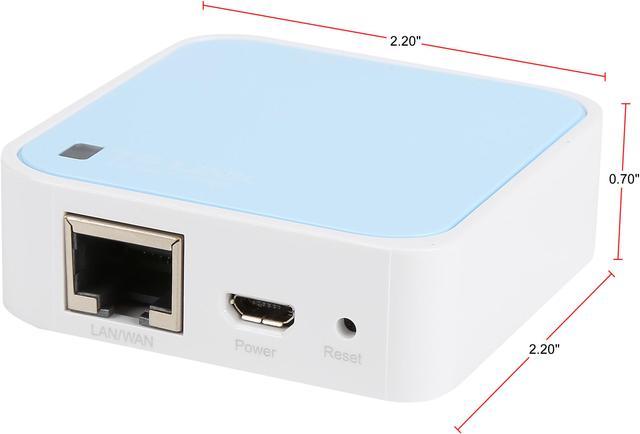
Travel routers are compact devices designed to create a personal Wi-Fi network wherever you go. They work by connecting to an existing internet source—like a hotel Ethernet port or public Wi-Fi—and then broadcasting your own secure signal. This setup gives you more control over your connection and can improve compatibility with devices like Chromecast.
Understanding how these routers function can help you decide if they fit your travel tech needs. Have you ever struggled to stream content because of a restrictive hotel Wi-Fi? A travel router might be the solution.
Basic Features Of Travel Routers
- Wireless Access Point:Converts wired internet into a Wi-Fi signal for your devices.
- Repeater Mode:Extends an existing Wi-Fi network to improve range and signal strength.
- Security Options:Offers encryption and password protection to keep your connection safe.
- Multiple Device Support:Allows several gadgets to connect simultaneously without slowing down.
- Compact Design:Small and lightweight for easy packing and portability.
These features make travel routers versatile and user-friendly. They help you maintain a stable connection, which is crucial for seamless streaming with devices like Chromecast.
Types Of Travel Routers Available
| Type | Description | Best Use Case |
|---|---|---|
| Wired Travel Router | Connects to Ethernet ports and creates a Wi-Fi network. | Hotels with Ethernet jacks or wired internet connections. |
| Wireless Travel Router | Repeats or extends existing Wi-Fi signals. | Places with weak or restrictive Wi-Fi networks. |
| Battery-Powered Travel Router | Operates without external power, ideal for on-the-go use. | Outdoor trips or locations without reliable power sources. |
| Multi-Mode Travel Router | Supports wired, wireless, and sometimes 4G connections. | Travelers needing flexible internet options. |
Choosing the right travel router depends on your travel style and the connectivity options available at your destination. Which features matter most to you when staying connected on the road?

Credit: www.amazon.ca
Chromecast Connectivity Basics
Understanding how Chromecast connects to a network is key to using it effectively. Chromecast needs a steady and compatible connection to stream content smoothly. Knowing the basics helps when setting up with travel routers or any other network device.
How Chromecast Connects To Networks
Chromecast links to Wi-Fi networks to stream media from your phone or computer. It uses your home or travel router’s wireless signal. Your device and Chromecast must be on the same network. This allows them to communicate and share content easily. Chromecast does not connect directly to the internet. Instead, it relies on the router to access online services.
Common Network Requirements
- Wi-Fi network with 2.4 GHz or 5 GHz bands
- Stable internet connection for streaming
- Router that supports standard wireless protocols (802.11 b/g/n/ac)
- Devices connected to the same network for casting
- Network without strict firewalls blocking Chromecast
Networks must allow device discovery and communication. Some public or hotel networks may restrict this. Travel routers often help by creating a private Wi-Fi network. This setup meets the needs of Chromecast connectivity more reliably.
Compatibility Between Travel Routers And Chromecast
Understanding the compatibility between travel routers and Chromecast is essential if you want to stream content smoothly while on the go. Not all travel routers work seamlessly with Chromecast devices due to differences in network settings and protocols. Knowing what affects this compatibility helps you avoid frustrating connection issues and enjoy your favorite shows anywhere.
Key Factors Affecting Compatibility
One important factor is whether the travel router supports the same Wi-Fi frequency bands as Chromecast, which typically uses 2.4 GHz. If the router only operates on 5 GHz, your Chromecast might struggle to connect.
Another key point is the router’s ability to handle multicast traffic, which Chromecast relies on for device discovery. Some travel routers block multicast by default, preventing your phone or tablet from finding the Chromecast on the network.
Network isolation features can also cause problems. Many travel routers isolate devices to enhance security, but this stops Chromecast from communicating with your smartphone or laptop.
Challenges When Using Travel Routers
- Device Discovery Problems:You might find your phone can’t detect Chromecast because the router blocks multicast or uses client isolation.
- Limited Network Configuration:Travel routers often have fewer settings, making it harder to enable features like UPnP or adjust firewall rules needed for Chromecast.
- Performance Issues:Some travel routers have weaker hardware, leading to slower speeds or dropped connections, which can disrupt streaming.
Have you ever set up a Chromecast with a travel router only to find it just won’t connect? This usually happens because the router doesn’t support the necessary protocols or isolates devices for security. Testing your travel router’s settings beforehand can save you time and frustration during your trip.
Credit: www.newegg.ca
Setting Up Chromecast With A Travel Router
Travel routers can create a private network that Chromecast can connect to easily. Setting up Chromecast with a travel router lets you stream content even on unfamiliar Wi-Fi. This setup ensures smoother casting during trips or in places with limited network access.
Setting up a Chromecast with a travel router can enhance your streaming experience on the go. This setup allows you to connect your Chromecast to the internet through a portable router. It can be particularly useful in hotels or places with restricted Wi-Fi access. Below, we provide a detailed guide to help you configure your Chromecast with a travel router.Step-by-step Setup Process
1. Connect the Travel Router: – Plug in the travel router. – Connect it to a power source. 2. Access the Router’s Network: – Use a device to connect to the router’s Wi-Fi network. – Open a web browser and enter the router’s IP address. 3. Configure the Router Settings: – Log in with the credentials provided. – Set up the router to connect to the available internet source. 4. Connect Chromecast: – Plug the Chromecast into your TV’s HDMI port. – Power it using a USB cable. 5. Set Up Chromecast: – Open the Google Home app on your device. – Follow the on-screen instructions to connect the Chromecast to the router’s Wi-Fi.Troubleshooting Connection Issues
Sometimes, connections might not work seamlessly. Try these solutions: – Check Wi-Fi Password: Ensure the password is correct. Re-enter if necessary. – Restart Devices: Power cycle both the router and Chromecast. This can resolve minor glitches. – Update Firmware: Ensure the router has the latest firmware installed. Check the manufacturer’s website for updates. – Adjust Wi-Fi Channel: Interference might cause issues. Change the router’s Wi-Fi channel through the settings. By following these steps, your Chromecast should connect smoothly to the travel router.Optimizing Performance And Security
Optimizing the performance and security of your travel router when using Chromecast can significantly enhance your streaming experience. A stable connection prevents frustrating interruptions, while strong security safeguards your data on unfamiliar networks. Let’s look at how you can improve both aspects effectively.
Improving Streaming Stability
Streaming with Chromecast over a travel router sometimes feels like a balancing act. You want a smooth video without constant buffering or dropouts.
Start by placing your travel router close to your Chromecast device. Walls and furniture can block signals, so a clear line of sight helps maintain a strong connection.
Adjust your router’s settings to use the 5GHz band if possible. This frequency offers faster speeds and less interference compared to the crowded 2.4GHz band, especially in busy hotel Wi-Fi environments.
Another tip is to reduce the number of devices connected to your travel router. More devices mean more competition for bandwidth, which can slow down your stream.
Have you ever noticed how your video freezes just when the plot thickens? Fixing these stability issues can make all the difference.
Securing Your Network
Your travel router acts as a shield between your Chromecast and potentially risky public Wi-Fi. Securing it protects your personal data from hackers.
Always change the default login credentials on your travel router. Many routers come with generic usernames and passwords that are easy targets.
Enable WPA3 or WPA2 encryption in your router’s settings to keep your connection private. Avoid open networks without passwords, as they expose your devices to threats.
Consider setting up a guest network on your travel router if you share your internet with others. This limits their access to your main devices and data.
Do you trust the hotel Wi-Fi? Taking these steps ensures you don’t have to.
Alternatives To Travel Routers For Chromecast
If you’re looking for ways to connect your Chromecast without using a travel router, there are practical alternatives that can keep your streaming smooth. These options offer flexibility, especially when you’re on the move or dealing with limited network setups. Understanding these choices can help you decide what fits your needs best and keeps your devices working seamlessly together.
Using Mobile Hotspots
Mobile hotspots can act as a wireless bridge between your Chromecast and your phone or laptop. By creating a personal Wi-Fi network, your Chromecast can connect to the internet even when traditional Wi-Fi isn’t available.
One tip is to ensure your mobile data plan supports hotspot use and offers enough speed for streaming. I’ve found that some hotspots struggle with multiple devices, so keep your setup simple to avoid buffering. Also, check if your hotspot allows devices to communicate with each other, which is essential for Chromecast to work properly.
Direct Wi-fi Connection Options
Chromecast supports a feature called Guest Mode, letting you cast without connecting to the same Wi-Fi network. This is handy if you can’t access the main network or want to keep your device connections minimal.
You can also connect your Chromecast directly to a device via an Ethernet adapter if Wi-Fi is unstable. This wired connection often improves performance, especially in hotel rooms or conference centers where Wi-Fi is spotty.
Have you tried setting up a Wi-Fi network directly from your laptop for Chromecast? It creates a private hotspot without extra hardware, which can be a lifesaver during travels.
Frequently Asked Questions
Do Travel Routers Support Chromecast Devices?
Yes, most travel routers support Chromecast by creating a local Wi-Fi network. This allows Chromecast to connect and stream content efficiently while traveling.
How To Connect Chromecast With A Travel Router?
Connect your travel router to the main network, then link Chromecast to the router’s Wi-Fi. Use Google Home app to complete setup.
Can Travel Routers Improve Chromecast Streaming Quality?
Travel routers can enhance streaming stability by providing a dedicated Wi-Fi connection. This reduces interference and buffering during Chromecast use.
Are All Travel Routers Compatible With Chromecast?
Not all travel routers are fully compatible. Choose routers that support DHCP and allow device communication on the same network.
Conclusion
Travel routers can work well with Chromecast in many cases. They create a private network that Chromecast connects to easily. This helps avoid issues with public Wi-Fi restrictions. Just set up the router and connect your devices. Keep in mind, some models may need extra steps or settings.
Testing your setup before streaming saves time and frustration. A travel router offers more control and better streaming on the go. Try it out and enjoy smooth Chromecast use while traveling.