Are you tired of weak Wi-Fi signals when you travel with your iPhone? You might have heard that travel routers can solve this problem, but do they really work with your device?
If you want reliable internet on the go, understanding how travel routers and your iPhone connect is key. Keep reading to discover how travel routers can boost your online experience and what you need to know before buying one. Your next trip could be much smoother with the right setup.
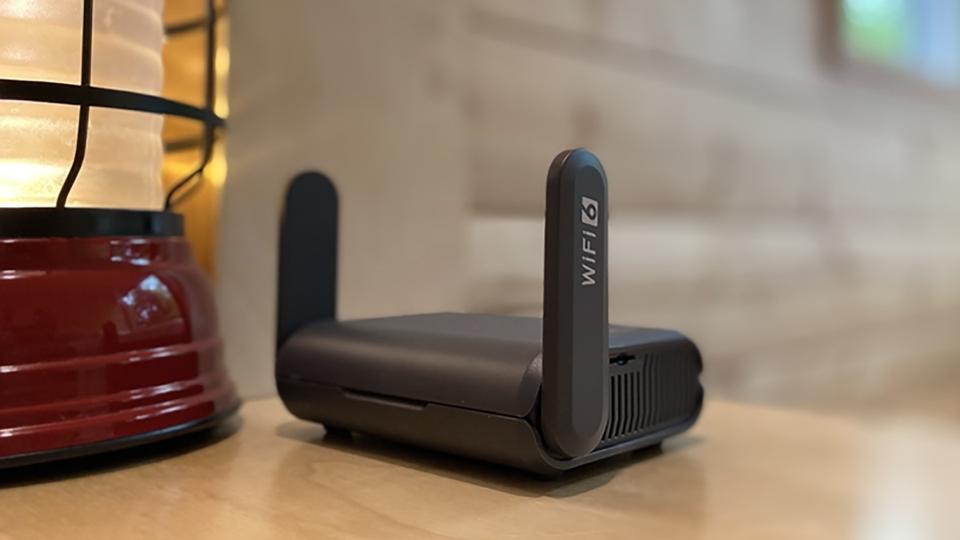
Credit: www.forbes.com
How Travel Routers Function
Travel routers provide a simple way to share one internet connection with multiple devices. They create a private Wi-Fi network wherever you are. This helps your iPhone connect easily and securely. Understanding how travel routers function helps you use them better on trips.
Basic Technology Behind Travel Routers
Travel routers work by receiving an internet signal from a wired or wireless source. They then broadcast this signal as a Wi-Fi network. Your iPhone connects to this network just like any other Wi-Fi hotspot. The router manages traffic between your devices and the internet.
Most travel routers include security features like password protection. This keeps your connection safe from unwanted users. They also support multiple devices at once, so all your gadgets stay connected.
Types Of Travel Routers
- Wired Travel Routers:Connect directly to an Ethernet cable. Ideal for hotel rooms with wired internet.
- Wireless Travel Routers:Catch Wi-Fi signals and rebroadcast them. Useful in places with public Wi-Fi.
- 4G LTE Travel Routers:Use a SIM card to access mobile data. Great for remote areas without Wi-Fi.
Each type serves different travel needs. Choose based on the available internet source and your iPhone’s compatibility.
Iphone Compatibility With Travel Routers
Travel routers offer a great way to manage internet access while on the move. Many people wonder if their iPhones can connect smoothly to these devices. The good news is that most travel routers are compatible with iPhones. They create a private Wi-Fi network your iPhone can join. This setup helps secure your connection and can improve internet speed in crowded places.
Understanding how your iPhone connects to a travel router helps avoid common problems. Each travel router may have different settings, but the basic connection process is simple. Knowing potential issues can save time and frustration during your trips.
Connecting Your Iphone To A Travel Router
Start by turning on the travel router and waiting for its network to appear. On your iPhone, open the Settings app and tap Wi-Fi. Look for the router’s network name in the list. Tap the network to connect.
Enter the password if the network is secured. Most travel routers come with a default password on a sticker or manual. After entering the password, your iPhone should connect quickly. Open a browser or app to test the internet connection.
- Ensure the travel router is powered on and working properly.
- Confirm you have the correct Wi-Fi name and password.
- Keep your iPhone’s Wi-Fi feature enabled.
Common Compatibility Issues
Some travel routers use special modes or frequencies that iPhones might not support. For example, routers may use 5 GHz bands, which older iPhones might not detect. Routers with complex login pages can also cause trouble. Your iPhone might not show the login prompt automatically.
Another issue is IP address conflicts. Sometimes the iPhone gets an invalid IP address from the router. This problem stops internet access even when connected to Wi-Fi. Restarting the router or your iPhone often fixes this.
- Check if the travel router supports both 2.4 GHz and 5 GHz bands.
- Use simple router settings without extra security layers.
- Restart devices if connections fail.
- Update your iPhone’s software for best compatibility.
Setting Up Travel Routers For Iphone
Setting up a travel router for your iPhone can dramatically improve your internet experience, especially when you’re in places with spotty Wi-Fi. Travel routers create a personal, secure network that your iPhone can connect to, making it easier to switch between different connections. Understanding how to properly set up and optimize your travel router ensures you get the most reliable and fastest connection on the go.
Step-by-step Setup Process
Start by powering on your travel router and connecting it to the available internet source—this might be a hotel Ethernet port or a public Wi-Fi network. Use your iPhone to find the router’s default Wi-Fi name in the Settings app under Wi-Fi networks.
Once connected, open a browser on your iPhone and enter the router’s IP address (usually something like 192.168.0.1) to access the router’s setup page. Here, you’ll be prompted to create a new network name (SSID) and password—choose something unique and secure to protect your connection.
After saving your settings, disconnect from the default router network and reconnect to your newly created network using your iPhone. This step ensures your iPhone uses the travel router’s secured network rather than the public one.
Optimizing Settings For Iphone
Adjust your travel router’s settings to prioritize your iPhone’s connection speed and security. Enable WPA3 encryption if available, as it offers stronger protection without compromising performance.
Consider disabling guest networks or any bandwidth-heavy services on the router that might slow down your iPhone’s connection. Also, check the DHCP settings to ensure your iPhone receives a proper IP address without conflicts.
Finally, update the router’s firmware regularly. I once skipped this step and faced frequent disconnections, but after an update, my connection stabilized significantly. Have you checked if your travel router has the latest firmware?

Credit: www.cnet.com
Benefits Of Using Travel Routers With Iphone
Using a travel router with your iPhone offers several advantages. It improves your internet experience while traveling. Travel routers help maintain a steady and fast connection. They also add extra protection for your data and privacy.
Improved Connectivity On The Go
Travel routers create a personal Wi-Fi network from public or hotel internet. This setup helps your iPhone connect more reliably. It reduces interruptions and slowdowns often found in crowded networks. A travel router can support multiple devices, making sharing easy. Your iPhone enjoys a stable connection even in busy places.
Enhanced Security Features
Travel routers provide better security than open public Wi-Fi. They encrypt data sent to and from your iPhone. This encryption protects sensitive information from hackers. Many travel routers include built-in firewalls for extra defense. Using one lowers risks of spying or data theft on the road.
Troubleshooting Connection Problems
Travel routers can be a lifesaver when you’re on the go, especially if you’re relying on your iPhone for connectivity. However, encountering connection problems can be frustrating. Let’s dive into some common issues and how you can troubleshoot them effectively.
Wi-fi Dropouts And Slow Speeds
You’re at a cozy café, sipping your latte, but your iPhone keeps dropping the Wi-Fi connection. Annoying, right? This could be due to interference from other devices or a weak signal. Try moving closer to the router or reducing the number of devices connected.
Slow speeds can ruin your browsing experience. Check if there’s any bandwidth-hogging app running in the background. Disconnect unnecessary devices from the router to free up bandwidth for your iPhone.
Have you updated your iPhone’s software recently? Software updates often include fixes for connectivity issues. Ensure your iPhone and travel router firmware are up to date for optimal performance.
Resolving Ip And Dhcp Issues
If your iPhone connects to the Wi-Fi but doesn’t access the internet, it might be an IP or DHCP issue. A quick fix is to renew the lease in your iPhone’s Wi-Fi settings. This can refresh your connection and assign a new IP address.
Sometimes, manually entering a static IP can resolve persistent issues. Go to your iPhone’s network settings, select ‘Configure IP,’ and input the necessary details. Ensure the IP address matches the router’s subnet.
Do you often switch between networks? Your iPhone might be holding onto old IP addresses. Resetting network settings can clear any residual data, giving you a clean slate for a fresh connection.
Connecting your iPhone to a travel router should be seamless. By addressing these common issues, you can ensure a smooth and reliable internet experience wherever your travels take you. What’s your go-to fix for connectivity hiccups?
Best Travel Routers For Iphone Users
Finding the best travel router that works seamlessly with your iPhone can significantly improve your travel experience. These devices help you connect multiple devices, secure your connection, and sometimes even boost weak hotel Wi-Fi signals. But which travel routers truly stand out for iPhone users, balancing performance and ease of use? Let’s dive into some of the top options and how they compare.
Top Models Based On Performance
Performance is key when choosing a travel router for your iPhone. You want fast, reliable connections without complicated setups.
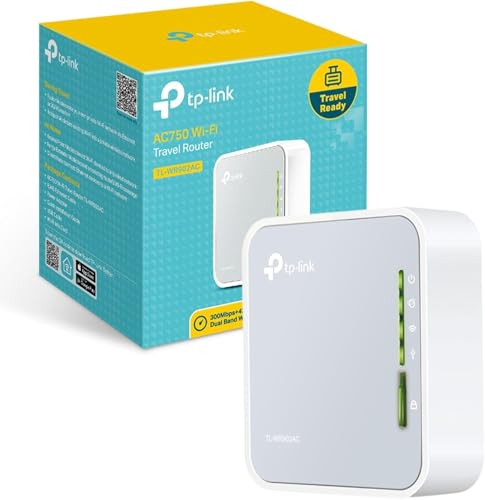
- TP-Link AC750 (TL-WR902AC): Compact and powerful, this router supports dual-band Wi-Fi and offers great speed for video calls and streaming on your iPhone. Its plug-and-play feature means you can set it up quickly in hotels or cafes.
- GL.iNet GL-AR750S: Known for robust security, this model has VPN support and a user-friendly app that works well with iPhone. It’s perfect if you’re concerned about privacy while traveling.
- RAVPower FileHub: This device doubles as a travel router and a media hub. It lets you stream content from SD cards or USB drives directly to your iPhone over Wi-Fi, which is great for long trips without internet.
Have you ever been stuck with a slow hotel Wi-Fi that ruins your plans? These routers can help you avoid that frustration.
Price Vs. Features Comparison
| Model | Price Range | Key Features | Ideal For |
|---|---|---|---|
| TP-Link AC750 | $30 – $40 | Dual-band Wi-Fi, Easy setup, Portable size | Budget travelers needing reliable speed |
| GL.iNet GL-AR750S | $70 – $90 | VPN support, Strong security, App control | Privacy-conscious users and frequent travelers |
| RAVPower FileHub | $50 – $70 | Media streaming, File sharing, Travel router | Travelers who want offline entertainment options |
Choosing a travel router involves balancing what you need against what you’re willing to spend. Would you pay more for added security, or is speed your priority? Thinking about how you use your iPhone on the go can help you decide which features matter most.
Tips For Maximizing Connectivity Abroad
Staying connected while traveling abroad can be a challenge, especially when relying on local networks. Travel routers can help bridge that gap, but you need to get the most out of them to enjoy seamless internet access. Let’s dive into practical tips that can boost your connectivity and keep your iPhone running smoothly wherever you go.
Using Vpns With Travel Routers
Using a VPN with your travel router adds a vital layer of security. It protects your data from prying eyes on public Wi-Fi networks, which are common when you travel. Many travel routers support VPN setup directly, meaning your entire connection is encrypted before it reaches your iPhone.
Setting up a VPN on the router avoids the hassle of configuring it on each device individually. It also helps access region-locked content without slowing down your iPhone with extra apps. Have you checked if your travel router supports popular VPN protocols like OpenVPN or WireGuard? This can make a huge difference in both speed and security.
Managing Data Usage Efficiently
Data limits can sneak up on you quickly abroad, especially if you’re streaming or downloading large files. Your iPhone might automatically update apps or backup photos in the background, draining your data without you noticing. Turning off automatic updates and backups before connecting to your travel router can save precious megabytes.
Use your router’s built-in tools or companion apps to monitor your data consumption in real-time. Some travel routers allow you to set daily or total data caps that help prevent unexpected overages. Also, consider enabling data-saving modes on your iPhone—this reduces background activity and optimizes app usage for lower data consumption.
Credit: cybernews.com
Frequently Asked Questions
Do Travel Routers Work With All Iphone Models?
Yes, travel routers are compatible with all iPhone models. They create a Wi-Fi network that iPhones can connect to easily. This allows iPhones to share internet access securely and conveniently while traveling.
How Do I Connect My Iphone To A Travel Router?
To connect, turn on the travel router and enable its Wi-Fi. On your iPhone, go to Settings > Wi-Fi, select the router’s network, and enter the password. Your iPhone will then connect to the internet through the router.
Can Travel Routers Improve Iphone Internet Speed?
Travel routers can improve your iPhone’s internet speed by stabilizing connections. They often support better Wi-Fi standards and reduce network congestion. However, ultimate speed depends on the internet source and router quality.
Are Travel Routers Safe For Iphone Internet Use?
Yes, travel routers offer secure connections by using encryption protocols like WPA2. They protect your iPhone from public Wi-Fi risks such as hacking and data theft. Always use trusted routers and update firmware regularly.
Conclusion
Travel routers can work well with iPhones for better internet access. They help connect your phone to different networks easily. Setting up is usually simple and quick. You get more control over your Wi-Fi connection while traveling. This can improve security and speed in many cases.
Not all travel routers work the same, so choose carefully. Overall, they can make your iPhone internet experience smoother on trips. Try one to see how it fits your travel needs.