Are you wondering if your gaming router needs a modem to work properly? It’s a common question that can confuse many gamers trying to boost their online experience.
Understanding how these devices work together can make a huge difference in your game’s speed and stability. Keep reading to find out exactly what you need to get the best performance from your gaming setup—and avoid wasting money on unnecessary gear.
Your next win might depend on it!
Credit: www.popsci.com
Gaming Router Basics
Understanding the basics of a gaming router is essential before deciding if you need one alongside a modem. Gaming routers are designed to improve your online gaming experience by managing network traffic and reducing lag. Knowing what sets them apart can help you make smarter choices for your gaming setup.
What Is A Gaming Router?
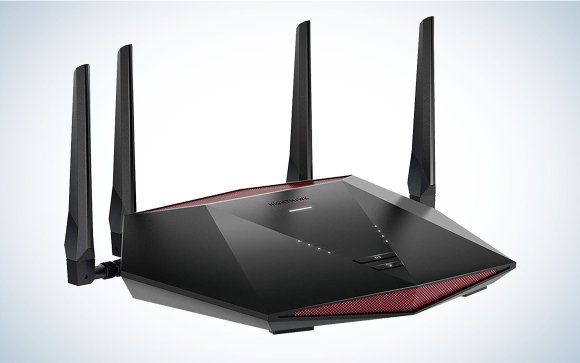
A gaming router is a specialized type of router built to prioritize gaming traffic on your network. It helps reduce latency and lag, giving you smoother gameplay. Unlike regular routers, gaming routers often come with software that lets you control bandwidth allocation for different devices and applications.
Think about the last time your game suddenly lagged while someone else was streaming movies. A gaming router can prevent that by ensuring your game gets the highest priority on the network. This means less frustration and more wins.
Key Features Of Gaming Routers
- Quality of Service (QoS) Settings:Allows you to prioritize gaming traffic over other data, reducing lag and interruptions.
- Low Latency:Designed to minimize delays in data transmission, which is crucial for real-time games.
- Advanced Antennas:Provides better wireless range and signal strength to keep your connection stable.
- Dual-Band or Tri-Band:Supports multiple frequency bands to reduce network congestion.
- Customizable Firmware:Lets you tweak settings to optimize your network specifically for gaming.
Are you currently experiencing lag spikes or connection drops during intense gaming sessions? These features can make a noticeable difference by keeping your gameplay smooth and responsive.
Role Of A Modem
The modem plays a crucial role in your home internet setup, especially if you’re a gamer aiming for smooth, lag-free sessions. It acts as the bridge between your internet service provider (ISP) and your gaming router, converting the digital data from your ISP into a signal your router can distribute. Without a modem, your router simply can’t connect to the internet, making it essential to understand its function.
How A Modem Works
A modem receives signals from your ISP through a cable, fiber, or phone line. It then translates these signals into digital data that your devices, including gaming routers, can understand.
Think of the modem as a translator converting the internet data into a language your home network can use. It also manages your internet connection, ensuring the data flows smoothly in and out.
Without a modem, your gaming router won’t get the internet signal it needs to distribute to your devices. So if you’re wondering why your gaming setup isn’t connecting online, the issue might be with your modem.
Modem Vs Router Functions
People often confuse modems and routers, but their roles are very different. A modem connects you to the internet, while a router shares that internet connection with multiple devices in your home.
- Modem:Connects to your ISP and converts internet signals.
- Router:Distributes the internet connection to your devices, wired or wireless.
In gaming, your router manages traffic between your console or PC and the internet. It handles local network tasks like device communication and Wi-Fi signal strength.
Imagine trying to play an online game with just a router but no modem—it won’t work because the router needs the modem’s internet connection to function. This distinction helps you troubleshoot connection problems more effectively.
Do You Need A Modem For A Gaming Router?
Wondering if a modem is essential for your gaming router? This question pops up often among gamers aiming for the best internet setup. Understanding when you actually need a modem can save you money and simplify your network.
When A Modem Is Necessary
You need a modem if your internet service provider (ISP) delivers your connection through cable, DSL, or fiber lines that require signal conversion. The modem’s job is to translate the ISP’s signal into data your router can use.
Without a modem, your gaming router can’t connect directly to these services. Think of the modem as the gateway from your ISP’s infrastructure to your home network. If you don’t have one, your router is just a device without internet access.
For example, if your ISP provides internet via a cable line, you must have a cable modem. The gaming router connects to this modem to distribute internet to your devices, including your gaming console or PC.
Scenarios Without A Modem
There are cases where you might not need a separate modem. If your ISP uses fiber-optic technology that terminates with an Optical Network Terminal (ONT), that device often acts like a modem already.
Some ISPs offer combo devices that combine modem and router functions. If you use such a device, your gaming router can connect directly to it, eliminating the need for a separate modem.
Additionally, if your internet comes through a mobile network or a public Wi-Fi, your gaming router might connect directly without requiring a modem. In these cases, the router manages the connection itself.
Ask yourself: What type of internet service do you have? Checking this will clarify whether you need a modem before your gaming router can work its magic.
Types Of Internet Connections
A gaming router improves internet speed and reduces lag. It still requires a modem to connect to your internet service provider. Different internet connections like fiber, DSL, or cable need a modem to access the internet.
Understanding the types of internet connections can be crucial for optimizing your gaming experience. Each connection type comes with its unique features, speeds, and setups. Knowing the differences can help you make informed decisions about your gaming setup.Cable
Cable internet is a common choice due to its widespread availability and decent speed. It uses the same coaxial cables that transmit cable TV services. While speeds can be high, bandwidth is shared with neighbors, which might impact gaming during peak hours.Dsl
DSL (Digital Subscriber Line) uses existing telephone lines for internet access. Although generally slower than cable, it’s more stable since it’s a dedicated line. If you live in an area with fewer options, DSL might be your reliable companion for gaming.Fiber
Fiber optic internet offers the fastest speeds with the most stable connections. It uses light signals over thin glass fibers, providing high bandwidth and low latency. This connection type is ideal for serious gamers, but availability can be limited to certain urban areas.Satellite
Satellite internet is accessible in remote locations where other types aren’t available. However, it comes with high latency due to the distance data must travel to and from satellites. This can make fast-paced gaming challenging, but it’s a valuable option where connectivity options are limited. Consider how each type of internet connection impacts your gaming setup. Are you in a bustling city with access to fiber, or are you in a rural area relying on satellite? The right connection can enhance your gaming, reducing lag and improving your overall experience.Modem-router Combos
Modem-router combos combine two essential devices into one unit, offering both modem and router functions. This all-in-one device connects your home network to the internet and distributes that connection wirelessly or via Ethernet. Many gamers wonder if these combos can handle the demands of gaming or if separate devices are better.
Pros And Cons
Pros:
- Simplified Setup:One device means fewer cables and less clutter on your desk.
- Cost-Effective:Buying a combo usually costs less than purchasing a modem and router separately.
- Space-Saving:Perfect for small gaming spaces or desks with limited room.
Cons:
- Limited Customization:Modem-router combos often lack advanced settings important for gaming, like QoS or port forwarding.
- Performance Trade-offs:Integrated devices may not offer the highest speeds or best stability compared to dedicated gaming routers.
- Upgrade Challenges:If one part becomes outdated, you must replace the entire unit.
Suitability For Gaming
If you’re a casual gamer, a modem-router combo might be enough. It delivers solid internet access without the fuss of multiple devices.
However, for competitive or high-demand gaming, separate devices often perform better. Dedicated gaming routers provide faster speeds, lower latency, and advanced settings that can reduce lag.
Ask yourself: Do you want a plug-and-play setup, or do you prefer fine-tuning your network for the best gaming experience? Your answer will guide whether a combo device fits your gaming style.

Credit: www.youtube.com
Improving Gaming Performance
Improving gaming performance involves more than just having a fast internet connection. The right setup and adjustments can make gameplay smoother and more responsive. Small changes to your router and network settings often reduce delays and increase stability. This creates a better experience, especially during intense online matches.
Optimizing Router Settings
Adjusting your router settings can improve how data flows to your gaming device. Prioritize gaming traffic by enabling Quality of Service (QoS). This helps reduce interruptions from other devices on the network. Use the 5 GHz Wi-Fi band for faster speeds and less interference. Keep your router firmware updated to fix bugs and improve performance.
Reducing Latency And Lag
Latency and lag cause delays between actions and responses in games. Place your router close to your gaming device to strengthen the signal. Use a wired Ethernet connection for the most stable link. Disable background apps and downloads that use bandwidth. Choose servers closer to your location to lower ping times.
Troubleshooting Connectivity Issues
Connectivity issues can turn your gaming session into a frustrating experience. Identifying the root cause is crucial before blaming your gaming router or modem. Let’s break down common problems and practical fixes to get your connection stable and fast again.
Common Problems
- Slow Internet Speeds:Your game lags or buffers despite having a high-speed plan.
- Frequent Disconnections:Sudden drops in connection interrupt your gameplay.
- High Latency (Ping):You notice delayed responses from game servers.
- Wi-Fi Interference:Other devices or physical obstacles weaken your signal strength.
- Incorrect Router or Modem Setup:Devices not properly configured can cause conflicts.
Fixes And Tips
Start by rebooting both your modem and gaming router. This simple step often clears temporary glitches affecting your connection.
Check if your modem and router firmware are up to date. Manufacturers release updates that improve performance and security.
Position your router in an open area, away from walls and electronic devices. This reduces interference and boosts signal strength.
Use an Ethernet cable for a direct connection whenever possible. Wired connections are more stable and faster than Wi-Fi.
Adjust Quality of Service (QoS) settings in your router to prioritize gaming traffic. This helps reduce lag by allocating bandwidth more efficiently.
If you face frequent disconnections, verify that your ISP is not experiencing outages. Sometimes, the problem lies outside your home network.
Have you tested your connection with different devices? If only your gaming device struggles, it might need a network setting reset.

Credit: www.ign.com
Frequently Asked Questions
Do Gaming Routers Replace The Need For A Modem?
No, gaming routers do not replace modems. A modem connects your home to the internet. The router distributes the internet to devices. Both are essential for a stable gaming connection.
Can A Modem Alone Support Online Gaming?
A modem alone provides internet access but lacks advanced features. A router improves network management and reduces lag. For optimal gaming, use both a modem and a gaming router.
Why Use A Gaming Router With A Modem?
Gaming routers offer low latency, QoS, and better Wi-Fi. They prioritize gaming traffic to reduce lag. Using a gaming router with a modem enhances online gaming performance.
Is A Modem Required For All Gaming Routers?
Yes, all gaming routers need a modem to access the internet. The modem translates ISP signals for your router to distribute. Without a modem, the gaming router cannot connect online.
Conclusion
A gaming router does not work without a modem. The modem connects your home to the internet. The router spreads this connection to your devices. You need both for online gaming and smooth play. Choosing the right modem and router improves your gaming experience.
Always check compatibility before buying. A good setup reduces lag and disconnections. Remember, the modem and router serve different roles. Together, they keep your games running well. Simple and clear.