Are you tired of losing Wi-Fi connection in certain spots around your home? Dead spots can be frustrating, especially when you need a strong signal for work, streaming, or gaming.
You might wonder if mesh WiFi could be the solution you need. Imagine walking from room to room without ever dropping your connection. You’ll discover how mesh WiFi works and whether it can finally eliminate those annoying dead spots in your space.
Keep reading to find out if this technology is the answer to your Wi-Fi woes.
What Causes Wifi Dead Spots
Wifi dead spots are areas in your home or office where the wifi signal is weak or missing. These spots make it hard to connect to the internet or cause slow speeds. Understanding what causes these dead spots helps in finding better wifi solutions.
Physical Barriers
Walls, floors, and furniture block wifi signals. Thick materials like concrete or metal reduce signal strength. Even mirrors and glass can reflect wifi waves and create dead spots. The more obstacles between your device and the router, the weaker the connection.
Distance From Router
The farther your device is from the router, the weaker the signal. Wifi signals lose power over distance. Large homes or offices have areas too far for a single router to cover. This distance creates dead zones where the signal can barely reach.
Interference From Devices
Other electronic devices can interrupt wifi signals. Microwaves, cordless phones, and baby monitors use similar frequencies. This overlap causes interference and drops the wifi signal. Even neighboring wifi networks can create noise and reduce your signal quality.

Credit: cybernews.com
How Mesh Wifi Works
Mesh WiFi improves internet coverage by using several devices working together. This system spreads the signal evenly across your home. It fills dead spots where regular routers cannot reach. The technology ensures a strong connection everywhere. The process relies on smart coordination between devices. Each part has a role to keep your network fast and stable.
Multiple Access Points
Mesh WiFi uses multiple access points instead of one router. These points are small devices placed around your home. Each one broadcasts WiFi signals to cover a specific area. Together, they create a wide, strong network. This setup helps avoid weak spots or slow zones. You get better signal strength in every room.
Seamless Roaming
Seamless roaming means your device switches smoothly between access points. Your phone or laptop connects to the strongest signal automatically. You do not have to change networks or settings. This feature keeps your connection steady while moving around. Streaming, gaming, and browsing continue without interruptions.
Self-healing Network
A self-healing network fixes problems on its own. If one access point fails, others take over its job. The system reroutes data to keep the network running well. This process happens quickly and without user input. It adds reliability and reduces downtime in your WiFi coverage.
Benefits Of Mesh Wifi For Coverage
Mesh Wifi systems improve internet coverage in homes. They use multiple devices to spread the signal evenly. This setup helps cover large areas and tricky spots. The benefits of mesh Wifi for coverage make it a smart choice for many households.
Eliminating Dead Zones
Dead zones are areas with weak or no Wifi signal. Mesh Wifi places nodes around the home. These nodes create a strong network that reaches every corner. Walls and furniture no longer block the signal. This reduces frustration from lost connections.
Consistent Speeds Throughout Home
Mesh Wifi keeps speeds steady across all rooms. Devices connect to the nearest node automatically. This prevents slowdowns as you move around. Streaming, gaming, and browsing work smoothly everywhere. No more buffering or lag in different rooms.
Easy Expansion
Mesh Wifi systems are simple to grow. Add more nodes to cover larger spaces. No complex setup or rewiring needed. This flexibility fits homes of all shapes and sizes. Expand coverage step-by-step as your needs change.

Credit: www.theguardian.com
Comparing Mesh Wifi To Traditional Routers
In the digital age, seamless connectivity is vital. Traditional routers often struggle with dead spots. Mesh WiFi offers a promising alternative. Let’s delve into how mesh WiFi compares to traditional routers.
Single Router Limitations
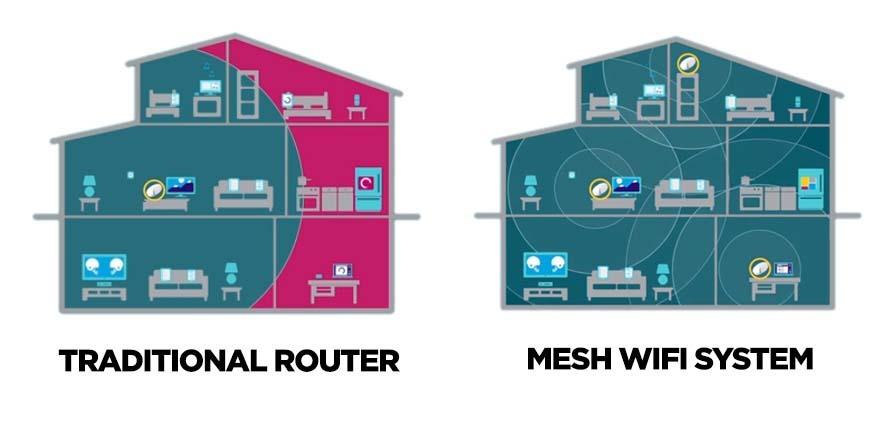
Traditional routers have a limited range. Walls and large spaces weaken signals. This results in frustrating dead spots. Many homes have areas with poor connectivity. A single router often can’t cover large homes effectively.
Interference from other devices can degrade performance. Old routers can struggle with multiple device connections. This leads to slower speeds and dropped connections.
Range Extenders Vs Mesh Nodes
Range extenders boost signals temporarily. They can be tricky to set up. Extenders often create separate networks. This means manual switching between networks as you move.
Mesh nodes work differently. They create a unified network. Moving around the house doesn’t drop connections. Mesh nodes communicate with each other. This ensures stronger, consistent coverage throughout the home.
Mesh systems are easy to expand. Adding a node can cover more space. They offer seamless roaming and better reliability. For large homes, mesh WiFi is often the better choice.
Setting Up Mesh Wifi For Best Results
Setting up your mesh WiFi system correctly is key to eliminating dead spots and enjoying smooth, reliable internet throughout your home. Small adjustments in placement and configuration can make a big difference in performance. Let’s look at how you can optimize your setup for the best results.
Optimal Node Placement
Where you place your mesh nodes matters more than you might think. Avoid putting nodes near thick walls, metal objects, or microwaves, as these can block signals.
Try positioning nodes in open areas, ideally at about eye level. If your home has multiple floors, place nodes on each level to ensure full coverage.
Think about your daily routine—where do you use WiFi the most? Place nodes near these spots to boost signal strength where you need it.
Network Configuration Tips
Setting up your mesh network doesn’t stop at placement. Access your router’s admin panel to check for the latest firmware updates. These updates often improve speed and stability.
Use a single SSID (network name) for all nodes to allow seamless connection as you move around your house. Avoid creating separate networks for each node.
Enable band steering if your mesh system supports it. This feature directs devices to the best frequency band, improving overall performance.
Managing Devices On Mesh Network
Too many devices can slow down your network. Identify which devices are hogging bandwidth and prioritize critical ones like work laptops or streaming devices.
Use your mesh system’s app to set device priorities or schedule internet access times for less important gadgets. This helps maintain a smooth experience for everyone.
Have you noticed some devices struggling to connect? Try reconnecting them or updating their network settings. Sometimes, a quick reset can solve persistent issues.
Potential Downsides Of Mesh Wifi
Mesh WiFi systems often promise to eliminate dead spots in your home, but they come with some downsides that you should consider before making a purchase. Understanding these drawbacks can help you decide if mesh WiFi is the right solution for your needs or if there might be better alternatives.
Cost Considerations
Mesh WiFi setups tend to be more expensive than traditional routers. You’re not just buying one device but multiple units to cover your space effectively.
This can add up quickly, especially if you need a larger system for a big home. Have you checked whether the benefits justify the extra cost for your situation?
Complexity For Beginners
Setting up a mesh WiFi network might feel overwhelming if you’re not tech-savvy. Unlike a single router, you have to position and connect multiple nodes correctly.
Misplacement or improper setup can reduce the system’s effectiveness, leaving you frustrated. Would you prefer a simpler plug-and-play option, or are you ready to learn the nuances of mesh networking?
Compatibility Issues
Not all mesh systems work seamlessly with every device or existing network setup. Some might struggle with older gadgets or certain internet service configurations.
This could cause slower speeds or connection drops, defeating the purpose of improving your WiFi coverage. Have you verified if your current devices and ISP support the mesh system you’re considering?
Real User Experiences And Reviews
Real user experiences provide valuable insight into whether mesh WiFi systems truly help with dead spots in homes and offices. Reviews reveal how these systems perform in everyday situations, highlighting both their strengths and weaknesses. Hearing from actual users can guide your decision on whether a mesh setup is the right solution for your connectivity problems.
Success Stories
Many users report significant improvements after switching to mesh WiFi. One homeowner shared how dead spots in their large two-story house vanished entirely after installing a three-node mesh system. The seamless coverage allowed them to stream videos in the backyard and work from the farthest room without interruptions.
Another user praised the easy setup and automatic network management, which eliminated the need to manually switch between routers. They noticed faster speeds and more stable connections throughout their apartment complex, even in areas that previously had weak signals.
- Improved coverage in multi-level homes
- Consistent speeds in previously weak areas
- Simple, user-friendly setup process
These success stories highlight how mesh WiFi can solve real connectivity issues, especially in larger or complex floor plans.
Common Complaints
Not all experiences are positive. Some users mention that mesh systems can be pricey compared to traditional routers. One reviewer pointed out that while coverage improved, speeds sometimes dropped when connecting through multiple nodes.
Another frequent complaint is the occasional lag in the mesh network’s automatic handoff between nodes. This can cause brief interruptions during video calls or gaming sessions. Additionally, a few users found the mobile app controls limited, restricting advanced customization options.
- Higher cost than standard routers
- Speed reduction when hopping between nodes
- Occasional lag during node switching
- Limited advanced settings in apps
These points suggest that mesh WiFi isn’t a perfect fix for everyone. Does your home’s layout or internet usage demand a more tailored network solution?
Credit: kb.pineapple.net.au
Future Trends In Wifi Coverage Solutions
Wifi coverage is evolving rapidly, and the future holds exciting possibilities that could change how you experience internet at home. Dead spots might soon become a thing of the past with smarter, more adaptive solutions. Let’s dive into what lies ahead in Wifi coverage technology and how it could impact your daily connectivity.
Advancements In Mesh Technology
Mesh Wifi systems are getting smarter and more powerful. New models will use AI to learn your home’s layout and adjust signals in real time, reducing dead spots even in tricky areas like basements or thick-walled rooms.
Imagine a system that predicts where you’ll need stronger signals based on your routine—whether you’re working in the home office or streaming in the living room. This means fewer interruptions and smoother connections without you lifting a finger.
Also, expect better hardware with longer battery life for portable nodes and more user-friendly apps that give you control and insight into your network’s health.
Integration With Smart Homes
As smart homes become more common, Wifi systems will integrate closely with your devices. Your router might communicate with smart lights, thermostats, and security cameras to prioritize bandwidth where it’s needed most.
For example, when you start a video call, your mesh system could automatically boost the signal in that room while temporarily lowering bandwidth to less critical devices.
This integration helps maintain seamless internet without you manually adjusting settings. Have you noticed how frustrating it is when your smart devices lag during important moments? Future Wifi solutions aim to solve exactly that.
Frequently Asked Questions
What Is Mesh Wifi And How Does It Work?
Mesh WiFi uses multiple devices called nodes to create a single, seamless network. It eliminates dead spots by spreading WiFi signals evenly across your home or office. Each node communicates with others, ensuring strong, consistent coverage everywhere.
Can Mesh Wifi Eliminate All Dead Zones?
Mesh WiFi significantly reduces dead zones by providing wider coverage. However, extreme physical barriers or interference may still cause weak signals. Proper node placement is essential to optimize performance and minimize dead spots effectively.
How Many Mesh Wifi Nodes Are Needed For Full Coverage?
The number of nodes depends on your space size and layout. Typically, 2-3 nodes cover a medium-sized home, while larger areas may need more. Proper placement and spacing ensure consistent signal strength and reduced dead spots.
Is Mesh Wifi Better Than Traditional Routers For Dead Spots?
Yes, mesh WiFi outperforms traditional routers by using multiple nodes for wider coverage. Traditional routers often struggle with weak signals in distant rooms. Mesh systems provide seamless connectivity and better dead spot elimination.
Conclusion
Mesh WiFi can fix dead spots in your home or office. It spreads WiFi signals evenly to hard-to-reach places. This means fewer slow connections and dropped signals. Setting up mesh WiFi is usually simple and user-friendly. It works well for large spaces or buildings with thick walls.
Choosing the right system depends on your space size and needs. Overall, mesh WiFi helps create a stronger, more reliable internet connection. It makes online activities smoother and more enjoyable for everyone.