Are you worried about your home WiFi security? You might have heard about WPA3, the latest and strongest WiFi security standard.
But does your mesh WiFi system support WPA3? Knowing this can make a huge difference in protecting your personal data and keeping hackers out. You’ll discover exactly how mesh WiFi and WPA3 work together, what benefits you get, and how to check if your system is up to date.
Keep reading to make sure your WiFi is as safe as it can be.
Mesh Wifi And Wpa3 Compatibility
Understanding the compatibility between Mesh Wifi systems and WPA3 security is crucial for anyone looking to boost their home network’s safety and performance. As cyber threats evolve, securing your wireless network with the latest protocols becomes more than just a tech upgrade—it’s a necessity. Let’s dive into how Mesh Wifi technology aligns with WPA3 and what it means for your network’s protection.
What Is Wpa3?
WPA3 stands for Wi-Fi Protected Access 3, the newest security protocol designed to protect wireless networks. It offers stronger encryption and better safeguards against brute-force attacks than its predecessor, WPA2. This means your personal data and devices are much harder for hackers to access.
One standout feature of WPA3 is its ability to provide individualized encryption on open networks. Have you ever worried about using public Wi-Fi? WPA3 helps keep your information private, even on networks without passwords.
Basics Of Mesh Wifi Technology
Mesh Wifi uses multiple devices, called nodes, spread around your home to create a single, seamless network. Instead of relying on one router, these nodes work together to cover dead zones and maintain strong signals everywhere.
This setup is ideal for larger homes or places with tricky layouts. You get consistent speeds, and devices switch smoothly between nodes as you move around. Have you noticed how your phone sometimes lags when moving far from your router? Mesh Wifi solves that problem.
Current Mesh Wifi Models With Wpa3
Many modern Mesh Wifi systems now support WPA3, but not all do. Brands like Google Nest Wifi, Netgear Orbi, and Asus ZenWiFi have models that include WPA3 encryption.
| Mesh Wifi Model | WPA3 Support | Key Features |
|---|---|---|
| Google Nest Wifi | Yes | Easy setup, strong parental controls, WPA3 encryption |
| Netgear Orbi RBK852 | Yes | High-speed Wi-Fi 6, robust security, WPA3 support |
| Asus ZenWiFi AX | Yes | Wi-Fi 6, AiProtection Pro, WPA3 |
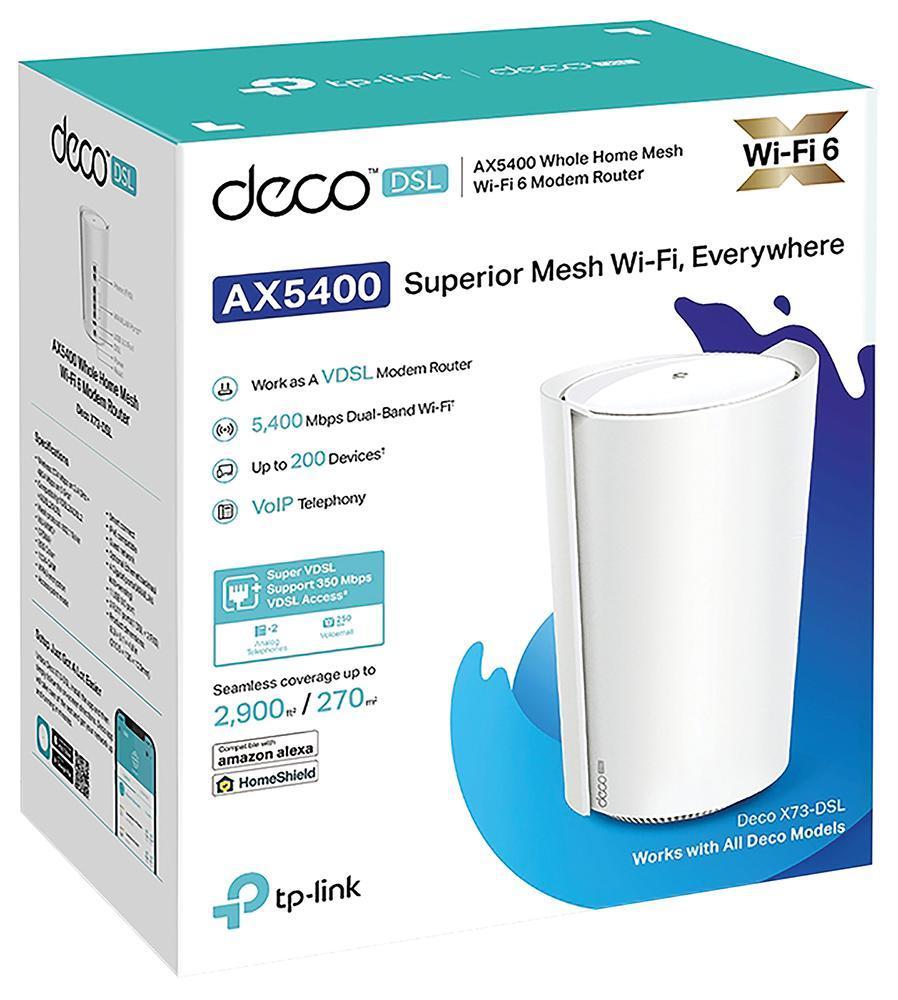
| TP-Link Deco M5 | No | Affordable, decent coverage, lacks WPA3 |
Before buying, check if the mesh system supports WPA3 because it affects how safe your network is from modern threats. Does your current Mesh Wifi offer this level of security? If not, consider upgrading to protect your digital life better.
Credit: www.ebay.ca
Benefits Of Wpa3 In Mesh Networks
WPA3 brings significant advantages to mesh networks, making your wireless connections safer and easier to manage. It enhances how your devices communicate within the mesh, ensuring stronger security without sacrificing speed or convenience. Understanding these benefits can help you decide if upgrading your mesh system to support WPA3 is worth the effort.
Enhanced Encryption Features
WPA3 uses stronger encryption methods that protect your data better than previous standards. It applies individualized encryption for each device, so even if one device is compromised, others remain secure.
This means your personal information, passwords, and online activities stay private, even on a busy mesh network. Have you ever worried about someone snooping on your connection at home or work? WPA3 cuts down that risk dramatically.
Improved Protection Against Attacks
One common threat in WiFi networks is brute-force attacks, where hackers try many password combinations to gain access. WPA3 defends against these by requiring more complex authentication processes.
It also protects against downgrade attacks that force devices to use weaker security settings. If you care about stopping hackers before they even try, WPA3 offers a significant leap forward for mesh networks.
Simplified Secure Connections
Setting up devices on a mesh network used to require careful password sharing. WPA3 introduces features like Simultaneous Authentication of Equals (SAE), which makes connecting new devices smoother and more secure.
This means less hassle for you and fewer opportunities for security mistakes. Imagine adding a smart home device without the usual worries about weak passwords or misconfigurations—WPA3 makes that easier to achieve.
Setting Up Wpa3 On Mesh Wifi
Setting up WPA3 on a mesh WiFi system enhances your network security. WPA3 is the latest WiFi security protocol, offering stronger protection against cyber threats. Many modern mesh routers support WPA3, but it requires proper setup.
This section guides through checking your router firmware, configuring WPA3, and handling common issues.
Checking Router Firmware
Start by verifying your mesh router’s firmware version. WPA3 support depends on updated firmware. Access your router’s admin panel via a web browser. Look for the firmware version in the settings or system info section.
Compare your version with the latest available on the manufacturer’s website. Download and install updates if needed. Keep your router updated to ensure WPA3 compatibility and better performance.
Configuring Wpa3 Security
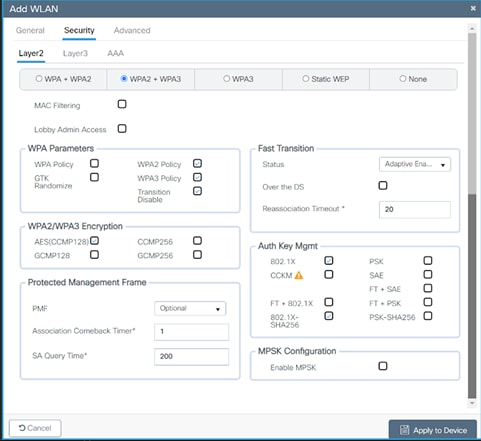
Access the wireless security settings in your mesh router’s admin panel. Find the security mode options and select WPA3 or WPA3 mixed mode. Mixed mode allows devices with WPA2 to connect alongside WPA3 devices.
Set a strong password for your WiFi network. Use a mix of letters, numbers, and symbols. Save the settings and reboot the mesh system if prompted. Check connected devices to confirm they use WPA3 security.
Troubleshooting Common Issues
Some devices may not support WPA3 and fail to connect. Switch to WPA3 mixed mode for better compatibility. Restart your router and devices to refresh connections.
Clear saved networks on your devices and reconnect. Reset the mesh system if problems persist. Consult the router’s manual or support site for specific error codes or messages. Keep firmware updated to avoid bugs.
Credit: www.cisco.com
Limitations And Compatibility Concerns
When exploring mesh WiFi systems, understanding their limitations is crucial. Compatibility issues often arise with advanced security protocols like WPA3. This can affect the network’s effectiveness and security. Knowing these concerns helps in making informed decisions for home or office networks.
Device Support For Wpa3
WPA3 offers enhanced security features over its predecessor, WPA2. But not all devices support it. Mesh WiFi systems may have WPA3 capability. Yet, older devices might not be compatible. This could lead to connectivity issues if those devices are part of the network. Always check device specifications for WPA3 support before upgrading.
Interoperability With Older Devices
Many homes have a mix of old and new devices. Mesh WiFi with WPA3 might not work well with older gadgets. These devices typically support only WPA2 or older protocols. This mismatch can lead to connectivity problems. Ensuring your older devices can connect is important for a seamless network experience.
Performance Considerations
Performance can suffer when older devices connect to a WPA3 network. They might slow down the network speed for all users. This happens because the network needs to use a less secure protocol for these devices. Consider upgrading devices that are crucial for speed and performance. This ensures they can take full advantage of WPA3 capabilities.
Future Of Mesh Wifi Security
Mesh WiFi systems continue to evolve, especially in security features. Protecting home networks is essential as more devices connect daily. The future of mesh WiFi security focuses on stronger protocols and smarter defenses. These improvements will help keep data safe from rising cyber threats.
Upcoming Security Protocols
WPA3 is already a big step forward in WiFi protection. New protocols will build on this foundation with enhanced encryption. Expect more robust methods to prevent hacking and unauthorized access. These protocols will also improve privacy for all connected devices.
Industry Trends For 2025
- Widespread adoption of WPA3 and beyond
- Integration of AI to detect threats in real time
- Focus on zero-trust network architecture
- Better support for IoT device security
- Faster updates to fix vulnerabilities quickly
Manufacturers will work together to create safer mesh networks. Security updates will become automatic and more frequent. Users will benefit from seamless protection without extra effort.
Recommendations For Users
- Choose mesh systems that support WPA3 or newer
- Keep your firmware updated regularly
- Use strong, unique passwords for your network
- Enable network monitoring features if available
- Limit access to trusted devices only
These steps help maintain a secure home network. Staying informed about new security features also helps protect your data.

Credit: www.amazon.ca
Frequently Asked Questions
Does Mesh Wifi Support Wpa3 Encryption?
Most modern mesh WiFi systems support WPA3 encryption for enhanced security. Always check the product specs to confirm WPA3 compatibility before purchase.
How Does Wpa3 Improve Mesh Wifi Security?
WPA3 provides stronger encryption and better protection against password guessing attacks. It ensures safer data transmission across mesh WiFi networks.
Can I Upgrade My Mesh Wifi To Wpa3?
Some mesh routers receive firmware updates enabling WPA3 support. Check the manufacturer’s website for upgrade availability and instructions.
Is Wpa3 Necessary For Mesh Wifi Networks?
WPA3 is highly recommended for improved security but not mandatory. It protects your mesh WiFi from evolving cyber threats effectively.
Conclusion
Mesh WiFi systems often support WPA3 for better security. This new protocol helps keep your network safe from hackers. Not all mesh devices have WPA3 yet, so check before buying. Using WPA3 means stronger passwords and safer connections. It protects your personal data while you browse or stream.
Choosing a mesh WiFi with WPA3 is a smart move. Stay secure with the latest WiFi safety features today.