Are you struggling with slow or spotty WiFi in your commercial building? You’re not alone.
Many business owners wonder if mesh WiFi systems can really fix those frustrating dead zones and keep everyone connected smoothly. Imagine walking through your office or retail space without losing signal or dealing with constant drops. You’ll discover how mesh WiFi works in commercial buildings and whether it’s the solution you’ve been searching for.
Keep reading to find out how you can boost your network’s speed and reliability effortlessly.
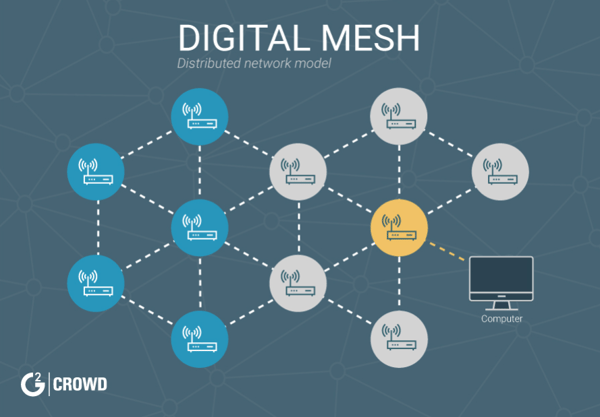
Credit: learn.g2.com
Mesh Wifi Basics
Understanding the basics of mesh WiFi is crucial before deciding if it suits a commercial building setup. Mesh WiFi systems are designed to cover larger areas with stable internet connections by using multiple devices working together. This approach can tackle dead zones and provide seamless roaming, which is often a challenge in commercial spaces.
How Mesh Networks Function
Mesh networks use several nodes placed around a building to create a single, unified WiFi network. Each node communicates with others, passing data along the fastest and clearest path available. This means if one node faces interference or goes offline, the network automatically reroutes the traffic through other nodes.
Imagine walking through your office without losing signal on your phone or laptop. This happens because your device switches between nodes without dropping the connection. This dynamic communication is what sets mesh WiFi apart from traditional setups.
Key Components
- Nodes:These are the individual devices spread throughout the building to provide coverage.
- Primary Router:This connects to your internet source and coordinates the nodes.
- Backhaul Connection:The communication link between nodes that can be wireless or wired.
Each component plays a vital role. For example, a wired backhaul improves speed and reliability, which can be important in busy commercial environments with high data usage.
Differences From Traditional Wifi
| Feature | Traditional WiFi | Mesh WiFi |
|---|---|---|
| Coverage | Limited to range of a single router or extender | Wide coverage through multiple nodes |
| Signal Strength | Can weaken with distance and obstacles | Consistent due to node-to-node communication |
| Network Management | Often requires manual switching between access points | Automatic seamless handoff between nodes |
| Installation | Simple but limited in large spaces | Designed for scalability in large or complex layouts |
Think about your office’s layout. Is a single router enough to cover every corner? Traditional WiFi often struggles in multi-floor buildings or those with thick walls. Mesh WiFi adjusts to these challenges by spreading the signal more effectively.

Credit: www.pcmag.com
Challenges In Commercial Spaces
Commercial buildings bring unique challenges to setting up mesh WiFi networks. Unlike homes, these spaces often have complex layouts and materials that block signals. Understanding these challenges helps you create a more reliable and efficient network for your business needs.
Building Materials Impact
Thick walls made of concrete, metal, or brick can seriously reduce WiFi signals. Glass windows with metallic coatings also reflect signals, causing dead zones. If your office has conference rooms with soundproofing, the materials used can further weaken the mesh nodes’ connection.
Think about your own office space—have you noticed WiFi dropping in certain rooms? That’s often due to these materials. Placing mesh nodes near such barriers won’t help much, so you must plan node locations carefully to work around these obstacles.
Interference Factors
Commercial spaces often have many devices running at once, from microwaves to security systems. These can create interference that disrupts WiFi signals. Even neighboring networks in an office park or mall can cause overlapping channels and slowdowns.
One time, I helped set up mesh WiFi in a coworking space and found printers and cordless phones were major culprits in signal issues. By identifying and relocating these devices, the network’s performance improved noticeably.
Network Density Needs
More users mean more data demand. In a busy office or retail store, hundreds of devices may connect simultaneously. Mesh WiFi systems must handle this high density without lag or dropouts.
Simply adding more nodes isn’t the answer; the network must be designed to balance load and avoid overcrowding on any single node. Ask yourself: how many devices will use your network at peak times? Planning for density helps avoid frustrating slowdowns.
Performance Factors
Performance factors play a key role in deciding if mesh WiFi suits commercial buildings. These factors affect how well the system works in large spaces and with many users. Understanding coverage, speed, and scalability helps businesses choose the right setup.
Coverage And Range
Mesh WiFi uses multiple nodes to spread signal evenly. Each node covers a certain area, creating a wide network. Walls and floors in commercial buildings can weaken signals. Placement of nodes matters a lot to avoid dead zones. Larger buildings need more nodes for full coverage. Good design ensures strong, consistent WiFi throughout the space.
Speed And Bandwidth
Speed depends on the number of users and devices connected. Commercial buildings often have many devices using WiFi at once. Mesh systems share bandwidth between nodes, which can lower speed if overloaded. High-quality mesh systems use advanced technology to maintain fast speeds. Choosing the right system avoids slow connections during busy times.
Scalability
Scalability means the network can grow with business needs. Mesh WiFi allows adding more nodes easily. This feature suits expanding office spaces and changing layouts. Adding nodes does not disrupt the existing network. Businesses can start small and increase coverage over time. Scalability ensures long-term use without replacing the whole system.
Installation Considerations
Installing mesh WiFi in commercial buildings needs careful planning. The setup affects signal strength and network reliability. Choosing the right spots for nodes and ensuring proper power and wiring can improve coverage. Security settings protect sensitive data from breaches. These factors together make mesh WiFi work well in large spaces.
Optimal Node Placement
Place nodes where the signal can travel freely. Avoid thick walls or metal objects that block signals. Spread nodes evenly to cover all areas. Keep nodes visible and high for better reach. Test the signal strength after installation to find weak spots.
Wiring And Power
Check if power outlets are near the nodes. Use Ethernet cables for some nodes to improve speed. Ensure cables are hidden or secured to avoid hazards. Consider power over Ethernet (PoE) for flexible placement. Backup power can keep the network running during outages.
Security Measures
Set strong passwords for the mesh network. Use WPA3 encryption for better protection. Regularly update the firmware to fix vulnerabilities. Limit guest access to keep the main network safe. Monitor the network for unusual activity to stop threats early.
Comparing Mesh With Other Solutions
Choosing the right WiFi solution for commercial buildings is crucial. Different setups offer unique benefits and challenges. Comparing mesh networks with traditional routers, access points, and wired networks helps clarify which fits best.
Traditional Routers
Traditional routers create a single WiFi signal from one point. They are simple and cost-effective for small spaces. Their range often falls short in large or complex buildings. Signal strength can weaken through walls and floors. Devices far from the router may face slow speeds or dropouts. Managing multiple routers separately adds complexity. They lack automatic handoff between devices moving around.
Access Points
Access points extend WiFi coverage by adding more broadcast spots. They connect to a wired network and create multiple WiFi zones. Access points offer more consistent coverage in large areas. They require more setup and cabling than mesh networks. Configuration can be complex for users without technical skills. Devices must switch manually between access points, which can cause brief disconnections. They work well in buildings with existing wired infrastructure.
Wired Networks
Wired networks use Ethernet cables for direct device connections. They provide the most stable and fastest internet connection. Wired setups avoid interference and signal loss common in wireless systems. Installing cables in commercial buildings can be costly and disruptive. Wiring limits device mobility and flexibility. Maintenance may require professional support. Wired networks often support WiFi through access points or mesh systems.
Case Studies
Exploring case studies helps understand mesh WiFi in commercial buildings. Real examples show how mesh networks perform in different settings. This insight aids in choosing the right solution for a business.
Small Office Setup
A small office with around 20 employees tested mesh WiFi. The network covered multiple rooms and floors easily. Employees experienced fewer dropped connections and faster speeds. Setup took less than a day with minimal technical help.
The mesh system improved video calls and cloud access. It also allowed easy expansion as the office grew. The business saved money by avoiding complex wiring and extra equipment.
Large Corporate Environment
A large company with hundreds of employees spread across a multi-floor building tried mesh WiFi. The mesh nodes created a strong, seamless network across all floors. The system handled many devices connecting at once without lag.
IT staff found the mesh easy to manage remotely through a central dashboard. The network adapted quickly to changing office layouts and new devices. Overall productivity increased as connectivity issues dropped sharply.
Retail Spaces
A retail chain installed mesh WiFi in stores of various sizes. The mesh helped provide stable internet for payment systems, staff tablets, and customer WiFi. Signal strength improved in areas that had weak coverage before.
Managers noted better customer satisfaction due to reliable WiFi. The mesh system also supported in-store security cameras without interruptions. Stores could add or move nodes without complex rewiring.
Troubleshooting Common Issues
Troubleshooting common issues in mesh WiFi systems helps keep networks reliable. Commercial buildings pose unique challenges for mesh networks. Identifying and fixing problems ensures smooth internet for everyone.
Signal Drops
Signal drops often occur due to physical barriers like walls or floors. Metal and concrete block WiFi signals easily. Position mesh nodes in open areas for better coverage. Avoid placing nodes near microwaves or large electronic devices. Restarting the mesh system can also restore weak connections.
Device Compatibility
Older devices may struggle to connect with modern mesh WiFi. Check if devices support the WiFi standards used by the mesh system. Update device software and drivers to improve compatibility. Some mesh networks allow creating a separate legacy network for older devices. This prevents connection problems and keeps the main network fast.
Network Congestion
High user numbers cause network congestion and slow speeds. Commercial buildings often have many devices connected at once. Limit bandwidth for non-essential applications to reduce load. Use Quality of Service (QoS) settings to prioritize important traffic. Adding more mesh nodes can spread the load and improve performance.
Future Trends
Exploring mesh WiFi for commercial buildings reveals its potential to enhance connectivity. This system uses multiple nodes to ensure consistent and widespread internet coverage. As commercial spaces grow, mesh WiFi can provide seamless and efficient network solutions.
The future of mesh WiFi in commercial buildings is incredibly promising, offering smarter, faster, and more efficient connectivity solutions. As technology evolves, so does the potential for mesh WiFi to adapt and meet the demands of modern businesses. Let’s dive into the emerging trends shaping the future of mesh WiFi in commercial settings.Wifi 6 And Beyond
WiFi 6 is already making waves by delivering faster speeds and improved performance. In a bustling commercial environment, this means more devices can connect without compromising on speed or reliability. Imagine a busy office space where everyone can video conference seamlessly, or a retail store where customers enjoy lightning-fast internet. The evolution doesn’t stop here. Future iterations like WiFi 7 are already on the horizon, promising even greater advancements. This continuous development ensures your business stays ahead in the connectivity game.Integration With Iot
The Internet of Things (IoT) is increasingly prevalent in commercial buildings. From smart lighting to security systems, IoT devices are everywhere, and they need robust WiFi to function optimally. Mesh WiFi networks can handle this surge in connected devices, ensuring everything runs smoothly. Consider a smart office where everything from the coffee machine to the thermostat is connected. A reliable mesh network makes this possible, enhancing productivity and energy efficiency. Are you ready to embrace this interconnected future?Ai-driven Network Management
Artificial Intelligence (AI) is transforming how we manage networks. AI-driven solutions can predict network issues before they occur, optimizing performance and reducing downtime. Imagine a network that self-adjusts during peak hours to maintain top-notch performance. These intelligent systems also provide detailed insights into network usage, helping you make informed decisions. With AI, managing a complex network becomes less of a hassle, allowing you to focus on what truly matters—growing your business. As these trends unfold, the potential of mesh WiFi in commercial buildings becomes even more exciting. Are you ready to harness these advancements for a more connected and efficient business environment?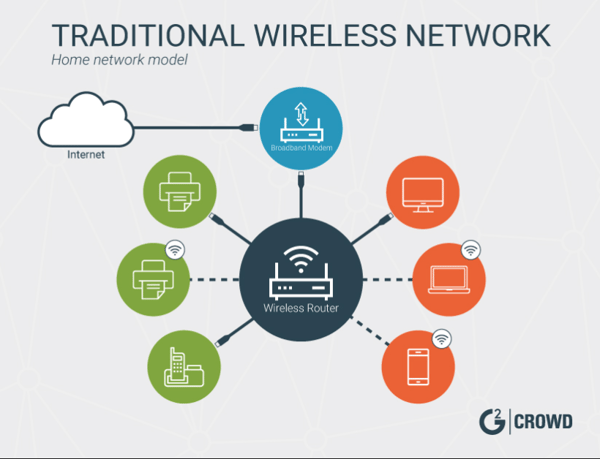
Credit: learn.g2.com
Frequently Asked Questions
Does Mesh Wifi Improve Coverage In Commercial Buildings?
Yes, mesh WiFi extends coverage by using multiple nodes. It eliminates dead zones and ensures consistent signal strength across large commercial spaces.
Can Mesh Wifi Handle High User Density?
Mesh WiFi supports many simultaneous users by distributing traffic. It manages bandwidth efficiently, making it ideal for busy commercial environments.
Is Mesh Wifi Easy To Install In Offices?
Mesh WiFi systems are simple to set up with minimal wiring. They offer flexible placement of nodes, reducing installation time in commercial buildings.
How Does Mesh Wifi Compare To Traditional Routers?
Mesh WiFi provides better coverage and seamless roaming than single routers. It adapts to building layouts, enhancing performance in complex commercial spaces.
Conclusion
Mesh WiFi can work well in many commercial buildings. It helps spread WiFi signals across large spaces. Walls and floors may reduce the signal strength sometimes. Placing mesh units in the right spots improves coverage. Businesses with many users benefit from stable connections.
Setup is simple and does not need special skills. Costs vary but can fit different budgets. Overall, mesh WiFi offers a flexible way to improve internet access in offices and shops. It’s worth considering for better wireless performance.