Are you tired of dead zones and slow internet in your home? Mesh WiFi promises to fix those issues by spreading strong signals everywhere.
But here’s the big question: does mesh WiFi work with all ISPs? You might be wondering if your current internet provider will support this upgrade or if you’ll face compatibility problems. Keep reading to discover how mesh WiFi interacts with different ISPs and what you need to know before making the switch.
Your internet experience could change for the better—let’s find out how.
Credit: medium.com
Mesh Wifi Basics
Understanding mesh WiFi basics helps you decide if it fits your internet needs. Mesh WiFi improves coverage and reduces dead zones in your home or office. It uses multiple devices to create a strong and seamless wireless network.
What Is Mesh Wifi
Mesh WiFi is a network system with several devices working together. Each device is called a node. These nodes communicate to spread WiFi signals evenly across large spaces. This setup provides better coverage than a single router. Mesh WiFi adapts to your space, offering reliable internet in every corner.
How Mesh Wifi Differs From Traditional Routers
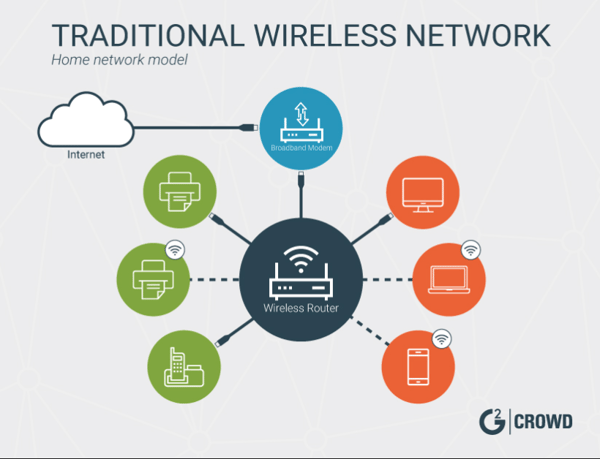
Traditional routers send WiFi from one central point. The signal weakens as you move farther away from the router. Mesh WiFi uses multiple nodes placed around your space. Each node boosts the signal, creating a strong network everywhere.
- Traditional routers can cause dead zones in large areas.
- Mesh WiFi covers wide spaces without losing speed.
- Mesh networks manage devices automatically for smooth connections.
- Traditional routers often need extra extenders for better coverage.
Credit: learn.g2.com
Isp Compatibility Factors
Mesh WiFi systems often promise wide coverage and strong signals. Compatibility with your Internet Service Provider (ISP) depends on several key factors. Understanding these factors helps ensure smooth setup and reliable connection.
Types Of Internet Connections
ISPs deliver internet using different technologies. Common types include:
- Cable
- Fiber optic
- DSL (Digital Subscriber Line)
- Satellite
- Fixed wireless
Most mesh WiFi systems work well with cable, fiber, and DSL. Satellite and fixed wireless may need specific settings. Knowing your internet type helps choose the right mesh system.
Router Requirements From Isps
Some ISPs require special routers or modems. They may provide a modem-router combo device. This device often manages your internet connection and network settings.
Mesh WiFi systems usually replace or work alongside your ISP’s router. Some ISPs lock router functions. This can limit mesh system features. Check if your ISP allows using third-party routers or mesh systems.
Modem And Mesh System Integration
Your modem connects your home network to the ISP. Mesh WiFi nodes create the wireless network inside your home. Integration depends on how these devices connect.
- Modem connects to mesh system’s main node via Ethernet.
- Mesh system handles routing and WiFi signals.
- Some ISPs require modem-router combos, affecting setup.
Proper integration ensures fast and stable internet throughout your home.
Popular Isps And Mesh Wifi
Choosing a mesh WiFi system often raises questions about whether it will work seamlessly with your internet service provider (ISP). Popular ISPs generally support mesh WiFi, but compatibility can depend on various factors. Understanding how major ISPs handle mesh WiFi can help you set up a smoother, faster network at home.
Compatibility With Major Isps
Most leading ISPs like Comcast Xfinity, AT&T, Verizon, and Spectrum allow you to use mesh WiFi systems without major issues. Usually, you just need to connect the mesh router to your ISP’s modem or gateway device. Some ISPs provide their own modem-router combos that might require setting to bridge mode for the mesh system to work properly.
For example, Verizon’s Fios customers often need to enable bridge mode on their router to avoid double NAT problems. This step might confuse some users, but once done, mesh networks deliver excellent coverage and speed. So, ask your ISP if your current modem supports bridge mode or if you need a separate device.
Regional Isp Variations
Smaller or regional ISPs might have different equipment or network setups that affect mesh WiFi compatibility. Some regional providers use unique modems or special firmware that may not always work smoothly with all mesh systems. This can lead to connectivity drops or complicated setup procedures.
If you live in an area served by a regional ISP, check online forums or ask neighbors about their experience with mesh WiFi. You might find specific models that perform better or instructions tailored for your provider. Have you reached out to your ISP’s support to confirm mesh compatibility yet? It can save you time and frustration.
Setting Up Mesh Wifi With Your Isp
Mesh WiFi can work with most ISPs but may need specific setup steps. Some providers require changing router settings or using bridge mode for smooth connection. Always check compatibility before installation to avoid issues.
Setting up a mesh WiFi system with your Internet Service Provider (ISP) can transform your internet experience, providing seamless coverage throughout your home. However, understanding how to integrate it with your existing ISP setup is crucial. Whether you choose to replace your ISP’s router or use it in conjunction with your mesh system, this guide will help you get the most out of your network.Replacing Isp Router Vs. Using Bridge Mode
When integrating a mesh WiFi system, you can either replace your ISP-provided router or use it in bridge mode. Replacing the router is often the simplest option, allowing the mesh system to take over all network functions. However, if your ISP requires the use of their router for certain services, setting it to bridge mode can prevent double NAT issues, ensuring smooth performance.Steps To Connect Mesh Systems
Connecting your mesh system involves a few straightforward steps: 1. Choose a Central Location: Place the primary mesh unit centrally to maximize coverage. 2. Power and Connect: Connect the primary unit to your modem using an Ethernet cable and power it on. 3. Install the App: Download the mesh system’s app on your smartphone for easy setup and management. 4. Follow Setup Instructions: Use the app to follow the step-by-step instructions, connecting additional nodes as required. By following these steps, you can ensure your mesh WiFi system is set up efficiently, providing robust coverage throughout your home.Troubleshooting Connection Issues
Encountering connection issues after setup can be frustrating, but they’re often easy to resolve. Start by checking the placement of your mesh nodes; they should be within range of each other. Verify that all cables are securely connected and the firmware is up to date. If problems persist, consider restarting your modem and mesh units. Sometimes, a quick reboot can resolve connectivity issues. You can also reach out to your mesh system’s support for further assistance. Isn’t it amazing how a few adjustments can lead to a stronger, more reliable connection? By understanding these setup options and troubleshooting steps, you’re well on your way to enjoying uninterrupted WiFi throughout your home.Choosing The Right Mesh System
Choosing the right mesh system is key to improving your home WiFi. A good mesh system covers dead zones and keeps the connection steady. Different systems offer different features and work better with some ISPs than others. Picking a system that fits your needs and ISP will give you the best results.
Features To Consider
- Coverage Area:Choose a system that covers your whole home.
- Speed:Match the mesh system speed with your internet plan.
- Number of Nodes:More nodes mean better coverage in larger homes.
- Ease of Setup:Look for systems with simple installation and app control.
- Security:Check for built-in features like automatic updates and guest networks.
- Compatibility:Ensure the system works with your ISP’s modem or router.
Isp-specific Recommendations
Some ISPs recommend specific mesh systems that work well with their service. These systems often support the ISP’s equipment and settings. For example, certain providers offer mesh kits tailored for their network.
Before buying, check your ISP’s website or support page. They may list compatible mesh systems or offer discounts. Using a recommended system can reduce setup problems and improve performance.
Keep in mind, most mesh systems work with all ISPs. But some features, like voice control or parental controls, may vary. Confirm your ISP supports these features if they matter to you.

Credit: www.reddit.com
Common Compatibility Challenges
Mesh WiFi systems offer great coverage and speed, but compatibility can be tricky. Some common challenges affect how well these systems work with different internet service providers (ISPs). Understanding these issues helps avoid connection problems and ensures smooth performance.
Firmware And Software Limitations
Mesh WiFi devices rely on firmware and software to function properly. Some ISPs use specific software settings that may not support third-party mesh systems fully. This can cause limited features or connection drops.
Manufacturers update firmware to fix bugs and improve compatibility. Without updates, devices may struggle with certain ISP networks. Always check if your mesh system’s firmware supports your ISP’s requirements.
Some mesh systems may not handle advanced ISP features like VLAN tagging or IPv6 well. This can create slow speeds or unstable connections. Confirm your mesh WiFi supports these features if your ISP uses them.
Isp Restrictions And Locked Equipment
Many ISPs provide routers or modems with locked software. These devices may not allow easy integration with mesh WiFi systems. The ISP’s equipment might block mesh nodes from connecting smoothly.
Some ISPs restrict network access to their own hardware only. This limits the use of third-party mesh devices or requires complex setup steps. In some cases, you must use ISP-provided equipment as the main router.
To use mesh WiFi, you might need to set your ISP modem to bridge mode. This disables its routing functions and lets the mesh system manage the network. Not all ISPs allow this change, causing compatibility issues.
Future Trends In Mesh Wifi And Isps
Looking ahead, the relationship between mesh WiFi systems and internet service providers (ISPs) is evolving quickly. As technology advances, mesh networks are becoming more adaptable and powerful, promising smoother connections no matter your ISP. Understanding these future trends can help you make smarter choices about your home or office WiFi setup.
Emerging Technologies
New tech like WiFi 6E and WiFi 7 are set to change the game for mesh systems. These technologies offer faster speeds and better handling of multiple devices at once.
Some mesh systems are already starting to support these standards, which means your network can stay up to date without a full overhaul. Imagine streaming 4K videos on all your devices simultaneously without buffering—this is becoming more realistic.
Plus, integration of AI is helping mesh routers learn your usage patterns. This lets them optimize bandwidth and reduce dead zones automatically, making your WiFi experience smoother without extra effort from you.
Improving Compatibility
Compatibility between mesh systems and ISPs is improving thanks to industry partnerships and open standards. This means mesh routers are designed to work more seamlessly with a wider range of ISP equipment.
You no longer need to worry if your mesh system will clash with your existing modem or router. Some providers even offer mesh-compatible hardware as part of their plans, simplifying setup.
Still, it’s smart to check for compatibility before buying. Have you ever bought a device only to find it doesn’t play well with your ISP’s gear? Avoid that frustration by confirming your mesh system supports your ISP’s technology.
Frequently Asked Questions
Does Mesh Wifi Work With All Internet Providers?
Yes, mesh WiFi systems are compatible with almost all ISPs. They connect to your existing modem or gateway, regardless of the provider. This means you can enhance your home network without changing your internet service.
Can Mesh Wifi Improve Slow Internet Speeds?
Mesh WiFi can improve coverage and reduce dead zones but won’t increase your ISP’s speed. It optimizes signal distribution for better performance throughout your home, giving a more stable and consistent connection.
Do I Need Special Equipment For Mesh Wifi?
No special ISP equipment is required. Mesh WiFi works with standard modems or gateways provided by your ISP. Just connect the primary mesh unit to your modem, and the rest will follow seamlessly.
Will Mesh Wifi Work With Fiber Or Cable Internet?
Yes, mesh WiFi supports both fiber and cable internet connections. It enhances wireless coverage without affecting the type of internet service you receive from your ISP.
Conclusion
Mesh WiFi works with most internet providers without issues. It helps spread your WiFi signal evenly in your home. Some ISPs may need extra setup steps, but that is rare. Choosing the right mesh system fits your internet plan well.
Check compatibility before buying to avoid surprises. With mesh WiFi, you get better coverage and fewer dead spots. Enjoy smooth internet for work, streaming, and gaming everywhere in your house. Mesh WiFi is a smart choice for better home internet.