Are you wondering if Verizon Fios supports multiple routers in your home or office? Managing your internet setup can get tricky, especially when you want to boost coverage or separate networks.
Knowing whether Verizon Fios allows more than one router can save you time, money, and frustration. You’ll discover exactly how Verizon Fios handles multiple routers, what benefits you can expect, and the best way to set it up. Keep reading to make sure your connection works smoothly and meets all your needs.
Credit: datafeature.com
Verizon Fios Network Basics
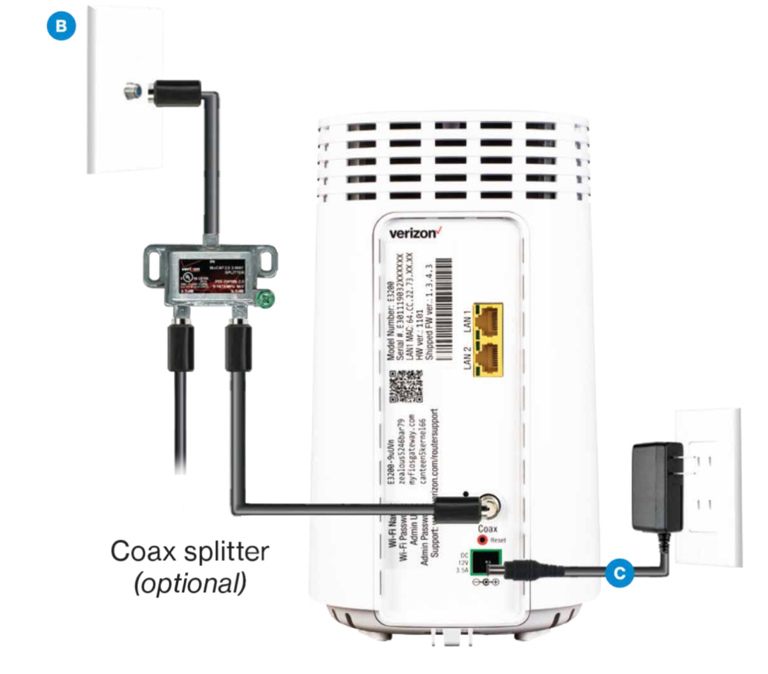
Verizon Fiosuses a fiber-optic network to deliver fast internet. The fiber line connects to an Optical Network Terminal (ONT) at your home. This device changes fiber signals to Ethernet. The ONT connects to the primary router, which manages your home network.
The primary routercontrols internet access, security, and device connections. It assigns IP addresses and manages traffic. This router is essential for your Fios internet to work properly.
Adding more routers can extend coverage but needs proper setup. Extra routers often work as access points, not main routers. The primary router stays central to the network’s function.

Credit: www.alphr.com
Using Multiple Routers With Fios
Using multiple routerswith Verizon Fios can help expand your Wi-Fi coverage. It allows you to connect more devices without losing speed. You can place routers in different rooms or floors for better signal.
Benefitsof multiple routers include:
- Stronger Wi-Fi signal in large homes
- More devices connected at once
- Reduced network traffic on each router
- Better control of network zones
Check compatibilitybefore adding routers. Verizon Fios uses an ONT device that connects to your main router. Extra routers must support bridge modeor access point mode. This avoids IP conflicts and network issues. Some routers may need special setup to work with Fios.
Setup Options For Multiple Routers
The Router Cascading Methodallows connecting two routers to extend your network. Connect the second router’s WAN port to the first router’s LAN port. Change the second router’s IP address to avoid conflicts. Disable DHCP on the second router to prevent assigning duplicate addresses. This setup helps increase wired and wireless coverage in larger homes.
Access Point Modeturns a second router into a simple access point. This method uses one router for routing and the second only to broadcast Wi-Fi. Connect the access point router to the main router via Ethernet. It improves Wi-Fi strength without creating a new network name. Devices connect seamlessly as if on one network.
Mesh Network Integrationworks with Verizon Fios by adding mesh nodes to the existing router. Mesh systems create a single Wi-Fi network that covers every corner of the house. Nodes communicate with each other to provide strong signals everywhere. This option is best for wide areas or homes with Wi-Fi dead zones.
Configuration Steps
Start by connecting the primary router to the Verizon Fios ONT device. Access the router’s admin page using its IP address. Login with the username and password found on the router label. Disable the DHCP server to avoid IP conflicts. Set a static IP address for the primary router within your network range.
Use an Ethernet cable to connect the secondary router’s WAN port to a LAN port on the primary router. Access the secondary router’s admin page with its IP address. Change its IP address so it does not clash with the primary router. Disable DHCP on the secondary router to let the primary router assign IPs.
| Network Setting | Primary Router | Secondary Router |
|---|---|---|
| DHCP Server | Disabled | Disabled |
| IP Address | Static within network range | Different static IP |
| Connection | Connected to ONT | Connected to primary router LAN |
Common Issues And Fixes
IP address conflictscan cause network problems. Each router needs a unique IP address. To fix this, set one router to use a different IP range or enable DHCP only on one router. This avoids overlap and keeps devices connected smoothly.
Wi-Fi interferencehappens when multiple routers use the same channel. Choose different channels for each router to reduce interference. This helps improve signal quality and reduces dropped connections.
Performance drops may occur if routers are too close or settings clash. Place routers apart and check settings like bandwidth and security. This can boost overall network speed and reliability.
Advanced Tips For Optimizing
Verizon Fios allows the use of multiple routers to expand your home network. Setting up extra routers can improve Wi-Fi coverage and reduce dead zones. Proper configuration ensures smooth internet performance across all devices.
Channel Selection
Choosing the right channelis important for your Wi-Fi. It helps reduce interference. Use a Wi-Fi analyzer tool. This tool shows which channels are crowded. Pick a less crowded channel for better performance.Firmware Updates
Firmware updateskeep your router secure and fast. Check for updates regularly. Visit the router’s website or settings page. Follow instructions to update firmware. This can fix bugs and improve speed.Security Enhancements
Boosting router securityis essential. Use a strong, unique password. Change it often. Enable WPA3 encryption for better protection. Turn off features like WPS and UPnP. These can be security risks. Protect your network from unwanted guests. `Alternative Solutions
Verizon Fios typically supports only one router per connection for optimal performance. Alternative solutions include using network switches or mesh systems to extend coverage with a single router. These options help maintain strong Wi-Fi signals across larger areas without multiple routers.
Using Network Switches
Network switches can help share internet in your home. They connect multiple devices easily. A switch is simple to set up. Just plug it into the router. It gives more Ethernet ports. This means more devices can connect. Switches are usually affordable. They work well with Verizon Fios. It’s a good choice if you need more connections.
Powerline Adapters
Powerline adapters use your home’s wiring. They send internet signals through electrical outlets. This helps when Wi-Fi signals are weak. Just plug one adapter into the wall. Connect it to the router. Plug another adapter where you need internet. It’s easy and fast. No extra cables needed. Powerline adapters are very handy.
Third-party Routers
Some people use third-party routers. These can offer more features. They might boost Wi-Fi range. Connect them to the main Verizon Fios router. They work well for bigger homes. Make sure the router is compatible. Check the settings for best performance. Third-party routers can improve your network.

Credit: www.wikihow.com
Verizon Fios Support And Resources
Verizon Fios offers several support optionsto help with network setup and troubleshooting. Customers can reach out to official support channelsthrough phone or chat for direct assistance. These channels provide quick answers about using multiple routers and other technical questions.
Community forumsare also valuable. Users share experiences and tips, making it easier to solve common problems. These forums are a great place to learn from others who use Verizon Fios.
Verizon provides helpful tools and appsto manage your network. The Fios app lets users check connection status, run speed tests, and control devices. These tools simplify network management and improve user experience.
Frequently Asked Questions
Does Verizon Fios Allow Multiple Routers On One Network?
Verizon Fios supports multiple routers, but only one can be active. You can connect additional routers as access points to extend Wi-Fi coverage.
Can I Use My Own Router With Verizon Fios?
Yes, Verizon Fios allows you to use your own router. Ensure it’s compatible and properly configured for optimal performance.
How To Connect Multiple Routers With Verizon Fios Service?
Connect the primary router to the Fios ONT. Then, set additional routers as access points to avoid IP conflicts.
Will Multiple Routers Improve Verizon Fios Wi-fi Speed?
Multiple routers can extend coverage but won’t increase overall internet speed. Speed depends on your Verizon Fios plan and hardware quality.
Conclusion
Verizon Fios works well with multiple routers in many cases. You can extend your Wi-Fi range easily this way. Just make sure to set up each router correctly. Using multiple routers helps reduce dead zones at home. It also allows more devices to connect smoothly.
Remember to check compatibility before buying extra routers. This setup can improve your internet experience overall. So, adding more routers with Verizon Fios is often a smart choice. Try it to enjoy better coverage and faster speeds.