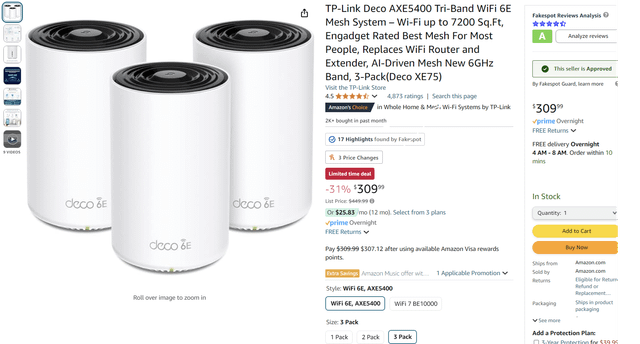
Are you tired of slow connections and frustrating delays when gaming, streaming, or video calling? You might have heard that Wifi 6E mesh systems promise faster speeds and better coverage.
But what about latency—the annoying lag that can ruin your online experience? If you’ve been wondering whether upgrading to Wifi 6E mesh can actually reduce latency and make your internet feel smoother, you’re in the right place. Keep reading to discover how this new technology could change the way your devices connect and why it might be the key to a lag-free home network.

Credit: www.reddit.com
Wifi 6e Basics
Wifi 6E is a new wireless standard that adds more channels and faster speeds. It builds on Wifi 6 technology but uses a new frequency band.
This technology aims to reduce delay and improve connections, especially in busy networks with many devices.
What Sets Wifi 6e Apart
Wifi 6E stands out because it uses a new band that was not available before. It offers more space for data to travel without interference.
- Access to the 6 GHz frequency band
- More channels for less congestion
- Better performance in crowded places
- Improved support for many connected devices
Frequency Bands Explained
Wifi 6E works on three main frequency bands. Each has its own role in speed and range.
| Frequency Band | Range | Speed | Use Case |
| 2.4 GHz | Longest | Lowest | Basic devices, good range |
| 5 GHz | Medium | Higher | Streaming and gaming |
| 6 GHz | Shortest | Highest | New devices, less crowded |
Key Features Impacting Speed
Several features in Wifi 6E help reduce latency and boost speed. These work together to improve the wireless experience.
- Wider channels allow more data at once
- OFDMA lets multiple devices share the channel efficiently
- Target Wake Time saves power and reduces traffic
- Reduced interference from other devices
Mesh Network Essentials
Wifi 6E mesh networks improve wireless internet by using multiple access points. They help cover larger areas with strong signals.
This technology can reduce delays in data transfer, called latency. Understanding how mesh networks work helps see their benefits and limits.
How Mesh Networks Work
Mesh networks use many nodes to send data between devices and the internet. Each node acts like a small router to pass information.
- Nodes connect wirelessly to form a network.
- Data can take different paths to reach its target.
- Nodes communicate with each other to keep the best route.
- This system helps avoid weak spots in coverage.
Benefits Over Traditional Routers
Mesh networks provide better coverage and more stable connections than single routers. They adapt as devices move around.
| Feature | Traditional Router | Mesh Network |
|---|---|---|
| Coverage | Limited to one spot | Wide area with many nodes |
| Signal Strength | Weak in corners | Strong throughout space |
| Latency | Can be high in far spots | Lower due to better routing |
| Setup | Simple but limited | More complex but flexible |
Common Latency Issues
Latency can cause delays in online games or video calls. Several factors affect latency in mesh networks.
- Distance between nodes affects speed.
- Too many devices sharing the network slow it down.
- Interference from walls or other electronics can cause delays.
- Old or low-quality nodes may increase latency.
Latency Factors In Wifi 6e Mesh
Wifi 6E mesh networks offer new features to improve wireless speed and connection. Latency, the delay before data transfer, is a key factor in network performance.
Understanding what affects latency helps users get better results from their Wifi 6E mesh systems.
Role Of 6 Ghz Band
The 6 GHz band is a new frequency range used by Wifi 6E. It has more channels and less traffic than older bands.
This band helps reduce latency by allowing faster data transfer and less network congestion.
Signal Interference And Range
Interference from other devices can increase latency. Walls, furniture, and other obstacles also affect signal strength and speed.
- Physical barriers lower signal quality
- Other wireless devices can cause interference
- Higher frequency signals have shorter range
- Strong signals reduce latency
Device Compatibility Impact
Not all devices support the 6 GHz band. Older devices use 2.4 GHz or 5 GHz bands which may cause slower speeds and higher latency.
| Device Type | Supported Bands | Effect on Latency |
| New Wifi 6E Devices | 2.4 GHz, 5 GHz, 6 GHz | Lowest latency |
| Wifi 6 Devices | 2.4 GHz, 5 GHz | Medium latency |
| Older Wifi Devices | 2.4 GHz only | Higher latency |

Credit: www.reddit.com
Speed Boosts With Wifi 6e Mesh
Wifi 6E Mesh technology offers significant improvements in speed and connectivity. It enhances the overall performance of wireless networks.
By expanding the available spectrum, Wifi 6E reduces congestion and boosts speed. This makes a noticeable difference in busy environments.
Real-world Performance Gains
Wifi 6E Mesh networks deliver enhanced real-world performance. Users experience faster internet connections and smoother online activities.
| Wifi Standard | Speed (Mbps) | Latency (ms) |
| Wifi 5 | 600 | 20 |
| Wifi 6 | 1200 | 10 |
| Wifi 6E | 2400 | 5 |
Gaming And Streaming Advantages
For gamers and streamers, Wifi 6E Mesh is ideal. It reduces lag and ensures high-quality video streaming with minimal buffering.
- Lower latency improves gaming response time
- Higher bandwidth supports 4K and 8K streaming
- Stable connections enhance multiplayer gaming
Comparison With Wifi 5 And 6
Comparing Wifi 5, 6, and 6E shows clear benefits. Wifi 6E outperforms its predecessors in speed and efficiency.
Wifi 6E uses the 6 GHz band, increasing capacity and reducing interference. This makes it superior for modern devices and applications.
Optimizing Your Wifi 6e Mesh Setup
Wifi 6E mesh networks can help reduce latency by spreading the signal evenly. Setting up your mesh system right is key to fast, stable connections.
This guide covers tips for node placement, firmware updates, and fixing latency issues. Follow these to get the best performance from your Wifi 6E mesh.
Placement Tips For Nodes
Place mesh nodes where they can share a strong signal with each other. Avoid walls and metal objects that block wireless signals.
Keep nodes at a medium height, not too low or too high. This helps the signal reach all areas of your home or office.
- Position nodes in open spaces for better coverage
- Keep nodes 20 to 30 feet apart for best connection
- Avoid placing nodes near microwaves or thick walls
- Use a central location for the main node
Firmware Updates And Settings
Keep your mesh system’s firmware up to date to improve performance and fix bugs. Check for updates regularly through the app or web interface.
Adjust settings like channel selection and band steering to reduce interference. These tweaks help lower latency and keep the network stable.
- Enable automatic firmware updates for security and speed
- Choose less crowded wireless channels in the 6 GHz band
- Turn on band steering to balance device connections
- Use QoS settings to prioritize important devices
Troubleshooting Latency Problems
Check your network speed and connection quality to find latency issues. Slow speeds or frequent drops can cause delays in Wifi 6E mesh.
Restart nodes and your router to clear temporary problems. If latency stays high, test each node’s connection to isolate the issue.
- Run speed tests on multiple devices and locations
- Restart mesh nodes and main router regularly
- Check for devices causing heavy traffic or interference
- Reset mesh network settings if problems persist
Credit: ezeefiber.com
Future Of Wifi 6e Mesh Networks
Wifi 6E mesh networks are the next step in wireless internet. They use a new 6 GHz band for faster speeds.
This technology aims to reduce delays and improve connections in many devices at once.
Upcoming Technology Trends
Wifi 6E will support more devices with less interference. This helps networks stay fast even in busy places.
New features like better channel selection and advanced antennas will improve network quality.
- Use of 6 GHz band for less crowded signals
- Improved mesh routing for stable connections
- Better support for high-data activities like VR and streaming
Potential For Lower Latency
Wifi 6E mesh networks can lower latency by using wider channels. This means faster data transfer with less delay.
Mesh systems spread signals well inside homes, reducing the time data takes to travel.
- Wide 160 MHz channels reduce waiting times
- Multiple access points lower network congestion
- Faster response times improve gaming and video calls
Integration With Smart Homes
Wifi 6E mesh networks can connect many smart home devices smoothly. This helps devices work together without lag.
Better coverage means smart lights, cameras, and speakers stay online everywhere in the house.
- Supports many devices at once without slowdowns
- Improves control and response of smart home gadgets
- Helps create a more connected and efficient home environment
Frequently Asked Questions
What Is Wifi 6e Mesh Technology?
Wifi 6E Mesh extends Wifi 6 into the 6 GHz band. It offers higher speeds, more channels, and less interference. This technology improves network capacity and coverage in dense environments.
Does Wifi 6e Mesh Reduce Latency Effectively?
Yes, Wifi 6E Mesh reduces latency by using a less crowded 6 GHz band. It minimizes interference and enhances real-time data transmission, making it ideal for gaming and video calls.
How Does Wifi 6e Improve Mesh Network Performance?
Wifi 6E provides wider channels and faster data rates. This reduces congestion and packet delays in mesh networks. It ensures smoother streaming and quicker device response times.
Is Wifi 6e Mesh Better Than Traditional Wifi 6?
Wifi 6E Mesh offers additional spectrum in 6 GHz, unlike traditional Wifi 6. This means less interference and lower latency. It is better for high-density and high-bandwidth applications.
Conclusion
Wifi 6E mesh can help lower latency in many cases. It uses new frequency bands to reduce interference. Devices connect faster and data moves more quickly. This means less delay during video calls or gaming. Not every setup will see the same results.
Factors like distance and device quality still matter. Still, Wifi 6E mesh offers a strong option for better speed. It supports smoother internet use in busy homes or offices. Choosing the right system can improve your online experience.


