Are you confused about whether to use the 2.4GHz or 5GHz band on your dual band router? Choosing the right frequency can make a big difference in your internet speed and connection quality.
Imagine streaming your favorite shows without buffering or enjoying smooth online gaming with no lag. This article will help you understand how the 2. 4GHz and 5GHz bands perform, so you can get the most out of your Wi-Fi. Keep reading, and you’ll soon know exactly which band suits your needs best.
Dual Band Router Basics
Understanding the basics of a dual band router can help you make smarter decisions about your home or office Wi-Fi setup. These routers use two different frequency bands to transmit data, which can improve speed and reduce interference. Knowing how these bands work is key to optimizing your internet experience.
What Is Dual Band?
A dual band router broadcasts two separate wireless signals simultaneously: one on the 2.4GHz band and another on the 5GHz band. This means your devices can connect to either frequency depending on their needs and capabilities.
Think of it like having two lanes on a highway. When one lane is crowded, traffic can flow smoothly on the other. This setup helps reduce congestion and interference, especially in busy areas with many Wi-Fi networks.
Role Of 2.4ghz And 5ghz Frequencies
The 2.4GHz band covers a wider area and can penetrate walls better, but it is slower and more prone to interference from devices like microwaves and cordless phones. This band suits activities that don’t need very high speeds, such as browsing the web or checking emails.
The 5GHz band offers faster speeds and less interference but has a shorter range and struggles with physical obstacles. It’s perfect if you stream HD videos, play online games, or transfer large files close to the router.
Ask yourself: Do you prioritize range or speed in your Wi-Fi? Your answer can guide which band to use more often for your devices.
Credit: medium.com
Speed Differences Between Bands
Understanding the speed differences between the 2.4GHz and 5GHz bands can help you decide which one suits your needs best. Each band offers unique advantages depending on your environment and what you want from your internet connection. Let’s break down how their speeds compare in real-world use.
Maximum Throughput On 2.4ghz
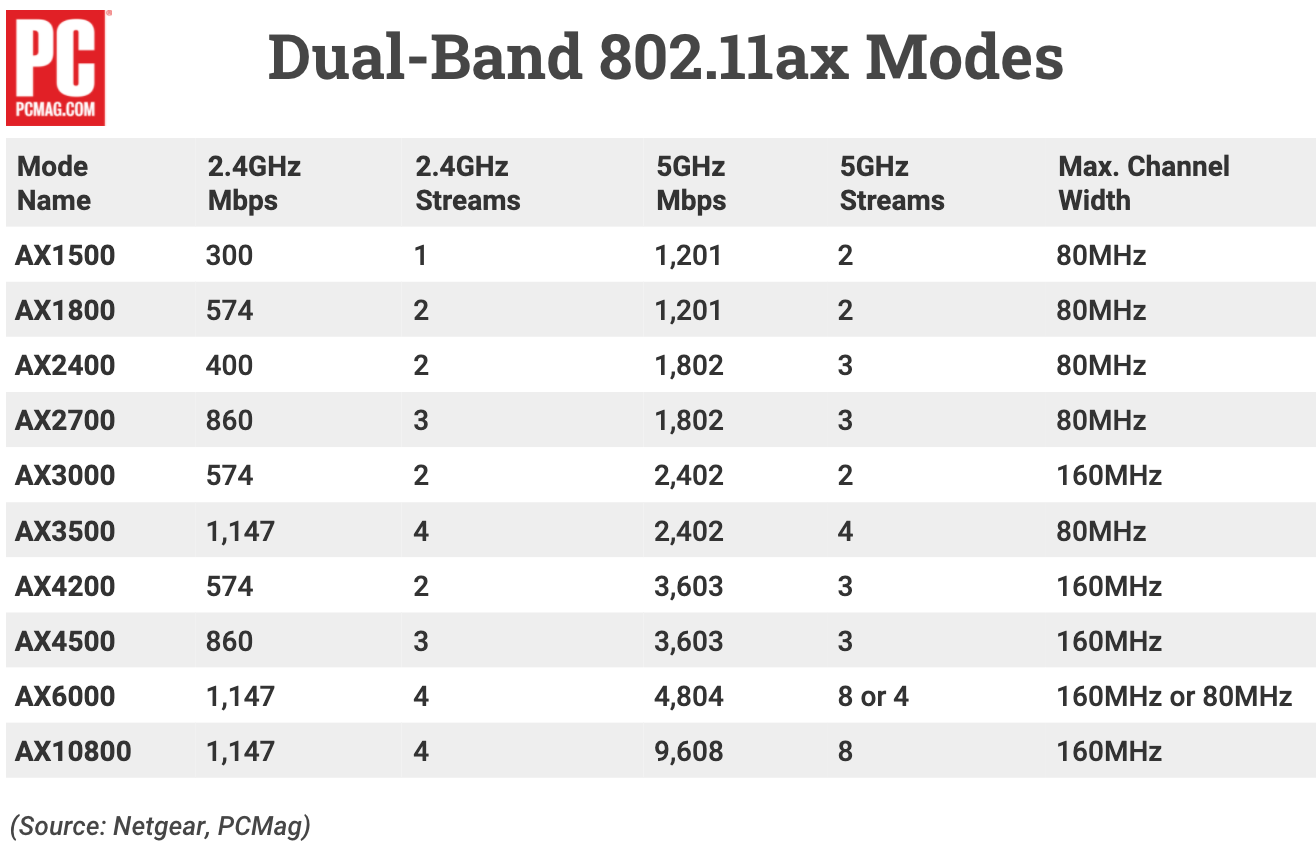
The 2.4GHz band typically offers a maximum throughput of around 450 to 600 Mbps with modern routers. However, this band is often crowded because many devices like microwaves, cordless phones, and older routers use it, which can cause interference and reduce actual speeds.
If your home has thick walls or your devices are far from the router, the 2.4GHz band’s longer range can maintain a stable connection better than 5GHz, even if the speed isn’t as high.
Have you noticed your devices slowing down when many people use Wi-Fi around you? That’s a common 2.4GHz issue due to interference and channel congestion.
Maximum Throughput On 5ghz
The 5GHz band supports much faster speeds, often reaching up to 1300 Mbps or more on modern dual-band routers. This higher throughput is perfect for activities like streaming 4K videos, online gaming, or transferring large files quickly.
However, 5GHz signals don’t travel as far and struggle with obstacles like walls, so the speed can drop sharply if you’re too far from the router.
Think about your typical Wi-Fi use—do you prioritize blazing-fast speeds near your router or a reliable connection in every corner of your home? That choice often decides which band performs better for you.
Range And Coverage
The range and coverage of a dual-band router greatly affect your internet experience. These routers operate on two frequencies: 2.4GHz and 5GHz. Each frequency has its strengths and weaknesses in terms of how far the signal can travel and how well it passes through obstacles. Understanding these differences helps in choosing the right band for your needs.
Signal Penetration On 2.4ghz
The 2.4GHz band has better signal penetration. It passes through walls, floors, and furniture more easily. This makes it ideal for larger homes or spaces with many obstacles. The lower frequency waves travel longer distances and maintain strength behind barriers. However, it may face more interference from other devices like microwaves and Bluetooth gadgets.
Signal Reach On 5ghz
The 5GHz band offers faster speeds but shorter range. It is less effective at penetrating walls and solid objects. This frequency works best in open spaces or rooms close to the router. It experiences less interference from common household devices. The trade-off is that the signal weakens quickly as distance increases, limiting coverage in larger areas.

Credit: blog.jazzcybershield.com
Interference And Congestion
Choosing between 2. 4GHz and 5GHz bands affects interference and congestion. The 2. 4GHz band often faces more interference due to crowded channels. Meanwhile, the 5GHz band offers less congestion, leading to better performance in crowded areas.
Interference and congestion are common challenges in wireless networks, especially when it comes to choosing between 2.4GHz and 5GHz bands. Understanding how these frequencies handle interference can significantly impact your network’s performance. While both bands have their pros and cons, knowing what affects each can help you make an informed decision.Common Sources On 2.4ghz
The 2.4GHz band is notorious for interference. This frequency is often crowded because many household devices use it. From microwaves to cordless phones, these devices can disrupt your Wi-Fi signal. Bluetooth devices also operate on 2.4GHz, adding to the congestion. If your neighborhood is densely populated, numerous Wi-Fi networks might be fighting for the same space. This can lead to slower speeds and frequent disconnections.Less Crowded 5ghz Spectrum
The 5GHz band, on the other hand, is less crowded. This frequency offers more channels, reducing the likelihood of interference. It’s ideal for environments with multiple devices, ensuring smoother connections. 5GHz is also less likely to be affected by non-Wi-Fi devices. This means you’ll experience fewer interruptions from household electronics. However, the trade-off is a shorter range, making it less effective through walls. Choosing between these bands may come down to your specific needs and environment. Do you prioritize speed over range? Or do you need a reliable connection through walls? Understanding these factors can guide you in optimizing your network’s performance.Device Compatibility
Device compatibility plays a key role in choosing between 2.4GHz and 5GHz bands. Different devices support different frequencies. Understanding this helps improve your network’s speed and reliability. Some devices only connect to one band. Others can switch between both for better performance.
Older Devices And 2.4ghz
Many older gadgets work only on the 2.4GHz band. This includes devices like early smartphones, laptops, and smart home gadgets. The 2.4GHz frequency has a longer range. It can pass through walls and obstacles better than 5GHz. The speed is lower, but the connection tends to be more stable on older devices.
- Works well for simple internet tasks
- Supports devices with basic Wi-Fi standards
- Good for large homes with many walls
Modern Devices And 5ghz
Newer devices usually support the faster 5GHz band. This includes recent smartphones, tablets, and laptops. The 5GHz band offers higher speeds and less interference. It works best for activities like streaming and gaming. The range is shorter, so it suits open spaces or rooms close to the router.
- Supports latest Wi-Fi standards like Wi-Fi 5 and Wi-Fi 6
- Better for high-speed data transfer
- Less crowded frequency with fewer devices connected
Best Use Cases For Each Band
Choosing between the 2.4GHz and 5GHz bands on your dual-band router depends largely on your environment and what you need from your internet connection. Each band has strengths that make it better suited for different situations. Understanding these can help you get the best speed and coverage for your devices.
When To Choose 2.4ghz
The 2.4GHz band is great for wider coverage. It can pass through walls and floors more easily, making it ideal for larger homes or spaces with many obstacles.
This band works well for devices that don’t need super high speeds but do need a stable connection over a distance. Think smart home devices, older laptops, or smartphones used mostly for browsing and streaming music.
If your home has many devices competing for bandwidth, 2.4GHz’s longer range can help maintain a connection when you’re far from the router. Ever tried streaming in the backyard? This band often keeps you connected better outdoors.
When To Opt For 5ghz
Choose the 5GHz band when you want faster speeds and less interference. It has more channels and is less crowded, which means smoother video calls, gaming, and HD streaming.
This band is perfect if you’re near the router or in the same room. Its shorter range means it struggles through walls but rewards you with quicker downloads and uploads when close.
Are you working from home and need reliable, fast video conferencing? Or maybe you’re streaming movies on multiple devices? The 5GHz band handles these tasks better because of its higher capacity and lower interference.
Performance Optimization Tips
Optimizing your dual band router’s performance improves your internet speed and stability. Small changes can reduce interference and boost signal strength. Focus on smart channel selection and correct router placement. These steps help both 2.4GHz and 5GHz bands work at their best.
Channel Selection Strategies
Choose the right channel to avoid signal overlap and interference. The 2.4GHz band has only three good channels: 1, 6, and 11. Use these to prevent cross-talk between networks.
For the 5GHz band, select channels with less congestion. Many routers offer automatic channel scanning to pick the clearest frequency. Manual selection can also work by checking nearby networks with a WiFi analyzer app.
- Pick channels with the least nearby network traffic.
- Change channels if you notice slow speeds or drops.
- Update router firmware to access new channel options.
Positioning Your Router
Place your router in an open, central spot in your home. Avoid areas near thick walls or metal objects that block signals. Elevate the router off the floor for better range.
Keep the router away from other electronics like microwaves or cordless phones. These devices create interference, especially on the 2.4GHz band. Position antennas vertically to improve coverage.
- Center the router for even signal distribution.
- Keep it visible, not hidden in cabinets or behind furniture.
- Place away from electronic devices that emit interference.

Credit: wolfblunt.medium.com
Future Of Dual Band Technology
The future of dual band technology holds exciting possibilities for enhancing your wireless experience. As more devices demand faster speeds and stable connections, the competition between 2.4GHz and 5GHz bands will evolve. Understanding what’s next can help you make smarter choices for your home or office network.
Emerging Wi-fi Standards
The introduction of Wi-Fi 6 and Wi-Fi 6E brings new dimensions to dual band routers. These standards improve speed, capacity, and efficiency on both 2.4GHz and 5GHz bands. With Wi-Fi 6E, the 6GHz band joins the mix, reducing congestion and offering even faster connections.
You might wonder how this affects your current setup. Simply put, newer routers that support these standards can handle more devices without slowing down. This is crucial if your home is packed with smartphones, smart TVs, and IoT gadgets.
Advancements Beyond 5ghz
While 5GHz has been the go-to for speed, the growing use of the 6GHz band means the landscape is shifting. This new band offers wider channels and lower interference, translating to better performance in crowded environments. Imagine streaming 4K videos or gaming online with fewer interruptions.
Manufacturers are also improving antenna designs and beamforming technologies. These advancements focus signals more precisely to your device, boosting reliability and range. Have you noticed how some routers now cover your entire home more effectively? That’s no accident.
In the near future, dual band routers might become tri-band by default, combining 2.4GHz, 5GHz, and 6GHz for optimal performance. Are you ready to upgrade your network to keep up with these changes?
Frequently Asked Questions
What Is The Main Difference Between 2.4ghz And 5ghz Bands?
The 2. 4GHz band offers longer range but slower speeds. The 5GHz band provides faster speeds but shorter range. Choosing depends on your device needs and environment.
Which Band Is Better For Gaming And Streaming?
5GHz is better for gaming and streaming. It offers higher speeds and less interference, ensuring smoother performance and lower latency.
Can 2.4ghz And 5ghz Bands Work Simultaneously?
Yes, dual-band routers can use both bands simultaneously. This helps separate devices for better performance and reduces network congestion.
Does 5ghz Have More Interference Than 2.4ghz?
No, 5GHz experiences less interference. The 2. 4GHz band is crowded with many devices, causing more signal interference and slower speeds.
Conclusion
Choosing between 2. 4GHz and 5GHz depends on your needs. 2. 4GHz covers larger areas but can be slower. 5GHz offers faster speeds but shorter range. Walls and obstacles affect 5GHz more than 2. 4GHz. For streaming and gaming, 5GHz works best.
For basic internet and distant rooms, 2. 4GHz suffices. Many routers support both bands for flexibility. Try both to see what fits your home. Your internet experience improves with the right choice. Simple and smart decisions lead to better Wi-Fi.