Are you getting the most from your dual band router? Keeping your router in top shape isn’t just about better internet speed—it protects your connection and keeps your devices running smoothly.
If your Wi-Fi has been acting up or slowing down, simple maintenance steps can make a huge difference. You’ll discover easy and effective tips to maintain your dual band router. Stick with us, and you’ll unlock a faster, more reliable network right at home.
Ready to boost your Wi-Fi experience? Let’s dive in.
Choosing The Right Location
Choosing the right location for your dual band router can make a huge difference in your internet speed and reliability. The spot you pick affects how well the signal spreads throughout your home or office. Small adjustments in placement can reduce dead zones and improve your overall connection quality.
Avoiding Interference
Electronic devices like microwaves, cordless phones, and baby monitors often interfere with your router’s signal. These devices usually operate on the 2.4 GHz band, which can cause slowdowns or dropped connections. Keep your router away from such gadgets to minimize interference.
Thick walls and metal objects also block or weaken signals. Have you ever noticed your Wi-Fi falters near metal filing cabinets or refrigerators? Moving your router to a more open area can help avoid this problem.
Optimal Router Placement
Place your router in a central location for the best coverage. If it’s tucked away in a corner or behind furniture, your signal will struggle to reach every room. Think about where you use the internet most and position the router nearby.
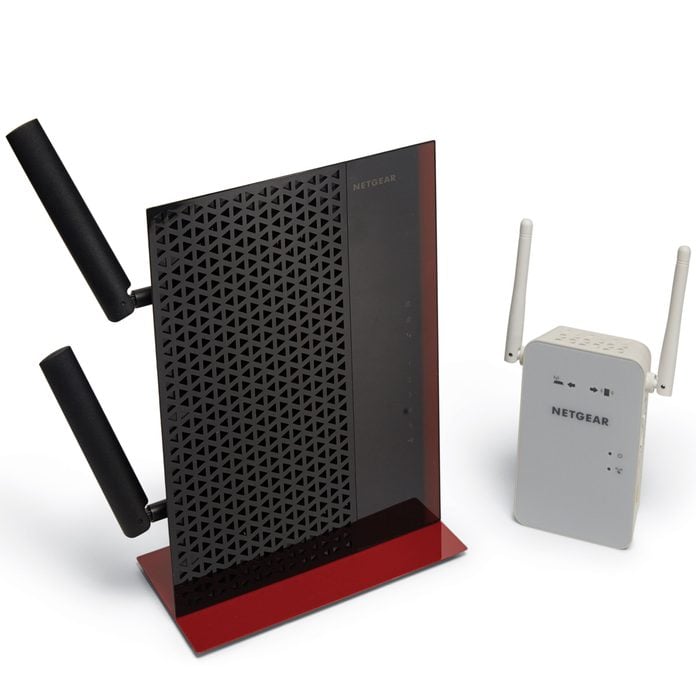
Elevate your router off the floor, ideally on a shelf or desk. Signals travel better when the router isn’t obstructed by low furniture or carpets. Also, make sure the antennas (if external) are positioned vertically to cover a wider area.
- Keep the router in an open space rather than inside cabinets.
- Avoid placing it near large metal objects.
- Ensure it’s away from thick walls or heavy electronic equipment.
Have you tested different spots around your home? A quick speed test app can show you how the signal strength changes with location. This simple experiment might reveal surprising results.
Credit: www.familyhandyman.com
Regular Firmware Updates
Regular firmware updates keep your dual band router running smoothly and securely. These updates fix bugs, improve performance, and protect your network from new threats. Staying current with firmware is key to a reliable internet connection.
Checking For Updates
Access your router’s admin panel through a web browser. Use the IP address found on the router label or manual. Look for the “Firmware Update” or “Router Upgrade” section.
Check the current firmware version against the latest available on the manufacturer’s site. Download and install updates directly from the router interface if available. Some routers can also update automatically.
Benefits Of Latest Firmware
- Fixes security vulnerabilities to protect your network.
- Improves speed and connection stability.
- Adds new features for better router management.
- Resolves bugs that cause crashes or slowdowns.
- Enhances compatibility with new devices.
Securing Your Network
Securing your dual band router is key to protecting your personal information and keeping your internet connection stable. Without proper security measures, your network becomes an easy target for hackers or unauthorized users. Taking simple yet effective steps can greatly reduce the risk and give you peace of mind.
Strong Password Practices
Using a strong password for your router’s admin panel and Wi-Fi network is your first line of defense. Avoid common passwords like “12345678” or “password”—these are often the first guesses hackers try. Instead, create a password that combines uppercase and lowercase letters, numbers, and special characters.
Think about a phrase or a combination of words that only you would remember. For example, “SunnyBeach!2024” is easier to recall but hard to crack. Changing your passwords regularly also helps keep your network secure over time.
Enabling Network Encryption
Encryption scrambles the data sent over your Wi-Fi, making it unreadable to outsiders. Most routers support WPA2 or WPA3 encryption—always choose the latest standard available on your device. This simple switch can prevent many common hacking attempts.
Check your router’s settings to confirm encryption is active. If you’ve never looked, you might be surprised to find your network is unprotected or using outdated encryption. Protecting your network with strong encryption is like locking the doors to your digital home.
Credit: www.tataneu.com
Optimizing Band Settings
Optimizing your dual band router’s settings can greatly improve your Wi-Fi experience. Adjusting the bands correctly ensures faster speeds, better coverage, and less interference. It’s not just about flipping a switch; it involves understanding when and how to use each frequency band effectively.
When To Use 2.4 Ghz Vs 5 Ghz
The 2.4 GHz band covers a wider area but offers slower speeds. It’s ideal for devices that are far from the router or when walls block signals. If you have smart home devices or older gadgets, they often work better on 2.4 GHz.
The 5 GHz band is faster but has a shorter range. Use it for activities that need high speed, like gaming or streaming HD videos. If your device is close to the router, switch to 5 GHz to enjoy a smoother connection.
Ask yourself: Are your devices spread out in different rooms or mostly near the router? This can help decide which band to prioritize.
Adjusting Channel Selection
Channels are like lanes on a highway. Choosing the right one reduces traffic and interference from neighbors’ Wi-Fi. Most routers auto-select channels, but manually picking a less crowded channel can boost your network’s performance.
You can use free apps or built-in router tools to scan for the best channel. Look for channels with the least interference, especially on the 2.4 GHz band, which has fewer channels available.
Try switching channels and testing your speed. Sometimes a small change here can make a big difference in your internet experience.
Routine Router Reboots
Routine router reboots keep your dual band router running smoothly. Restarting clears temporary glitches and frees up memory. This simple step helps maintain strong and stable internet connections. Regular reboots can prevent slowdowns and reduce network interruptions. Many users overlook this easy yet effective practice.
Scheduled Restart Benefits
Scheduling router restarts improves performance without manual effort. It:
- Reduces network lag and buffering issues.
- Clears memory leaks that slow down your device.
- Helps apply updates and configuration changes.
- Improves overall connection stability and speed.
- Prevents router overheating by giving it a break.
Consistent restarts keep your network healthy and reliable. This habit saves time troubleshooting and reduces frustration.
How To Automate Reboots
Automating router reboots is simple and convenient. Follow these steps:
- Access your router’s web interface by typing its IP address in a browser.
- Look for the system or maintenance settings.
- Find the option for scheduled reboots or system restarts.
- Set the preferred reboot time, often during low usage hours.
- Save the settings and let the router restart automatically.
Some routers do not have built-in scheduling. Use third-party tools or scripts for automation. Check your router’s manual for specific instructions.

Credit: cyberraiden.wordpress.com
Monitoring Network Traffic
Monitoring network traffic is essential to keep your dual band router running smoothly and efficiently. It helps you understand how your internet bandwidth is being used and spot any unusual activity. By keeping an eye on traffic, you can prevent slowdowns and make sure every device gets the speed it needs.
Identifying Bandwidth Hogs
Sometimes, certain devices or apps consume more bandwidth than others, causing your network to slow down. Identifying these bandwidth hogs allows you to manage or limit their usage. You might find a streaming service, a large file download, or even a forgotten app updating in the background.
Check your router’s traffic logs regularly to see which devices use the most data. You can then decide if some activities can be paused or scheduled for off-peak hours. Have you ever noticed your internet lagging during a video call but didn’t know why? This is often due to unnoticed bandwidth hogs.
Using Built-in Router Tools
Most dual band routers come with built-in tools to monitor network traffic easily. These tools often include traffic meters, device lists, and usage reports that show real-time and historical data. You don’t need extra software—just log in to your router’s admin page and explore the options.
Use these tools to set limits or prioritize traffic for important devices, like your work laptop or gaming console. You can even schedule internet access for kids’ devices to control usage times. Have you tried adjusting settings through your router’s dashboard? It can surprisingly improve your network’s performance without extra cost.
Cleaning And Physical Care
Keep your dual band router clean by wiping dust off vents and surfaces regularly. Check cables and connections to ensure strong signals and prevent interruptions. Simple care helps your router work better and last longer.
Cleaning and physical care of your dual band router is crucial to maintaining its performance and longevity. A well-maintained router ensures seamless internet connectivity and prevents any potential hardware issues. Let’s explore some actionable tips to keep your device in pristine condition.Dust Removal Tips
Dust can accumulate quickly, especially if your router is placed in a high-traffic area. Use a soft, lint-free cloth to gently wipe the exterior of your router. For hard-to-reach places, like vents, a can of compressed air is your best friend. Be gentle to avoid damaging delicate components. Consider setting a regular schedule for dusting your router. A monthly cleanup can work wonders in preventing dust buildup. Have you ever noticed a drop in internet speed? Dust might be the culprit!Ensuring Proper Ventilation
Routers generate heat, and without proper ventilation, they might overheat, affecting performance. Place your router in an open area, avoiding cramped spaces like cabinets or bookshelves. Ensure there’s at least a few inches of space on all sides for air to circulate. Think about the placement of your router. Is it near other electronic devices that generate heat? If so, consider relocating it. Keeping it cool can enhance its lifespan and efficiency. Would you prefer a brief interruption now or a complete internet outage later?Frequently Asked Questions
How Often Should I Update My Dual Band Router Firmware?
Updating your router firmware every 3 to 6 months improves security and performance. Check the manufacturer’s website for updates regularly. Firmware updates fix bugs and add new features, ensuring your router runs smoothly and securely.
What Is The Best Placement For A Dual Band Router?
Place your router in a central, elevated spot away from walls and interference. Avoid placing it near microwaves or cordless phones. Proper placement improves signal strength and coverage across both 2. 4 GHz and 5 GHz bands.
How Can I Secure My Dual Band Router Effectively?
Use a strong, unique password and enable WPA3 or WPA2 encryption. Disable WPS and regularly update your router’s firmware. These steps protect your network from unauthorized access and enhance overall security.
Why Should I Regularly Reboot My Dual Band Router?
Rebooting your router weekly clears memory and resets connections. This helps improve speed and fix minor connectivity issues, keeping your network stable and responsive.
Conclusion
Regular care keeps your dual band router working well. Clean it often and update its software. Check settings to keep your network safe. Restart the router if it slows down. Place it in an open spot for better signals. Small steps help avoid big problems later.
Stay consistent with these simple tips. Enjoy faster, more reliable internet at home. Easy maintenance makes a big difference every day.