Have you ever been frustrated by slow WiFi in certain parts of your home? You’re not alone.
The good news is there’s a smart solution that can change the way your internet works—mesh WiFi. But how does mesh WiFi work, and why is it different from your regular router? Understanding this can help you get stronger, faster internet where you need it most.
Keep reading to discover how mesh WiFi can transform your connection and make your online experience smoother than ever.
Mesh Wifi Basics
Mesh WiFi is a modern way to spread internet across your home or office. It uses multiple devices working together to cover every corner. This system solves common problems like weak signals and dead zones. Understanding the basics helps you see why mesh networks are popular.
Core Components
A mesh WiFi system mainly has three parts:
- Main Router:Connects to your internet source and controls the network.
- Nodes:These are smaller devices placed around to extend WiFi coverage.
- Backhaul:The communication path between the router and nodes, often wireless or wired.
Each part plays a role to keep the network strong and stable everywhere.
How Nodes Communicate
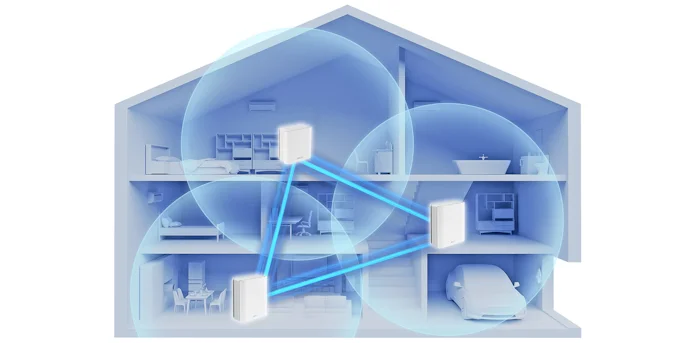
Nodes talk to each other to share data and manage signals. They use the backhaul to send information quickly. If one node faces trouble, another takes over. This teamwork keeps your connection smooth and reliable.
Difference From Traditional Wifi
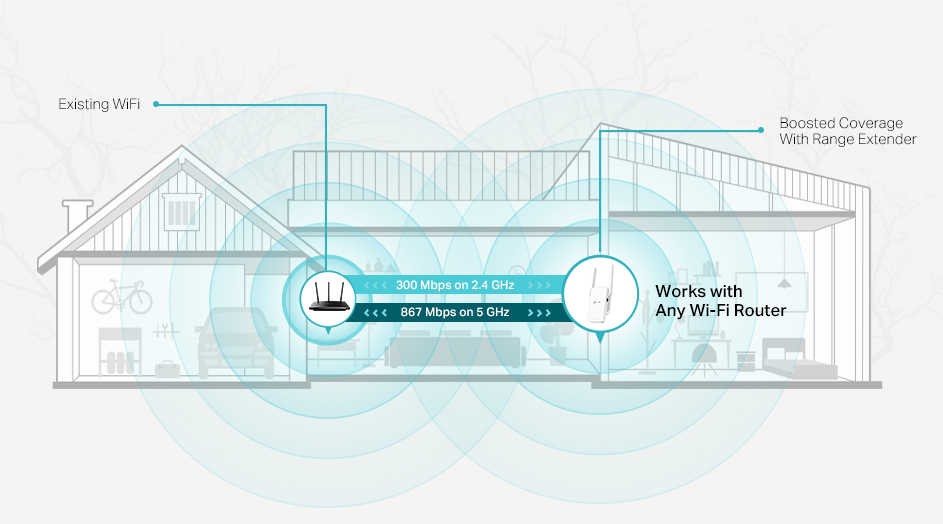
Traditional WiFi uses one router to cover the whole area. This often causes weak signals far from the router. Mesh WiFi uses multiple nodes to cover more space evenly. It creates a single network with one name for easy use. Devices switch automatically to the strongest signal node.
Setting Up Mesh Wifi
Setting up mesh WiFi is simple and effective for whole-home coverage. It involves selecting the right system, placing nodes correctly, and configuring them to work together smoothly. Each step ensures strong, reliable WiFi in every corner of your space.
Choosing The Right System
Pick a mesh WiFi system that fits your home size and internet speed. Check for compatibility with your internet provider. Look for easy-to-use apps that help in setup and management. Consider the number of nodes included and whether you can add more later.
Placement Of Nodes
Place the main router near your modem for the best connection. Spread other nodes evenly throughout your home. Avoid placing nodes near thick walls or large metal objects. Keep nodes in open spaces and at a medium height for better signal reach.
Configuration Steps
- Plug in the main router and connect it to your modem.
- Power on the additional nodes and place them in chosen spots.
- Use the system’s app or web interface to start setup.
- Follow on-screen prompts to link all nodes to the main router.
- Create your WiFi name (SSID) and password.
- Test the connection in different areas to ensure full coverage.
Benefits Of Mesh Wifi
Mesh WiFi systems offer several advantages that can transform your home or office internet experience. They tackle common connectivity problems with smart, user-friendly technology. Understanding these benefits can help you decide if a mesh network fits your needs.
Improved Coverage
Mesh WiFi spreads your internet signal across multiple nodes placed around your space. This setup fills in dead zones and weak spots where traditional routers struggle. You get strong and consistent WiFi even in far corners, basements, or multi-story homes.
Imagine streaming your favorite show in the backyard without buffering. That’s the kind of coverage improvement you can expect.
Seamless Roaming
With mesh WiFi, your devices switch smoothly from one node to another without losing connection. You can walk around your house or office without manually reconnecting to different networks. This seamless handoff keeps video calls, gaming, and downloads uninterrupted.
Have you ever noticed your call dropping when you move to another room? Mesh WiFi solves that by making your entire space feel like one single network.
Easy Scalability
Adding more coverage is simple with mesh WiFi—you just add more nodes. There’s no need to reconfigure complicated settings or run extra cables. This flexibility lets you expand your network as your space or needs grow.
Think about hosting a party or setting up a home office in a new room. You can easily boost your WiFi wherever you need it most.
Credit: www.tp-link.com
Performance Factors
The performance of a mesh WiFi system depends on several key factors. These factors ensure smooth connectivity and strong signal coverage. Understanding them can help optimize your home network.
Impact Of Node Quantity
The number of nodes affects coverage. More nodes mean better signal strength across larger areas. Each node works together to create a seamless network. It’s crucial to place nodes strategically. This placement helps eliminate dead zones in your home.
Role Of Backhaul Connections
Backhaul connections are essential for data flow between nodes. Wired backhaul connections are often faster and more stable. They use Ethernet cables to link nodes. Wireless backhaul relies on radio signals. This might reduce speed if the signal is weak.
Interference And Obstacles
Interference can disrupt WiFi signals. Common sources include walls, floors, and electronic devices. Thick walls and metal objects block signals. Position nodes away from these obstacles. Doing so improves signal reach and reliability.
Advanced Features
Mesh WiFi systems offer more than just strong signals. They come with smart features to improve your network’s safety and control. These advanced options help manage devices and protect your home internet easily.
Security Enhancements
Mesh WiFi uses strong encryption to keep data safe. It blocks unwanted access and stops hackers from entering your network. Regular updates fix security issues automatically. This keeps your system secure without extra effort.
Parental Controls
Parents can limit internet time for kids with ease. Block harmful websites and set schedules for online access. Controls allow safe browsing and reduce distractions during homework time. All settings are simple to adjust through an app.
Device Prioritization
Mesh WiFi lets you choose which devices get faster speeds. Prioritize work laptops or streaming devices for smooth performance. This feature ensures important tasks don’t slow down. It balances internet use across all connected gadgets.
Credit: edgeup.asus.com
Common Issues And Fixes
Mesh WiFi systems make internet access smooth across your home. Yet, some common issues can affect their performance. Understanding these problems helps keep your connection strong and steady. Below are frequent challenges and simple fixes.
Connectivity Drops
Connectivity drops happen when nodes lose contact. Walls, furniture, or distance may block signals. Devices might switch nodes too often, causing interruptions.
- Place nodes in open, central spots for better signal.
- Reduce physical barriers between nodes.
- Restart nodes to refresh connections.
- Check for device overload; limit heavy internet use on one node.
Speed Fluctuations
Speed changes can frustrate users. Network congestion, many connected devices, or interference cause slowdowns.
- Limit the number of devices using the network simultaneously.
- Move nodes away from microwaves and cordless phones.
- Use Ethernet backhaul if possible for stable speed.
- Test speeds on different nodes to find weak points.
Firmware Updates
Firmware keeps your mesh system secure and fast. Outdated firmware may cause bugs and slow performance.
- Check the app or web interface for updates regularly.
- Enable automatic updates if the option exists.
- Follow update instructions carefully to avoid errors.
- Restart the system after updates to apply changes.
Future Of Mesh Wifi
The future of mesh WiFi holds exciting possibilities that can change how you experience internet connectivity at home and beyond. As technology evolves, mesh networks are becoming more than just a way to boost your WiFi signal—they’re turning into smart, adaptable systems that fit seamlessly into modern lifestyles.
Integration With Smart Homes
Your smart home devices rely heavily on stable internet connections. Mesh WiFi systems are starting to work hand-in-hand with these devices, allowing you to control everything from lights to security cameras more efficiently.
Imagine your mesh router automatically prioritizing bandwidth to your smart doorbell when someone rings the bell or ensuring your smart thermostat stays connected during a busy day. This kind of integration makes your home smarter and your internet experience smoother.
Emerging Technologies
New technologies like WiFi 6E and upcoming WiFi 7 standards promise faster speeds and lower latency. Mesh networks will adopt these advancements, giving you even better coverage and performance in your home or office.
Additionally, AI-driven mesh systems can learn your usage patterns and adjust settings to optimize network performance without you lifting a finger. This level of automation could save you time and reduce frustration with connectivity issues.
Expanding Use Cases
Mesh WiFi is no longer just for large homes with dead zones. Businesses, schools, and public spaces are starting to rely on mesh networks to provide reliable coverage over large areas.
Outdoor mesh networks could soon support community events, smart city applications, and even disaster response efforts by quickly setting up stable internet connections where they’re needed most. How could your workplace or community benefit from more flexible, powerful WiFi?
Credit: www.screenbeam.com
Frequently Asked Questions
What Is Mesh Wifi And How Does It Function?
Mesh WiFi uses multiple nodes to create a single, seamless network. It extends coverage by routing data through interconnected devices, improving signal strength and reducing dead zones in large areas.
How Does Mesh Wifi Improve Internet Coverage?
Mesh WiFi spreads your connection across several access points. These nodes communicate to eliminate weak signals, providing consistent and strong internet throughout your home or office.
Can Mesh Wifi Replace Traditional Routers?
Yes, mesh WiFi can replace traditional routers for better coverage. It offers flexible placement, easy expansion, and improved speed, making it ideal for large or multi-story buildings.
Is Mesh Wifi Suitable For Large Homes?
Mesh WiFi is perfect for large homes. Its multiple nodes cover more area, ensuring fast and reliable internet even in hard-to-reach spots.
Conclusion
Mesh WiFi spreads internet evenly across your home. It uses multiple devices to cover dead spots. Each device talks to the others to keep signals strong. This means fewer dropped connections and faster speeds. Setting it up is usually easy and quick.
Mesh WiFi suits big homes or places with thick walls. It helps keep all your devices online smoothly. Choose it for steady internet without interruptions. A smart way to enjoy better WiFi every day.