Are you tired of slow Wi-Fi in certain rooms or constant buffering during your favorite shows? You might be thinking about setting up a mesh Wi-Fi system, but one big question stands in your way: how many mesh Wi-Fi nodes do you really need?
Getting this right can make a huge difference in your home’s internet speed and coverage. Too few nodes, and you’ll still have dead zones. Too many, and you could be wasting money and complicating your setup. Keep reading, because we’ll help you find the perfect balance to power your entire home with strong, reliable Wi-Fi.
Benefits Of Mesh Wifi
Mesh WiFi systems bring many benefits to home and office networks. They create a strong, reliable internet connection across large areas. Mesh networks use multiple nodes to spread WiFi signals evenly. This setup fixes common issues like dead spots and slow speeds.
Seamless Coverage
Mesh WiFi offers smooth internet access everywhere. Nodes work together to cover all corners of your space. Devices connect automatically to the strongest signal. This means no drops or interruptions as you move around.
Easy Scalability
Adding more mesh nodes is simple and quick. You can expand coverage as needed without rewiring or complex setup. This flexibility suits growing homes or offices. Just place new nodes where signal is weak.
Improved Network Reliability
Mesh networks reduce single points of failure. If one node stops working, others keep the network alive. This makes the connection more stable and dependable. Your devices stay online even if one part fails.
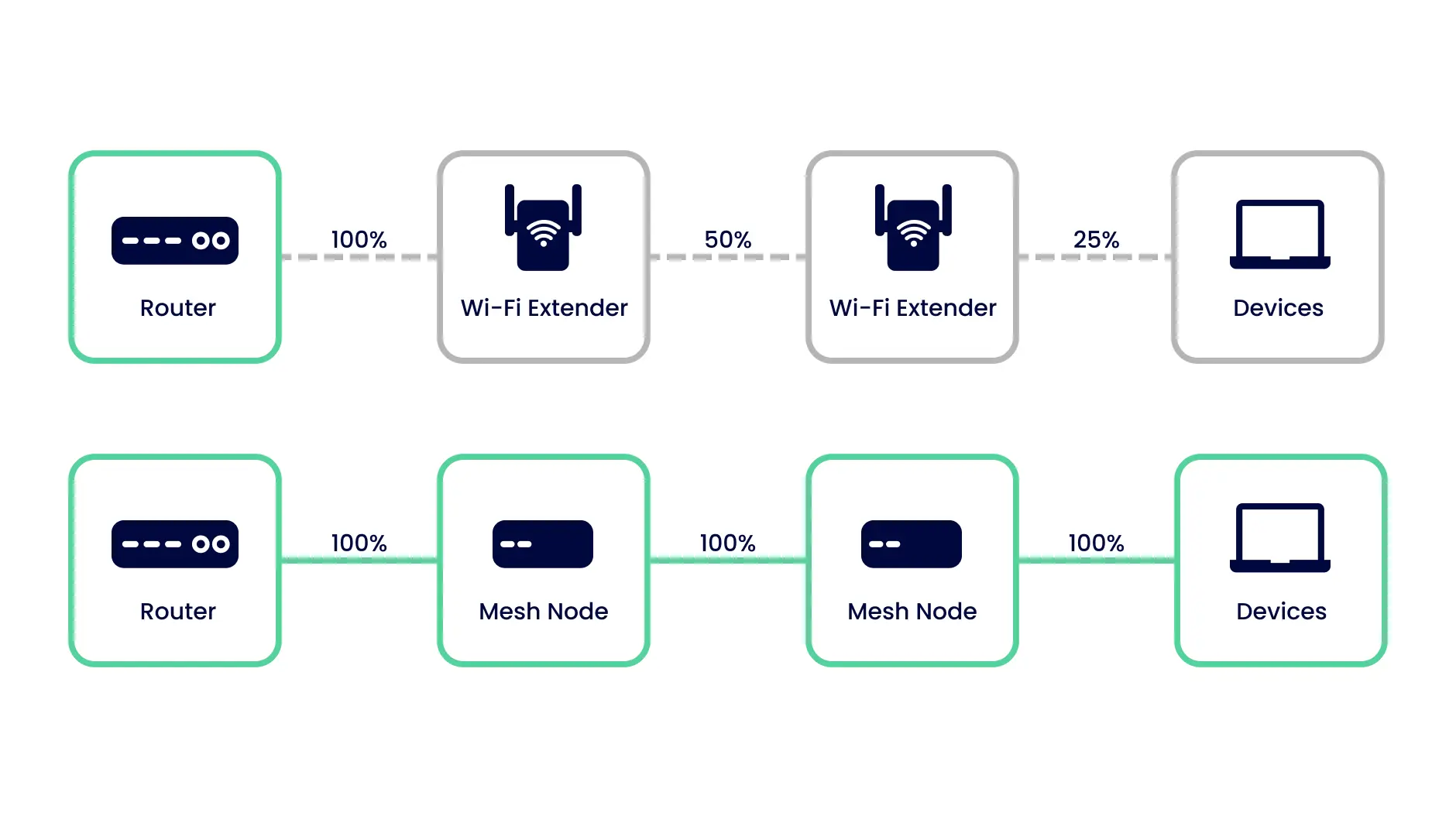
Credit: inseego.com
Factors Influencing Node Count
Determining the right number of mesh WiFi nodes for your home isn’t just about guessing or buying the biggest pack available. Several key factors shape how many nodes you actually need to create a strong, seamless wireless network. Understanding these can save you money and improve your internet experience.
Home Size And Layout
The bigger your home, the more nodes you’ll likely need to cover every corner. But size alone doesn’t tell the whole story. Open floor plans allow signals to travel more freely, requiring fewer nodes, while multiple floors and separated rooms block signals more.
Think about your home’s layout. Are there long hallways, multiple stories, or separate wings? Each of these can create dead zones that a single node might not reach.
Building Materials
The walls around you affect WiFi strength more than you might expect. Materials like concrete, brick, and metal can significantly reduce signal reach, forcing you to add extra nodes. Even thick wooden walls or glass can weaken the connection.
If you live in an older house with thick stone walls or a modern home with metal studs, plan for additional nodes to keep your connection steady. It’s worth checking how your home’s construction impacts your current WiFi signal before deciding on the node count.
Device Density
How many devices rely on your WiFi? If you have a handful of devices, a few nodes might be enough. But in a busy household with smartphones, smart TVs, gaming consoles, and smart home gadgets, you’ll need more nodes to handle the traffic smoothly.
Each node shares the load, so more devices mean you need more nodes to avoid slowdowns. Think about not only how many devices you have now but what you might add in the future.
Internet Speed Requirements
Your internet speed plan influences how many nodes you should deploy. If you have a high-speed connection, you want nodes that can handle that speed across your home. Fewer nodes may cause bottlenecks, reducing your effective speed in certain areas.
Consider how you use the internet. Are you streaming 4K videos, gaming online, or working from home? Higher demands require more consistent coverage, which usually means adding more nodes to maintain speed and reliability everywhere.
Estimating Nodes For Different Homes
Estimating the number of mesh WiFi nodes depends on the size and layout of your space. Each home type needs a different approach for good coverage. Walls, floors, and furniture can block signals. Knowing your home type helps you choose the right number of nodes.
Small Apartments
Small apartments usually need only one or two mesh nodes. One node covers about 1,200 square feet well. Adding a second node helps if the apartment has thick walls or a complex layout. Two nodes keep a strong signal in every room.
Medium-sized Houses
Medium-sized houses often require two to three mesh nodes. These homes are usually between 1,500 to 2,500 square feet. Placing nodes on different floors or opposite ends improves coverage. Three nodes ensure no dead zones in the house.
Large Multi-story Homes
Large homes need more nodes to cover all floors and rooms. Four to six nodes work well in houses over 3,000 square feet. Each floor should have at least one node. Extra nodes fill in large rooms and areas far from the main router.
Office Spaces
Office spaces vary in size and layout, affecting node count. Small offices may need two or three nodes. Larger offices with multiple rooms and floors require four or more. Nodes should be placed near work areas for strong and steady WiFi.
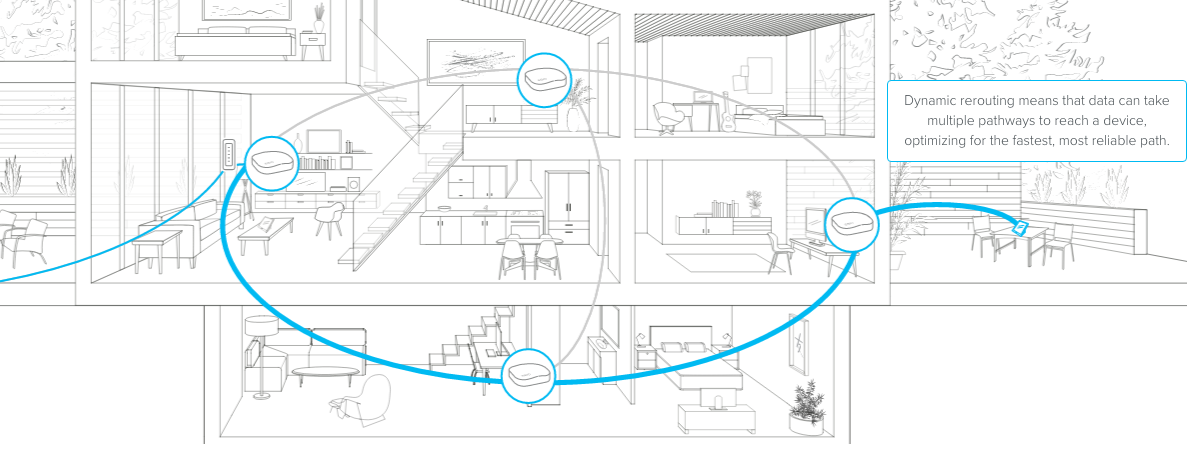
Credit: blog.eero.com
Placement Tips For Optimal Coverage
When setting up a mesh WiFi system, the placement of nodes can make a huge difference in ensuring seamless coverage throughout your home. Strategic positioning of these nodes not only enhances signal strength but also minimizes dead zones. Let’s dive into some practical tips to help you achieve optimal WiFi coverage.
Centralized Positioning
Think of your home as a hub, and place the main node in the most central location possible. This allows the WiFi signal to radiate evenly, reaching all corners with minimal obstruction. If your main node is tucked away in a corner, you may find the opposite end of your house struggling to get a strong signal.
When I set up my mesh system, I realized placing the main node in the living room, centrally located, was a game-changer. Suddenly, I could work on my patio without any buffering issues. Consider the areas where you use WiFi the most and aim to centralize accordingly.
Avoiding Signal Interference
While positioning your nodes, keep them away from potential signal disruptors. Items like microwaves, cordless phones, and metal objects can interfere with your WiFi signal. You’d be surprised how much a simple change in placement can boost your signal strength.
Once, I had placed a node right next to a metal bookshelf, and the connection was terrible. Moving it just a few feet away made all the difference. Think about what might be blocking your signal and reposition accordingly.
Balancing Node Distance
The distance between your nodes is crucial. Too far apart, and they won’t communicate effectively. Too close, and you’re not utilizing their full potential.
Generally, nodes should be within two rooms of each other. This ensures they can communicate efficiently while covering a larger area. Experiment with different configurations to find what works best for your home layout.
Have you ever considered how the layout of your home affects your WiFi? By thoughtfully placing your nodes, you can ensure everyone gets the fast, reliable connection they need. Try it out and enjoy the difference!
Tools And Apps To Measure Coverage
Measuring WiFi coverage is key to deciding how many mesh nodes you need. Tools and apps help identify weak spots in your home or office. They show signal strength and speed in different areas. This data helps place nodes for the best coverage and performance.
Wifi Analyzer Apps
Wifi analyzer apps scan your space for signal strength. They display heatmaps showing where WiFi signals are strong or weak. These apps detect interference from other networks. You can find crowded channels and switch to a clearer one. Popular options include NetSpot, WiFi Analyzer, and Acrylic WiFi.
Speed Test Tools
Speed test tools measure your internet download and upload rates. They test latency and overall connection quality. Running tests in different rooms shows speed variations. This helps identify dead zones or slow areas. Common tools are Ookla Speedtest, Fast.com, and Google Speed Test.
Mesh System Management Apps
Many mesh systems come with their own apps. These apps monitor node status and coverage. You can see signal strength between nodes and devices. Some apps recommend ideal node placement. They also allow firmware updates and network controls. Examples include Google Home, Eero, and Netgear Nighthawk apps.

Credit: blog.eero.com
Common Mistakes To Avoid
Choosing the right number of mesh WiFi nodes is key for good coverage. Many users make simple mistakes that reduce their system’s performance. Avoiding these errors helps create a fast and stable network throughout your home or office.
Overcrowding Nodes
Adding too many nodes can cause interference and slow down your network. Nodes placed too close compete for signals, leading to poor performance. Space the nodes properly to let each cover its area well. A few well-placed nodes work better than many clustered together.
Ignoring Dead Zones
Dead zones are areas with weak or no WiFi signal. Not checking these spots wastes your mesh system’s potential. Test your space to find dead zones before placing nodes. Place nodes near these weak spots to improve coverage and avoid signal drops.
Placing Nodes Near Obstacles
Walls, furniture, and appliances block WiFi signals. Putting nodes behind thick walls or metal objects weakens the connection. Place nodes in open areas and away from large obstacles. This helps signals travel freely and reach all corners of your space.
Upgrading And Expanding Your Mesh Network
Upgrading and expanding your mesh network ensures strong WiFi coverage throughout your space. Adding more nodes can improve signal strength in weak areas. It also helps support more devices without slowing down your connection. Knowing when and how to expand keeps your network efficient and reliable.
When To Add More Nodes
Consider adding nodes when WiFi signals are weak in some rooms. Large homes or buildings often need extra nodes for full coverage. Notice slow speeds or frequent disconnects in certain areas. Adding nodes helps devices connect smoothly without interruptions.
Compatibility Considerations
Use nodes from the same brand or system for best results. Mixing different brands may cause connection issues or reduce performance. Check if new nodes support your existing network’s technology. Consistent hardware ensures seamless communication between nodes.
Firmware And Software Updates
Keep all nodes updated with the latest firmware and software. Updates fix bugs and improve network stability. Regular updates add new features and enhance security. Most mesh systems update automatically, but manual checks are a good practice.
Frequently Asked Questions
How Many Mesh Wifi Nodes Cover A 2000 Sq Ft Home?
Typically, 2 to 3 mesh wifi nodes cover a 2000 sq ft home. Placement matters for optimal coverage and signal strength. Adjust based on walls and interference for best performance.
Can One Mesh Wifi Node Cover A Multi-story House?
One node usually can’t cover multiple floors effectively. At least one node per floor is recommended for consistent connectivity across levels.
How Do I Determine The Right Number Of Mesh Nodes?
Assess your home size, layout, and Wi-Fi usage. Start with the manufacturer’s recommendation, then add nodes for dead zones or weak signals.
Is More Mesh Wifi Nodes Always Better For Coverage?
Not always. Too many nodes can cause signal interference and reduce speed. Balance the number to cover your area efficiently without overlap.
Conclusion
Finding the right number of mesh WiFi nodes boosts your internet coverage. One node may suit small spaces, but larger homes need more. Think about your house size, wall thickness, and device count. Placing nodes evenly helps avoid weak signals and dead zones.
Good WiFi means smoother streaming, faster downloads, and better calls. Choose the number that fits your space and needs. This way, your connection stays strong everywhere in your home. Simple steps lead to better internet every day.