Imagine enjoying your favorite show or video call by the pool without any annoying buffering or weak signals. You want your outdoor pool area to have strong, reliable WiFi, but it often feels like the connection just doesn’t reach.
What if you could easily boost your WiFi so you stay connected wherever you are, even outside? You’ll discover simple, effective ways to enhance your WiFi signal around your pool, making every splash and sunny moment more enjoyable. Ready to turn your outdoor space into a seamless digital zone?
Keep reading to find out how.
Credit: www.signalbooster.com
Assess Current Wifi Setup
The router locationis key for good outdoor Wifi. Place it near windows or walls facing the pool area. Avoid hiding the router in cabinets or behind furniture. Higher spots can give better signal range.
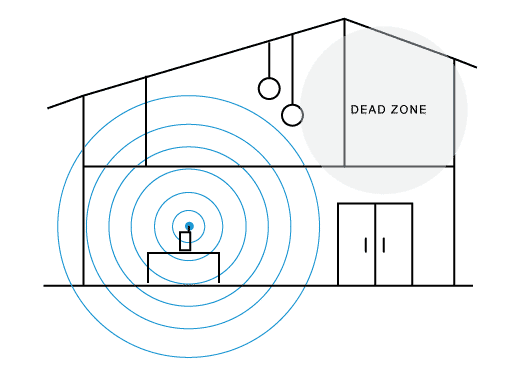
Check the signal strengthoutside. Use a phone or laptop near the pool to test Wifi speed and connection. Weak signals mean the router may be too far or blocked by walls.
Look for things that cause interference. Walls, trees, metal fences, and other electronics can block or weaken signals. Try to keep the path between the router and pool clear of these obstacles.
Upgrade Router Equipment
Upgrading your router can improve WiFi range and strength near your outdoor pool. Newer models offer better signals and faster speeds for outdoor use. Placing the router closer to the pool area also helps boost connectivity.
Choose High-gain Antennas
High-gain antennas send wifi signals farther than regular ones. They focus the signal in one direction. This helps cover the pool area better. Replace your router’s antennas with high-gain ones for stronger signals outdoors.
Consider Dual-band Or Tri-band Routers
Dual-band routers use two frequency bands: 2.4 GHz and 5 GHz. Tri-band routers add another 5 GHz band. More bands mean less wifi crowding and faster speed. These routers keep outdoor devices connected smoothly.
Use Wifi Extenders Or Mesh Systems
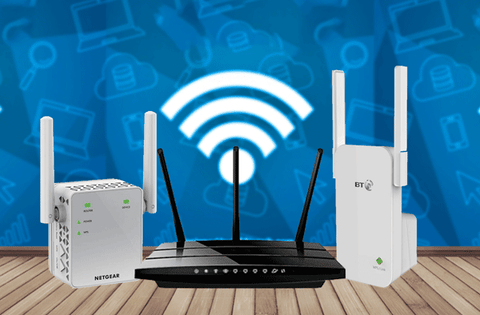
Wifi extenders catch the router signal and send it farther. Mesh systems use many devices to spread wifi evenly. Both help cover large outdoor spaces like pools. Place extenders or mesh units close to the pool for best results.
Optimize Router Settings
Choosing the best WiFi channelreduces interference from nearby networks. Use channels 1, 6, or 11 for 2.4 GHz band. For 5 GHz, pick a channel with the least traffic. This ensures a clearer signal for your outdoor pool area.
Adjusting the transmit powercan improve coverage. Increase power to reach farther, but avoid maxing out. Too high power may cause signal noise and dropouts. Find a balance that covers your pool without losing quality.
Enable Quality of Service (QoS)to prioritize important devices. This helps keep your video calls or streaming smooth by giving them higher priority. QoS manages bandwidth, so your pool area devices get a steady connection.
Improve Outdoor Signal Reach
Outdoor access points help extend the wifi signal outside the house. These devices are built for open areas and can cover larger spaces. Using weatherproof wifi antennaskeeps the equipment safe from rain, wind, and sun. This ensures the signal stays strong for a longer time.
Placing devices in the right spots matters a lot. Position them higher up, like on walls or poles. Avoid placing near thick walls or metal objects. These block signals and reduce coverage. Clear line of sight between devices and pool area is best for strong wifi.
Minimize Obstacles And Interference
Physical barrierslike walls, fences, and furniture block WiFi signals. Clearing these can help the signal reach the pool better.
Electronic devicessuch as microwaves, cordless phones, and baby monitors can cause interference. Keep them away from your WiFi router to reduce signal problems.
Tall plants and thick bushesnear the pool can also weaken WiFi signals. Trim or remove some vegetation to create a clearer path for the signal.
- Move or remove walls and large objects near the router
- Keep electronic devices that cause interference at a distance
- Trim plants and bushes blocking the WiFi path

Credit: www.cnet.com
Secure Your Outdoor Wifi
Setting a strong passwordkeeps your outdoor WiFi safe from unwanted users. Use a mix of letters, numbers, and symbols. Avoid common words or simple sequences.
Enable network encryptionto protect data sent through your WiFi. WPA3 is the best option for security. If your router does not support it, use WPA2 instead.
Keep an eye on devices connected to your network. Regularly check the list of connected devicesin your router’s settings. Remove any unknown or suspicious devices immediately.
Credit: www.screenbeam.com
Frequently Asked Questions
How Can I Improve Wifi Signal By The Outdoor Pool?
Use a WiFi extender or mesh system near the pool area. Position devices higher and avoid obstructions like walls or trees. This enhances coverage and signal strength outdoors.
What Type Of Router Is Best For Outdoor Wifi?
Choose a router with strong external antennas and dual-band support. Routers with beamforming and high power output improve outdoor coverage effectively.
Can Weather Affect Outdoor Wifi Performance?
Yes, rain, wind, and humidity can weaken WiFi signals. Waterproof and weather-resistant equipment helps maintain consistent connectivity near pools.
Is Using A Wifi Extender Necessary For Outdoor Pools?
Extenders boost WiFi range beyond the main router’s reach. For outdoor pools far from the router, extenders ensure stable and fast connections.
Conclusion
Boosting your WiFi to the outdoor pool is simple. Follow these easy steps. Choose the right equipment for your needs. Place extenders strategically around your home. Experiment with different positions for the best signal. Consider using mesh systems for wider coverage.
Always keep your equipment updated for optimal performance. Regular maintenance can prevent connectivity issues. Enjoy seamless internet by the pool with these tips. Your outdoor experience just got more connected and enjoyable. With the right setup, streaming music or videos becomes a breeze.
Stay connected, relax, and make the most of your outdoor space.