Are you ready to boost your internet speed and enjoy a stronger, more reliable connection? Connecting a high-end router to your modem is the key step that can transform your online experience.
But if you’re unsure where to start or worried about making mistakes, this guide is here to help you. By following simple, clear steps, you’ll have your powerful router up and running in no time. Keep reading to discover how easy it is to unlock the full potential of your internet setup.

Credit: tech.yahoo.com
Choosing The Right Router And Modem
Compatibilityis key when connecting a high-end router to a modem. Both devices must support the same connection types, like Ethernet or coaxial cables. Check if the router and modem work with your internet service provider (ISP). Some ISPs require specific modem modelsor settings.
Look for these featuresin your router and modem:
- Speed ratingsthat match or exceed your internet plan
- Dual-band or tri-bandsupport for better Wi-Fi coverage
- Security optionslike WPA3 encryption
- Firmware updatesto keep devices secure and fast
- Multiple Ethernet portsfor wired connections
| ISP Requirement | What to Check |
|---|---|
| Supported Modem Types | Cable, DSL, Fiber, or Satellite |
| Approved Models | List of compatible modems on ISP website |
| Account Settings | Username, password, or other login details |
| Firmware Updates | Ensure modem firmware is up to date |
Preparing Your Equipment
Unbox your routerand modemcarefully. Check for any damage or missing parts. Make sure all accessories are included.
- Power cables for both devices
- Ethernet cable to connect router and modem
- Any special tools mentioned in the manual
Choose a central locationin your home for both devices. Avoid placing near walls or metal objects. Keep them elevated for better signal. Ensure easy access to power outlets and cable connections.
Connecting The Router To The Modem
Turn off both the routerand modembefore connecting them. This prevents any electrical issues and allows the devices to sync properly. Wait a few seconds after powering them off.
Use a high-quality Ethernet cableto connect the devices. Avoid using damaged or old cables as they can cause slow or unstable connections.
| Router Port | Modem Port | Purpose |
|---|---|---|
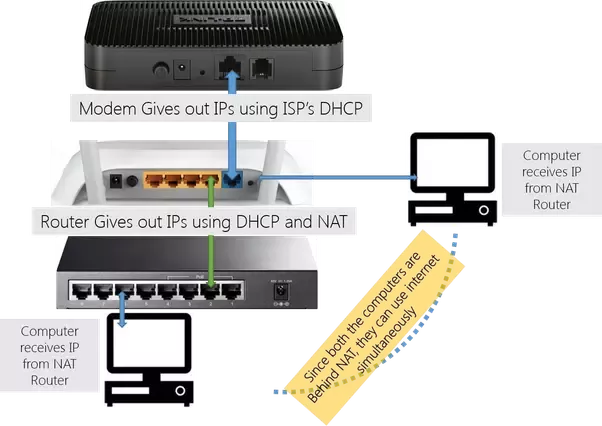
| WANor Internet | Ethernetor LAN | Link the router to the modem for internet access |
Plug one end of the Ethernet cable into the router’s WANor Internetport. Connect the other end to the modem’s Ethernetor LANport. This creates a direct link for data flow.
Credit: medium.com
Setting Up The Router
Connect the router to your computer using an Ethernet cable. Open a web browser and enter the router’s IP address, often 192.168.1.1or 192.168.0.1. Login using the default username and password found in the router’s manual or on a sticker. This opens the router’s web interface.
Set a unique network name (SSID)to identify your Wi-Fi. Choose a strong passwordwith letters, numbers, and symbols. This protects your network from unauthorized access.
Check the router’s settings for firmware updates. Updated firmware improves security and performance. Download and install any available updates to keep your network safe.
Testing The Connection
Check if devices connect to the internet after router setup. Open a browser and visit a simple website. Use multiple devices like phones, tablets, or laptops to test the connection. Ensure each device shows internet access without errors.
Common issues include no internet, slow speed, or dropped connections. Restart the modem and router to fix many problems. Check cables and connections for any loose or damaged parts. Update the router’s firmware for better performance.
Place the router in an open, central spot in your home. Avoid hiding it in cabinets or near metal objects. Keep the router away from thick walls or microwaves to reduce signal blockage. Higher placement often improves signal strength and coverage.

Credit: www.wikihow.com
Securing Your Network
Enable encryption protocolslike WPA3 or WPA2 to protect your network. These protocols scramble data, making it hard for others to see your info. Choose the strongest protocol your router supports for better security.
Change the default login credentialsof your router. Default usernames and passwords are easy to guess. Use a unique, strong password to stop unwanted access. This step keeps your network safe from hackers.
- Set up a guest networkfor visitors. It keeps your main network private and secure.
- Limit guest access to only internet use.
- Change guest network passwords regularly.
Frequently Asked Questions
How Do I Connect A High-end Router To A Modem?
To connect, first power off both devices. Use an Ethernet cable to link the modem’s LAN port to the router’s WAN port. Power on the modem, wait for it to fully start, then power on the router. This ensures a stable connection.
Can I Use Any Ethernet Cable For This Connection?
Yes, any standard Ethernet cable (Cat5e or higher) works. Higher category cables offer better speed and reliability. Use a quality cable to ensure optimal performance between your modem and high-end router.
What Settings Should I Configure On The Router?
Access the router’s admin page via its IP address. Configure the internet connection type, Wi-Fi settings, and security options. Update the router’s firmware for best performance and security.
Why Is My Internet Slow After Connecting The Router?
Slow internet can result from incorrect settings, outdated firmware, or cable issues. Restart both devices, check cable connections, and update firmware. Also, verify your ISP speed matches your router’s capabilities.
Conclusion
Connecting a high-end router to a modem is simple. Follow the steps carefully. Ensure all cables are secure. Check your internet speed afterward. A stable connection improves online experiences. Troubleshooting helps if issues arise. Always refer to the router’s manual.
It provides specific guidance. A strong connection enhances your home network. Enjoy faster streaming and browsing. Your devices will work more efficiently. No more internet interruptions! With practice, this task becomes easier. Soon, you’ll feel like a tech pro. Happy surfing!