Are you struggling with weak WiFi signals in your office? Connecting a mesh WiFi system to your office network could be the simple solution you need.
Imagine having strong, reliable internet in every corner of your workspace—no more dropped calls, slow downloads, or frustration. This guide will walk you through easy steps to set up your mesh WiFi, so you can boost productivity and keep your team connected without hassle.
Keep reading, and you’ll have your office network running smoothly in no time.
Benefits Of Mesh Wifi In Offices
Mesh WiFi systems bring a range of advantages that can significantly improve your office network. These benefits go beyond just faster internet; they impact how smoothly your entire team works. Understanding these perks can help you decide if mesh WiFi is the right move for your workspace.
Improved Coverage
Traditional routers often leave dead zones where WiFi is weak or nonexistent. Mesh WiFi uses multiple nodes spread throughout your office, eliminating these coverage gaps. This means every corner, from conference rooms to break areas, gets strong, consistent internet access.
Have you ever noticed how frustrating it is when a client call drops because of poor WiFi? Mesh networks help prevent this by maintaining stable signals everywhere.
Seamless Roaming
With mesh WiFi, your devices connect automatically to the strongest signal as you move around the office. You won’t need to manually switch networks or deal with interruptions during video calls or file transfers.
This seamless experience is especially useful if your work requires moving between different areas or meeting rooms. It keeps your focus on the task, not on reconnecting to WiFi.
Enhanced Network Reliability
Mesh WiFi creates multiple paths for data to travel between nodes. If one node experiences issues, your network automatically reroutes traffic to keep things running smoothly. This redundancy reduces downtime and makes your office network more dependable.
Imagine a scenario where one access point fails—mesh networks ensure your work doesn’t stop, which can save time and prevent costly delays.

Credit: www.reddit.com
Choosing The Right Mesh System
Choosing the right mesh WiFi system for your office network is crucial to ensure smooth connectivity and productivity. A system that fits your office’s specific needs can eliminate dead zones, handle multiple devices, and grow with your business. Understanding key factors like office size, network compatibility, and scalability helps you make an informed decision.
Assessing Office Size And Layout
Start by measuring the total square footage of your office and noting the number of rooms and floors. Mesh systems vary in coverage; some are designed for small spaces, while others can blanket large, multi-story offices.
If your office has thick walls or unusual layouts, you might need nodes strategically placed to avoid weak signals. Have you noticed areas where your current WiFi drops? Those spots are where extra mesh nodes will make a difference.
Compatibility With Existing Network
Check if the mesh system supports the network hardware you already use, such as routers, modems, or switches. Some mesh systems work best as standalone setups, while others integrate smoothly with your existing infrastructure.
Also, verify if the mesh supports your internet service provider’s speed and settings. Using incompatible devices can cause network slowdowns or connectivity issues that frustrate your team.
Scalability And Features
Consider how your office might grow and whether the mesh system can expand with you. Look for models that allow easy addition of nodes without complex setup.
Other features like guest networks, parental controls, and security protocols can add value. Think about what features matter most to your office’s workflow and security needs.
Preparing Your Office Network
Getting your office network ready is a crucial part of connecting a mesh WiFi system. This preparation ensures a smooth setup and reliable performance. Taking time now to understand your current network and make necessary adjustments can save you from headaches later.
Checking Current Network Setup
Start by identifying all devices connected to your network. Are there any old routers, switches, or access points that might interfere? Understanding the layout helps you decide where to place your mesh nodes for the best coverage.
Look at your network’s IP address scheme. Does it use static or dynamic IP addresses? Conflicts here can cause connection drops, so knowing this upfront is key.
Ensuring Proper Internet Connection
Your mesh WiFi can only perform as well as your internet connection allows. Check your ISP plan to confirm it meets your office’s bandwidth needs. If your team streams videos or handles large files, a higher speed plan might be necessary.
Test the current internet speed using an online tool. If speeds are inconsistent or slower than expected, troubleshoot or contact your provider before adding new hardware.
Configuring Router Settings
Access your main router’s settings through its IP address in a web browser. You may need to disable features like DHCP if your mesh system will handle IP assignments. This prevents devices from getting conflicting addresses.
Set up a strong admin password and update your firmware. These steps protect your network and ensure compatibility with the mesh nodes.
Consider enabling Quality of Service (QoS) to prioritize critical office applications. This keeps your network running smoothly even during peak usage times.
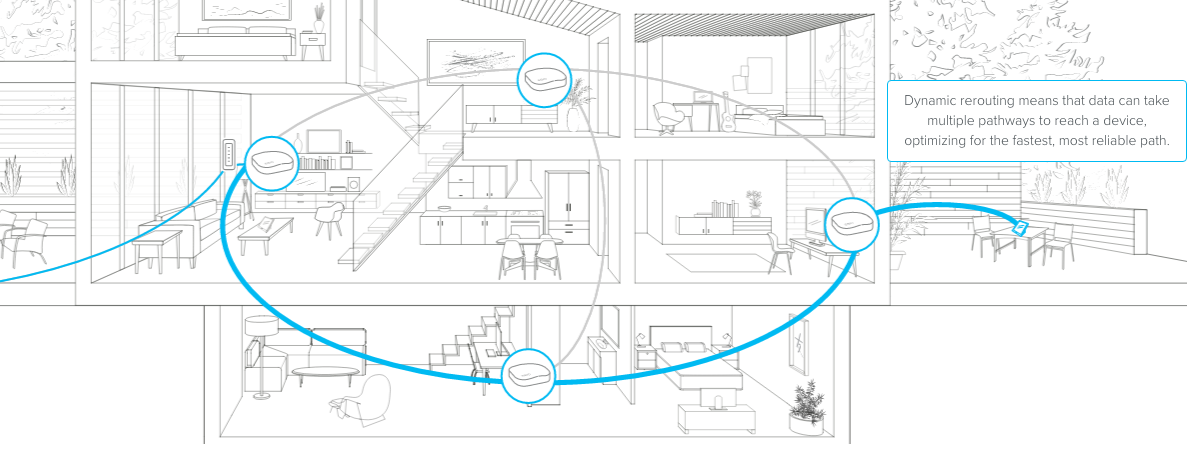
Credit: blog.eero.com
Connecting Mesh Wifi To The Network
Begin by placing the main mesh WiFi unit near your office router and connect them using an Ethernet cable. Power on the mesh system and follow the app instructions to link additional units. This setup ensures strong WiFi coverage throughout the office space.
Connecting a mesh WiFi system to your office network can improve connectivity. It helps in reducing dead zones and ensuring smooth internet access. This guide will walk you through the process of setting up your mesh WiFi network efficiently.Setting Up The Primary Mesh Node
Start by connecting the primary mesh node to your modem. Use an Ethernet cable for this connection. Ensure the modem is powered on. Plug in the primary node and wait for the indicator light to signal readiness. This node acts as the central hub for your network. Access the node’s setup interface via a web browser or mobile app. Follow the instructions to configure network settings. Set a secure password for network access.Linking Additional Nodes
Place the additional nodes around the office. Ensure they are within range of the primary node. Plug in each node to a power source. Wait for the indicator lights to stabilize. Use the app or web interface to add each node to the network. Name each node for easy identification. Confirm that each node connects successfully. Check for any updates or firmware upgrades.Optimizing Node Placement
Place nodes strategically for optimal coverage. Avoid placing nodes near large metal objects. Keep nodes away from thick walls and electronic devices. Test the signal strength in different areas of the office. Adjust the node positions based on signal performance. Ensure there are no dead zones in crucial areas. Regularly monitor network performance for any issues. Adjust as necessary for consistent connectivity.Configuring Network Settings
Configuring network settings is crucial for connecting mesh WiFi to an office network. Proper setup ensures smooth communication between devices. It also improves security and network performance. Understanding key settings helps avoid common connectivity issues.
Ssid And Password Setup
The SSID is the network name visible to users. Choose a clear, simple name that employees recognize easily. Avoid using personal or sensitive information in the SSID.
Set a strong password to protect the network from unauthorized access. Use a mix of letters, numbers, and symbols. Change the default password immediately after installation.
Ip Address Management
Assigning IP addresses correctly helps devices communicate on the network. Use DHCP to automatically assign addresses to most devices. Reserve static IP addresses for critical equipment like printers or servers.
Ensure the IP range does not conflict with existing network devices. This prevents connection errors and improves network stability.
Enabling Security Features
Activate WPA3 or WPA2 encryption for the best network security. These protocols protect data sent over WiFi from interception.
Enable a guest network for visitors. This keeps the main office network safe from external devices.
Turn on firewall settings within the mesh system. Firewalls block unwanted traffic and potential attacks.
Testing And Troubleshooting
Testing and troubleshooting your mesh WiFi setup in an office environment is crucial to ensure smooth, uninterrupted connectivity. Without proper checks, you might face unexpected drops or slow connections that can disrupt work. Let’s dive into how you can verify your network’s health and fix common issues quickly.
Verifying Connectivity Across Nodes
Start by checking if each mesh node is properly connected to the network. Use simple tools like ping tests to verify communication between nodes. For example, pinging the IP address of one node from another helps confirm they are talking to each other.
Walk through the office and check signal strength at different spots using a WiFi analyzer app. This helps you identify dead zones or weak signals. If some nodes show weak connectivity, consider repositioning them for better coverage.
Common Issues And Fixes
Many office mesh networks struggle with interference from other devices or physical obstacles like walls and furniture. If you notice slow speeds or dropped connections, check for sources of interference such as microwaves or cordless phones.
Another common problem is outdated firmware on mesh devices. Always keep your mesh system updated to the latest version for improved stability. Rebooting nodes often resolves temporary glitches—don’t underestimate the power of a quick restart.
- Issue:Nodes not connecting to the main router.
Fix:Ensure the Ethernet cables are securely plugged and try resetting the node. - Issue:Slow speeds in certain areas.
Fix:Move nodes closer or add additional nodes to cover dead zones. - Issue:Devices dropping off the network.
Fix:Check for IP conflicts or increase the DHCP range in your router settings.
Performance Monitoring Tools
Using performance monitoring tools helps you keep an eye on your network’s health without constant manual checks. Tools like Wireshark or PRTG Network Monitor provide real-time data on bandwidth use and node status.
Many mesh systems come with built-in apps that show you which devices are connected and how much data they use. This insight can help you spot unusual activity or bandwidth hogs quickly.
Have you tried setting alerts for network drops? It can save you hours by notifying you immediately when something goes wrong, allowing you to act before your team even notices.
Maintaining Your Mesh Network
Keeping your mesh WiFi network in top shape ensures smooth connectivity throughout your office. Maintenance isn’t just about fixing issues; it’s about preventing them before they disrupt your work. Let’s look at key practices that help your network stay reliable and efficient every day.
Regular Firmware Updates
Firmware updates are like vitamins for your mesh system—they keep it strong and healthy. Manufacturers release updates to fix bugs, improve security, and add new features. Ignoring these updates can leave your network vulnerable or slow.
Set a reminder to check for updates monthly. Many mesh systems offer automatic updates—turn this feature on to save time. Have you ever experienced sudden slowdowns that disappeared after an update? That’s a sign how crucial these updates are.
Network Performance Checks
Regularly testing your network’s performance helps you spot weak spots before they become big problems. Use apps or built-in tools to measure speed and signal strength in different office areas.
Look for dead zones or devices that frequently disconnect. Sometimes, moving a node just a few feet can boost coverage dramatically. How often do you think about your network’s health? Making it a routine can save hours of frustration.
Expanding The Network When Needed
Your office layout or staff size might change, and your mesh network should adapt. Adding more nodes can extend coverage to new rooms or floors seamlessly.
Before buying extra units, check if your current system supports expansion and which models are compatible. Keep an eye on network load; too many devices on a single node can slow things down. Have you noticed slower speeds during peak hours? Adding nodes strategically can balance the load effectively.

Credit: www.reddit.com
Frequently Asked Questions
What Is Mesh Wifi And How Does It Work In Offices?
Mesh WiFi is a system of multiple nodes creating seamless wireless coverage. It eliminates dead zones and improves signal strength across office spaces.
How To Connect Mesh Wifi To An Existing Office Network?
Connect the primary mesh node to the office router via Ethernet. Then, place additional nodes strategically to extend coverage and sync automatically.
Can Mesh Wifi Improve Office Network Speed And Reliability?
Yes, mesh WiFi boosts speed and reliability by balancing traffic across nodes. It prevents congestion and ensures consistent connectivity throughout the office.
Is Mesh Wifi Secure For Office Network Use?
Mesh WiFi systems offer strong security features like WPA3 encryption and guest network options. Regular firmware updates keep office data protected.
Conclusion
Connecting mesh WiFi to your office network improves coverage and speed. It helps devices stay connected without drops or delays. Set up is simple with clear steps and proper tools. A strong network supports daily tasks and boosts productivity. Keep your system updated for the best performance.
Enjoy seamless internet access throughout your workspace. This small change makes a big difference in your office.