Are you tired of your WiFi cutting out just when you need it most? Imagine moving around your home or office without losing connection or slowing down.
Enabling fast roaming on your tri-band WiFi extender can make this a reality. It allows your devices to switch quickly between networks, keeping your internet smooth and uninterrupted. You’ll learn exactly how to set it up step-by-step, so you can enjoy seamless WiFi wherever you go.
Keep reading to unlock a faster, smarter way to stay connected.
Fast Roaming Basics
Fast Roaminglets your device switch quickly between Wi-Fi points. It helps keep your connection smooth. No need to wait or reconnect manually.
This feature is great for large homes or offices. Devices move freely without losing signal. This means fewer interruptions during calls or streaming.
| Benefits | Details |
|---|---|
| Seamless connection | Switches without dropping Wi-Fi |
| Better coverage | Uses multiple bands for strong signals |
| Improved speed | Reduces lag and buffering |
- Tri-band extender must support fast roaming standards.
- Client devices need to be compatible too.
- Router and extender should use the same security type.
- Firmware updates can improve compatibility.
Tri Band Wifi Extender Setup
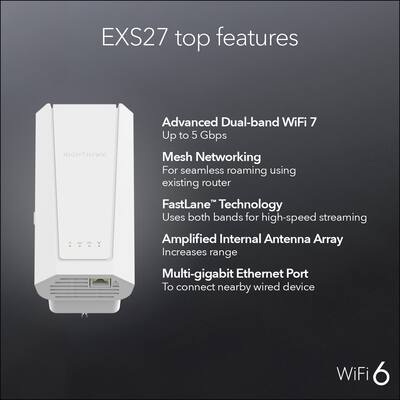
Choosing the right tri band WiFi extenderis key. Look for models that support fast roamingto keep your devices connected smoothly as you move around your home.
Connect the extender to your main network. Use the 5GHz band for better speed and less interference. Place the extender where the signal is still strong but closer to areas with weak WiFi.
Access the extender settings through a web browser. Enter the extender’s IP address or use the app provided by the manufacturer. Login with the default credentials or the ones you set.
- Enable fast roamingor 802.11r in the settings menu.
- Save and apply the changes.
- Restart the extender if needed to activate the new settings.
Enabling Fast Roaming
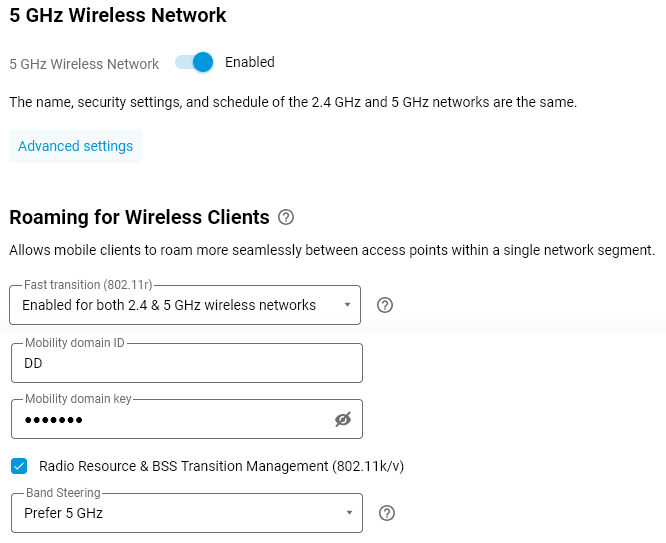
Access the extender’s web interface using its IP address. Log in with your username and password. Navigate to the Wireless Settingsor Advanced Settingssection. Look for the Fast Roamingoption. It might be under 802.11k/v/rsettings or similar.
Enable the Fast Roamingfeature by selecting the checkbox or toggle. Adjust any extra options like Trigger Thresholdif available. These settings help devices switch networks smoothly and quickly.
Click the Saveor Applybutton at the bottom of the page. Wait for the extender to update the settings. The device may reboot automatically. Confirm that the changes are active by checking the status page.
Credit: support.keenetic.com
Optimizing Your Network
Keeping your firmware updatedis key for fast roaming. Check the extender’s website for the latest version. Download and install updates to improve performance and security.
Adjusting channel settings helps reduce interference. Choose channels with less traffic. This lets devices switch smoothly between bands without losing signal.
Seamless handoff means your device moves from one access point to another without delay. Enable fast roaming features like 802.11ron your extender and router. This keeps your connection stable during movement.
Troubleshooting Tips
Fast roaming may not work if the device is not compatiblewith your tri band extender. Check the device’s Wi-Fi standardsand firmware version. Older devices might not support fast roaming features.
Resetting your extender can often fix connection issues. Press the reset buttonfor 10 seconds until the lights blink. This clears settings and restores factory defaults. After resetting, set up the extender again carefully.
- Ensure the extender and router have the latest firmware.
- Place the extender where it gets a strong router signal.
- Use the same SSID and password for all Wi-Fi bands.
- Check for interference from other devices like microwaves or cordless phones.

Credit: www.youtube.com
Credit: www.bestbuy.com
Frequently Asked Questions
What Is Fast Roaming On A Wifi Extender?
Fast roaming allows seamless connectivity as you move between different WiFi zones. It ensures devices switch access points without interruption. This feature is crucial for maintaining stable connections during video calls or gaming. Enabling fast roaming on a tri-band WiFi extender enhances network efficiency and user experience.
How Do I Enable Fast Roaming On My Extender?
To enable fast roaming, access your extender’s settings via its web interface. Look for the “Fast Roaming” option under advanced settings. Toggle it to the “On” position and save changes. Ensure your devices support 802. 11r, as this protocol is essential for fast roaming functionality.
Why Is Fast Roaming Important For Wifi Extenders?
Fast roaming minimizes connection drops when moving between access points. It enhances the user experience by providing uninterrupted internet access. This is particularly important for activities requiring stable connections, like streaming and online gaming. With fast roaming, tri-band WiFi extenders offer optimized performance and seamless connectivity.
Does Fast Roaming Affect Wifi Speed?
Fast roaming itself doesn’t directly affect WiFi speed. However, it enhances device connectivity, reducing potential interruptions. This means better overall performance, especially during activities requiring stable connections. The improved transition between access points ensures consistent speed and reliability, enhancing the effectiveness of your tri-band WiFi extender.
Conclusion
Enabling fast roaming on your tri-band WiFi extender improves your network experience. Devices switch quickly between access points without dropping connection. This keeps video calls smooth and streaming uninterrupted. The setup process is simple and takes just a few steps.
After enabling fast roaming, enjoy stronger and more reliable WiFi throughout your home. Stay connected easily, no matter where you move. Fast roaming helps your devices work better together. Try it today and notice the difference in your wireless network.