Are you struggling with weak WiFi in your attic? You’re not alone.
Many people find their mesh WiFi signals barely reach this tricky space. But what if you could enjoy strong, reliable internet up there too? Imagine streaming, working, or gaming without interruptions, right from your attic. You’ll discover simple, effective ways to extend your mesh WiFi system to cover your attic perfectly.
Keep reading, and you’ll learn how to boost your connection where you need it most.
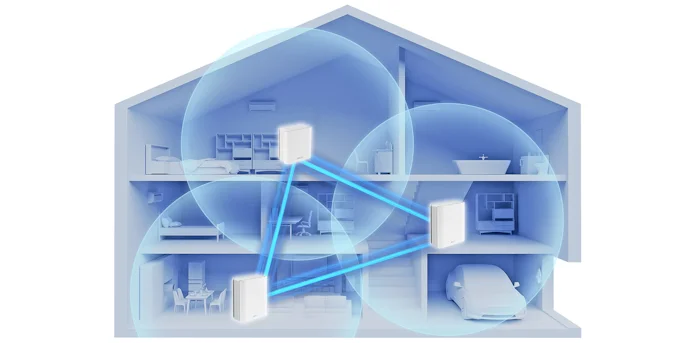
Credit: edgeup.asus.com
Assess Attic Coverage Needs
Extending mesh WiFi to your attic helps improve signal strength. You need to check the attic’s coverage needs first.
Assessing these needs lets you plan where to place the mesh nodes. It ensures strong WiFi in the attic.
Identify Dead Zones
Dead zones are areas where WiFi does not work well. Find these spots to know where the signal is weak.
Walk around the attic with a phone or laptop. Check the WiFi signal in different places.
- Use apps to test WiFi signal strength
- Mark places with no or weak signal
- Note areas with slow internet speed
Measure Attic Size
Knowing the attic size helps decide how many mesh nodes you need. Measure length and width for total area.
High or oddly shaped attics may need extra nodes. This ensures full coverage without signal loss.
- Measure floor area in square feet or meters
- Note any walls or obstacles in the attic
- Check ceiling height if it is very tall
Check Existing Signal Strength
Test the current WiFi signal near the attic entrance. This shows if the mesh network reaches the attic well.
Weak signals at the attic start mean you need a node closer to the attic. Strong signals may need fewer nodes.
- Use a WiFi analyzer to check signal bars
- Test upload and download speeds
- Note any drops or interruptions in connection

Credit: www.reddit.com
Choose The Right Mesh Wifi Device
Extending mesh wifi to your attic needs the right device. Choosing the correct mesh wifi device improves signal strength and coverage.
Learn how to pick the best mesh system for attic coverage by comparing systems, checking compatibility, and considering range and speed.
Compare Mesh Systems
Different mesh wifi systems offer various features. Look at the number of units, setup ease, and customer support. Some brands focus on security, while others on speed.
- Check the number of nodes included
- Review user ratings and feedback
- Look for features like parental controls or guest networks
- Compare prices and warranties
Select Compatible Units
Choose mesh devices that work well together. Using compatible units keeps the network stable and easy to manage. Mixing brands or models may cause problems.
| Device Type | Compatibility | Notes |
| Same Brand Units | High | Best for seamless mesh network |
| Different Models (Same Brand) | Medium | Usually compatible but check firmware |
| Different Brands | Low | May not work well together |
Consider Range And Speed
Attics often have obstacles like walls and insulation. Select mesh devices with enough range to cover the space. Speed matters for streaming and gaming in the attic.
- Choose devices with strong signal range
- Look for units supporting the latest wifi standards
- Check the maximum speed rating
- Consider devices with multiple bands for better performance
Prepare Your Attic For Installation
Extending your mesh wifi to the attic can improve your home’s internet coverage. Before you install the device, prepare the attic properly. This will help your mesh wifi work well and last longer.
This guide covers three important steps to get your attic ready: ventilation, power outlets, and clearing obstructions.
Ensure Proper Ventilation
The attic must have good airflow to keep your mesh wifi device cool. Heat can damage the device and lower its performance. Check that vents or windows provide fresh air circulation.
- Look for existing vents or fans in the attic.
- Keep vents clear from dust or debris.
- Use a small fan if natural airflow is low.
- Avoid placing the device near heat sources like water heaters.
Check Power Outlet Availability
Your mesh wifi node needs a power source nearby. Find out if there are enough power outlets in the attic. If not, plan to add one safely.
| Power Outlet Status | Recommended Action |
|---|---|
| Outlet present and working | Use it to plug in the mesh device. |
| No outlet available | Hire an electrician to install one. |
| Outlet present but damaged | Get it repaired before installation. |
Clear Obstructions
Objects in the attic can block wifi signals. Clear the space around where you want to place the mesh node. This helps the signal spread well.
- Remove boxes, old furniture, or insulation near the device spot.
- Keep the area dry and clean to avoid damage.
- Place the device on a shelf or a high point for better signal reach.
Optimal Placement Of Mesh Nodes
Extending mesh WiFi to your attic needs careful placement of nodes. Good placement helps keep a strong signal throughout your home.
Follow these tips to place your mesh nodes for the best attic coverage.
Find Central Location
Place the mesh node near the center of the attic space. This helps the signal reach all corners evenly.
- Choose a spot away from walls and corners
- Place the node on a high shelf or mount it on the wall
- Keep it close to the attic entrance for better connection to lower floors
Avoid Interference Sources
Keep mesh nodes away from devices that cause wireless interference. Interference lowers WiFi speed and range.
| Interference Source | Effect on WiFi |
| Microwave ovens | Blocks signals temporarily |
| Bluetooth devices | Causes signal overlap |
| Metal objects | Reflects and weakens signals |
| Thick walls or insulation | Reduces signal strength |
Maintain Line Of Sight
Try to keep a clear path between mesh nodes. Walls and large objects can block signals.
Tips for line of sight:
- Place nodes in open areas
- Avoid placing nodes behind furniture
- Use angled positions to reduce obstacles
- Elevate nodes if possible to clear barriers
Set Up Mesh Wifi In The Attic
Extending your mesh WiFi to the attic ensures seamless connectivity in every corner of your home. Setting up mesh nodes correctly will enhance your internet experience.
This guide will help you connect nodes, update firmware, and test signal strength for optimal performance in your attic.
Connect And Configure Nodes
To start, place the mesh nodes in strategic locations. This will help in covering all areas of the attic. Make sure each node is within range of the other.
- Plug in the primary node near your router.
- Install additional nodes in the attic, ensuring they form a chain.
- Follow the app instructions to connect each node to the network.
Update Firmware
Updating firmware is crucial for the stability and security of your mesh WiFi network. It also brings performance improvements.
Access your router’s settings through a web browser or app. Check for available updates and apply them to ensure all nodes are running the latest firmware.
Test Signal Strength
Once the nodes are set up, testing the signal strength will confirm the effectiveness of your setup. This ensures reliable coverage in the attic.
| Area | Signal Strength |
| Near Node 1 | Strong |
| Center of Attic | Moderate |
| Far Corner | Weak |
Troubleshoot Common Issues
Extending mesh WiFi to your attic can improve internet access in that space. Sometimes, issues like weak signals or connection drops happen.
Knowing how to fix these problems helps keep your WiFi strong and steady in the attic.
Fix Weak Signals
Weak WiFi signals in the attic can cause slow speeds. Thick walls or floors may block the signal.
Try these tips to improve signal strength:
- Use a WiFi extender or an extra mesh node closer to the attic.
- Remove objects that block signals, like metal or thick furniture.
- Change the WiFi channel to avoid interference from other networks.
Resolve Connection Drops
Connection drops happen when the signal is unstable or the device moves out of range. This interrupts internet use.
Try these fixes to stop connection drops:
- Restart your mesh system to refresh connections.
- Check for firmware updates for your mesh devices.
- Keep mesh nodes away from electronics that cause interference.
Adjust Node Placement
Correct placement of mesh nodes is key for good WiFi in the attic. Nodes too far apart may lose connection.
Follow these tips for better node placement:
- Place nodes in open areas, not inside cabinets or behind walls.
- Keep nodes at similar heights for better signal flow.
- Test signal strength before final placement to find the best spots.
Boost Signal With Additional Tools
Extending your mesh wifi to the attic can be simple. Additional tools can help boost the signal effectively.
Using the right tools ensures that every corner of your home, including the attic, receives a strong wifi signal.
Use Wifi Extenders
Wifi extenders are devices that amplify the existing wifi signal. They help reach areas where the signal is weak.
- Place the extender halfway between the router and the attic.
- Ensure it is plugged into a power outlet.
- Use the same network name to avoid confusion.
Install Powerline Adapters
Powerline adapters use the electrical wiring in your house. They provide a wired connection to your attic.
| Adapter Model | Speed (Mbps) |
| Model A | 600 |
| Model B | 1200 |
| Model C | 2000 |
Upgrade Antennas
Upgrading antennas on your router can improve signal reach. Consider antennas with higher gain for better coverage.
Check antenna compatibility with your router. Use dual-band antennas for best results.

Credit: www.reddit.com
Frequently Asked Questions
How Can I Improve Mesh Wifi Signal In The Attic?
Place a mesh node near the attic entrance for better signal. Use a WiFi extender or powerline adapter if needed. Ensure minimal obstacles and avoid interference from electrical devices.
What Is The Best Placement For Attic Mesh Wifi Nodes?
Position mesh nodes in open areas away from thick walls. Place them halfway between the main router and attic for optimal coverage. Elevate nodes for stronger signal distribution.
Can I Use Ethernet Backhaul To Extend Wifi To Attic?
Yes, Ethernet backhaul provides stable, fast connection between nodes. It reduces interference and improves speed to attic mesh points. Run Ethernet cables discreetly to attic nodes for best results.
Are Mesh Wifi Extenders Effective For Attic Coverage?
Mesh extenders boost signal but may reduce speed slightly. They work well if placed strategically near attic access points. Choose extenders compatible with your existing mesh system.
Conclusion
Extending your mesh WiFi to the attic improves your whole home’s internet. Place nodes where signals are weak for better coverage. Keep devices updated and check connections often. Use simple tools to test your network strength. A strong WiFi in the attic helps with work and streaming.
Small steps make a big difference in WiFi reach. Enjoy faster and more reliable internet upstairs too. Your attic can be part of a connected home.