Are you tired of weak Wi-Fi signals that leave you frustrated in certain corners of your home? Your tri band router is powerful, but sometimes its range just isn’t enough to cover every room.
Imagine streaming your favorite shows, joining video calls, or gaming online without sudden drops or lag. You’ll discover simple and effective ways to boost your tri band router’s range. By making a few smart adjustments, you can enjoy stronger, faster connections wherever you are.
Keep reading to unlock the full potential of your router and say goodbye to dead zones for good.
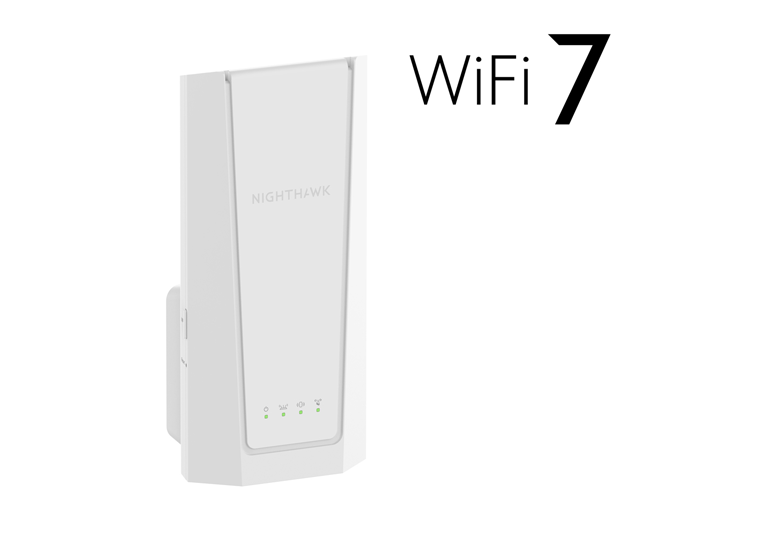
Credit: www.netgear.com
Tri Band Router Basics
Understanding the basics of a tri band router is key to boosting your Wi-Fi range effectively. These devices are designed to handle more devices and reduce traffic jams on your network. Let’s break down what makes tri band routers different and why they might be a smart choice for your home or office.
What Is A Tri Band Router
A tri band router broadcasts three separate Wi-Fi bands instead of the usual one or two. Typically, it has one 2.4 GHz band and two 5 GHz bands. This setup allows multiple devices to connect without slowing down your network.
Think about your home network like a busy highway. Most routers offer two lanes, but a tri band router adds a third lane. This extra lane helps keep your internet fast, even when many devices are using it simultaneously.
Benefits Of Tri Band Technology
Tri band technology offers several advantages that can directly improve your online experience. First, it reduces interference because devices spread out across three bands instead of crowding one or two. This means fewer dropped connections and smoother streaming.
- Better performance:More bands mean less competition among devices.
- Improved range:You can place devices further apart without losing signal quality.
- Enhanced reliability:The router can automatically assign devices to the best band for their needs.
I once struggled with buffering during video calls and slow downloads because my old dual band router was overloaded. After switching to a tri band model, the difference was clear. My devices stayed connected, and speeds improved noticeably across the house.
Are you experiencing slow Wi-Fi in certain rooms or at specific times? Understanding these basics can help you decide if upgrading to or optimizing a tri band router is right for you.
Factors Affecting Router Range
Understanding the factors affecting your tri band router’s range helps improve your Wi-Fi coverage. Various elements can weaken or block the signal. Knowing these factors allows better placement and setup of your router.
Physical Barriers And Interference
Walls, floors, and furniture block Wi-Fi signals. Thick materials like concrete and metal reduce signal strength more. Household items such as microwaves and cordless phones cause interference. Electronic devices near the router create noise that disrupts the signal.
Router Placement Importance
Placing the router in an open area improves signal spread. Avoid corners, closets, or behind large objects. Higher locations help signals travel farther. Central locations reach all rooms better than edges of a house.
Device Limitations
Older devices may not support strong Wi-Fi signals. Some gadgets work only on specific bands. The number of connected devices affects router performance. Overloading the router can reduce the signal range for all devices.
Optimizing Router Placement
Optimizing router placement is key to extending the range of a tri-band router. The right spot boosts signal strength and reduces dead zones. Proper placement helps the router cover more area efficiently. Small changes in location can make a big difference in Wi-Fi performance.
Choosing Central Locations
Place the router near the center of your home or office. This position helps the signal reach all rooms evenly. Avoid placing the router in corners or near walls that block signals. Higher locations, like shelves, work better than low spots. A central location reduces signal loss and improves coverage.
Avoiding Obstacles And Electronics
Keep the router away from thick walls, metal objects, and large furniture. These can block or weaken the Wi-Fi signal. Electronics like microwaves, cordless phones, and baby monitors cause interference. Place the router at least a few feet away from these devices. Clear space around the router allows the signal to travel freely and improves range.

Credit: www.amazon.ca
Adjusting Router Settings
Adjusting your router settings can significantly boost your Wi-Fi range. Simple tweaks can lead to better performance and coverage in your home. Let’s explore three key settings that can enhance your tri-band router’s range.
Selecting Optimal Channels
Choosing the right channel is crucial to minimize interference. Routers often default to certain channels that might be crowded. Access your router’s settings through a web browser. Check for channel options. Opt for less crowded channels. Use tools or apps to see which channels are less busy in your area.
Enabling Quality Of Service (qos)
Quality of Service (QoS) prioritizes traffic on your network. This ensures important devices get more bandwidth. Open your router settings. Look for the QoS option. Enable it and set priorities for devices or applications. This helps in reducing lag for streaming or gaming activities.
Updating Firmware
Firmware updates can improve your router’s performance and security. Check for updates regularly. Log into your router’s admin panel. Find the firmware update section. Follow instructions to install the latest version. Updated firmware can enhance range and fix known issues.
Using Range Extenders
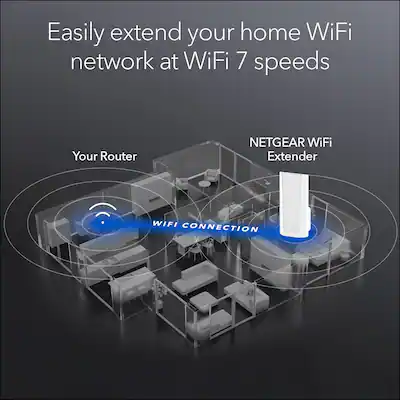
Using range extenders is a simple way to increase the coverage of a tri band router. These devices catch your router’s signal and push it further into weak areas. This helps remove dead zones and improves Wi-Fi strength across your home or office.
Range extenders work well with tri band routers because they can handle multiple frequency bands. This means faster speeds and less interference. Choosing the right extender and placing it correctly are key to better Wi-Fi performance.
Types Of Extenders Compatible With Tri Band
- Dual-Band Extenders:Support 2.4 GHz and 5 GHz bands. They work but may limit tri band benefits.
- Tri-Band Extenders:Designed for tri band routers. They keep all three bands active for best speed.
- Mesh Wi-Fi Extenders:Create a seamless network with your tri band router. Ideal for large homes.
- Powerline Extenders:Use your home’s electrical wiring to extend Wi-Fi. Useful where Wi-Fi signals struggle.
Placement Tips For Extenders
- Place extenders halfway between the router and dead zone.
- Avoid walls and metal objects blocking the signal.
- Keep extenders away from microwaves and cordless phones.
- Position extenders at a height, like on a shelf.
- Test different spots to find the strongest signal.
Credit: www.bestbuy.com
Mesh Network Solutions
Extending the range of your tri band router can be tricky, especially in large homes or offices with multiple walls and floors. Mesh network solutions offer a smarter way to boost your Wi-Fi coverage. Instead of relying on a single router or traditional extenders, mesh systems use multiple devices working together to create one seamless network.
Advantages Over Traditional Extenders
Mesh networks provide consistent speeds across your entire space. Unlike traditional extenders, which often create separate Wi-Fi names and reduce bandwidth, mesh nodes communicate on dedicated bands to keep your connection strong.
They automatically route your device to the nearest node with the best signal. This means you don’t have to manually switch networks as you move around. Plus, mesh systems are easier to manage with user-friendly apps that let you control settings and monitor performance from your phone.
- Seamless coverage:One network name, no switching required.
- Dedicated backhaul:Tri band mesh routers use one band just for node communication, improving speed.
- Simple setup:Guided apps make installation quick for beginners.
- Scalability:Add more nodes anytime to expand coverage without rewiring.
Setting Up A Tri Band Mesh System
Start by placing your main tri band router where your internet enters your home. This will be the primary node. Next, position additional mesh nodes in areas where your Wi-Fi signal weakens.
Use the mesh system’s app to connect each node to the main router. The app usually guides you step-by-step, checking signal strength and suggesting optimal placement. Avoid placing nodes behind thick walls or appliances that block signals.
Once all nodes are connected, test your Wi-Fi in different rooms. You should notice a stronger and more stable connection everywhere. Have you tried moving a node just a few feet and seen a big difference? Small adjustments can make a huge impact.
Upgrading Hardware
Upgrading the hardware of your tri-band router can greatly improve its signal strength and coverage. New hardware components often provide better performance and extend the wireless range. This approach is practical and can be cost-effective compared to buying a new router. Small changes to your current setup can deliver noticeable improvements in network reach and stability.
High-gain Antennas
High-gain antennas focus the wireless signal in specific directions. They replace the standard antennas on your tri-band router. These antennas send stronger signals over longer distances. Installing them can boost coverage in areas with weak signals.
Choose antennas with compatible connectors for your router. Position them to direct the signal where you need it most. This upgrade helps reduce dead zones and improves connection quality in large spaces.
Powerline Adapters As Alternatives
Powerline adapters use your home’s electrical wiring to extend the network. They provide a wired connection without running cables through walls. Plug one adapter near your router and connect it via Ethernet.
Place the second adapter in a room where Wi-Fi is weak. It creates a new access point with strong signal strength. This hardware upgrade can reach areas that wireless signals struggle to cover.
Powerline adapters are easy to set up and often more reliable than wireless extenders. They work well in homes with thick walls or multiple floors. This makes them a great alternative for extending your tri-band router’s range.
Security And Performance
Enhancing the security and performance of your tri-band router is crucial when extending its range. A strong network protects your data and devices from unauthorized access. At the same time, optimizing performance ensures smooth connectivity across all your devices, even at the edges of your expanded range.
Securing Your Network
Start by changing the default administrator password of your router. Many routers come with generic passwords that hackers can easily guess.
Enable WPA3 encryption if your router supports it. This is the most secure wireless encryption standard available and helps keep your network traffic safe.
Disable WPS (Wi-Fi Protected Setup). Although convenient, it can create vulnerabilities that hackers exploit.
Set up a guest network for visitors. This keeps your main network isolated, reducing the risk of unauthorized access to your devices and files.
Monitoring Network Traffic
Regularly check which devices are connected to your network. Unknown devices might indicate unauthorized access.
Use your router’s built-in traffic monitoring tools or third-party apps to track bandwidth usage. This helps identify if any device is hogging the connection or if there’s unusual activity.
Look out for sudden drops in performance or spikes in data usage. These can be signs of malware or network breaches.
Ask yourself: Do you know every device connected to your router right now? If not, take a moment to review and secure your network before expanding its range.
Frequently Asked Questions
How Can I Boost My Tri Band Router’s Signal Range?
To boost your tri band router’s signal, place it centrally and away from obstructions. Use high-gain antennas or a Wi-Fi extender for wider coverage. Regularly update router firmware to enhance performance and reduce interference.
What Settings Improve Tri Band Router Range?
Adjust your tri band router’s channel settings to less crowded frequencies. Enable beamforming if available, which directs signals to devices. Lowering transmission power can also reduce interference and improve range in dense areas.
Does Upgrading Router Firmware Extend Tri Band Range?
Yes, upgrading firmware can improve performance and fix bugs. It often enhances signal stability and extends effective range. Always download updates from the manufacturer’s official website to ensure security and compatibility.
Can A Wi-fi Extender Work With Tri Band Routers?
Yes, Wi-Fi extenders are compatible with tri band routers. They amplify existing signals to cover dead zones. For best results, use extenders supporting tri band or at least dual band frequencies.
Conclusion
Extending the range of your tri-band router makes a big difference. Place your router in an open, central spot for best coverage. Use range extenders or mesh systems to cover dead zones. Keep your router’s firmware updated for better performance.
Avoid obstacles like thick walls or metal objects that block signals. Small changes can improve your Wi-Fi signal and speed. Enjoy smoother internet for work, streaming, and gaming. A stronger Wi-Fi connection helps everyone in your home stay connected easily.