Are you struggling with weak WiFi signals around your large property? Frustrated by dead zones where your connection just won’t reach?
You’re not alone, and the good news is there are simple, effective ways to extend your WiFi coverage without breaking the bank. Imagine streaming, working, or gaming anywhere on your property without interruptions. In this guide, you’ll discover easy steps and smart solutions to boost your WiFi signal and enjoy fast, reliable internet everywhere you need it.
Keep reading to transform your WiFi experience now!
Common Wifi Challenges On Large Properties
Signal interferencecan weaken wifi signals. Things like walls, trees, and electronic devices create noise that blocks wifi waves. This interference causes slow internet or dropped connections.
Distance and obstaclesreduce signal strength. The farther the signal travels, the weaker it becomes. Thick walls, metal objects, and floors also stop wifi signals from reaching all areas.
Many wifi deviceshave limits on how far their signals reach. Routers and extenders may not cover large spaces well. Devices might struggle to connect if too far or blocked.

Credit: www.youtube.com
Choosing The Right Equipment
High-Gain Antennashelp boost your WiFi signal strength. They send signals farther than regular antennas. These antennas work best for covering large outdoor areas or long distances. Installing them on your router can improve your WiFi range.
WiFi Extenders and Repeaterscatch the WiFi signal and send it further. They are easy to set up. Place them where your WiFi signal is still strong. This helps fill in weak spots in your property. But, they may reduce speed slightly.
Mesh WiFi Systemsuse multiple devices to create a large WiFi network. Each device talks to others to cover the whole property. They give strong and steady internet everywhere. Perfect for large homes or buildings with many rooms.
Optimal Router Placement
Placing your router in a central locationhelps spread WiFi signals evenly across the property. Walls, furniture, and other obstacles can block signals and cause weak spots. Avoid placing routers near thick walls or metal objects that can reduce signal strength.
Elevating the router on a shelf or high surface improves coverage. Signals travel better when the router is above ground level. This reduces interference from furniture or appliances. Try to keep the router away from floors and corners for best results.
- Place router in the middle of your home or property.
- Keep away from thick walls and metal objects.
- Elevate router on a shelf or high spot.
- Avoid floors and corners to reduce signal loss.
Credit: www.engadget.com
Wired Solutions To Boost Coverage
Powerline adaptersuse your home’s electrical wiring to carry internet signals. Plug one adapter near your router and connect it with an Ethernet cable. Plug the second adapter in the area where you want better WiFi. This creates a wired connection without extra cabling. It works best in homes with good electrical wiring.
Ethernet cablingis the most reliable way to extend your network. Running Ethernet cables to different parts of your property ensures a strong, stable connection. This setup can support high speeds and many devices. It may require drilling holes or burying cables but gives the best performance.
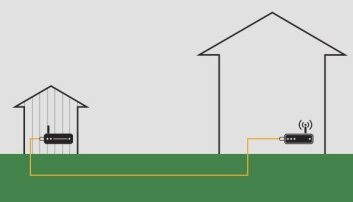
Access pointsconnect to your router via Ethernet cables and create new WiFi zones. Place them in rooms or buildings far from your main router. They provide strong WiFi signals over larger areas. Access points help cover dead zones and reduce signal dropouts.
Configuring Network Settings
Selecting the right WiFi channelshelps avoid signal interference. Use the 2.4 GHz band for longer range but slower speed. The 5 GHz band gives faster speeds but covers less area. Choosing a less crowded channel improves connection quality.
Keep your router’s firmware updated. Updates fix bugs and improve performance. Check your router’s settings or manufacturer website for updates. Regular updates keep your network stable and secure.
Set strong security settingsto protect your network. Use WPA3 or WPA2 encryption. Avoid using outdated security like WEP. Create a strong password with letters, numbers, and symbols. Secure networks prevent unauthorized access and keep data safe.
Using Outdoor Wifi Devices
Weatherproof access pointshelp extend WiFi outside. They resist rain, dust, and sun. Place them in spots with good air flow. This keeps the signal strong and steady.
Directional antennassend WiFi signals in one direction. This focuses the signal to reach farther places. Use them to connect buildings or cover large open areas.
Long-range WiFi bridgeslink two distant WiFi networks. They use antennas on rooftops or poles. This is good for very large properties with separate buildings.
Testing And Monitoring Signal Strength
Signal mapping tools help find weak wifi spots on large properties. They create a visual map showing signal strength in different areas. This makes it easy to see where the wifi is strong or weak.
Speed tests measure how fast your wifi works in different places. These tests check download and upload speeds. They help find spots where the internet feels slow or unsteady.
Adjusting for performance means moving devices or changing settings. Try placing routers or extenders in better spots. Changing channels or updating firmware can also improve speed. Small changes can make a big difference in signal quality.
Tips For Maintaining Strong Wifi
Extending WiFi to a large property needs good placement of routers and signal boosters. Using a mesh network can help cover all corners with strong signals. Regularly updating your devices keeps connections stable and fast.
Regular Equipment Checks
Check your router and modemoften to ensure they work well. Dust and dirt can cause problems. Restart devices sometimes to keep them fresh. Look for firmware updatesto improve performance and security.
Managing Connected Devices
Too many devices can slow down wifi speed. Limit devices that connect at once. Disconnect unused devices to free up bandwidth. Prioritize important devices for better connection quality.
Upgrading Hardware
Old routers may not cover large areas. Consider buying a mesh wifi systemfor big properties. Use wifi extendersto reach far places. Newer models offer better speed and range.

Credit: www.youtube.com
Frequently Asked Questions
How Can I Improve Wifi Coverage On A Large Property?
Use WiFi extenders, mesh networks, or outdoor access points to boost coverage. Place devices strategically to avoid dead zones and ensure strong signals throughout the property.
What Is The Best Wifi Extender For Outdoor Use?
Choose a weather-resistant WiFi extender with strong antennas and high range. Look for models supporting dual-band frequencies and easy setup for reliable outdoor coverage.
Can Mesh Wifi Systems Cover Large Homes Effectively?
Yes, mesh WiFi systems create a seamless network using multiple nodes. They provide consistent signal strength and eliminate dead spots across large properties.
How Do Outdoor Access Points Enhance Wifi Range?
Outdoor access points are designed to withstand weather and extend WiFi far outdoors. They connect directly to your router and broadcast strong signals over wide areas.
Conclusion
Boosting your WiFi signal can enhance your property’s connectivity. Start by assessing your space’s needs and obstacles. Use extenders or mesh systems for better coverage. Position your router centrally for optimal performance. Consider upgrading to a stronger antenna for wider reach.
Avoid interference from other electronic devices. Regularly update your router’s firmware for improved efficiency. Remember, a strong WiFi connection makes life easier and more enjoyable. With these steps, you can ensure seamless internet access across your large property. Enjoy uninterrupted browsing and streaming without any hassle.


