Want to keep your portable router’s network private and secure? Hiding your SSID (the network name) is one of the easiest ways to stop strangers from seeing your Wi-Fi.
But how do you do it without messing up your connection? You’ll learn simple, step-by-step methods to hide your SSID on any portable router. By the end, you’ll have a safer, more discreet Wi-Fi setup that only you control. Keep reading to discover how easy it is to protect your network from unwanted eyes.

Credit: www.youtube.com
Why Hide Ssid Matters
Hiding your SSID on a portable router adds an important layer of security. It stops your network name from appearing in public Wi-Fi lists. This simple step helps protect your connection from unwanted attention. It also makes it harder for strangers to find your network. Understanding why hiding your SSID matters can improve your online safety.
Privacy Benefits
Hiding the SSID keeps your network name private. It prevents others from seeing your Wi-Fi in their device lists. This reduces the chance of someone targeting your network. It also stops casual users from connecting without permission. Privacy improves because your network becomes less visible in crowded areas.
Reducing Unauthorized Access
When your SSID is hidden, it is harder for unauthorized users to join. Hackers and intruders often scan visible networks first. A hidden SSID adds an obstacle to their search. It discourages less skilled attackers from attempting to connect. This simple step helps keep your data and devices safer.
Limitations Of Ssid Hiding
Hiding the SSID is not a full security solution. Skilled attackers can still detect hidden networks. Devices need to know the SSID to connect, which can reveal the name. It may cause inconvenience when connecting new devices. Other security measures like strong passwords remain essential.
Credit: helpdeskgeek.com
Portable Router Basics
Portable routers offer a simple way to create a Wi-Fi network anywhere. They are small devices that connect to the internet and share it wirelessly. Many users rely on portable routers for travel, work, or places without fixed internet. Understanding their basic features helps manage settings like hiding the SSID for privacy. Let’s explore the core elements of portable routers and how SSID broadcast works.
Common Features
- Compact size for easy portability
- Battery-powered or USB-powered options
- Wi-Fi network creation with customizable names
- Multiple device connections simultaneously
- Security options including WPA2 encryption
- Web-based or app-based management interface
- Compatibility with 3G, 4G, or wired internet sources
How Ssid Broadcast Works
SSID stands for Service Set Identifier. It is the name of your wireless network. When SSID broadcast is enabled, the router sends this name to nearby devices. Devices see the network name in their Wi-Fi list.
Broadcasting SSID helps devices find and connect easily. Turning off the SSID broadcast hides the network name. Devices must enter the network name manually to connect. This adds a layer of privacy by making the network less visible.
Steps To Hide Ssid On Portable Routers
Hiding the SSID on your portable router helps keep your network private. It stops your network name from showing in Wi-Fi lists. This makes it harder for others to see or connect to your network without permission.
Follow these clear steps to hide your SSID. The process is similar across most portable routers. It only takes a few minutes and can improve your network’s security.
Accessing Router Settings
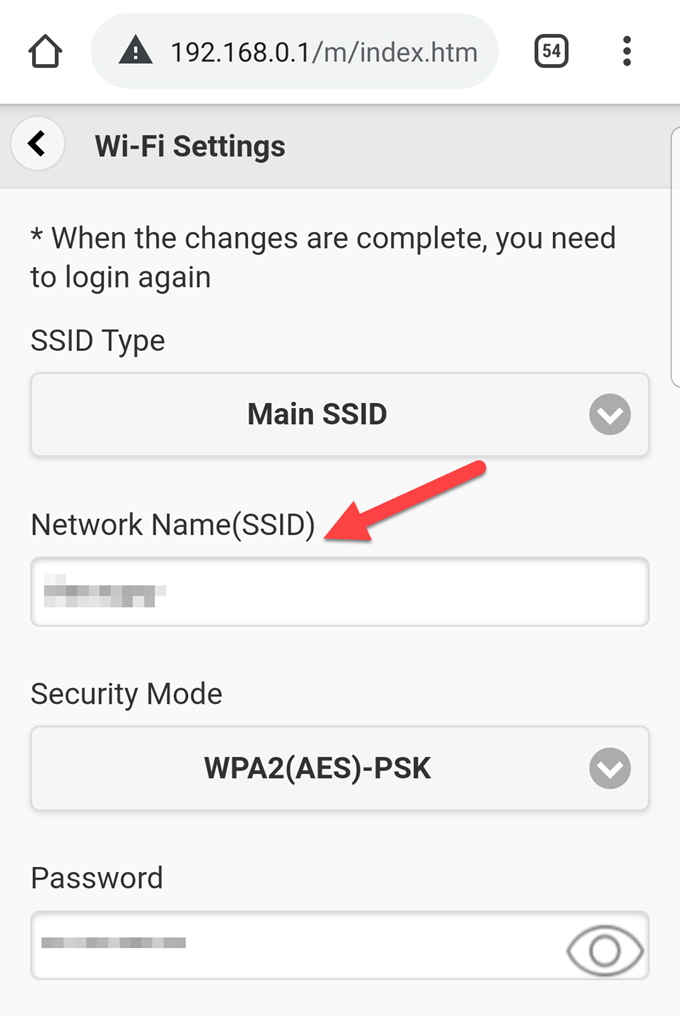
Connect your device to the portable router using Wi-Fi or a cable. Open a web browser and enter the router’s IP address. Common IPs include 192.168.0.1 or 192.168.1.1. Login with the username and password. These details are often on the router’s label or manual.
Locating Wireless Settings
Once logged in, find the wireless or Wi-Fi settings menu. This is where you manage your network name and security. Look for options named “Wireless,” “Wi-Fi,” or “SSID.” The layout may vary but the section is usually easy to find.
Disabling Ssid Broadcast
In the wireless settings, locate the option to broadcast or hide the SSID. It might be labeled as “SSID Broadcast,” “Visibility,” or “Enable SSID.” Uncheck or disable this option. This stops the router from showing your network name publicly.
Saving And Restarting
After disabling SSID broadcast, save your changes. Look for a “Save” or “Apply” button at the bottom or top of the page. Restart your router to apply the new settings. Your SSID will now be hidden from others scanning for networks.

Credit: beambox.com
Advanced Privacy Settings
Advanced privacy settings on your portable router play a crucial role in keeping your network secure and hidden from unwanted access. Beyond just hiding the SSID, these settings help you control who connects and how data is protected. Let’s look at some practical ways you can strengthen your router’s privacy with simple yet effective adjustments.
Enabling Wpa3 Or Wpa2 Encryption
Encryption is the first line of defense for your wireless network. WPA3 is the latest and most secure encryption protocol available, but if your router doesn’t support it, WPA2 is still a strong choice.
Switch to WPA3 or WPA2 in your router’s settings to ensure data sent over your network is scrambled and unreadable to outsiders. This prevents hackers from easily intercepting your information, even if they find your hidden SSID.
Have you checked your router’s security settings lately? Upgrading your encryption can make a noticeable difference in your network safety.
Changing Default Passwords
Default passwords are often the easiest way for intruders to access your network. Manufacturers use common or simple passwords that are widely known.
Change your router’s admin password and Wi-Fi password immediately after setup. Use a mix of letters, numbers, and symbols to create a strong, unique password that you won’t forget but others won’t guess.
Think about how often you change passwords on your other devices—your router deserves the same attention to keep your network truly private.
Using Mac Address Filtering
MAC address filtering lets you specify exactly which devices can connect to your portable router. Each device has a unique MAC address, so you can create a whitelist of trusted gadgets.
Enable MAC filtering and add the addresses of your phone, laptop, and any other devices you want on the network. This blocks unknown devices even if they discover your hidden SSID and have the password.
While it’s not foolproof, combining MAC filtering with strong encryption and password changes adds an extra layer that can stop casual intruders in their tracks.
Troubleshooting Ssid Hiding
Hiding the SSID on a portable router keeps your network name private from others nearby. Access the router settings, find the wireless options, and disable SSID broadcast. This simple step improves security by making your Wi-Fi harder to detect.
Hiding your SSID on a portable router can be a smart move to enhance your network’s security. However, once you’ve taken the step to hide your SSID, you may encounter some challenges. Troubleshooting these issues is essential to maintaining a seamless and secure connection. Let’s dive into some key aspects of troubleshooting SSID hiding.Connecting To Hidden Networks
When you hide your SSID, connecting to your network isn’t as straightforward as selecting it from a list. You’ll need to manually enter your network’s name and password. This may sound daunting, but it’s quite simple once you know how. Access your device’s Wi-Fi settings and look for the option to add a network manually. Enter the exact SSID and password, ensuring there are no typos. It’s a small task that can save you from potential frustration.Common Issues And Fixes
One common issue is entering the SSID or password incorrectly. This mistake can lead to connectivity problems. Double-check your entries and ensure your device is set to the correct security type, such as WPA2. Another issue might be that your device isn’t set to automatically connect to hidden networks. Ensure that this option is enabled in your Wi-Fi settings. It’s an easy fix that can make your life easier in the long run.When To Reset Router
Resetting your router should be a last resort. Before you do, try other troubleshooting steps like restarting your device or checking for firmware updates. If you find that nothing else works, a reset can clear any potential glitches that might be causing issues. Just remember to note down your settings before you reset, as this will save you time when reconfiguring your network. Are you facing any of these challenges with your hidden SSID? Addressing them proactively can keep your network running smoothly and securely.Alternatives To Ssid Hiding
Hiding your SSID is one way to keep your portable router more private. Still, it is not the only option. Other measures can help improve your network security and privacy without hiding the SSID. These alternatives are often easier to manage and can protect your data better.
Vpn Usage
Using a VPN on your portable router encrypts your internet traffic. This makes it hard for outsiders to see what you do online. A VPN creates a secure tunnel between your device and the internet. Even if someone finds your network, your data stays safe and private.
Guest Networks
Setting up a guest network allows visitors to connect safely. It keeps your main network separate and more secure. You can limit the guest network’s access to your devices and files. This way, guests use the internet without risking your personal data.
Disabling Router When Not In Use
Turning off your portable router when you do not need it stops unwanted access. No active signal means no chance for hackers or strangers to connect. It saves battery and reduces the risk of cyber threats. This simple step adds a strong layer of protection to your network.
Frequently Asked Questions
How Do I Hide Ssid On A Portable Router?
To hide SSID, access your router’s admin panel via its IP address. Locate the wireless settings. Find the “SSID Broadcast” option and disable it. Save the changes. This prevents your network name from showing in Wi-Fi lists.
Why Should I Hide Ssid On My Portable Router?
Hiding SSID enhances your network’s privacy by making it less visible to outsiders. It reduces unauthorized access risks. However, it’s not a full security measure and should be combined with strong passwords and encryption.
Can Devices Connect To Hidden Ssid Networks?
Yes, devices can connect to hidden SSID networks by manually entering the network name and password. This method requires users to know the exact SSID, adding an extra layer of security.
Does Hiding Ssid Improve Wi-fi Security?
Hiding SSID offers limited security benefits. It stops casual users from seeing your network but does not prevent hackers. Always use WPA3 or WPA2 encryption alongside hiding SSID for better protection.
Conclusion
Hiding your SSID on a portable router helps protect your network. It keeps your Wi-Fi name private and harder to find. This simple step adds extra security to your internet. You control who can see and connect to your router.
Remember to save your settings after making changes. Now your connection stays safer from unwanted users. Try this easy method to keep your Wi-Fi more secure today.