Are you struggling to get a strong 5GHz signal from your tri-band router? You’re not alone.
Many people find their fast Wi-Fi speeds drop or become spotty just when they need them most. But what if you could boost that signal easily and enjoy smoother streaming, faster downloads, and better gaming? You’ll discover simple, effective ways to improve your 5GHz signal right now.
Keep reading to unlock the full power of your tri-band router and transform your wireless experience.
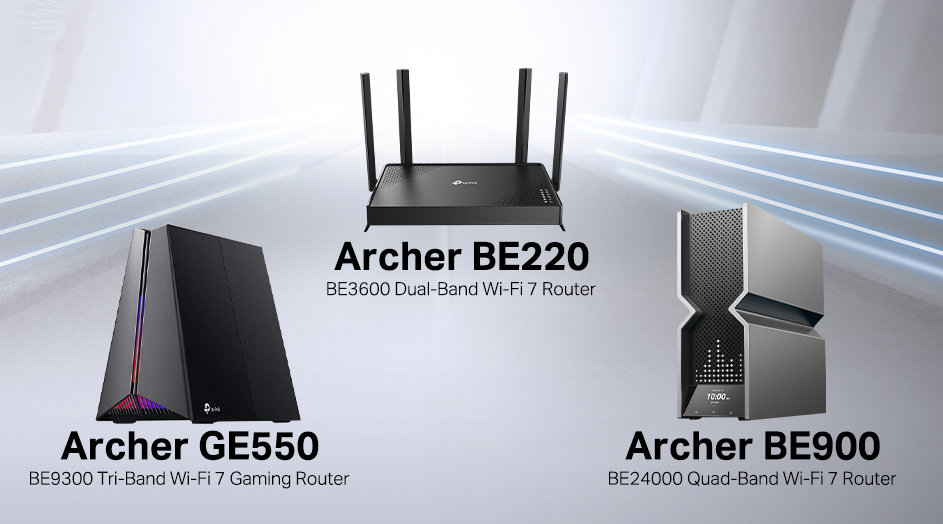
Credit: www.tp-link.com
Optimize Router Placement
Optimizing the placement of your tri-band router greatly improves the 5GHz signal strength. The 5GHz band has a shorter range but offers faster speeds. Proper placement reduces signal loss and interference. Follow these tips to get the best performance from your router.
Choose Central Location
Place the router near the center of your home. This helps the 5GHz signal reach more devices evenly. Avoid placing it near outside walls. A central spot gives a better overall coverage area.
Avoid Physical Obstructions
Keep the router away from thick walls, metal objects, and large furniture. These block or weaken the 5GHz signal. Clear the space around the router to allow signals to travel freely. Avoid placing it inside cabinets or behind TVs.
Elevate The Router
Set the router on a high shelf or mount it on the wall. Elevation prevents signal loss from floors and low furniture. Higher placement spreads the 5GHz signal more evenly across rooms. Avoid placing the router on the floor.
Credit: blog.jazzcybershield.com
Adjust Router Settings
Adjusting the settings on your tri-band router can boost your 5GHz signal strength. Small tweaks in the router’s control panel can reduce interference and improve speed. These changes help your devices connect better and stay stable.
Focus on selecting the right channel, managing traffic with Quality of Service (QoS), and keeping the firmware up to date. Each step targets a different aspect of your router’s performance. Together, they create a smoother Wi-Fi experience on the 5GHz band.
Select Best Channel
Interference from nearby networks can slow down your 5GHz signal. Choosing the best channel avoids crowded frequencies. Use your router’s interface to scan and find the least busy channel.
Channels 36, 40, 44, and 48 often work well. Try switching between these to see which gives the best speed. This simple change reduces signal clashes and improves connection quality.
Enable Qos For Prioritization
Quality of Service (QoS) lets you prioritize important traffic on your network. Enable QoS in your router settings to give priority to devices or apps that need fast speeds. Streaming, gaming, and video calls can work better with QoS active.
Set rules to allocate bandwidth smartly. This reduces lag and buffering on your 5GHz band. The network stays balanced even when many devices are connected.
Update Firmware Regularly
Router manufacturers release firmware updates to fix bugs and improve performance. Check for updates often in the router’s admin panel. Installing the latest firmware keeps your 5GHz band running smoothly.
Updates may also add new features and security patches. An up-to-date router handles network traffic better and resists interference more effectively.
Use External Antennas
Using external antennas can significantly enhance the 5GHz signal on a tri-band router. These antennas replace or supplement the built-in ones, improving signal strength and coverage. External antennas often have higher gain and better design to focus the signal where it’s needed most.
Upgrading to external antennas is a simple step. It helps reduce dead zones and boosts wireless speed. This upgrade is especially useful in larger homes or spaces with many walls. External antennas allow better control over signal direction and reach.
Benefits Of High-gain Antennas
High-gain antennas send signals farther than standard antennas. They focus energy in specific directions instead of spreading it everywhere. This focus improves signal strength and reduces interference from other devices.
With high-gain antennas, expect a more stable connection at longer distances. They help maintain faster speeds when you move away from the router. High-gain antennas are perfect for covering larger rooms or multiple floors.
Proper Antenna Orientation
Correct antenna positioning can boost the 5GHz signal. Most routers have adjustable antennas. Try different angles to find the best signal strength.
- Position antennas perpendicular to each other for better coverage.
- Point one antenna vertically and another horizontally.
- Raise antennas to clear obstructions like furniture or walls.
- Avoid placing antennas inside cabinets or near metal objects.
Testing signal strength with a Wi-Fi analyzer app helps find the optimal setup. Small changes in orientation can make a big difference in signal quality.
Reduce Interference
Keep your router away from other electronic devices to avoid signal overlap. Choose a channel with less traffic to reduce disruptions. This helps maintain a stronger and clearer 5GHz connection on your tri-band router.
Reducing interference is crucial for enhancing your 5GHz signal on a tri-band router. Interference can disrupt the signal, leading to slower internet speeds. By addressing these issues, you can enjoy a more stable and faster connection.Identify Common Interference Sources
Many devices can interfere with your 5GHz signal. Common culprits include microwaves, cordless phones, and Bluetooth devices. These devices operate on similar frequencies, which can cause disruptions. Identifying these sources is the first step to reducing interference. Place your router away from these electronic devices. Walls and large furniture can also block signals. Ensure your router is in an open space, free from obstacles.Limit Competing Devices
Too many devices connected can strain your network. Disconnect devices not in use to reduce load. This simple action can improve your 5GHz signal strength. Set up a guest network for visitors. It separates their traffic from your main network. Fewer devices on the primary network enhance performance. Also, check for devices set to auto-connect. Disable this feature to prevent unwanted connections. This ensures only necessary devices are using the bandwidth. By managing interference and device connections, you can boost your 5GHz signal efficiency.Leverage Mesh Systems
Using a mesh system can dramatically improve your 5GHz signal on a tri-band router. Mesh networks consist of multiple devices that work together to create a strong, unified Wi-Fi network throughout your space. This setup helps eliminate dead zones and maintains high-speed connections where a single router might struggle.
Expand Coverage With Nodes
Adding mesh nodes spreads your 5GHz signal further than a standalone router can reach. Each node acts as a mini router, relaying the signal to areas with weak coverage. You can place nodes in different rooms or floors, ensuring your entire home or office benefits from faster speeds.
Think about a spot in your home where your 5GHz connection drops. Placing a mesh node nearby can fix this instantly, delivering a strong signal without extra cables. This flexibility lets you customize your network to your unique space.
Seamless Roaming Benefits
One big advantage of mesh systems is seamless roaming. As you move around your home or office, your device automatically connects to the strongest node without any interruption. This means your video calls and streaming won’t drop or buffer.
Have you ever experienced lag while moving from one room to another? Mesh networks solve this by switching connections smoothly. You get uninterrupted access to your 5GHz band, keeping your internet experience consistent and reliable.

Credit: www.youtube.com
Upgrade Hardware When Needed
Upgrading your hardware can significantly boost your 5GHz signal on a tri-band router. Old devices may not support the latest technology, limiting your internet speed and coverage. Knowing when to replace your equipment helps maintain a strong and stable connection.
Recognize Signs Of Outdated Equipment
Slow internet speeds and frequent disconnections suggest outdated hardware. Devices that only support older Wi-Fi standards, like 802.11n or 802.11g, struggle with modern demands. Weak 5GHz signals inside your home can also mean your router is no longer efficient.
Check your router’s age and model. If it is more than five years old, it might not handle current network loads well. Limited antenna count and low maximum speed ratings also indicate the need for an upgrade.
Choosing A Better Tri-band Router
Select a router that supports the latest Wi-Fi standard, such as Wi-Fi 6 or Wi-Fi 6E. These provide better speed, range, and capacity for multiple devices. Look for tri-band routers with strong 5GHz bands to reduce congestion and interference.
Features to consider:
- Multiple high-gain antennas for wider coverage
- Advanced beamforming technology for focused signals
- High data transfer rates to support fast connections
- Good security options like WPA3
Choosing the right router ensures a better 5GHz signal and a smoother online experience. Invest in hardware that fits your home size and device count.
Frequently Asked Questions
How Can I Boost 5ghz Signal On A Tri-band Router?
To boost 5GHz signal, place the router centrally, avoid obstructions, update firmware, and select less crowded channels. Adjust antenna orientation for better coverage and reduce interference from other devices.
Why Is My 5ghz Wifi Signal Weak On Tri-band Routers?
Weak 5GHz signals often result from distance, walls, or interference. 5GHz has shorter range than 2. 4GHz. Position your router properly and minimize obstacles for stronger signals.
Does Changing 5ghz Channel Improve Tri-band Router Performance?
Yes, switching to a less congested 5GHz channel can reduce interference and improve speed. Use tools to scan for busy channels and select a clearer one for better connectivity.
How Far Does 5ghz Signal Reach On Tri-band Routers?
Typically, 5GHz signals cover about 30-50 feet indoors. Walls and furniture reduce range. Tri-band routers manage multiple devices better but can’t extend 5GHz signal distance significantly.
Conclusion
Improving your 5GHz signal on a tri-band router is simple and effective. Place your router in a central, open spot. Avoid walls and metal objects that block signals. Change the channel to avoid interference from other networks. Keep your router’s firmware updated for best performance.
Use devices that support 5GHz for faster speeds. Small changes can make a big difference in your internet experience. Enjoy smoother streaming, faster downloads, and better connections at home. Try these tips today and see the improvement yourself.