Are you tired of lag ruining your gaming sessions? Your mesh WiFi might be the key to smoother, faster gameplay.
Imagine cutting down those frustrating delays and staying ahead in every match. You’ll discover simple, effective ways to boost your mesh WiFi specifically for gaming. Ready to take your connection to the next level and dominate your games? Keep reading, because your best gaming experience starts here.
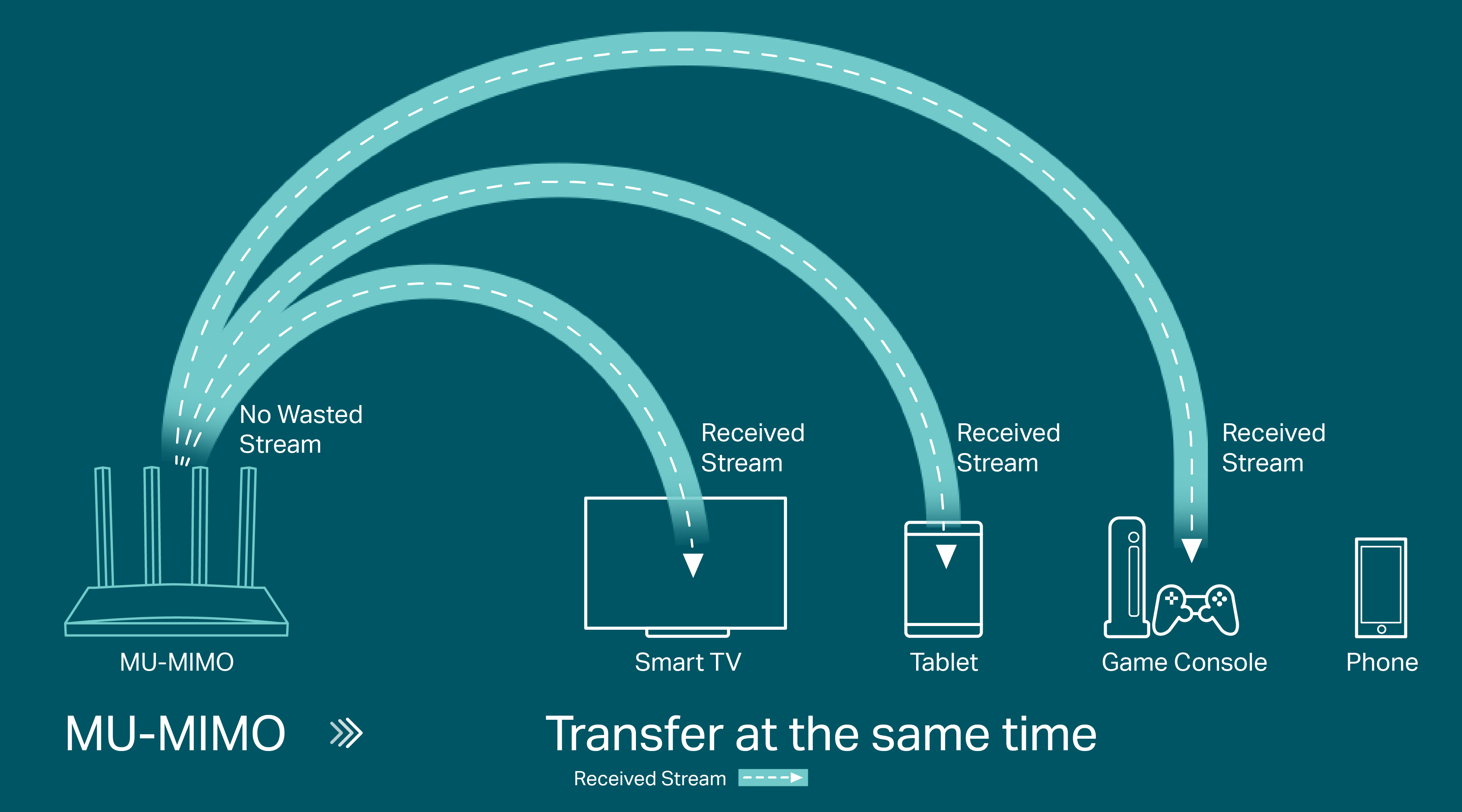
Credit: www.tp-link.com
Optimizing Mesh Router Placement
Optimizing the placement of your mesh router nodes can dramatically enhance your gaming experience. Poor placement often leads to weak signals and lag, which can ruin critical moments in a game. Let’s look at how to position your mesh nodes to get the fastest, most stable connection possible.
Ideal Locations For Nodes
Place your mesh nodes in open, central areas of your home rather than tucked away in corners or behind furniture. Think about where you usually game—your nodes should be close enough to that spot to provide strong coverage.
Spacing matters too. Nodes should be far enough apart to cover the entire area but close enough to maintain a strong connection with each other—usually about two rooms away or 30 to 40 feet. You might be surprised how much your walls and floors reduce signal strength even if the distance seems short.
Avoiding Interference
Wireless signals struggle against interference from household electronics. Keep nodes away from microwaves, cordless phones, Bluetooth devices, and baby monitors. These can all cause unexpected dips in your Wi-Fi performance.
Materials like metal, mirrors, and thick concrete walls can also block or weaken signals. Position your nodes so they don’t face these obstacles directly. Have you noticed your connection drops when you move near certain spots? That’s a clue interference is at play.
Height And Orientation Tips
Elevate your mesh nodes rather than placing them on the floor. A height of 3 to 5 feet off the ground often works best to avoid obstructions and spread the signal evenly.
Face antennas or the front of the node toward your main gaming area. Orientation can impact signal direction and strength. If your node has adjustable antennas, angle them perpendicular to each other—one vertical and one horizontal—to improve coverage in multi-level homes.
Choosing The Right Mesh System
Choosing the right mesh WiFi system can make a huge difference in your gaming experience. A mesh network isn’t just about covering every corner of your home with WiFi; it’s about delivering consistent, low-latency connections where you game the most. Picking a system designed with gaming in mind helps reduce lag, packet loss, and connection drops that can ruin a match.
Features For Gaming
Look for mesh systems that offer Quality of Service (QoS)settings. QoS lets you prioritize gaming traffic over other devices, so your gameplay stays smooth even if others are streaming or downloading.
Another key feature is low latency mode. Some systems optimize data paths to reduce the time it takes for your gaming data to travel, which is crucial in fast-paced games.
Also, consider mesh routers that support Ethernet backhaul. Wired connections between mesh nodes reduce wireless interference and improve stability, especially if you have a wired gaming setup.
Recommended Models
- ASUS ROG Rapture GT-AXE11000:Designed specifically for gamers, it offers robust QoS, low latency, and tri-band WiFi 6E support.
- Netgear Nighthawk MK83:This model balances strong coverage with gaming-friendly features like dynamic QoS.
- TP-Link Deco X90:A powerful WiFi 6 mesh system with excellent speed and stable connections, perfect for gaming and heavy streaming.
Choosing one of these can significantly improve your gaming connection without breaking the bank or requiring complex setups.
Bandwidth And Speed Considerations
How much bandwidth do you really need for gaming? Most online games require minimal bandwidth but are very sensitive to speed and latency. This means a fast, stable connection matters more than just raw bandwidth.
Prioritize mesh systems that support WiFi 6 or WiFi 6E. These technologies handle multiple devices better and offer faster speeds with less interference. It’s especially useful if your household has many connected gadgets.
Also, consider mesh systems with dual-band or tri-bandcapabilities. Tri-band systems dedicate one band for backhaul communication between nodes, freeing up other bands exclusively for your devices. This setup reduces congestion and increases overall speed.
Configuring Network Settings
Configuring your mesh WiFi network settings can boost gaming performance significantly. Adjusting these settings helps reduce lag and improves connection stability. Focus on managing traffic and optimizing channels for the best gaming experience.
Prioritizing Gaming Traffic
Prioritize your gaming device within the network. This ensures it gets more bandwidth and lower latency. Many mesh systems allow you to assign priority to specific devices. Look for settings like “Device Priority” or “Gaming Mode” in your router’s interface.
Prioritizing gaming traffic reduces interruptions from other devices. This keeps your game smooth and responsive.
Using Quality Of Service (qos)
Quality of Service (QoS) manages how your network handles different types of data. Configure QoS to favor gaming packets over regular traffic. This minimizes delays and packet loss during gameplay.
Set rules to give gaming apps or devices higher priority. Some mesh systems offer preset gaming QoS options. Enable these to improve your connection quality without complex setup.
Channel Selection Strategies
Select the best WiFi channel to avoid interference. Channels overlap and cause slowdowns. Use a WiFi analyzer app to find less crowded channels around you.
Switch your mesh nodes to those clearer channels manually. This reduces signal interference and improves speed. For 2.4 GHz, try channels 1, 6, or 11. For 5 GHz, pick channels with the lowest noise.

Credit: www.screenbeam.com
Firmware Updates And Maintenance
Keeping your mesh WiFi firmware updated fixes bugs and boosts performance. Regular maintenance ensures smooth gaming with less lag and better connection stability. Check for updates often to enjoy a faster, more reliable network.
Keeping your mesh WiFi network in top shape is crucial for an uninterrupted gaming experience. Firmware updates and regular maintenance play a pivotal role in ensuring your network runs smoothly. Neglecting these can lead to lag, connection drops, and overall poor performance. Let’s dive into how you can keep your mesh WiFi optimized for gaming.Keeping Firmware Current
Regularly updating your router’s firmware is like giving your network a fresh set of tools to tackle connectivity issues. Manufacturers often release updates to fix bugs, enhance security, and improve performance. Set a reminder to check for updates monthly, or enable automatic updates if your device supports it. New firmware can also introduce features that enhance gaming. Imagine reducing latency or getting better bandwidth allocation just by updating. Don’t miss out on these benefits.Regular System Reboots
Just like you need rest, your router needs a break too. Rebooting your mesh WiFi system clears out temporary glitches and refreshes connections. A simple restart can resolve many connectivity issues and improve speed. Consider scheduling regular reboots during low-usage hours. This simple act can be a game-changer, preventing issues before they arise and ensuring peak performance during your gaming sessions.Monitoring Network Performance
Keep an eye on how your network is performing. Use apps or built-in tools provided by your router’s manufacturer to monitor speed and device connections. Recognize patterns that might indicate issues, like certain times when your network slows down. Are there specific devices that hog bandwidth? Identifying and managing these can significantly improve your gaming experience. Engage with your network—understanding its behavior can empower you to make informed adjustments.Reducing Network Latency
Reducing network latency is key to better gaming on mesh WiFi. Latency means the delay between your actions and the game’s response. Lower latency means faster reactions and smoother gameplay. Mesh WiFi can sometimes cause delays due to how signals travel between nodes. Improving this helps keep your game fast and fluid.
Wired Backhaul Benefits
A wired backhaul connects mesh nodes with Ethernet cables. This reduces signal loss and interference. Wired links offer stable, fast communication between nodes. This cuts down on delays and packet loss. Using a wired backhaul keeps your gaming traffic smooth and quick.
Minimizing Connected Devices
Too many devices slow your network and increase latency. Each device uses bandwidth and processing power. Limiting connected devices frees up resources for gaming. Turn off or disconnect devices not in use. This helps your mesh WiFi focus on gaming data.
Eliminating Bandwidth Hogs
Some apps or devices use a lot of bandwidth. Streaming, downloads, and backups can slow your network. Identify bandwidth hogs and pause or limit them during gaming. Use Quality of Service (QoS) settings to prioritize gaming traffic. This reduces lag and keeps gameplay responsive.
Credit: www.screenbeam.com
Advanced Tips For Gamers
Improving your mesh WiFi setup for gaming means going beyond basic tweaks. Advanced strategies can help you squeeze every bit of performance out of your network. These tips focus on optimizing your connection to reduce lag, boost speed, and keep your gameplay smooth and responsive.
Using Gaming Vpns
Gaming VPNs can sometimes lower your ping by routing traffic through less congested paths. Choosing a VPN server close to your game server can reduce lag spikes and improve stability.
However, not all VPNs are created equal. Look for ones specifically designed for gaming, with low latency and high-speed servers.
Have you noticed sudden lag during matches? Trying a gaming VPN might reveal if your ISP routes are causing delays.
Custom Dns Settings
Switching to a faster, more reliable DNS server can speed up how quickly your gaming devices resolve domain names.
Popular options like Google DNS (8.8.8.8) or Cloudflare DNS (1.1.1.1) often reduce connection delays compared to default ISP DNS.
Changing DNS settings on your mesh router or directly on your gaming device is simple and can lead to noticeable improvements in game server connectivity.
Testing With Ping And Speed Tools
Regularly testing your network using ping and speed tools helps identify where delays or bottlenecks occur.
Use tools like PingPlotter or Ookla Speedtest to measure latency, jitter, and download/upload speeds.
Tracking these metrics over time helps you understand if changes to your mesh setup improve your gaming experience or if further tweaks are needed.
Frequently Asked Questions
How Can I Reduce Lag On Mesh Wifi For Gaming?
To reduce lag, place mesh nodes closer and avoid physical obstructions. Use Ethernet backhaul if possible. Update firmware regularly and limit other devices’ bandwidth during gaming sessions.
What Is The Best Mesh Wifi Setup For Gaming?
A wired backhaul mesh setup is best for gaming. Position nodes evenly to cover your gaming area. Use dual-band or tri-band routers to minimize interference and optimize speed.
How Do I Prioritize Gaming Traffic On Mesh Wifi?
Enable Quality of Service (QoS) in your mesh router settings. Prioritize your gaming device’s IP address or MAC address. This reduces latency and improves gaming performance by allocating more bandwidth.
Does Mesh Wifi Improve Online Gaming Performance?
Yes, mesh WiFi enhances coverage and stability, reducing dead zones. It can lower ping and packet loss by providing a stronger, more reliable signal throughout your home.
Conclusion
Improving your mesh WiFi helps create a smooth gaming experience. Place nodes closer to your gaming area for strong signals. Use wired connections when possible to reduce lag. Keep your network devices updated for better performance. Limit other devices using the internet during playtime.
Test your speed often to spot any issues fast. Small changes can make a big difference in gaming. Enjoy faster, more stable connections with these simple tips. Gaming feels better when your WiFi works well.