Are you tired of slow internet and weak signals when using your long range WiFi extender? You’re not alone.
Many people struggle to get the full performance out of their devices. The good news is, there are simple and effective ways to boost your extender’s speed and range. You’ll discover practical tips that will help you enjoy faster, more reliable WiFi throughout your home or office.
Keep reading, and you’ll soon unlock the full potential of your long range WiFi extender.
Choosing The Right Extender
Frequency bandsaffect WiFi range and speed. The 2.4 GHz band covers longer distances but is slower. The 5 GHz band offers faster speeds but shorter range. Choosing the right channel can reduce interference from other devices. Channels 1, 6, and 11 are best for 2.4 GHz to avoid overlap.
Antenna typesimpact signal strength. Omni-directional antennas spread signals in all directions. Directional antennas focus signals in one direction for longer reach. Proper placement is key. Position the extender high and away from walls or metal objects for better coverage.
| Router Type | Compatibility | Notes |
|---|---|---|
| Single-Band | Works with single-band extenders | Best for basic coverage |
| Dual-Band | Supports dual-band extenders | Offers better speed and range |
| Tri-Band | Compatible with tri-band extenders | Ideal for heavy traffic and multiple devices |
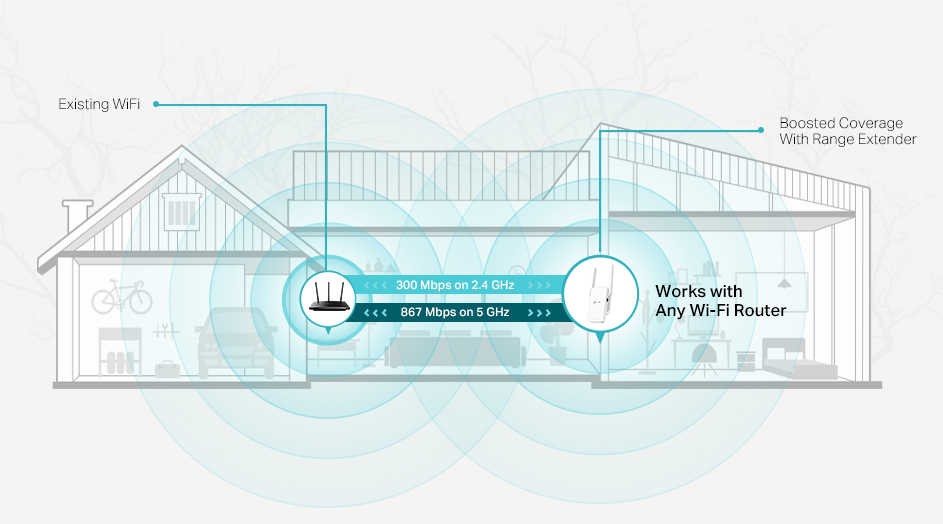
Credit: www.tp-link.com
Optimal Extender Placement
Placing the wifi extender in the best locationimproves its range and speed.
Choose a spot halfway between your router and the area needing coverage.
- Avoid walls and thick objects that block signals.
- Keep the extender away from microwaves, cordless phones, and Bluetooth devices.
- These interference sourcesweaken the wifi signal.
Position the extender higher, like on a shelf or wall mount.
Adjust the angleof its antennas for the clearest signal path.
Small changes in height and angle can boost performancegreatly.
Network Settings Optimization
Choosing the best channelhelps avoid interference from other devices. Use a Wi-Fi analyzer app to find channels with less traffic. Select channels 1, 6, or 11 for 2.4 GHz networks. For 5 GHz, pick a channel with the least noise.
Adjusting the transmit powercontrols the signal strength. Higher power can cover more distance but may cause interference. Lower power reduces noise but limits range. Find a good balance for your space.
Quality of Service (QoS) lets you prioritize important traffic. It helps your extender give faster speeds to video calls, gaming, or streaming. Set QoS in your extender’s settings to improve performance for key tasks.
Hardware And Firmware Updates
Updating firmware regularlykeeps your WiFi extender running smoothly. Firmware fixes bugs and adds new features. Check the extender’s app or website for updates. Install updates carefully to avoid connection loss.
Upgrading extender hardwarecan boost range and speed. Some models support better antennas or dual-band signals. Choose hardware that fits your home size and internet needs. Sometimes, a newer extender model works best.
Checking router firmwareis as important as the extender’s update. Router updates improve security and performance. Visit your router’s admin page to find updates. Restart the router after installing new firmware for better effect.
Enhancing Signal Strength
External antennas can greatly boostyour WiFi extender’s signal. They help to focusthe wireless signal in a specific direction. This leads to a stronger and more stable connection. Many long-range extenders allow antenna upgrades.
WiFi boosters work by amplifyingthe existing signal. They extend coverage to areas with weak or no signal. Place boosters in spots where your main signal is still strong for best results.
Physical barriers like walls and furniture blockWiFi signals. Reducing these obstacles improves signal strength. Try to keep the path between your extender and router clearand open.

Credit: www.amazon.ca
Managing Network Traffic
Limiting the number of connected deviceshelps keep the WiFi extender fast. Too many devices slow down the network. Disconnect devices not in use. This frees bandwidth for important tasks.
Scheduling bandwidth usage means setting timeswhen devices can use the internet. This stops many devices from using WiFi at once. For example, limit video streaming during work hours.
Prioritizing critical applications gives important tasksmore internet speed. Use Quality of Service (QoS) settings on your extender. This lets work or study apps run smoothly while less important apps wait.
Advanced Techniques
Mesh Network Integrationhelps extend WiFi coverage by linking several devices. This creates a seamless network with fewer dead zones. Devices automatically connect to the strongest signal. It improves connection stability across large areas.
Powerline Adapter Combinationuses your home’s electrical wiring to carry internet signals. Plug one adapter near your router and another in the room needing better WiFi. This helps bypass walls and long distances that weaken signals.
Using Directional Antennasfocuses the WiFi signal in one direction. This boosts signal strength toward the area needing better coverage. Ideal for long-range setups where the signal must travel far without spreading out.

Credit: www.reddit.com
Frequently Asked Questions
How To Position A Wifi Extender For Best Performance?
Position your WiFi extender midway between your router and the area with weak signal. Ensure there are minimal obstructions like walls and electronic devices. Elevating the extender can also enhance coverage. This strategic placement helps in maximizing the signal strength and improving overall performance.
Does A Wifi Extender Slow Down Internet Speed?
A WiFi extender can slightly reduce speed due to signal relay. However, it can significantly enhance coverage. Ensure your extender is compatible with your router and positioned correctly for optimal performance. Using dual-band extenders can also help in mitigating speed issues and maintaining a strong connection.
How Often Should I Update My Wifi Extender?
Regularly check for firmware updates every few months for your WiFi extender. Updates can enhance performance and security. Most manufacturers release updates periodically. Keep your extender’s software up-to-date to ensure optimal functionality and protection against potential vulnerabilities.
Can A Wifi Extender Work With Any Router?
Most WiFi extenders are compatible with any router, regardless of brand. However, using extenders from the same manufacturer as your router can provide better performance. Always check the compatibility specifications before purchasing. This ensures seamless integration and optimal network performance.
Conclusion
Improving your long range WiFi extender’s performance takes some simple steps. Place the extender in a clear spot, away from walls and devices. Keep the firmware updated for better speed and stability. Use the right channel to avoid interference. Adjust antennas to get the best signal.
Test your connection often to find the best setup. These tips help your WiFi reach farther and work smoother. Enjoy stronger internet in every corner of your home. Small changes can make a big difference.