Are you tired of lagging games and slow connections? Monitoring your gaming router traffic can be the key to unlocking smoother gameplay and faster speeds.
By understanding what’s happening on your network, you can spot issues before they ruin your gaming experience. You’ll discover simple ways to track your router’s traffic and take control of your online gaming. Ready to boost your connection and dominate every match?
Let’s dive in.
Choosing The Right Gaming Router
Choosing the right gaming router is key to smooth gameplay and stable connections. A good router helps reduce lag and keeps your network fast. Picking one designed for gaming ensures it handles high traffic and multiple devices well.
Key Features For Gamers
- Low Latency:Minimizes delay in data transfer for quick responses.
- High Speed:Supports fast internet speeds to avoid slowdowns.
- Quality of Service (QoS):Prioritizes gaming traffic over other data.
- Dual-Band or Tri-Band:Provides multiple channels to reduce interference.
- Strong Security:Protects against cyber threats during online play.
- Easy Traffic Monitoring:Allows users to track and control network usage.
- Multiple Ethernet Ports:Supports wired connections for stable gaming.
Top Models In The Market
| Router Model | Main Feature | Price Range |
|---|---|---|
| ASUS ROG Rapture GT-AX11000 | Tri-band with advanced QoS and strong security | High |
| Netgear Nighthawk Pro Gaming XR500 | Optimized for low latency and traffic control | Medium |
| TP-Link Archer C5400X | Powerful tri-band and easy-to-use interface | High |
| Linksys WRT32X | Custom firmware for gaming traffic prioritization | Medium |
| ASUS RT-AX58U | Affordable Wi-Fi 6 with good speed and range | Low |
Setting Up Traffic Monitoring Tools
Setting up traffic monitoring tools is essential for managing your gaming router’s performance. These tools track data flow, helping identify slowdowns and unusual activity. Monitoring ensures smooth gameplay and better network control.
You can use features built into your router or install third-party software. Each option offers different levels of detail and ease of use. Choosing the right tool depends on your needs and technical comfort.
Built-in Router Features
Many routers come with basic traffic monitoring tools. These are often found in the router’s web interface. Access this by entering your router’s IP address in a browser.
- Look for sections named “Traffic Meter,” “Bandwidth Monitor,” or “Statistics.”
- View real-time and historical data on connected devices.
- Set limits or alerts for bandwidth usage to avoid slowdowns.
- Some routers offer Quality of Service (QoS) to prioritize gaming traffic.
These built-in tools are easy to use and require no extra installation. They provide a good starting point for basic traffic monitoring.
Third-party Software Options
Third-party software offers advanced features for detailed traffic analysis. These tools can track data more precisely and support multiple devices.
- Wireshark – captures and analyzes network packets in real time.
- GlassWire – provides visual graphs and alerts for bandwidth use.
- PRTG Network Monitor – monitors network health with customizable sensors.
Install software on a PC connected to your router or use a dedicated device. Some apps require technical knowledge but give deeper insights.
Choose software based on your comfort level and the detail needed. They help identify bandwidth hogs, detect intrusions, and optimize gaming traffic.
Analyzing Network Traffic
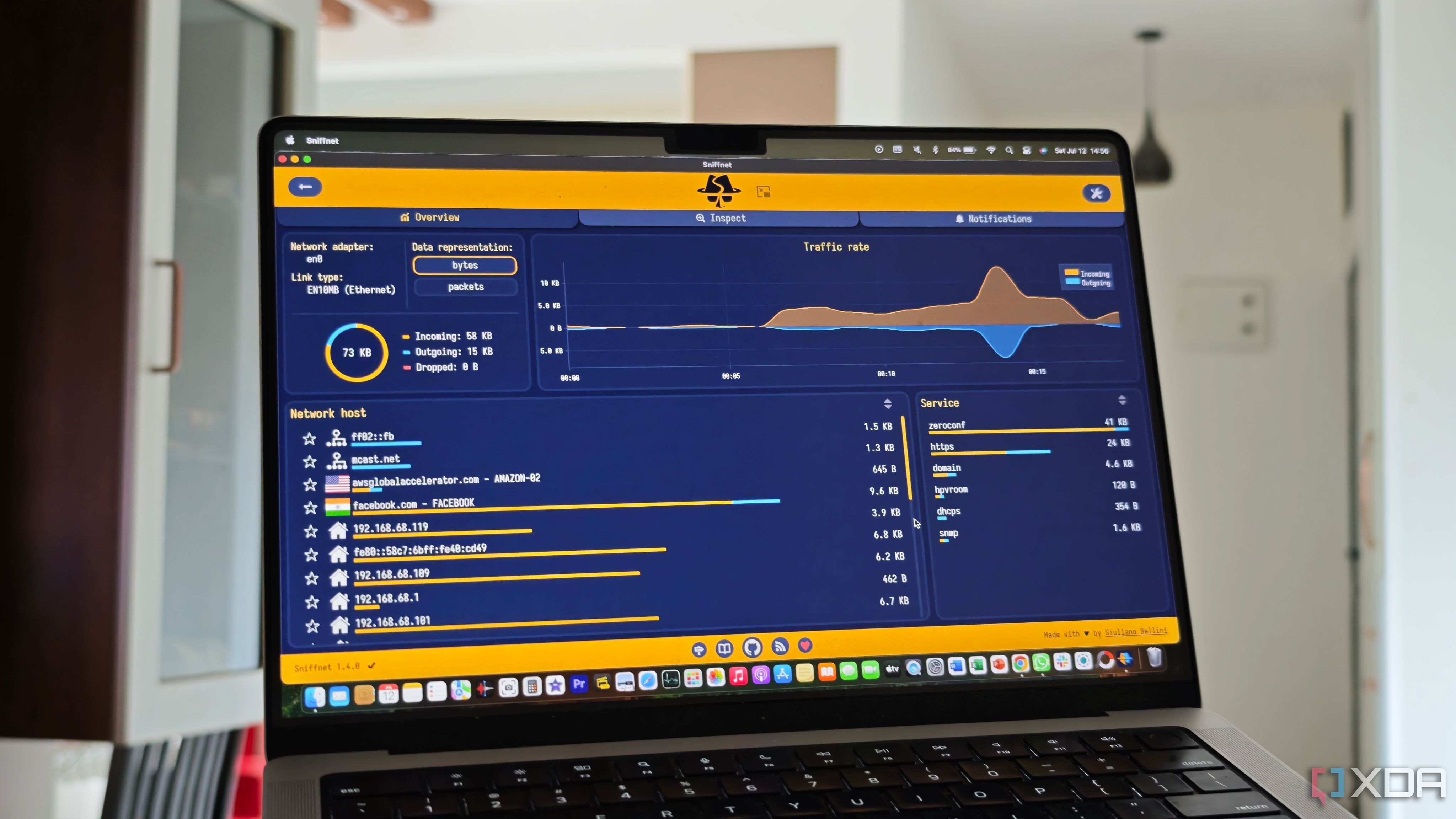
Analyzing network traffic is vital for maintaining a smooth gaming experience. It helps detect issues that slow down your connection. By studying data flow, you can see which devices use the most bandwidth. You also spot strange activities that might harm your network. This insight lets you make smart changes to improve speed and security.
Identifying Bandwidth Hogs
Bandwidth hogs are devices or apps that use too much data. They can cause lag or slow downloads during games. Check your router’s traffic logs to find these users. Look for devices with high data consumption over short periods.
- Streaming videos and downloads often use a lot of bandwidth.
- Some apps update in the background without you knowing.
- Multiple devices connected at once can compete for bandwidth.
By spotting bandwidth hogs, you can limit their usage or schedule heavy tasks for off-peak times. This frees up bandwidth for gaming.
Spotting Unusual Activity
Unusual activity means any network behavior that seems odd or unexpected. It might be a sign of malware or unauthorized access. Watch for sudden spikes in data or unknown devices on your network.
- Unexpected uploads or downloads may drain your connection.
- Unknown IP addresses could indicate a security breach.
- Repeated connection attempts from outside your network are suspicious.
Monitoring for these signs keeps your gaming router safe. Prompt action helps prevent data theft and connection problems.
Credit: www.xda-developers.com
Optimizing Router Settings
Enhancing your gaming experience often starts with your router settings. A well-optimized router ensures smooth and uninterrupted gameplay. Fine-tuning these settings can help reduce lag and boost performance. Let’s explore some key aspects for optimizing your gaming router.
Prioritizing Gaming Traffic
Make gaming traffic a priority. Begin by accessing your router’s interface. Look for the option to prioritize traffic. This ensures gaming data gets processed first. It reduces delays and interruptions. Many routers have a dedicated gaming mode. Turn this feature on if available. It directs bandwidth to your games. Other devices receive less priority. This helps maintain a stable connection for gaming.
Adjusting Qos Settings
QoS, or Quality of Service, is vital for gamers. These settings manage bandwidth distribution. Open your router settings to find QoS options. Enable QoS to improve game performance. Set priority levels for devices and applications. Ensure your gaming console or PC ranks high. This prevents other devices from hogging bandwidth. Adjust these settings based on your network needs. It helps create a balanced and efficient network.
Reducing Lag And Latency
Reducing lag and latency is key to a smooth gaming experience. High lag causes delays between your actions and the game response. Latency affects how quickly data travels between your device and the game server. Monitoring router traffic helps identify issues causing these delays. Fixing them improves gameplay and reduces frustration.
Minimizing Interference
Wireless signals can face interference from many devices. Microwaves, cordless phones, and other Wi-Fi networks cause problems. They weaken your signal and increase lag. Keep your router away from these devices. Use a Wi-Fi analyzer tool to find less crowded channels. Switching to a less busy channel improves connection quality.
Using Wired Connections
Wired connections offer the most stable and fast link. Ethernet cables avoid interference common in wireless signals. They deliver data directly to your device with low latency. Use a Cat5e or higher cable for best results. Connect your gaming device directly to the router. This setup reduces lag significantly and keeps your connection steady.

Credit: www.youtube.com
Regular Maintenance Tips
Keeping your gaming router in top shape is essential for smooth gameplay and accurate traffic monitoring. Regular maintenance not only improves performance but also helps you catch issues before they disrupt your gaming sessions. Here are some practical tips to keep your router updated and running efficiently.
Firmware Updates
Firmware updates fix bugs, patch security holes, and sometimes add new features. Ignoring these updates can leave your network vulnerable or slow down your connection. Check your router’s settings regularly to see if new firmware versions are available.
Most routers offer an automatic update option, but I prefer manually checking every couple of weeks. This way, I control when the router restarts and ensure compatibility with other devices. Have you ever experienced lag spikes right after an update? Monitoring the update notes can help you decide the best time to install them.
Reboot Scheduling
Restarting your router clears temporary glitches and refreshes connections. Setting a regular reboot schedule can prevent slowdowns that happen after hours of continuous use. You can usually set automatic reboots during off-peak hours through your router’s interface.
If your router doesn’t support scheduled reboots, a simple nightly manual restart can work wonders. I noticed my ping stabilized after I started rebooting the router every morning before gaming. What time of day does your connection feel the most stable?

Credit: dev.to
Frequently Asked Questions
How Can I Monitor My Gaming Router Traffic Effectively?
You can monitor gaming router traffic via the router’s web interface or dedicated software. Check bandwidth, connected devices, and data usage regularly to optimize gaming performance and reduce lag.
What Tools Help Track Gaming Router Traffic In Real-time?
Tools like Wireshark, GlassWire, and router-specific apps provide real-time traffic monitoring. They display network activity, bandwidth usage, and connected devices, helping you manage and troubleshoot gaming traffic efficiently.
Why Is Monitoring Gaming Router Traffic Important?
Monitoring router traffic prevents bandwidth hogging by other devices. It ensures smooth gaming by identifying network issues and optimizing connection quality, reducing lag, and improving overall gaming experience.
How Do I Check Bandwidth Usage On My Gaming Router?
Access your router’s admin panel via IP address, then navigate to traffic or bandwidth sections. Most gaming routers offer detailed usage stats to help track and manage data consumption.
Conclusion
Monitoring your gaming router traffic helps keep your connection fast and stable. It lets you see which devices use the most data. You can find and fix problems quickly. This keeps your games smooth and lag-free. Regular checks make sure no one slows your network down.
Use simple tools to track traffic easily. Stay in control and enjoy better gaming every time.