Are you tired of lag ruining your gaming experience? Your router could be the hidden culprit.
Optimizing your router for gaming can make a huge difference in speed, stability, and overall performance. Imagine smoother gameplay, faster response times, and fewer frustrating disconnects. You’ll discover simple, effective steps to get the most out of your router and take your gaming to the next level.
Ready to boost your connection and dominate every match? Let’s dive in.
Choose The Right Router
Gaming-specific routersoffer features like Quality of Service (QoS). This helps prioritize gaming traffic over other devices. It reduces lag and improves connection stability.
Choosing a dual-band or tri-band routercan enhance performance. Dual-band routers operate on 2.4 GHz and 5 GHz bands. Tri-band routers add another 5 GHz band for more devices. This reduces network congestion and keeps your game smooth.
| Wi-Fi Standard | Speed | Range | Best for Gaming |
|---|---|---|---|
| Wi-Fi 5 (802.11ac) | Up to 3.5 Gbps | Good | Decent for most games |
| Wi-Fi 6 (802.11ax) | Up to 9.6 Gbps | Better | Great for high-speed gaming |
Routers with the latest Wi-Fi standardsgive faster speeds and lower lag. This helps keep gameplay smooth and stable.

Credit: www.youtube.com
Position Your Router Strategically
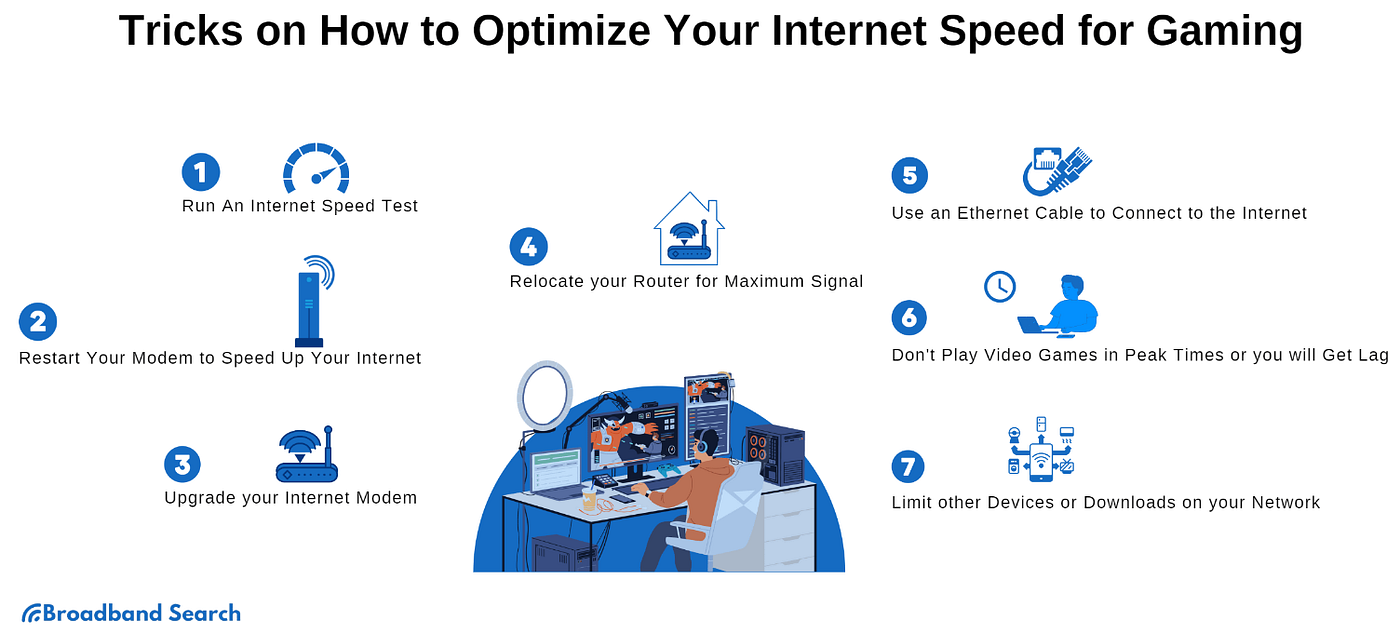
Place your router in the center of your home. This helps the signal reach all rooms evenly. Avoid placing it near walls or large objects that block the signal.
Keep the router away from thick furniture, metal objects, and appliances. These can reduce the Wi-Fi strengthand cause slow gaming speeds.
Elevate the router by putting it on a shelf or table. A higher position gives a clear path for the signalto travel. This reduces interference and improves connection quality.
Optimize Network Settings
Quality of Service (QoS)helps give priority to gaming traffic. This reduces lag and keeps your game smooth. Enabling QoS on your router can lower interruptions from other devices.
Choosing the best Wi-Fi channelavoids interference from neighbors’ networks. Use tools or your router’s settings to find a channel with less traffic. This makes your connection more stable.
The 5 GHz bandoffers faster speeds and less interference than 2.4 GHz. Use it for gaming devices close to the router. This improves response time and reduces delays.
Secure Your Network
Set strong passwordsfor your router and Wi-Fi network. Use a mix of letters, numbers, and symbols. Avoid common words or easy-to-guess phrases. This keeps hackers out and protects your gaming data.
Update firmware regularlyto fix bugs and improve security. Router makers release updates that help your device run better. Check for updates every few weeks and install them fast.
Limit device accessto your network. Only allow trusted devices to connect. Use the router’s settings to block unknown gadgets. This reduces traffic and helps your games run smoother.
Reduce Network Congestion
Limit background applicationson your devices to free up bandwidth. Apps like video streaming or large file syncs can slow your connection. Close or pause these apps during gaming sessions for better speeds.
Schedule large downloadsfor times when you are not gaming. Night or early morning hours work best. This prevents your connection from being overwhelmed and keeps gaming smooth.
| Priority Setting | Effect |
|---|---|
| Enable QoS (Quality of Service) | Gives gaming traffic higher priority over others |
| Assign priority to gaming devices | Reduces lag and improves responsiveness |
| Limit bandwidth for non-gaming apps | Prevents network congestion during play |
Use Wired Connections When Possible
Wired connections offer faster and more stable internet for gaming. They reduce lag and avoid interference common with Wi-Fi signals. Connecting your device directly to the router improves game performance and response time.
Benefits Of Ethernet Over Wi-fi
Ethernet connectionsare stable and fast. They reduce lag during gaming. Wi-Fi can be slow and unstable. Walls and other things block Wi-Fi signals. Ethernet gives a direct link to the router. This makes your gaming smoother. Less interruptions happen with Ethernet.
Setting Up Ethernet Connections
First, find an Ethernet cable. Connect the cable to your router. Plug the other end into your gaming device. Check for a secure fit. This ensures a stable connection. Your gaming will be faster and more reliable.
Using Powerline Adapters
Powerline adapters help when Ethernet cables are not possible. Plug one adapter near your router. Connect it with an Ethernet cable. Plug the second adapter near your gaming area. Connect it to your device. This uses home wiring for internet. It’s a smart way to improve gaming.
Monitor And Test Network Performance
Testing your network speed and connection quality helps spot issues early. Monitoring performance shows if your router delivers stable and fast gaming signals. Regular checks keep gameplay smooth and reduce lag or interruptions.
Use Speed Test Tools
Run a speed test to check your internet speed. Make sure the speed matches what your provider promises. Use tools like Ookla Speedtestor Fast.com. These tools measure download and upload speeds quickly. Knowing your speeds helps you adjust settings.
Check For Packet Loss And Latency
Packet loss means data doesn’t reach its destination. Latency is the time data takes to travel. Both affect gaming. Use tools like PingPlotterto check these metrics. Low packet loss and latency are good for smooth gaming.
Adjust Settings Based On Results
Change router settings if needed. Some routers have a gaming mode. This mode can prioritize gaming traffic. You can also change Wi-Fi channels to reduce interference. Small changes can make a big difference in gaming.

Credit: helpdeskgeek.com
Credit: medium.com
Frequently Asked Questions
How To Prioritize Gaming Traffic On A Router?
To prioritize gaming traffic, enable Quality of Service (QoS) on your router. This feature boosts gaming packets, reducing lag and improving stability during gameplay.
What Router Settings Improve Gaming Performance?
Adjust router settings like channel selection, frequency band, and QoS. Use 5GHz Wi-Fi for faster speeds and less interference, optimizing your gaming experience.
Should I Use Wired Or Wireless For Gaming?
Wired connections are preferred for gaming due to lower latency and stable speeds. Use Ethernet cables to minimize lag and ensure consistent performance.
How Does Firmware Update Affect Gaming Routers?
Firmware updates fix bugs and improve router features. Keeping your router’s firmware updated ensures optimal speed, security, and gaming performance.
Conclusion
Optimizing your router can improve your gaming experience a lot. A better connection means less lag and faster speeds. Simple steps like updating firmware and choosing the right settings help a lot. Prioritize your gaming device on the network for smoother play.
Keep your router in an open spot to get a strong signal. Regularly checking your network helps catch problems early. Small changes make gaming more fun and less frustrating. Start tweaking your router today and enjoy better gameplay.