Are you tired of slow or unreliable internet when you’re on the move? A travel router can be your best friend, giving you a strong and secure connection wherever you go.
But how do you power it effectively, especially when outlets aren’t always available? In this guide, you’ll discover simple and practical ways to keep your travel router running smoothly. By the end, you’ll know exactly how to stay connected without the hassle.
Let’s dive in and make sure your internet never lets you down while traveling.
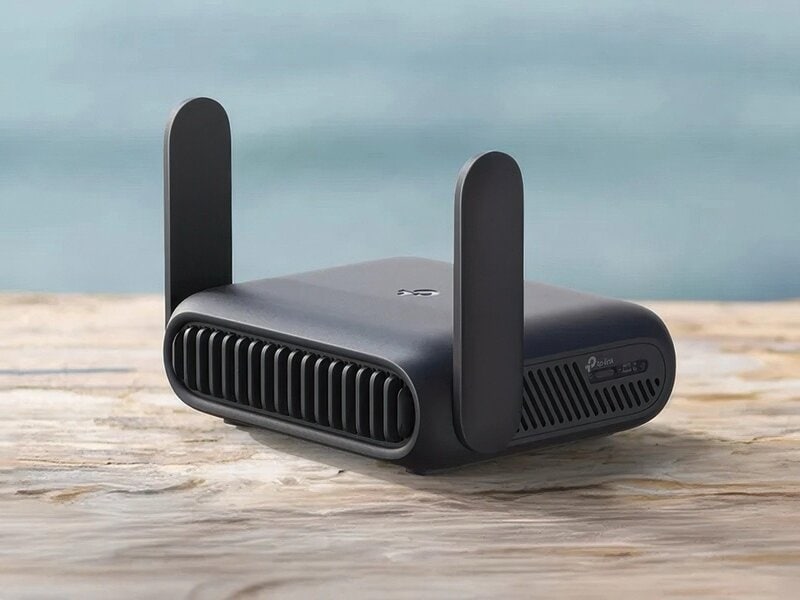
Credit: www.trendhunter.com
Choosing The Right Power Source
Choosing the right power source for a travel router is important for reliable internet access. Different power options fit different travel needs. Consider factors like portability, power availability, and device compatibility. The right power source keeps your router running without interruptions during your trip.
Battery Options For Travel Routers
Many travel routers come with built-in batteries. These batteries allow use without a direct power outlet. Portable and convenient for outdoor or remote locations. Battery life varies by model, often lasting several hours. Some routers support replaceable batteries, which is useful for long trips.
Rechargeable lithium-ion batteries are common. They provide good energy density and recharge quickly. Check the battery capacity, usually shown in mAh, for how long the router can last. Consider carrying spare batteries if your router supports them.
Using Usb Power Banks
USB power banks are popular for powering travel routers on the go. They offer a lightweight and portable way to extend usage time. Choose a power bank with enough capacity to match your router’s power needs.
Look for power banks that support output voltage and current compatible with your router. Many travel routers draw power through a USB port, making USB power banks a perfect match. Keep the power bank fully charged before travel to avoid downtime.
Ac Adapter Compatibility
Some travel routers require AC power for continuous use. Check the voltage and plug type before connecting to outlets in different countries. Using the correct AC adapter ensures safe and stable power delivery.
Universal adapters with multiple plug options work well for international travel. Confirm the adapter supports your router’s input voltage range. Avoid cheap adapters that could damage your device or cause power loss.

Credit: tech.yahoo.com
Portable Power Solutions
Portable power solutions keep your travel router running without fixed power sources. These options offer flexibility and convenience for travelers on the move. Choose a method that matches your travel style and environment.
Solar Chargers For Outdoor Use
Solar chargers convert sunlight into electricity to power devices. They are perfect for outdoor trips or places without electricity. Compact and lightweight models fit easily in backpacks. Look for solar panels with USB outputs to connect your travel router. Keep panels in direct sunlight for best charging results. Solar chargers work well during the day but need backup power at night.
Car Chargers And Adapters
Car chargers plug into your vehicle’s 12V socket. They provide a steady power supply while driving or parked. Many travel routers support USB power, so use a USB car adapter. This option is ideal for road trips and long drives. Carry an adapter compatible with your router’s power needs. It ensures continuous internet access without draining your router’s battery.
Powering With Laptop Usb Ports
Laptop USB ports can power travel routers in a pinch. Most routers consume low power, so laptops can supply enough energy. This method works best when you carry a laptop and need temporary power. Connect your router’s USB cable to the laptop port. Keep the laptop powered on for stable energy flow. This solution is handy indoors or in cafes with your laptop.
Maximizing Battery Life
Maximizing your travel router’s battery life is essential to stay connected longer without hunting for power outlets. Small adjustments in settings and habits can make a big difference. Let’s look at practical ways to extend your router’s uptime so your devices stay online when you need them most.
Power-saving Settings On Your Router
Most travel routers have built-in power-saving modes—have you checked if yours does? Activating features like sleep mode or reducing signal strength can significantly cut battery drain.
Try lowering the Wi-Fi broadcast power if you’re in a small space. This reduces energy consumption without affecting your connection quality. Also, disable unused ports or functions like USB sharing when you don’t need them.
Managing Device Usage
Each device connected to your router pulls power, so managing how many devices use your network helps preserve battery life. Limit connections to only essential gadgets during travel.
Think about which devices truly need constant access. Disconnect phones or tablets when they’re idle or not in use. This simple habit can add hours to your router’s battery life.
Optimizing Connection Settings
Adjusting your router’s connection settings can save energy while keeping your internet stable. For example, choosing a less congested Wi-Fi channel reduces interference and lowers power use.
Switch to the 2.4 GHz band if your devices support it—it generally consumes less power than 5 GHz. Also, set a shorter DHCP lease time to free up resources faster when devices disconnect.
Troubleshooting Power Issues
Encountering power issues with your travel router can disrupt your connectivity. Identifying and resolving these problems ensures a smoother travel experience. Addressing common issues, inspecting cables, and resetting the device can often solve power-related troubles.
Common Power Problems
Travel routers may experience power issues for various reasons. The router may not turn on, indicating a possible power supply problem. It could also power on but not maintain a stable connection. Another issue is intermittent power loss, causing frequent disconnections. Understanding these common problems helps in narrowing down the solution.
Checking Cables And Connectors
Cables and connectors often cause power issues. Begin by inspecting the power cable for visible damage. A frayed or bent cable can disrupt power supply. Ensure the power adapter is securely plugged into an outlet. Check if the connectors fit snugly into the router’s power port. Loose connections can lead to power interruptions.
Resetting And Rebooting
Sometimes, a simple reset can resolve power issues. Locate the reset button on your router, usually found at the back. Press and hold it for about 10 seconds. This action resets the router to its default settings. If resetting does not work, try rebooting the device. Disconnect the power source, wait a minute, and then reconnect it.
Safety Tips For Powering Travel Routers
Powering your travel router safely is key to keeping your device functional and your data secure. Ignoring safety can lead to overheating, damage, or even fire hazards. Let’s look at practical tips that help you power your travel router without risks.
Avoiding Overheating
Overheating is a common issue that can shorten your router’s life or cause sudden shutdowns. Always place your travel router on a flat, hard surface to allow air circulation. Avoid stacking it under heavy bags or in direct sunlight, especially during long charging sessions.
Have you noticed your router getting unusually warm after a few hours? That’s a warning sign to unplug it and let it cool down. Using a cooling pad or a small fan can also help if you’re in a hot climate.
Using Certified Chargers
Not all chargers are created equal. Using uncertified or cheap chargers may deliver inconsistent power, risking damage to your travel router’s battery or internal circuits. Stick to the charger that came with your router or buy replacements from reputable brands.
Look for certifications like UL, CE, or FCC on the charger to ensure it meets safety standards. Have you ever tried charging your device with a random cable from a gas station? It’s tempting, but can lead to voltage spikes or slow charging.
Proper Storage And Handling
How you store and handle your travel router affects its lifespan. When not in use, keep it in a cool, dry place away from dust and moisture. Avoid tossing it loosely into your backpack where it might get crushed or scratched.
Use a padded case or dedicated pouch to protect it during travel. Also, unplug the power source during storms or when you won’t use the router for a long time to prevent electrical damage.

Credit: www.youtube.com
Frequently Asked Questions
How Do I Power A Travel Router On The Go?
You can power a travel router using a USB power bank or a portable charger. This method offers flexibility when outlets are unavailable.
Can I Use A Travel Router With A Laptop Usb Port?
Yes, most travel routers can be powered via a laptop’s USB port. This is convenient for quick setup and mobile use.
What Power Adapters Are Compatible With Travel Routers?
Travel routers typically use 5V USB power adapters. Check your router’s specifications to match the voltage and current requirements.
Is It Safe To Use A Car Charger For A Travel Router?
Yes, a car charger with the correct output voltage is safe. Always ensure the charger matches your router’s power needs.
Conclusion
Powering a travel router is simple and flexible. Use batteries, power banks, or USB adapters. Choose what fits your trip and device best. Keep your router charged to stay connected everywhere. A reliable power source means smooth internet on the go.
Remember, small steps make travel easier and more fun. Enjoy your travels with steady Wi-Fi access.