Are you struggling with weak WiFi signals in your school’s outdoor spaces? Imagine students trying to connect their devices, only to be met with frustratingly slow internet speeds or, worse, no connection at all.
You’re not alone—many schools face this challenge, but there’s a solution! Setting up an outdoor WiFi booster can transform your school’s connectivity, extending internet access to playgrounds, sports fields, and outdoor learning areas. In this guide, you’ll learn step-by-step how to set up an outdoor WiFi booster, ensuring seamless connectivity for all.
Say goodbye to the hassle of dead zones and hello to a world of uninterrupted learning and communication. Ready to unlock the full potential of your school’s outdoor spaces? Let’s dive in!

Credit: www.youtube.com
Choosing The Right Outdoor Wifi Booster
Outdoor WiFi boostershelp extend internet signals across large school areas. Types include repeaters, extenders, and mesh systems. Repeaters catch and resend signals but may reduce speed. Extenders create a new signal, covering bigger spaces. Mesh systems use multiple units to form a strong network.
Important factors for schools:
- Coverage area:Choose boosters that cover playgrounds and buildings.
- Weather resistance:Devices must work in rain, wind, and sun.
- Speed support:Supports many users for smooth online learning.
- Easy installation:Setup should be quick and simple for staff.
- Security features:Protect the network from unauthorized access.
| Brand | Model | Key Features |
|---|---|---|
| TP-Link | Omada EAP225-Outdoor | Wide coverage, weatherproof, easy setup |
| Netgear | EX7300 | High speed, good range, simple app control |
| Ubiquiti | UniFi AC Mesh | Mesh support, strong signal, durable |
Planning Your Wifi Coverage
Start by mapping the entire school grounds. Walk around to note areas with walls, trees, and buildings that may block WiFi signals.
Next, identify dead zones. These are spots where the WiFi signal is weak or not available. Use a phone or laptop to check signal strength in different areas.
Set clear coverage goals. Decide which areas need strong WiFi, such as classrooms, playgrounds, and cafeterias. This helps in placing the booster in the best spots.
- Map the whole school area
- Find spots with no WiFi
- Choose important zones for good coverage
Preparing For Installation
Gathering the right toolsis essential for a smooth setup. You will need:
- A compatible outdoor WiFi booster
- Mounting bracketsand screws
- A drilland screwdriver
- Ethernet cablesfor connection
- A ladderfor high places
- Signal testeror app to check coverage
Safety should come first. Always wear protective gearlike gloves and goggles. Make sure the ladder is stable and on level ground. Avoid working near power lines. Check weather conditions; do not install during rain or strong wind.
Before starting, get permission from school authorities. They must approve the installation site and process. Also, consult with the local internet service providerif needed. Following rules avoids future problems.
Step-by-step Installation Process
Choose a high spot to mount the outdoor WiFi booster. It should have a clear view with no walls or trees blocking the signal. Use strong screws and brackets to fix the booster firmly. Ensure it is safe from rain and direct sunlight.
Connect the booster to the school’s existing WiFi network. Use an Ethernet cable or connect wirelessly, depending on the booster type. Make sure the booster is within range of the main router for a strong signal.
Access the booster’s settings through a web browser. Enter the default IP address, username, and password found in the manual. Change the network name (SSID) if needed and set a secure password. Save the settings and restart the booster to apply changes.
Testing And Optimizing Signal Strength
Use signal measurement toolslike apps or devices to check WiFi strength. These tools show signal bars or numbers. Move around the school area to test different spots. Find areas with weak signalsand note them.
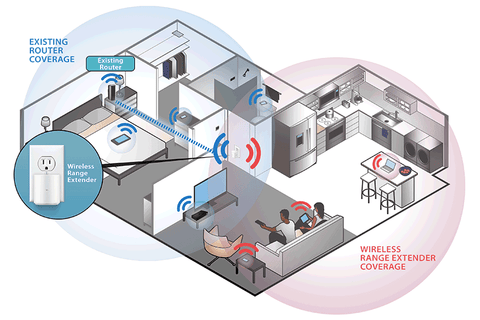
Adjust the booster placementto cover those weak spots. Place it higher and near open spaces for better reach. Avoid putting the booster near thick walls or metal objects. These can block the signal.
- Keep the booster away from microwaves and cordless phones.
- Use channels with less WiFi traffic to reduce interference.
- Separate multiple boosters so their signals don’t overlap too much.
Good placement and managing interference help boost WiFi speed and coverage. Test often to keep the signal strong everywhere.
Credit: www.signalbooster.com
Maintenance And Troubleshooting
Regular checkups help keep the outdoor WiFi boosterworking well. Check the device for dust or dirt. Clean it gently with a dry cloth. Make sure all cables are tight and not damaged. Check the signal strength to ensure good coverage in school areas.
Common issues include weak signals, slow internet, or no connection. Restart the booster to fix many problems. Move the booster to a better spot if signals are weak. Replace damaged cables quickly. Reset the device to factory settings if problems continue.
Updating firmware keeps the booster secureand fast. Check the manufacturer’s website for updates. Follow instructions carefully to avoid errors. Updates fix bugs and add new features. Regular updates help avoid crashes and connection drops.
Enhancing Security For Outdoor Networks
Use strong passwordsto protect the outdoor WiFi network. Choose passwords with a mix of letters, numbers, and symbols. Avoid simple words or easy combinations like “1234” or “password”. Change passwords regularly to keep the network safe.
Network encryptionhelps keep the data private. Enable WPA3 or WPA2 encryption on the WiFi booster. This stops outsiders from seeing or stealing information shared on the network.
Keep an eye on who connects to the network. Use tools to monitor network access. Block unknown devices quickly. Regular monitoring helps find unusual activity and keeps the network secure.

Credit: www.amazon.com
Frequently Asked Questions
How Do I Choose The Best Outdoor Wifi Booster For Schools?
Select a booster with strong signal range, weather resistance, and easy installation. Ensure it supports multiple devices and offers secure connections for school environments.
Where Should I Install An Outdoor Wifi Booster At School?
Place the booster in a central, elevated outdoor location. Avoid obstructions like walls or large trees to maximize signal coverage across the school campus.
Can Outdoor Wifi Boosters Improve Classroom Internet Speed?
Yes, boosters extend signal strength outdoors, reducing dead zones. This helps classrooms near outdoor areas get faster, more reliable internet access.
How Do I Secure Outdoor Wifi Boosters For School Networks?
Use WPA3 encryption and strong passwords. Regularly update firmware and monitor devices to prevent unauthorized access and maintain a safe network environment.
Conclusion
Setting up an outdoor WiFi booster helps schools stay connected easily. It improves internet reach across playgrounds and open spaces. Students and teachers enjoy smoother online lessons and activities. Choose the right booster and place it carefully for best results.
Regular checks keep the connection strong and stable. This simple step supports better learning in every corner of the school. Good WiFi makes school life more productive and fun.