Are you tired of your gaming lagging just when the stream starts buffering? You want smooth gameplay and crystal-clear streaming, but your internet feels like it’s fighting against you.
What if you could split your bandwidth in a way that gives both gaming and streaming the power they need? This isn’t just about faster internet—it’s about smart internet. Keep reading, and you’ll discover simple, effective ways to balance your connection so you never have to choose between winning the game and sharing the moment with your audience.
Your ultimate online experience is closer than you think.
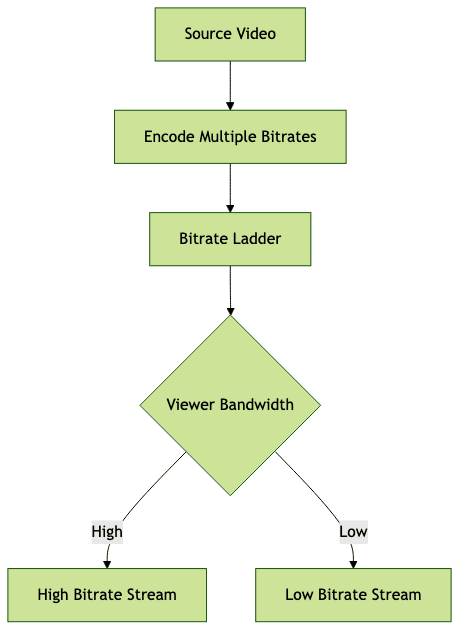
Credit: www.videosdk.live
Bandwidth Basics
Understanding bandwidth is key to managing internet speed for gaming and streaming. Bandwidth is the amount of data your internet connection can handle at once. It affects how fast games load and how smoothly videos play. Knowing the basics helps balance your internet use between different activities.
What Affects Bandwidth
Several factors impact bandwidth availability. The type of internet connection matters, such as fiber, cable, or DSL. The number of devices using the network also reduces bandwidth for each device. Online activities like downloads, uploads, streaming, and gaming consume different amounts of bandwidth. Network congestion and distance from the router can slow down speeds too.
Why Bandwidth Splitting Matters
Splitting bandwidth ensures fair internet speed for gaming and streaming. It stops one activity from using all the available data. This balance prevents lag during games and buffering in videos. Proper bandwidth management improves the overall online experience for everyone on the network. It helps keep both gaming and streaming smooth and reliable.

Credit: mainstreamdigicom.com
Assessing Your Network Needs
Assessing your network needs is the first step to split bandwidth effectively. Different activities demand different internet speeds. Understanding each task’s requirements helps allocate bandwidth wisely. This way, gaming remains smooth, and streaming stays buffer-free. Consider every device connected to your network for a clear picture.
Gaming Bandwidth Requirements
Online games usually need low latency more than high speed. Games use about 3-6 Mbps for smooth play. Fast response times prevent lag during gameplay. Multiplayer games may require more stable connections. Download speeds matter less than upload speeds for gaming.
Streaming Bandwidth Needs
Streaming video needs more bandwidth than gaming. Standard definition video requires 3-4 Mbps. High definition needs 5-8 Mbps. 4K video streaming can use over 25 Mbps. Streaming quality depends on internet speed and device capabilities.
Other Household Devices
Household devices also share your internet connection. Phones, tablets, and smart TVs use bandwidth constantly. Background updates and downloads can slow your network. Identify devices and their internet use to manage traffic. Prioritize bandwidth for gaming and streaming during peak times.
Methods To Split Bandwidth
Splitting bandwidth helps balance internet use between gaming and streaming. It keeps games smooth and streams clear by managing how much data each activity uses. Several ways exist to control bandwidth effectively. Choose one that fits your setup and skill level.
Router Qos Settings
Many routers include Quality of Service (QoS) features. QoS lets you prioritize traffic for gaming or streaming devices. You can set higher priority for gaming to reduce lag. Streaming can get a steady share without interruptions. Access your router’s admin page to find QoS options. Adjust rules based on device or app to control bandwidth flow.
Using Bandwidth Management Software
Software tools offer detailed control over internet speed use. These programs monitor and limit bandwidth per app or device. They work well on PCs and sometimes on routers. Use software to cap streaming speed while reserving more for gaming. It helps avoid sudden slowdowns during important moments. Choose software with easy settings for quick setup.
Manual Bandwidth Allocation
Manual allocation means setting fixed bandwidth limits yourself. Assign specific speeds to gaming consoles and streaming devices. This method requires knowing your total internet speed. Use simple calculations to divide bandwidth fairly. For example, give 60% to gaming and 40% to streaming. Manual control works best if your network is small and stable. Adjust allocations if you notice lag or buffering.
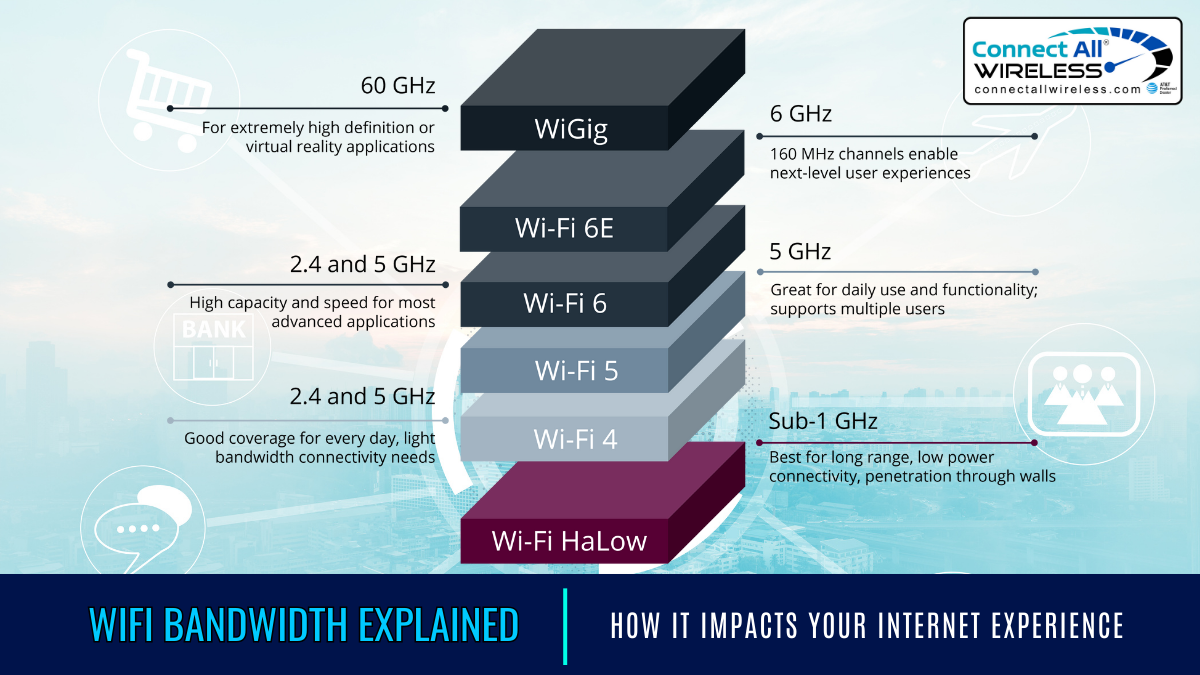
Credit: medium.com
Optimizing For Gaming
Splitting bandwidth effectively ensures smooth gaming and streaming. Allocate specific bandwidth for gaming to reduce lag. Use Quality of Service (QoS) settings on your router for better control over network traffic.
Gaming demands a seamless experience, and optimizing your bandwidth is crucial to avoid lag and disruptions. Whether you’re exploring vast open worlds or engaging in intense multiplayer battles, every millisecond counts. Let’s dive into how you can enhance your gaming experience by smartly managing your bandwidth.Prioritizing Low Latency
Low latency is essential for gaming, as it affects your response time. Consider setting up Quality of Service (QoS) rules on your router. This allows you to prioritize gaming traffic over other data. Try to connect your gaming device directly to the router with an Ethernet cable. This reduces the chances of latency issues that often arise with wireless connections.Reducing Packet Loss
Packet loss can disrupt your gaming experience, causing delays and even disconnections. One effective way to combat this is by ensuring your router firmware is up to date. Manufacturers often release updates that optimize performance and fix connectivity issues. Another tip is to minimize network interference. Keep your router away from devices like microwaves and cordless phones that may cause signal disruption.Choosing The Right Server
The server you choose can drastically affect your gaming experience. Opt for servers geographically closer to you to reduce latency. Many games allow you to select your server location in their settings menu. Have you ever noticed better performance during certain times of the day? This might be due to server load. Try playing during off-peak hours when fewer players are online, to enhance your connection quality. By implementing these strategies, you can significantly improve your gaming experience. What adjustments have you made to optimize your gaming setup? Share your insights in the comments!Optimizing For Streaming
Optimizing your bandwidth for streaming ensures your content looks great without interruptions. Streaming demands consistent upload speeds and smart settings to balance quality and performance. Let’s dive into how you can keep your streams smooth and enjoyable, even while gaming or handling other online tasks.
Ensuring Stable Upload Speeds
Your upload speed directly affects streaming quality. If it fluctuates, your stream may lag or pixelate. You can monitor your upload speed using simple tools like Speedtest.net before streaming.
To keep your upload stable, try these tips:
- Use a wired Ethernet connection instead of Wi-Fi to reduce interference.
- Limit other upload-heavy activities on your network during streaming.
- Set Quality of Service (QoS) rules on your router to prioritize streaming traffic.
Have you noticed your stream drop right when something exciting happens? Managing upload speed stability can fix that annoying issue fast.
Adjusting Streaming Quality
Higher quality streams need more bandwidth, but not every viewer has fast internet. Adjust your streaming settings to find a balance that suits your audience and your network.
Start by tweaking these:
- Bitrate:Lowering bitrate reduces bandwidth use but can blur the video.
- Resolution:Streaming at 720p instead of 1080p can ease bandwidth demands.
- Frame Rate:Dropping from 60fps to 30fps can save upload capacity without ruining the experience.
During a recent stream, I dropped the resolution slightly and saw fewer buffering issues. Experiment with these settings to see what works best for your setup.
Handling Multiple Streams
Streaming on multiple platforms or running multiple streams at once splits your upload bandwidth further. This can cause performance issues if not managed properly.
To handle multiple streams smoothly, consider:
- Allocating bandwidth per stream to avoid one hogging all resources.
- Using streaming software features that optimize bandwidth use.
- Scheduling streams so they don’t overlap, giving each stream enough resources.
Would splitting your bandwidth among streams improve your overall viewer experience? Testing different setups can reveal the best way to keep all your streams running well.
Troubleshooting Common Issues
Troubleshooting common issues in bandwidth splitting helps keep both gaming and streaming smooth. Many problems arise from network conflicts or misallocation of bandwidth. Identifying and fixing these issues improves your overall online experience.
Dealing With Lag
Lag disrupts gaming and streaming by causing delays. Check your router settings to ensure gaming devices get priority. Lower background app usage that consumes bandwidth. Use wired connections for better stability. Restart your router regularly to clear temporary glitches.
Buffering Problems
Buffering interrupts video streams by stopping playback frequently. Lower the streaming quality to reduce bandwidth needs. Pause the stream to allow buffering before resuming. Close other devices using the same network. Update streaming apps to their latest versions for better performance.
Bandwidth Fluctuations
Fluctuations cause uneven speeds, affecting both gaming and streaming. Monitor network traffic to find bandwidth-heavy apps. Schedule large downloads or updates during off-peak hours. Use Quality of Service (QoS) settings to allocate bandwidth evenly. Consider upgrading your internet plan for higher stability.
Tools To Monitor Bandwidth
Monitoring your bandwidth is key to ensuring a smooth experience while gaming and streaming simultaneously. Without clear insight into how your internet is being used, you might face unexpected lags or buffering. The right tools help you see which devices or applications consume the most data, so you can adjust accordingly.
Network Monitoring Apps
Network monitoring apps are great for real-time tracking of your bandwidth usage. Many offer simple interfaces that show data consumption per device on your network.
Apps like GlassWire or NetBalancer provide detailed graphs and alerts when usage spikes. This way, you can quickly spot if your streaming app is hogging bandwidth during a critical gaming session.
Have you ever wondered why your game suddenly lags? Checking these apps might reveal background downloads or updates eating your bandwidth.
Router Built-in Tools
Most modern routers come with built-in bandwidth monitoring features. Accessing your router’s dashboard often reveals traffic stats and device prioritization options.
These tools allow you to set limits or prioritize gaming traffic over streaming. If you’ve struggled with lag, using Quality of Service (QoS) settings on your router can make a noticeable difference.
Don’t overlook your router’s capabilities—they can manage bandwidth without additional software or apps.
Third-party Software Options
Third-party software provides advanced options for managing and monitoring your bandwidth. Programs like NetLimiter or PRTG Network Monitor offer customization that can suit heavy internet users.
They allow you to throttle bandwidth for specific apps or schedule when certain devices can access the internet. This control can be crucial if you want uninterrupted gameplay while others in your home stream videos.
Would you like to control every bit of your bandwidth? These tools give you that power.
Future-proofing Your Network
Future-proofing your network means setting it up to handle not just today’s demands but also tomorrow’s. As gaming and streaming become more data-heavy, you need a plan that keeps your connection fast and reliable. It’s about thinking ahead so you won’t struggle when new devices or higher-quality streams join your setup.
Upgrading Equipment
Your router and modem are the heart of your network. Older models may not support the speeds or features needed for smooth gaming and streaming at the same time.
Look for routers with Quality of Service (QoS) settings. These allow you to prioritize gaming traffic over streaming or other activities. My own experience showed a huge difference after switching to a router that supports dual-band and QoS—lag during games dropped significantly even when the family streamed movies.
Also, consider mesh Wi-Fi systems if your home is large. They reduce dead zones and keep your devices connected at strong speeds everywhere.
Planning For Increased Usage
Think about how many devices will use your network simultaneously. Will you add more smart TVs, phones, or gaming consoles soon? Planning for more users means your bandwidth split won’t get overwhelmed.
Create a simple list of devices and their typical usage. Assign more bandwidth to gaming if you play competitively and to streaming if you watch a lot of 4K content.
Ask yourself: Are you ready for virtual reality games or live streaming your gameplay? These can double or triple your data needs quickly.
Considering Internet Plan Options
Not all internet plans are created equal. Some offer higher speeds but have data caps, while others provide unlimited data but slower speeds.
Check if your current plan supports the combined speed needed for gaming and streaming together. If you notice buffering or lag, it might be time to upgrade.
Compare plans based on:
- Download and upload speeds
- Data limits or caps
- Latency and stability
Sometimes paying a bit more for a higher-tier plan can save frustration and improve your overall experience.
Frequently Asked Questions
How Can I Split Bandwidth For Gaming And Streaming?
You can split bandwidth by prioritizing gaming traffic using Quality of Service (QoS) settings on your router. Allocate more bandwidth to gaming devices and limit streaming devices to avoid lag. This ensures smooth gameplay and uninterrupted streaming simultaneously.
What Is The Best Bandwidth Split Ratio For Gaming And Streaming?
A good starting point is allocating 60% bandwidth for gaming and 40% for streaming. Adjust based on your internet speed and usage. Prioritize gaming to reduce latency, while ensuring enough bandwidth for high-quality streaming without buffering.
Can Router Qos Improve Gaming And Streaming Performance?
Yes, router QoS helps by prioritizing traffic types. It reduces lag during gaming and buffering while streaming. Configuring QoS ensures critical applications get required bandwidth, optimizing overall network performance for simultaneous gaming and streaming.
Does Streaming Affect Online Gaming Bandwidth?
Yes, streaming consumes significant bandwidth, which can cause gaming lag. Without proper bandwidth management, streaming lowers available bandwidth for gaming. Splitting bandwidth or using QoS settings helps maintain smooth gaming experiences alongside streaming.
Conclusion
Splitting bandwidth helps keep gaming and streaming smooth. Assign enough speed to both tasks for better performance. Simple tools and settings can make a big difference. Test your connection often to find the best balance. Small changes can reduce lag and buffering problems.
Enjoy your games and streams without interruptions. Keep these tips in mind for a better online experience.