Are you frustrated by slow internet speeds even though you have a high-end router? It might be time to test your router’s latency.
Understanding latency can help you pinpoint delays and improve your network’s performance. You’ll discover simple, effective ways to test latency on your high-end router. By the end, you’ll know exactly how to measure and reduce lag, making your online experience smoother and faster.
Keep reading to take control of your connection and get the speed you deserve.
Credit: www.screenbeam.com
Importance Of Latency Testing
Testing latency on a high-end router reveals how quickly data travels through your network. It helps identify delays that affect internet speed and performance. Accurate latency testing ensures smoother streaming, gaming, and online communication.
Impact On Network Performance
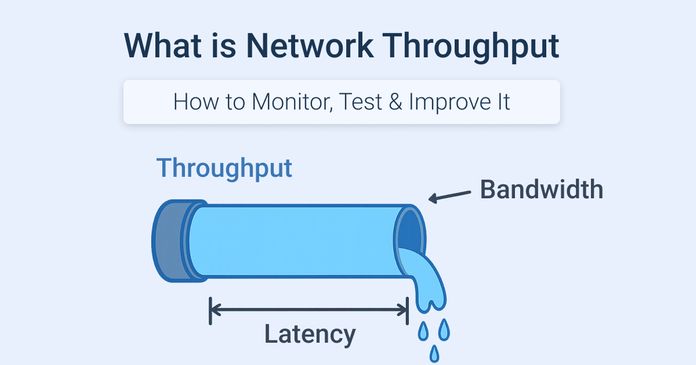
Latencyaffects how fast data travels across your network. Low latency means faster response times, which is key for activities like gaming, video calls, and online work. High latency causes delaysand interruptions, making the experience frustrating. Testing latency helps find network problems early, so you can fix them before they get worse.
Latency Vs. Bandwidth
| Aspect | Latency | Bandwidth |
|---|---|---|
| Definition | Time for data to travel | Amount of data sent per second |
| Measure | Milliseconds (ms) | Megabits per second (Mbps) |
| Effect | Speed of response | Volume of data |
| Importance | Critical for real-time apps | Important for downloads and streaming |
Credit: obkio.com
Preparing For Latency Tests
Choosing the right toolsis key for accurate latency tests. Use software like Ping, Traceroute, or specialized network analyzers. These tools help measure delay and packet loss effectively.
Some routers have built-in test features. Use them to get quick results. For detailed data, connect a computer directly to the router with an Ethernet cable. This reduces interference from Wi-Fi.
- Pick tools that match your skill level.
- Ensure software updates are installed.
- Use wired connections for stable results.
Setting up the test environment means creating a clean space. Turn off other devices using the network. This avoids extra traffic that can affect latency.
Place the router in a central, open area. Avoid walls or metal objects that block signals. Keep the testing device close to the router for best results.
Methods To Measure Latency
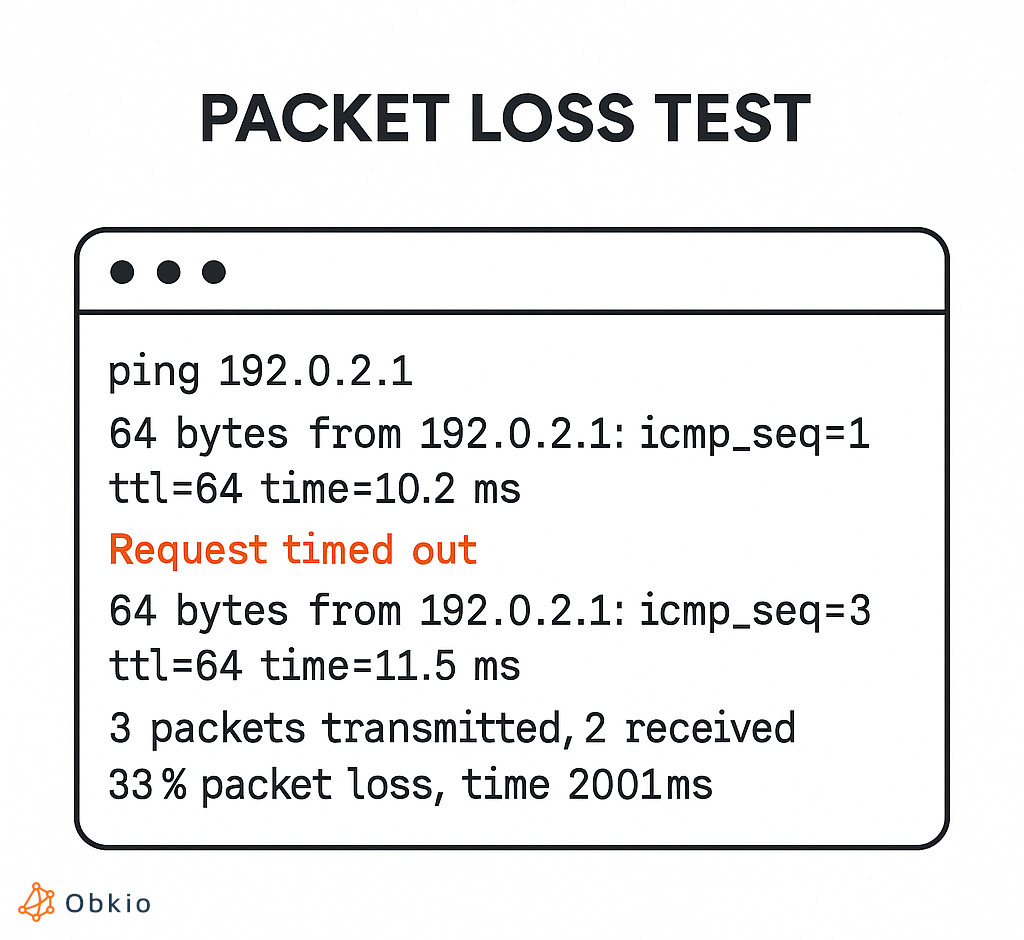
Pinguses small data packets to check the time it takes for a signal to travel. It sends a request and waits for a reply. This shows the round-trip latency. Easy to use and built into most devices.
Traceroutemaps the path data takes to reach a destination. It shows each step, or “hop,” and the delay at each one. Helps find where slowdowns happen in the network.
Network analyzers capture and display real-time traffic data. They provide detailed views of latency and other network issues. These tools are more advanced but give deep insights for tuning performance.
Advanced Testing Techniques
Simulating real-world traffic helps test how a router handles different data loads. Use traffic generators to mimic video calls, gaming, and browsing. This shows how the router performs under pressure. It reveals delays or slowdowns in real use.
Jitter and packet loss are key to measuring network quality. Jittermeans the variation in delay between packets. Packet lossmeans some packets do not reach their destination. Both can cause poor streaming and gaming experiences.
| Measurement | What It Shows | Why It Matters |
|---|---|---|
| Jitter | Delay variation between packets | Causes choppy calls and video |
| Packet Loss | Data packets lost during transmission | Leads to missing information and slow speeds |
Interpreting Latency Results
Identifying bottlenecksmeans finding parts of the network causing delays. Check each device and connection. Look for unusual spikes in latency. It might be a slow port, poor cable, or overloaded router. Testing different times helps spot patterns. Use tools to log latency over time. This shows if issues happen during heavy use or all the time.
Comparing against benchmarkshelps you understand if latency is normal. Benchmarks are standard latency values for your router type. Compare your results to these numbers. If your latency is higher, something may be wrong. Keep a record of your own results to track changes. This makes it easier to detect new problems quickly.
| Latency Benchmark | Typical Value (ms) |
|---|---|
| Local Network | 1 – 5 |
| ISP Connection | 10 – 50 |
| Remote Server | 50 – 150 |
Optimizing Router Settings
Keeping your router’s firmware updatedis key to better latency. New updates fix bugs and improve speed.
Adjusting settings carefully helps. Reset to default before changing anything.
- Check for updates on the router’s website or app.
- Follow instructions to install new firmware.
- Backup current settings before updating.
Quality of Service (QoS)lets you prioritize important traffic. This means gaming or video calls get faster response.
- Enable QoS in router settings.
- Set high priority for apps that need low latency.
- Lower priority for less important data.
Troubleshooting Latency Issues
Latency issuescan affect router performance and internet speed. Common causes include network congestion, outdated firmware, and faulty cables. Restarting the router often fixes minor glitches. Checking for firmware updates can improve stability and speed.
Interference from other devices or poor Wi-Fi signal may also cause latency. Changing the router’s channel or moving it to a better spot helps reduce interference. Using a wired connection can give a more stable and faster connection.
When to seek professional help:
- Latency remains high after basic troubleshooting
- Router frequently disconnects from the internet
- Firmware updates fail or cause new problems
- Network setup is complex or involves many devices
- Need help with advanced settings like QoS or VPN
Credit: obkio.com
Frequently Asked Questions
What Tools Are Best To Test Router Latency?
Use tools like Ping, Traceroute, and specialized software like iPerf. These help measure response times and network delays accurately.
How Do I Measure Latency On A High-end Router?
Send test packets to a destination and record the round-trip time. Use built-in router diagnostics or third-party apps for precise results.
Why Is Low Latency Important For Routers?
Low latency ensures faster data transmission, improving gaming, streaming, and video calls. It enhances overall network performance and user experience.
Can Firmware Updates Affect Router Latency?
Yes, firmware updates can optimize performance and reduce latency by fixing bugs and improving processing efficiency on the router.
Conclusion
Testing latency on high-end routers boosts your network’s efficiency. Regular checks ensure smooth streaming and online gaming. Using simple tools, you can measure latency easily. Run tests during different times for accuracy. Identify and fix issues promptly. This keeps your internet experience seamless.
Understanding latency helps you make informed decisions. Always aim for lower latency for better performance. By following these steps, you maintain a high-speed connection. Keep your router updated for optimal results. Stay connected with minimal delays. Enjoy fast, reliable internet every day.
Your network deserves the best care.