Imagine staying connected on your cruise without worrying about spotty Wi-Fi or expensive data charges. If you want reliable internet access while sailing, using a travel router can be a game-changer.
In this guide, you’ll learn exactly how to set up and use a travel router on cruise ships to boost your connection, save money, and enjoy smooth online access wherever you go. Keep reading, and you’ll discover simple steps that make your cruise internet experience easier and more enjoyable.

Credit: cruisepackinglist.com
Choosing The Right Travel Router
Choosing the right travel router is essential for a smooth internet experience on cruise ships. Not all routers work well in this unique environment. The right device helps you connect multiple gadgets easily and keeps your connection stable. Consider features that fit your travel style and the ship’s network setup.
Key Features To Look For
- Dual-band support for better connection and speed
- Easy setup with user-friendly interface
- Strong security options like WPA3 encryption
- Ability to create a private Wi-Fi network
- Multiple ports for wired connections
Compatibility With Cruise Ship Networks
Cruise ships often use captive portals for Wi-Fi access. Choose a router that supports captive portal logins. Some routers can store login details, so you don’t repeat the process. Check if the router supports Ethernet or USB tethering, as some ships offer wired internet.
Battery Life And Portability
Long battery life is key during long days without power outlets. Look for routers with rechargeable batteries lasting at least 6-8 hours. Compact and lightweight designs fit easily in your carry-on bag. A travel router should be easy to carry and quick to pack.
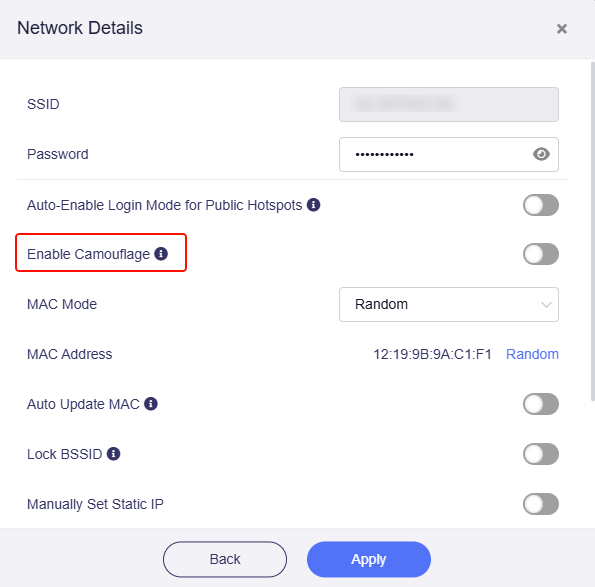
Credit: forum.gl-inet.com
Setting Up Your Travel Router
Setting up your travel router on a cruise ship can transform your online experience. Instead of struggling with multiple device connections and weak signals, you create a personal, stable network. This section walks you through the key steps to get your travel router ready and connected, ensuring smooth sailing online.
Initial Configuration Steps
Start by plugging your travel router into a power source, either the ship’s outlet or a USB port. Connect your laptop or smartphone to the router’s default Wi-Fi network, usually named on the device or in the manual.
Open the router’s setup page via a web browser, typically by typing an IP address like 192.168.0.1or 192.168.1.1. You’ll be prompted to create a new network name (SSID) and password. Choose something easy for you but hard for others to guess.
Many travel routers offer a “bridge” or “client” mode—select this if available. This mode lets your router connect to the cruise ship’s Wi-Fi and then share that connection with your devices.
Connecting To The Cruise Wi-fi
Once your router’s basic setup is complete, use its interface to scan for available networks. Select the cruise ship’s Wi-Fi network and enter the access credentials, which you usually get from the ship’s reception or onboard portal.
Keep in mind that cruise Wi-Fi often requires a login page to open after connection, asking for payment or verification. Your travel router handles this differently; you may need to connect a device directly to accept terms before the router shares the connection.
Ask yourself: have you checked if the ship’s Wi-Fi supports multiple devices under one login? If not, your travel router can help by funneling all your devices through a single connection, saving you money and hassle.
Securing Your Network
Security is crucial, especially on a public network like a cruise ship’s Wi-Fi. Change the router’s default admin password immediately to prevent unauthorized access.
Enable WPA3 or WPA2 encryption on your router to protect your personal data. Avoid open or WEP encryption, as these are less secure and easier to breach.
Consider turning off features like WPS (Wi-Fi Protected Setup), which can be vulnerable. Regularly check for firmware updates from your router’s manufacturer to patch security holes.
Optimizing Connectivity On Board
Optimizing your connectivity on a cruise ship can be challenging due to limited bandwidth and physical barriers. Using a travel router effectively means not just setting it up but also knowing how to place it and manage your connection wisely. Small changes in your approach can make a big difference in your internet experience while at sea.
Best Locations For Signal Strength
Signal strength varies dramatically depending on where you place your travel router. Aim to set it near a window or in an open area, preferably close to the ship’s Wi-Fi source like the lounge or deck.
Avoid placing your router inside cabins with thick walls or metal doors. I once moved my router just a few feet from the hallway into my cabin, and the connection dropped noticeably. You might find spots like the common areas or near the ship’s antenna that offer stronger signals.
Managing Bandwidth Usage
Bandwidth on cruise ships is often shared among many users, so managing your usage is crucial. Limit high-data activities like streaming videos or online gaming when others need the connection too.
Use your travel router’s settings to prioritize essential devices or applications. For example, you can restrict background app updates and pause cloud backups to save bandwidth. Have you noticed how quickly your connection slows down when too many devices are connected?
Troubleshooting Common Issues
Connectivity issues can happen even with the best setup. If your router loses connection, start by rebooting it and checking for firmware updates.
Interference from other electronics or ship structures can disrupt your signal. Try changing the router’s channel or moving it to a different location. If the issue persists, contacting the ship’s IT support can save you frustration—they often have tips specific to their network.

Credit: cruisepackinglist.com
Using Your Router With Multiple Devices
Using a travel router on a cruise ship lets you connect many devices at once. This helps keep your phones, tablets, and laptops online without extra fees. Managing these connections well improves your internet experience.
Device Limits And Sharing
Most travel routers have a limit on how many devices can connect. Too many devices slow down your internet speed. Prioritize the devices that need the internet the most.
Sharing your router means everyone in your group can use one connection. This saves money on multiple internet passes. Keep the number of connected devices within the router’s limit.
Prioritizing Important Connections
Focus on devices that need stable internet first. Streaming video or video calls need more bandwidth than checking emails. Some travel routers allow you to set priority for these devices.
Turn off Wi-Fi on devices not in use. This frees up bandwidth for other devices. It also helps avoid slow internet on the cruise ship.
Cost-saving Tips For Internet Access
Saving money on internet access while on a cruise ship is important. Internet packages on ships can be expensive and limited. Using a personal travel router can help reduce these costs. Smart choices can keep you connected without overspending.
Cruise Wi-fi Packages Vs. Personal Router
Cruise ships offer Wi-Fi packages that charge by time or data. These packages can be pricey and slow. A personal travel router lets you share one internet connection among devices. It can connect to public Wi-Fi or nearby hotspots. This method often costs less than buying multiple cruise packages. Using your own router helps control how much you spend on internet access.
Avoiding Roaming Charges
Roaming charges on cruise ships happen when your phone uses cellular data. These charges add up quickly. A travel router can connect devices to Wi-Fi instead of cellular networks. This avoids roaming fees entirely. Turn off mobile data on your devices to stop accidental roaming. Use Wi-Fi-only connections to save money during your cruise.
Data Compression Tools
Data compression tools reduce the size of the data sent and received. These tools help save bandwidth on slow or expensive connections. Use apps or browser extensions that compress images and videos. Enable compression in your travel router if the feature is available. This reduces data use and lowers your internet costs on board.
Alternative Connectivity Options
Travel routers offer reliable internet by connecting to ship Wi-Fi or cellular networks. They create a private network for multiple devices onboard. This helps avoid high roaming charges and improves signal strength during your cruise.
While cruising the open seas, staying connected to the world can be a challenge. Understanding alternative connectivity options can be your savior when a travel router alone isn’t cutting it. These options will help ensure you stay in touch without breaking the bank or losing your sanity.Using Mobile Hotspots
Mobile hotspots can be a lifesaver, especially when docked at a port. They allow you to connect multiple devices using your mobile data plan. Ensure your plan supports international data, and check roaming charges to avoid a surprise bill. Personal experience: I once used a mobile hotspot in a Caribbean port and enjoyed seamless connectivity. It was a great way to share vacation photos instantly. Consider a portable hotspot device that supports different SIM cards. This flexibility can be handy when switching regions or networks.Satellite Internet Services
Cruise ships often offer satellite internet, but it’s known to be pricey. The connection can also be spotty due to weather conditions or remote locations. To save money, opt for packages that cater to your specific needs—social media, email, or full browsing. Be strategic about when you use the internet. Early mornings or late nights often have less congestion, providing a smoother experience.Offline Solutions For Cruise Travel
Sometimes, the best solution is to disconnect entirely. Prepare offline solutions for entertainment and navigation. Download movies, books, and music before your trip. Offline maps can guide you through ports, preventing you from getting lost. Apps like Google Maps allow you to download maps for offline use, which can be a game-changer. Consider this: Would a digital detox enhance your cruise experience? Embracing offline moments can add a new dimension to your journey, allowing you to truly unwind and soak in the beauty around you.Frequently Asked Questions
What Is A Travel Router On Cruise Ships?
A travel router is a device that creates a private Wi-Fi network using the ship’s internet. It enhances connectivity and security for your devices onboard.
How Do I Set Up A Travel Router On A Cruise Ship?
Connect the travel router to the ship’s Ethernet port or Wi-Fi. Follow the router’s instructions to create a secure network for your devices.
Can A Travel Router Improve Cruise Ship Wi-fi Speed?
Yes, a travel router can optimize Wi-Fi signals and reduce device interference, potentially improving speed and connection stability.
Is Using A Travel Router On Cruise Ships Secure?
Yes, travel routers add a layer of security by creating a private network, protecting your data from public Wi-Fi risks.
Conclusion
Using a travel router on cruise ships helps you stay connected easily. It creates a private Wi-Fi network just for your devices. You can share the internet with family and friends without trouble. This small tool saves money and improves your online experience.
Remember to check the ship’s Wi-Fi rules before using the router. Simple steps make your cruise more fun and less stressful. Stay connected, share memories, and enjoy smooth internet on the sea. Safe travels and happy cruising!