Imagine having fast, secure internet wherever your business takes you. Whether you’re meeting clients at a café, working from a hotel, or setting up a temporary office, a portable router can be your best ally.
But how do you make sure you’re using it right to keep your work smooth and your data safe? You’ll discover simple, effective ways to use a portable router that can boost your productivity and protect your business. Ready to unlock the power of portable internet?
Let’s dive in.

Credit: www.theverge.com
Benefits Of Portable Routers
Portable routers offer a range of advantages that can significantly improve how you manage connectivity in your business. They provide flexibility without compromising on performance, helping you stay connected wherever your work takes you. Understanding these benefits can help you decide if a portable router is the right tool to boost your business efficiency.
Enhanced Mobility
With a portable router, you’re not tied down to a fixed location. You can set up a secure Wi-Fi network anywhere—be it a client’s office, a coffee shop, or even during travel. This freedom means your team can work smoothly outside the traditional office environment without worrying about finding stable internet.
Imagine closing deals during a business trip while accessing your company’s network securely. That’s the kind of mobility that can give you an edge over competitors stuck to fixed connections.
Reliable Connectivity
Portable routers often come with fail-safe features like dual SIM slots or support for multiple network bands. This setup ensures your business stays online even if one network fails. You avoid costly downtime, keeping projects on track and clients satisfied.
Think about a situation where your main office internet goes down during an important video call. A portable router can instantly switch to a backup connection, keeping you connected without interruption.
Cost-effective Solutions
Running internet for multiple devices at temporary locations can get expensive. Portable routers help cut costs by providing a shared connection for your team without needing multiple data plans. You pay for one device and let everyone connect through it.
Plus, many portable routers come with affordable data plans that adjust to your usage, helping you avoid overpaying for bandwidth you don’t need. This makes managing your business internet budget simpler and more predictable.
Choosing The Right Portable Router
Choosing the right portable router can make a significant difference in your business productivity, especially when you’re on the move. You need a device that fits your specific work style and tech setup without causing interruptions. Let’s break down the essential factors to help you pick a portable router that truly supports your business needs.
Key Features To Consider
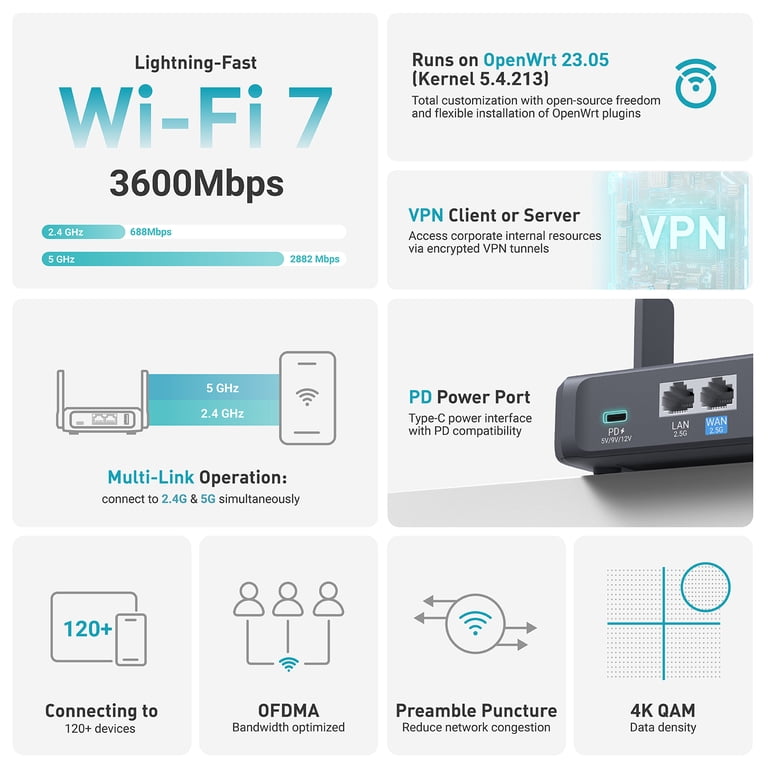
Start by looking at what the portable router offers beyond just internet access. Features like dual-band support (2.4GHz and 5GHz) ensure better connection stability and speed. Some models include advanced security options, such as VPN support and firewall protection, which are crucial for safeguarding sensitive business data.
Think about whether you need a router with multiple Ethernet ports or one that supports guest networks. These features can enhance your ability to connect various devices or separate work and personal traffic effectively. Have you ever struggled with slow Wi-Fi during a critical video call? Choosing a router with Quality of Service (QoS) can prioritize bandwidth for your most important tasks.
Compatibility With Devices
Your portable router must work smoothly with all your business gadgets. Check if it supports the latest Wi-Fi standards like Wi-Fi 5 (802.11ac) or Wi-Fi 6 (802.11ax) for faster speeds and better device handling. Compatibility isn’t just about wireless connections; some routers also offer app-based management, which can simplify network control from your smartphone or laptop.
Think about the number of devices you usually connect during work. Can the router handle multiple simultaneous connections without lag? A router that struggles with your device load can disrupt your workflow and frustrate your team. Have you tested your current setup to see where the bottlenecks are?
Battery Life And Performance
When you’re traveling or working remotely, battery life is a game-changer. Look for portable routers with long-lasting batteries that keep you online through extended meetings and busy days. Some models provide quick charging options or the ability to power the router via USB, adding flexibility.
Performance ties directly to battery efficiency. A high-performance router that drains its battery in hours won’t be practical. Consider routers with energy-saving modes or those designed specifically for mobile use. What’s your typical workday like, and how long do you need your router to last without recharging?
Setting Up Your Portable Router
Setting up a portable router is key for smooth business operations on the go. A well-configured router ensures reliable internet access for meetings, presentations, and remote work. Follow simple steps to get your device ready quickly and securely.
Initial Configuration Steps
Start by powering on the portable router and connecting it to your computer or smartphone. Open a web browser and enter the router’s default IP address, often found in the manual. Log in using default credentials, then change the admin username and password to something unique. Set your network name (SSID) to a clear, professional name that clients or employees can easily recognize.
- Connect router to power source
- Access router settings via browser
- Change default login credentials
- Set a unique network name (SSID)
Securing Your Network
Protect business data by securing your network. Use WPA3 or WPA2 encryption to keep connections safe. Create a strong Wi-Fi password with a mix of letters, numbers, and symbols. Disable features like WPS to prevent unauthorized access. Enable firewall settings to add an extra layer of protection.
- Choose WPA3 or WPA2 encryption
- Create a strong Wi-Fi password
- Disable WPS (Wi-Fi Protected Setup)
- Enable firewall and security options
Optimizing Signal Strength
Good signal strength is essential for uninterrupted business tasks. Place the router in a central location, away from walls and electronic devices. Adjust antennas for better coverage if available. Consider using Wi-Fi extenders for larger spaces. Test connection speed and move the router until you find the best spot.
- Place router centrally and elevated
- Keep away from thick walls and electronics
- Adjust antennas for wider coverage
- Use Wi-Fi extenders if needed
- Test and adjust for strongest signal
Using Portable Routers In Different Business Scenarios
Portable routers offer flexibility and connectivity in various business scenarios. They provide reliable internet access, enhancing productivity and efficiency. These devices are especially useful in situations where traditional internet connections are unavailable.
Remote Work And Telecommuting
Remote work has become common in many industries. Portable routers ensure a stable internet connection from home or remote locations. This helps employees stay connected to their teams and complete tasks efficiently. A portable router is easy to set up and use, making it a practical choice for remote workers.
On-site Client Meetings
Presentations and discussions often need a reliable internet connection. Portable routers provide seamless connectivity during on-site client meetings. They ensure uninterrupted access to online resources, enhancing the quality of the presentation. This can leave a positive impression on clients.
Travel And Business Trips
Business trips require constant connectivity for communication and work. Portable routers offer a secure internet connection in hotels, airports, or any location. This helps in accessing emails, participating in video calls, and completing other tasks efficiently. A portable router ensures that business operations continue smoothly while on the move.
Troubleshooting Common Issues
Troubleshooting common issues with a portable router can save time and reduce frustration. These devices are designed for convenience, but sometimes problems arise. Understanding how to fix basic issues helps keep your business connected and productive.
Problems often involve connection, speed, or software. Checking simple settings first often resolves most problems. This section covers key areas to check and fix.
Connectivity Problems
Check if the router is powered on and within range. Ensure the SIM card or internet source is active. Restart the router to refresh the connection.
- Verify cables and antennas are securely attached.
- Make sure the device is not in airplane mode.
- Confirm that your data plan is active and has coverage.
- Reset network settings on connected devices if needed.
Speed And Performance
Slow speeds can disrupt work. Test the speed using online tools to identify issues. Move closer to the router or to a location with better signal.
- Limit the number of connected devices to reduce load.
- Close background apps that use internet bandwidth.
- Check for physical obstructions blocking the signal.
- Use the 5GHz band for faster speeds if available.
Firmware Updates
Firmware updates improve router security and performance. Check the manufacturer’s website or app for updates regularly. Updating firmware can fix bugs and add new features.
- Download updates only from trusted sources.
- Ensure the router stays powered during the update process.
- Follow the update instructions carefully to avoid errors.
- Reboot the router after the update to apply changes.

Credit: www.amazon.com
Maximizing Productivity With Portable Routers
Portable routers can transform how you manage your business on the go. They ensure you stay connected without depending on fixed internet points. By maximizing their use, you can boost your team’s efficiency and keep operations running smoothly, no matter where you are.
Integrating With Cloud Services
Cloud services are essential for modern business workflows. Your portable router lets you access important files and applications directly from the cloud wherever you are. This means you can update documents, share presentations, or manage customer data without delay.
Think about moments when you needed to quickly retrieve a file during a client meeting. With your portable router, that file is just a few clicks away, stored safely on platforms like Google Drive or Dropbox. This instant access saves time and prevents interruptions in your work.
Collaborative Tools Access
Collaboration tools like Slack, Microsoft Teams, and Zoom require stable internet to function properly. Portable routers provide a reliable connection that supports real-time communication and teamwork. This keeps your team connected, even in remote locations or while traveling.
Imagine being able to join a video call with your team while waiting at an airport or a coffee shop. This uninterrupted access allows you to participate actively and make decisions without missing a beat. It also helps your team share updates and feedback instantly.
Maintaining Secure Connections
Security should never be compromised when using portable routers for business. Many portable routers come with built-in encryption and VPN support to protect sensitive data. You can set up password protection and firewall settings to keep unauthorized users out.
Ask yourself if your current mobile internet setup guards your business information effectively. Using a portable router with strong security features gives you peace of mind when handling client data or conducting financial transactions on the move. Always update your router’s firmware to stay ahead of potential threats.
Credit: www.walmart.com
Frequently Asked Questions
What Is A Portable Router Used For In Business?
A portable router provides secure internet on-the-go for business tasks. It enables remote work, video calls, and secure data access. Small and lightweight, it fits easily in travel bags. It boosts connectivity in areas with weak Wi-Fi or no network.
How Do Portable Routers Improve Business Productivity?
Portable routers ensure constant internet access, reducing downtime. Employees can work from anywhere with reliable connections. They support multiple devices simultaneously, enhancing teamwork. This flexibility leads to faster decision-making and uninterrupted communication.
Can Portable Routers Secure Business Data Effectively?
Yes, portable routers use advanced encryption like WPA3 to protect data. They create private networks, preventing unauthorized access. Many models include VPN support for added security. These features keep sensitive business information safe from cyber threats.
How To Set Up A Portable Router For Business Use?
Setup involves plugging in the router, connecting to a power source, and accessing the admin panel via a browser. Enter your ISP details, configure network name and password, then save settings. Most routers offer quick setup wizards for ease.
Conclusion
A portable router helps keep your business connected anywhere. It offers flexibility and saves time during travel or meetings. Small and easy to carry, it fits in any bag. Setting it up takes only a few minutes. You can share internet with your team safely and quickly.
Using this device can improve work efficiency. Try it to see how it supports your daily tasks. A simple tool with big benefits for your business.