Are you tired of weak Wi-Fi signals and dead zones in your home? Imagine having fast, reliable internet everywhere, without breaking the bank.
If you use Alexa or Google Home, you want a mesh Wi-Fi system that works seamlessly with your smart devices. The good news? You don’t have to spend a fortune to get it. You’ll discover the best mesh Wi-Fi options under $200 that will boost your home network and make your smart home run smoother than ever.
Keep reading to find the perfect fit for your needs and budget.

Credit: www.amazon.com
Benefits Of Mesh Wifi
Mesh Wifi systems are a smart choice for homes with Alexa and Google Home devices. They offer better internet connection than regular routers. You can enjoy fast and stable Wifi in every corner of your home.
Mesh Wifi under $200 is affordable and good enough for most smart homes. It helps all your devices work smoothly without interruptions or delays.
Improved Coverage
Mesh Wifi uses multiple units to spread the signal across your home. This setup covers large areas and eliminates dead spots. You get strong internet even in basements or far rooms.
This is great for homes with many rooms or thick walls. Your Alexa or Google Home device will always connect well, no matter where it is.
Seamless Connectivity
Mesh Wifi lets your devices switch smoothly from one unit to another. You do not lose connection while moving around your home. Streaming music or controlling smart devices stays easy and smooth.
This continuous connection makes voice commands to Alexa and Google Home fast and reliable. Your smart home feels more responsive and useful.
Smart Home Compatibility
Mesh Wifi systems work well with many smart home devices. They support voice assistants like Alexa and Google Home without issues. This helps your smart devices communicate quickly and clearly.
- Connect multiple smart devices easily
- Reduce delays in voice commands
- Keep smart home gadgets online all the time
Key Features To Consider
Choosing the right mesh WiFi system under $200 for Alexa and Google Home can be tricky. Focus on key features that affect your home network experience.
This guide covers speed, compatibility, setup, and security to help you decide.
Speed And Performance
Look for mesh WiFi systems that offer fast speeds and stable connections. Check for dual-band or tri-band support for better traffic handling.
- High data transfer rates for streaming and gaming
- Good coverage to eliminate dead zones
- Low latency to support smart home devices
Device Compatibility
Ensure the mesh system works well with Alexa and Google Home. It should support various devices without connection issues.
| Feature | Description | Supports Alexa | Supports Google Home |
| WiFi Standards | 802.11ac or 802.11ax | Yes | Yes |
| Smart Home Integration | Works with voice assistants | Yes | Yes |
| Device Limit | Number of devices supported | Up to 50 | Up to 50 |
Setup And Management
Choose a mesh WiFi that is easy to set up and manage. Look for apps with user-friendly controls and clear instructions.
- Mobile app for setup and control
- Automatic updates for better security
- Parental controls and guest network options
Security Features
Security keeps your network safe from threats. Check for strong encryption and automatic security updates.
| Security Feature | Benefit |
|---|---|
| WPA3 Encryption | Stronger protection for your WiFi |
| Guest Network | Keeps visitors isolated from your main network |
| Automatic Updates | Keeps system secure without manual action |
Top Budget Mesh Wifi Systems
Mesh wifi systems provide strong internet signals in every corner of your home. They work well with smart devices like Alexa and Google Home. You can find good mesh systems under $200.
This guide covers three top budget mesh wifi systems. Each system offers reliable coverage and easy setup. They help keep your smart home devices connected.
System A Highlights
System A delivers stable wifi with simple installation. It supports voice assistants like Alexa and Google Home. The system covers medium-sized homes well.
- Dual-band wifi for good speed
- Easy app control
- Works with all major smart assistants
- Includes two nodes for wide coverage
- Affordable price under $200
System B Highlights
System B offers strong wifi signals and good device support. It works well with Alexa and Google Home devices. Setup is quick and user-friendly.
| Feature | Description |
| Speed | Up to 1.2 Gbps |
| Coverage | Up to 3,000 sq ft |
| Nodes Included | 3 |
| Smart Home Support | Alexa and Google Home |
| Price | Under $200 |
System C Highlights
System C is a budget-friendly choice for smart homes. It offers good wifi coverage and easy controls. Alexa and Google Home devices connect without issues.
- Plug-and-play setup
- Stable connection for multiple devices
- Supports voice commands via Alexa and Google Home
- Compact design fits any room
Compatibility With Alexa And Google Home
Mesh WiFi systems under $200 can work well with Alexa and Google Home devices. These systems provide strong internet coverage for your smart home.
Connecting your mesh WiFi to voice assistants helps you control devices using simple voice commands. This guide explains how to set up and use these systems.
Voice Control Integration
Most mesh WiFi routers support voice control with Alexa and Google Home. You can ask your voice assistant to check network status or restart your router.
- Enable the mesh WiFi skill or action in your voice assistant app.
- Link your mesh WiFi account to Alexa or Google Home.
- Use commands like “Alexa, check internet speed” or “Hey Google, restart WiFi.”
- Manage connected devices through voice commands.
Smart Home Automation
Mesh WiFi helps smart home devices stay connected without drops. This supports smooth automation routines with Alexa or Google Home.
| Feature | Benefit |
| Seamless Coverage | Smart devices stay online everywhere |
| Easy Setup | Quickly connect new smart devices |
| Network Stability | Fewer interruptions during automation |
| Voice Control Support | Control devices hands-free |
Troubleshooting Tips
If you face issues using mesh WiFi with Alexa or Google Home, try these tips to fix problems fast.
- Restart your mesh WiFi router and voice assistant device.
- Check your internet connection speed and stability.
- Update firmware for both mesh WiFi and voice assistant.
- Re-link your mesh WiFi account in the voice assistant app.
- Place the mesh WiFi nodes closer for better signal strength.
User Reviews And Ratings
Many users look for mesh WiFi systems under $200 that work well with Alexa and Google Home. These systems help improve WiFi coverage in homes and support smart assistants. User reviews give real feedback on how these devices perform.
This section shares what users say about performance, ease of use, and value for money. These insights help buyers make smart choices.
Performance Feedback
Users often report good WiFi coverage and stable connections with mesh systems under $200. Many say their smart home devices work smoothly with Alexa and Google Home. Some mention occasional slowdowns when many devices connect at once.
- Strong signal in most rooms
- Fast enough for streaming and calls
- Works well with voice assistants
- Some lag during heavy use
Ease Of Use
Most buyers find these mesh WiFi systems easy to set up. The apps are simple to use and guide users step-by-step. Connecting Alexa or Google Home is usually quick and trouble-free.
- Simple app setup process
- Clear instructions for smart assistant links
- Easy to add extra nodes
- Good for beginners
Value For Money
Users say mesh WiFi systems under $200 offer good value. They like the balance between price and features. Some wish for better speed or range, but most feel the cost matches the quality.
- Affordable price for home WiFi
- Includes support for Alexa and Google Home
- Good features for the cost
- Some models have fewer advanced options
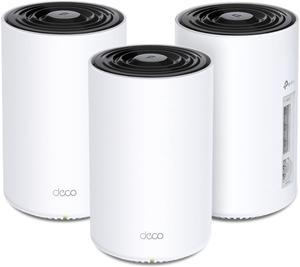
Credit: www.newegg.com
Tips For Optimizing Mesh Wifi
Mesh Wifi systems offer seamless internet coverage across your home. They work well with Alexa and Google Home devices. Here are tips to get the best performance under $200.
Optimizing your Mesh Wifi ensures better connectivity and speed. Let’s explore strategies to enhance your network.
Placement Strategies
Proper placement of your mesh nodes is crucial. It can improve signal strength and coverage.
- Place nodes in central locations to cover more area.
- Avoid placing nodes near metal objects or microwaves.
- Ensure nodes are within range of each other for best performance.
Firmware Updates
Regular firmware updates keep your Mesh Wifi system running smoothly. They improve security and add new features.
Check for updates monthly to ensure you have the latest version. This helps maintain optimal performance.
Network Security
Securing your Mesh Wifi network is vital. It protects your devices and personal information.
Consider these security practices:
- Use a strong and unique password for your network.
- Enable network encryption like WPA3.
- Disable unused features to reduce vulnerability.
Following these tips will help keep your network safe from unauthorized access.

Credit: www.yahoo.com
Frequently Asked Questions
What Is The Best Mesh Wifi Under $200 For Alexa?
The best mesh WiFi under $200 for Alexa offers strong coverage and easy Alexa integration. Look for models supporting voice control and seamless smart home connectivity to enhance your Alexa experience.
Can Google Home Work With Mesh Wifi Under $200?
Yes, Google Home works well with mesh WiFi under $200. These networks provide stable, fast internet, improving Google Home’s response times and smart device control throughout your home.
How Does Mesh Wifi Improve Smart Home Devices?
Mesh WiFi extends coverage and reduces dead zones. It ensures smart home devices like Alexa and Google Home stay connected without interruptions or lag, enhancing overall performance.
Are Budget Mesh Wifi Systems Reliable For Smart Homes?
Budget mesh WiFi systems under $200 can be reliable if they offer good speed and coverage. Choose well-reviewed models with strong security and compatibility for smart home setups.
Conclusion
Choosing a mesh WiFi system under $200 can boost your smart home experience. These devices work well with Alexa and Google Home. They help keep your connection strong in every room. Setup is simple, even for beginners. Enjoy smoother streaming, faster downloads, and better calls.
A good mesh WiFi brings comfort and ease to daily life. Invest in one that fits your budget and needs. Reliable internet makes smart devices more useful and fun. Your home network deserves a smart upgrade today.