Are you tired of dead zones and slow internet in parts of your home? Choosing between a mesh WiFi system and a range extender can be confusing.
Both promise to boost your WiFi, but which one really fits your needs? You’ll discover the key differences that affect your connection speed, coverage, and overall experience. By the end, you’ll know exactly what to pick to enjoy smooth, reliable internet in every corner of your space.
Keep reading to find the solution that works best for you.

Credit: www.amazon.com
Mesh Wifi Basics
Understanding the basics of Mesh Wifi can help you decide if it’s the right choice for your home or office network. Unlike traditional routers or range extenders, Mesh Wifi creates a seamless web of connectivity that covers every corner of your space. Let’s look at what makes Mesh Wifi different and why it might be worth considering.
How Mesh Networks Work
Mesh networks use multiple devices called nodes to provide continuous wifi coverage. Each node communicates with others to share the internet connection evenly. This setup means your device automatically connects to the strongest signal without any interruptions as you move around.
Think about walking through your house and never losing your connection—Mesh Wifi makes that possible. Instead of relying on a single router, you have a system that works together to cover dead spots.
Key Components Of Mesh Wifi
- Primary Node:This is the main device connected to your modem, acting as the gateway for internet access.
- Secondary Nodes:These devices spread throughout your home, extending the network’s reach.
- Backhaul Connection:A dedicated communication link between nodes that keeps data moving smoothly without clogging your wifi.
Each component plays a role in maintaining strong and stable wifi. If you’ve ever struggled with spotty internet in certain rooms, these parts work together to fix that.
Benefits Over Traditional Routers
Mesh Wifi offers several clear advantages over traditional routers and range extenders. First, it eliminates the need to switch networks manually when you move around your home. Your devices stay connected to the best node, reducing drops and slowdowns.
Second, installation is often simpler. Instead of fiddling with multiple extenders, you just place nodes strategically and let the system optimize itself. Plus, many mesh systems come with user-friendly apps that let you manage settings easily.
Does your current wifi struggle with coverage or speed in certain rooms? Mesh Wifi could be the solution that makes your connection reliable everywhere you need it.
Range Extender Essentials
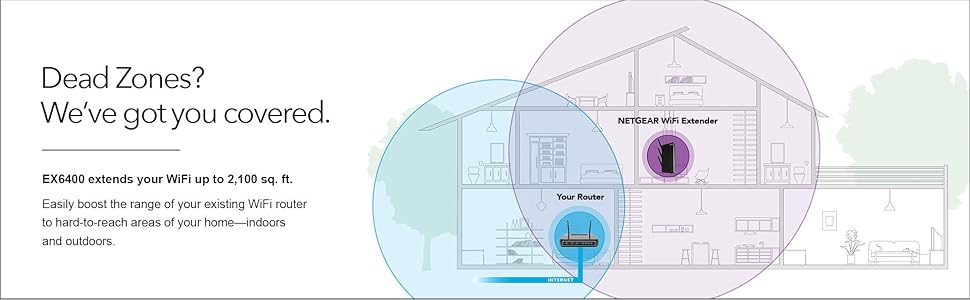
Range extenders boost Wi-Fi signals to cover dead zones in your home. They catch your main router’s signal and rebroadcast it. This helps areas with weak or no Wi-Fi get better coverage. Range extenders are simple tools to improve Wi-Fi reach without complex setup.
They work well for smaller spaces or spots far from the router. Understanding their basics helps decide if they fit your needs.
Functionality Of Range Extenders
Range extenders receive Wi-Fi from your main router. They amplify and resend this signal to areas with weak coverage. This creates a second network with a different name or the same name but slower speeds. The device must be placed where it still gets a strong signal from the router. Too far from the router, and the extender will give poor speeds.
Extenders do not create a new Wi-Fi system. They only repeat the existing signal. This can cause some delay or slow speeds compared to the original network.
Types Of Range Extenders
- Plug-in Extenders:Small devices that plug directly into wall outlets. Easy to install and move around.
- Desktop Extenders:Larger units that sit on a desk or shelf. Often have better antennas for stronger signals.
- Powerline Extenders:Use home electrical wiring to send internet signals. Connect one unit near the router, another where coverage is needed.
- Mesh Extenders:Part of mesh systems but can also work as standalone range extenders. They offer better handoff between units.
Common Use Cases
- Extending Wi-Fi to far rooms or basements with poor coverage.
- Improving Wi-Fi in garages or outdoor spaces.
- Supporting devices that need a steady Wi-Fi signal but are far from the router.
- Temporary solutions during events or gatherings to boost coverage.
Performance Comparison
Comparing the performance of Mesh WiFi and Range Extenders helps you choose the best fit. Both improve your wireless network but differ in how they handle coverage, speed, and stability. Understanding these differences can guide your decision for a stronger home network.
Coverage And Signal Strength
Mesh WiFi systems use multiple nodes placed around the home. They create a large, seamless network covering every corner. This means fewer dead zones and better signal strength throughout the house.
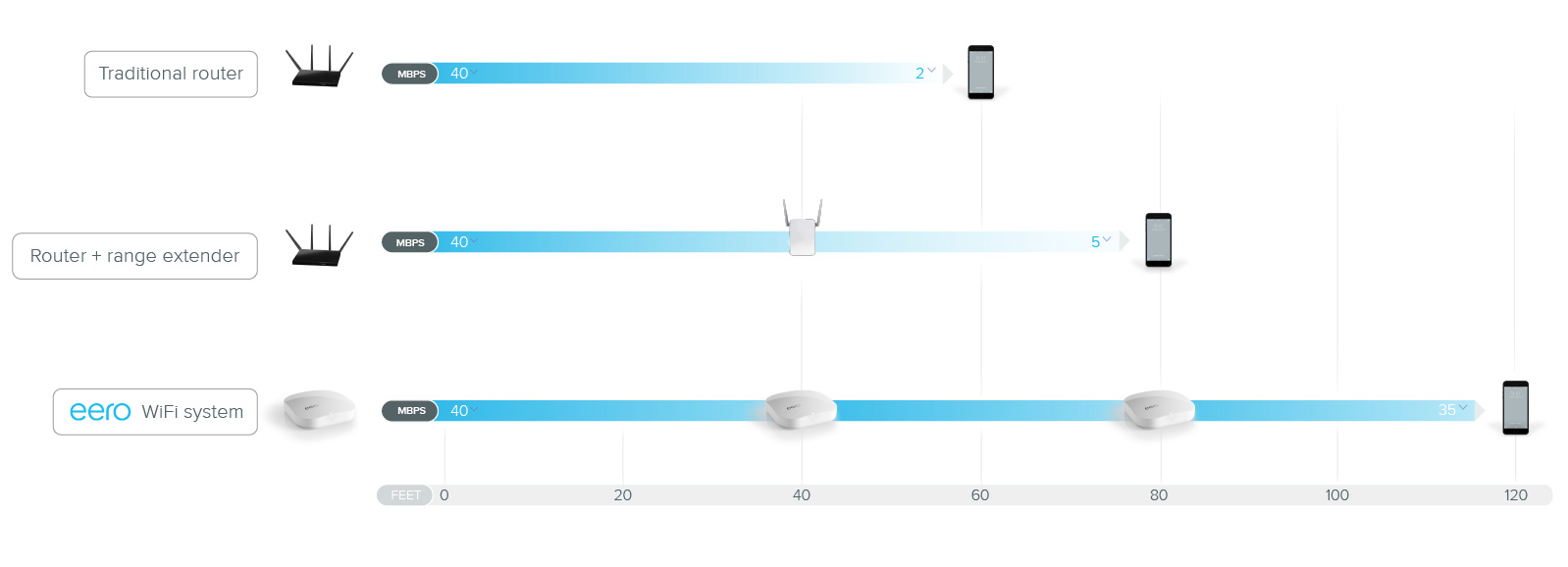
Range extenders boost the existing WiFi signal by repeating it. They extend coverage but may create weak spots where the signal is repeated. The signal strength near the extender can be lower than with mesh nodes.
Speed And Bandwidth
Mesh WiFi maintains high speed across all connected devices. It uses smart routing to manage traffic efficiently. This results in faster internet and less slowdown with many users.
Range extenders often cut the speed in half. They share bandwidth between the main router and the extended signal. This can cause slower internet speeds, especially far from the router.
Reliability And Stability
Mesh networks offer stable connections by automatically switching nodes. They keep devices connected to the strongest signal. This reduces interruptions and dropped connections.
Range extenders may cause unstable connections. They depend on the original router’s signal quality. If the signal is weak, the extender’s connection may drop or lag.
Setup And Installation
Mesh WiFi systems connect multiple devices for seamless coverage and simple setup. Range extenders are easier to install but may slow your network. Both improve WiFi reach, but mesh offers smoother performance across large areas.
Setting up a new internet system at home can be challenging. You want it easy and seamless. Let’s explore how mesh WiFi and range extenders differ in setup and installation.Ease Of Setup
Mesh WiFi systems offer a simple setup process. Most come with a mobile app to guide you. Just plug in the nodes and follow the app instructions. This user-friendly method appeals to many. Range extenders require a bit more effort. You often need to access a web interface. Then, connect the extender to your existing router. Some models might offer a WPS button for easier setup.Compatibility With Existing Devices
Mesh WiFi systems work well with most devices. They replace your existing router entirely. This means they are compatible with modern gadgets. Range extenders connect to your current router. Compatibility depends on your existing router’s standards. Check if your router supports the same frequency band as the extender.Maintenance Requirements
Mesh WiFi systems require minimal maintenance. Updates are often automatic. This ensures your network runs smoothly without manual intervention. Range extenders might need occasional updates. You’ll need to check for firmware updates regularly. This ensures optimal performance and security.Cost Analysis
Understanding the cost differences between Mesh Wifi systems and Range Extenders helps you make a smart choice for your home network. The price you pay upfront and over time can affect your satisfaction and budget. Let’s break down what you should expect financially from each option.
Initial Investment
Mesh Wifi systems usually require a higher upfront cost. A typical starter kit with two or three nodes can range from $150 to $400. On the other hand, range extenders often come at a lower price, typically between $30 and $100.
Think about your space size too. If you have a large home, buying multiple extenders might add up. Sometimes, investing in one mesh system could be more straightforward and cost-effective than buying several extenders.
Long-term Expenses
Range extenders may save you money initially but can incur hidden costs later. They often need to be replaced or upgraded more frequently due to slower speeds and compatibility issues. Mesh systems tend to last longer and receive software updates that keep your network running smoothly.
Also, consider the time and effort you spend troubleshooting connection drops with extenders. That can be a costly inconvenience. Are you ready to fix your WiFi repeatedly, or do you prefer a set-it-and-forget-it solution?
Value For Money
Value isn’t just about the price tag but what you get for your money. Mesh Wifi offers consistent coverage and faster speeds across your home, which can boost productivity and entertainment quality. Range extenders might cover dead zones but often at reduced speed and reliability.
Ask yourself: Is saving a little now worth struggling with weak signals later? For many, the convenience and performance of mesh systems justify the higher cost. Your choice depends on how much you prioritize hassle-free connectivity and future-proof technology.
Credit: blog.eero.com
Ideal Scenarios For Each
Choosing between mesh WiFi and range extenders depends heavily on your specific needs and environment. Each has strengths that make it better suited for certain situations. Understanding these ideal scenarios helps you get the most reliable and fast internet connection in your space.
When To Choose Mesh Wifi
Mesh WiFi works best if you have a large home or office with multiple floors. It creates a single, seamless network that covers every corner without dropping signals. If you often move around while using WiFi or have many devices connected at once, mesh systems keep your connection smooth.
Think about your last time trying to watch a video in the backyard or a far room. Did the signal lag or cut out? Mesh WiFi solves this by using multiple nodes that communicate with each other, so you don’t lose speed or connection as you move.
When Range Extenders Make Sense
Range extenders are ideal if you only have a small dead zone or weak spot in your current WiFi coverage. They are easy to set up and cost less than mesh systems. If your home is medium-sized and your existing router is decent, an extender can boost the signal exactly where you need it.
Imagine your router is in the living room, but the kitchen or guest room has weak WiFi. Adding a range extender nearby can fill that gap without replacing your whole system. However, keep in mind extenders often create a new network name, which might require manual switching on devices.
Hybrid Solutions
Sometimes neither mesh nor extenders alone solve your problem perfectly. In such cases, a hybrid approach can work well. You might use a mesh system for broad coverage and add extenders in tricky spots like basements or garages.
This combo allows you to customize your network without overspending. It also lets you upgrade gradually—start with extenders, then add mesh nodes as needed. Have you considered testing your WiFi signal strength in various rooms? Understanding those weak points guides which solution to try first.
Troubleshooting Tips
Troubleshooting your home network can feel like solving a puzzle without the picture on the box. Whether you’re using Mesh Wifi or a Range Extender, knowing the specific issues you might face helps you fix problems faster. Let’s break down common challenges and share ways to get the best performance from your setup.
Common Issues With Mesh Wifi
Mesh Wifi systems are designed to cover large areas seamlessly, but that doesn’t mean they’re immune to hiccups. One frequent issue is nodes losing connection to each other, which breaks the network mesh and reduces coverage.
Another problem can be slow speeds at certain nodes caused by interference from walls or electronic devices. Sometimes, firmware updates don’t install correctly, leading to instability or random disconnections.
Have you noticed devices switching between nodes and causing temporary drops? This handoff can be tricky if nodes aren’t optimally placed or if your system’s settings aren’t tailored for your home layout.
Common Issues With Range Extenders
Range extenders often struggle with signal degradation because they rebroadcast the existing signal, sometimes at half the original speed. You might experience lag or buffering especially if the extender is too far from the main router.
Another challenge is network confusion—devices might connect to the extender when closer to the router, causing inconsistent speeds. Also, some extenders create separate network names, which can make switching between networks a hassle.
Have you ever found your extender’s placement awkward, like in the middle of a hallway with no power outlet? Limited placement options often reduce their effectiveness.
Optimization Strategies
- Place nodes or extenders strategically:Avoid walls, thick doors, and appliances that block signals. Try midpoints with clear line-of-sight.
- Update firmware regularly:This fixes bugs and improves performance. Don’t skip updates even if your system seems fine.
- Use apps or tools for placement:Many mesh systems offer apps that suggest ideal spots based on signal strength.
- Adjust channel settings:Interference from neighboring networks can slow down your connection. Changing Wi-Fi channels may help.
- Limit connected devices:Too many devices can overload your network. Prioritize critical devices or upgrade your plan if needed.
Are you tracking how your devices move between nodes or extenders? Understanding this can reveal weak spots and help you refine your setup for smoother browsing and streaming.
Credit: www.amazon.com
Frequently Asked Questions
What Is The Main Difference Between Mesh Wifi And Range Extender?
Mesh Wifi creates a single seamless network with multiple nodes. Range Extenders boost signal from one router, creating separate networks. Mesh systems provide consistent speeds and coverage, while extenders may cause speed drops and dead zones.
Which Is Better For Large Homes: Mesh Wifi Or Range Extender?
Mesh Wifi is better for large homes. It offers wider, uniform coverage and supports many devices smoothly. Range Extenders may leave gaps and reduce internet speed in bigger areas.
How Does Mesh Wifi Improve Internet Speed Compared To Extenders?
Mesh Wifi uses multiple nodes to distribute traffic efficiently. It reduces congestion and maintains faster speeds. Extenders often halve bandwidth, causing slower connections and interruptions.
Are Mesh Wifi Systems More Expensive Than Range Extenders?
Yes, Mesh Wifi systems generally cost more upfront. They offer advanced features and better performance. Range Extenders are cheaper but may need multiple units for large coverage.
Conclusion
Choosing between mesh WiFi and a range extender depends on your needs. Mesh systems cover large homes smoothly with one network name. Range extenders are cheaper but may slow your internet. Consider your budget, home size, and device use. A strong, steady WiFi signal makes work and fun easier.
Think about what fits your space best. Both options improve WiFi but in different ways. Make a choice that keeps you connected without hassle. Simple and steady internet is key for every home.