Are you wondering if it’s time to upgrade your home or office WiFi from WiFi 6 to WiFi 6E? You’re not alone.
With new technology constantly emerging, it’s easy to feel overwhelmed and unsure if the jump is worth it. Imagine faster speeds, less interference, and a smoother connection—sounds great, right? But is WiFi 6E really going to make a noticeable difference for you?
You’ll discover the key benefits, costs, and whether the upgrade fits your needs. Keep reading to find out if making the switch will transform your internet experience or if you’re better off sticking with what you have.
Wifi 6 Vs Wifi 6e
Wifi 6 and Wifi 6E are both new wifi standards. They improve speed and reduce delays compared to older versions.
Many people wonder if they should upgrade from Wifi 6 to Wifi 6E. This guide explains the main differences between them.
Frequency Differences
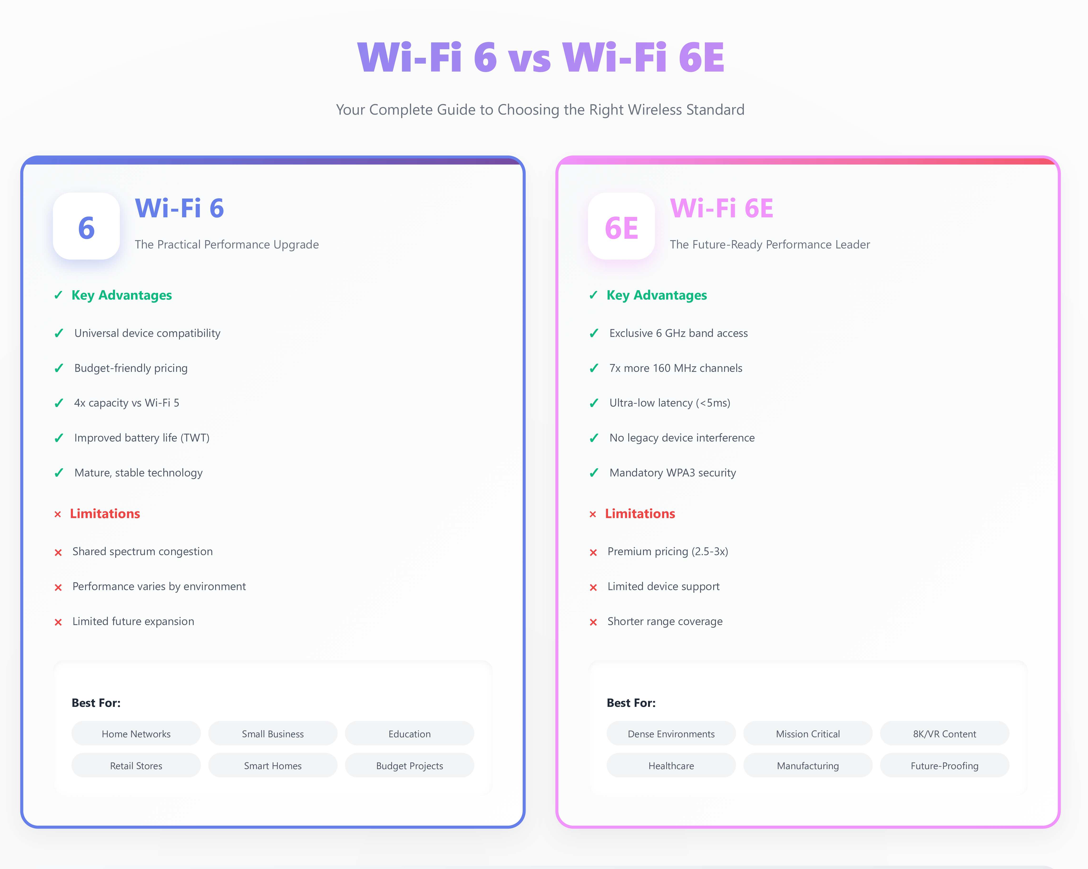
Wifi 6 uses the 2.4 GHz and 5 GHz frequency bands. Wifi 6E adds a new 6 GHz band. This extra band gives more space for devices to connect.
The 6 GHz band has less interference. It means fewer problems from other devices. This helps keep your connection stable.
- Wifi 6: 2.4 GHz and 5 GHz bands
- Wifi 6E: 2.4 GHz, 5 GHz, and 6 GHz bands
- 6 GHz band offers more channels and less interference
Speed And Performance
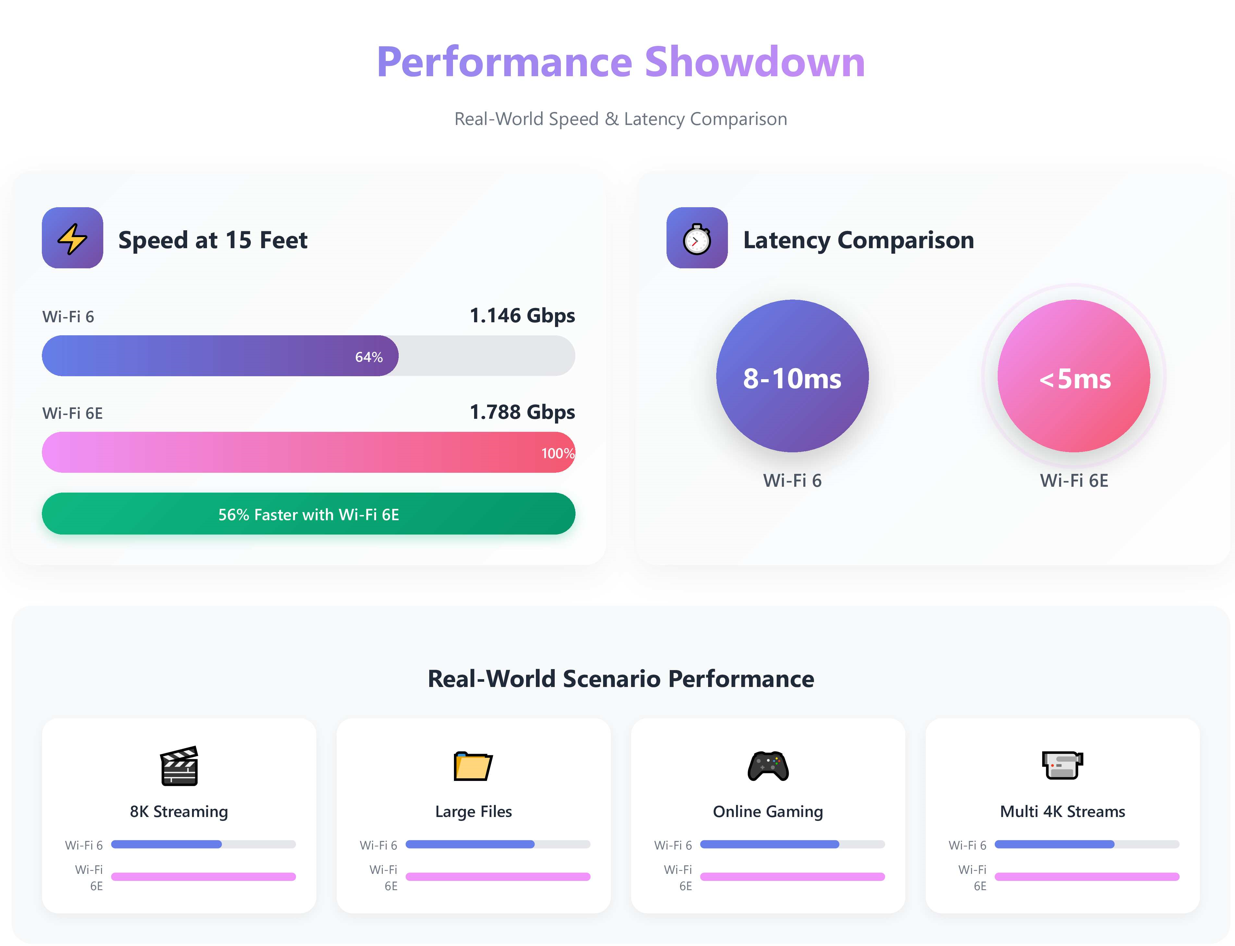
Both Wifi 6 and Wifi 6E can deliver fast speeds. Wifi 6E can be faster because it uses the new 6 GHz band. This band is less crowded.
Wifi 6E supports more channels at wider widths. This means it can handle more data at once. It is better for busy networks.
- Wifi 6 offers great speed on 2.4 GHz and 5 GHz
- Wifi 6E adds faster speeds on the 6 GHz band
- Wifi 6E handles more devices with less delay
Device Compatibility
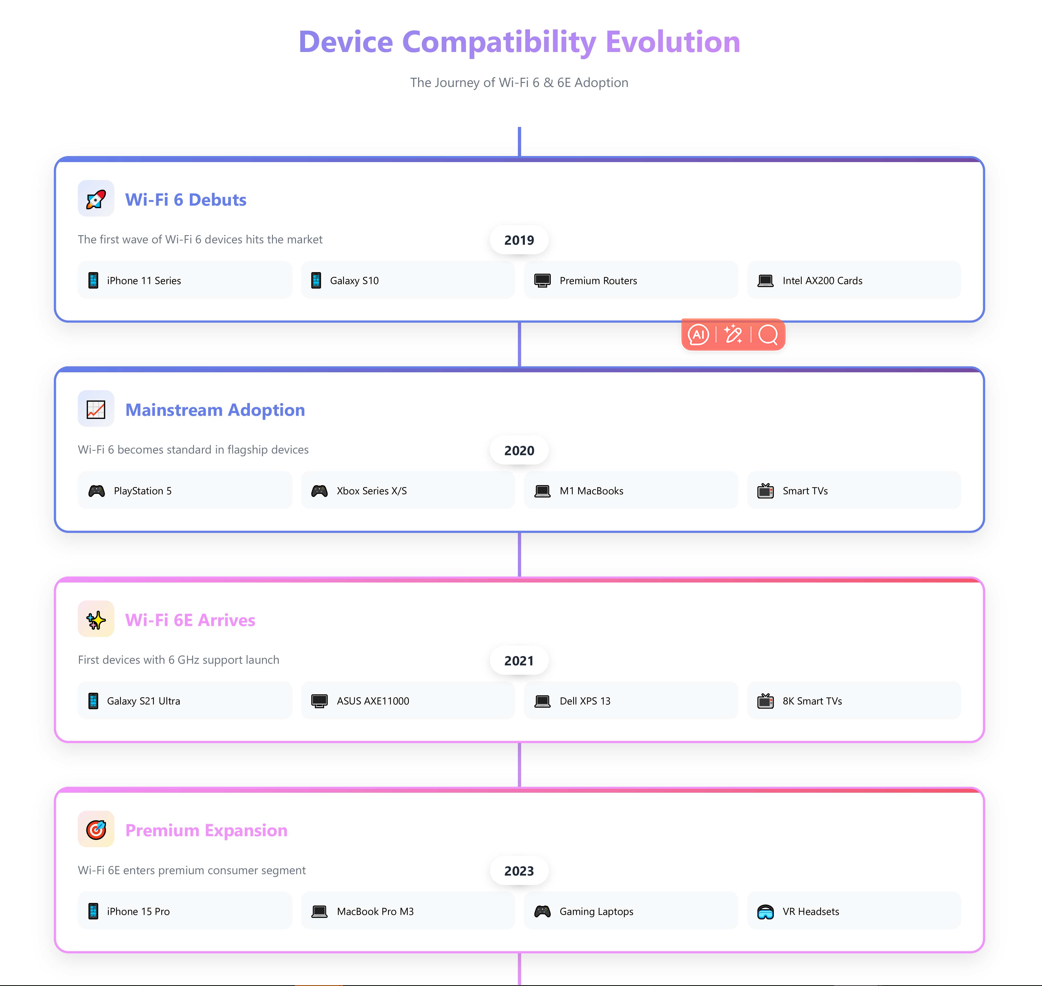
Most new devices support Wifi 6. Only newer devices support Wifi 6E because they need 6 GHz radios. Older devices cannot use Wifi 6E.
To use Wifi 6E, your router and device must both support the 6 GHz band. Without this, you will only get Wifi 6 speeds.
- Wifi 6 works with many current devices
- Wifi 6E needs new devices with 6 GHz support
- Check device specs before upgrading
Credit: www.lb-link.com
Advantages Of Wifi 6e
Wifi 6E is the latest update to Wifi technology. It builds on Wifi 6 with new features. Many people wonder if upgrading is worth it.
This article explains the main advantages of Wifi 6E. It focuses on new frequency bands, less interference, and faster response times.
Access To 6 Ghz Band
Wifi 6E uses a new 6 GHz frequency band. This band is larger than the 2.4 GHz and 5 GHz bands. It offers more space for devices to connect.
The 6 GHz band supports higher data rates and wider channels. This means faster internet speeds for devices that use Wifi 6E.
- More channels available for use
- Supports wider channels up to 160 MHz
- Less interference from older devices
Reduced Congestion
Wifi 6E reduces congestion on Wifi networks. It uses the new 6 GHz band that has fewer devices. This lowers traffic on the network.
With less congestion, your devices face fewer delays. This improves the overall Wifi experience, especially in busy areas like offices or apartments.
- Less crowded channels mean better performance
- More devices can connect smoothly
- Improves network reliability in dense areas
Improved Latency
Wifi 6E offers lower latency compared to older Wifi versions. Latency is the time it takes for data to travel between devices.
Lower latency helps with activities like video calls, online games, and streaming. It makes these tasks feel faster and smoother.
- Faster response times for connected devices
- Better performance in real-time applications
- Improves user experience for video and gaming
When To Consider Upgrading
Deciding to upgrade from Wifi 6 to Wifi 6E depends on your specific needs.
This guide helps you understand when an upgrade makes sense.
Network Environment
Your current network setup affects the benefits of Wifi 6E.
- If you have many devices, Wifi 6E can reduce congestion.
- Wifi 6E works well in crowded areas with many networks.
- Large homes or offices can gain better coverage with Wifi 6E.
- If your environment has many walls, the new 6 GHz band may help.
Device Support
Check if your devices support Wifi 6E before upgrading.
| Device Type | Wifi 6 Support | Wifi 6E Support |
| Smartphones | Many | Few models |
| Laptops | Common | Limited |
| Routers | Wide range | New models only |
| Smart Home Devices | Some | Rare |
Future-proofing Needs
Think about your internet use and plans for new devices.
- If you plan many new devices soon, Wifi 6E is worth it.
- For heavy streaming or gaming, Wifi 6E offers more bandwidth.
- Wifi 6E may keep your network faster for longer.
- Consider Wifi 6E if you want the latest technology now.
Credit: www.lb-link.com
Potential Drawbacks Of Wifi 6e
Wifi 6E is the newest wireless standard that adds a new frequency band. It promises faster speeds and less interference. Still, there are some drawbacks to consider before upgrading.
This article covers three key drawbacks: limited range, cost implications, and compatibility issues. Knowing these can help you decide if Wifi 6E fits your needs.
Limited Range
Wifi 6E uses the 6 GHz band, which has less range than 2.4 GHz and 5 GHz bands. This means its signals do not travel as far or pass through walls well.
Users might find they need more access points to cover the same area. This can limit Wifi 6E’s use in large homes or offices.
Cost Implications
Upgrading to Wifi 6E can be costly. New routers and devices that support the 6 GHz band usually cost more than Wifi 6 hardware.
| Item | Typical Cost Range |
| Wifi 6 Router | $100 – $250 |
| Wifi 6E Router | $200 – $400 |
| Wifi 6 Device | $150 – $300 |
| Wifi 6E Device | $250 – $500 |
Compatibility Issues
Not all devices support Wifi 6E. Many older phones, laptops, and smart home gadgets work only on 2.4 GHz or 5 GHz bands.
- Older devices cannot connect to 6 GHz networks
- Some devices may need driver updates
- Mixing Wifi 6 and Wifi 6E devices can cause network complexity
- Limited device options may reduce benefits of upgrading
Setting Up Wifi 6e
Wifi 6E is the latest in wireless technology. It offers faster speeds and better performance. Upgrading to Wifi 6E can enhance your network experience.
Setting it up requires some new equipment and a few configuration steps. Let’s explore what you need to do to get started with Wifi 6E.
Router Requirements
To use Wifi 6E, you need a compatible router. Not all routers support Wifi 6E, so check your model.
- Ensure the router is Wifi 6E compatible.
- Update the router’s firmware to the latest version.
- Place the router in a central location for optimal coverage.
Device Configuration
Devices must also support Wifi 6E to connect to this network. Check your device settings.
If your device is compatible, connect it to the new Wifi 6E network. Enter the network password if prompted.
Security Features
Security is crucial when setting up Wifi 6E. It helps protect your network from unauthorized access.
Enable the following security settings:
- WPA3 encryption for better security.
- Set a strong password for your Wifi network.
- Disable WPS to prevent unauthorized device connections.
Real-world Use Cases
WiFi 6E adds a new 6 GHz band to the existing WiFi 6 technology. This gives more channels and less interference. It can help in places with many devices or high data needs.
Deciding to upgrade depends on how you use your network. Below are some common real-life uses that show the differences between WiFi 6 and WiFi 6E.
Gaming And Streaming
WiFi 6E can reduce lag and buffering by offering faster speeds and lower latency. This is useful for online games and 4K or 8K video streaming.
- Less congestion means smoother gameplay
- Supports more devices without slowdowns
- Better video call quality for streaming
Smart Home Integration
Smart homes often have many devices connected at once. WiFi 6E’s extra spectrum helps keep these devices running well. It reduces interference for sensors, cameras, and assistants.
| Device Type | WiFi 6 Performance | WiFi 6E Performance |
|---|---|---|
| Security Cameras | Good for HD video | Smoother 4K video streaming |
| Smart Lights | Works well with some delay | Faster response times |
| Voice Assistants | Clear voice commands | Less interference, clearer audio |
Enterprise Applications
In offices, many users and devices share WiFi. WiFi 6E provides more space and speed for business tasks. It helps video meetings, file sharing, and cloud work.
- Supports more simultaneous connections
- Reduces network delays during peak hours
- Improves security with newer protocols
Comparing Wifi 6e With Upcoming Standards
Wifi 6E is an upgrade over Wifi 6. It includes access to the 6 GHz band. This allows for faster speeds and less congestion. But, new standards are on the horizon.
Understanding these advancements can help you make informed decisions. Let’s explore what Wifi 7 might offer and what you should consider before upgrading.
Wifi 7 Prospects
Wifi 7 is expected to bring significant improvements. It aims for higher data rates and better performance. Here are some key features that might be included:
- Enhanced speed for faster downloads
- Lower latency for smoother gaming
- Improved efficiency in crowded areas
Investment Considerations
Upgrading to Wifi 6E or waiting for Wifi 7 can be a tough choice. Consider your current network needs and budget. Here are some factors to think about:
| Factor | Consideration |
| Cost | Wifi 6E devices are more affordable now. |
| Compatibility | Check if your devices support Wifi 6E. |
| Future-proof | Wifi 7 might offer longer-term benefits. |
Each option has its pros and cons. Weigh these factors to decide the best time to upgrade your network.
Credit: www.lb-link.com
Frequently Asked Questions
What Are The Main Differences Between Wifi 6 And Wifi 6e?
WiFi 6E extends WiFi 6 by adding the 6 GHz band. This offers less interference, faster speeds, and more channels for better performance.
Is Wifi 6e Compatible With My Current Devices?
WiFi 6E requires new hardware that supports the 6 GHz band. Older devices cannot use WiFi 6E but work on WiFi 6 or older standards.
Will Upgrading To Wifi 6e Improve My Internet Speed?
Upgrading to WiFi 6E can boost speed if your environment supports 6 GHz and your devices are compatible. Otherwise, improvements may be minimal.
Does Wifi 6e Reduce Network Congestion Effectively?
Yes, WiFi 6E reduces congestion by offering more channels and less interference on the 6 GHz band, improving network stability and capacity.
Conclusion
Upgrading to WiFi 6E offers faster speeds and less interference. It uses a new frequency band with more space. This can help in crowded areas or busy homes. But WiFi 6 still works well for many users. Check your devices and internet needs before deciding.
The choice depends on your budget and usage. WiFi 6E could be worth it if you want the latest tech. Otherwise, staying with WiFi 6 remains a good option. Choose what fits your situation best.