Are you getting the most out of your tri band router’s security settings? With more devices connecting to your network, making sure your Wi-Fi is safe and fast is crucial.
You might think your default settings are enough, but hackers are always looking for weak spots. You’ll discover simple steps to lock down your tri band router and protect your personal information. Keep reading to take control of your network security and enjoy worry-free internet every day.
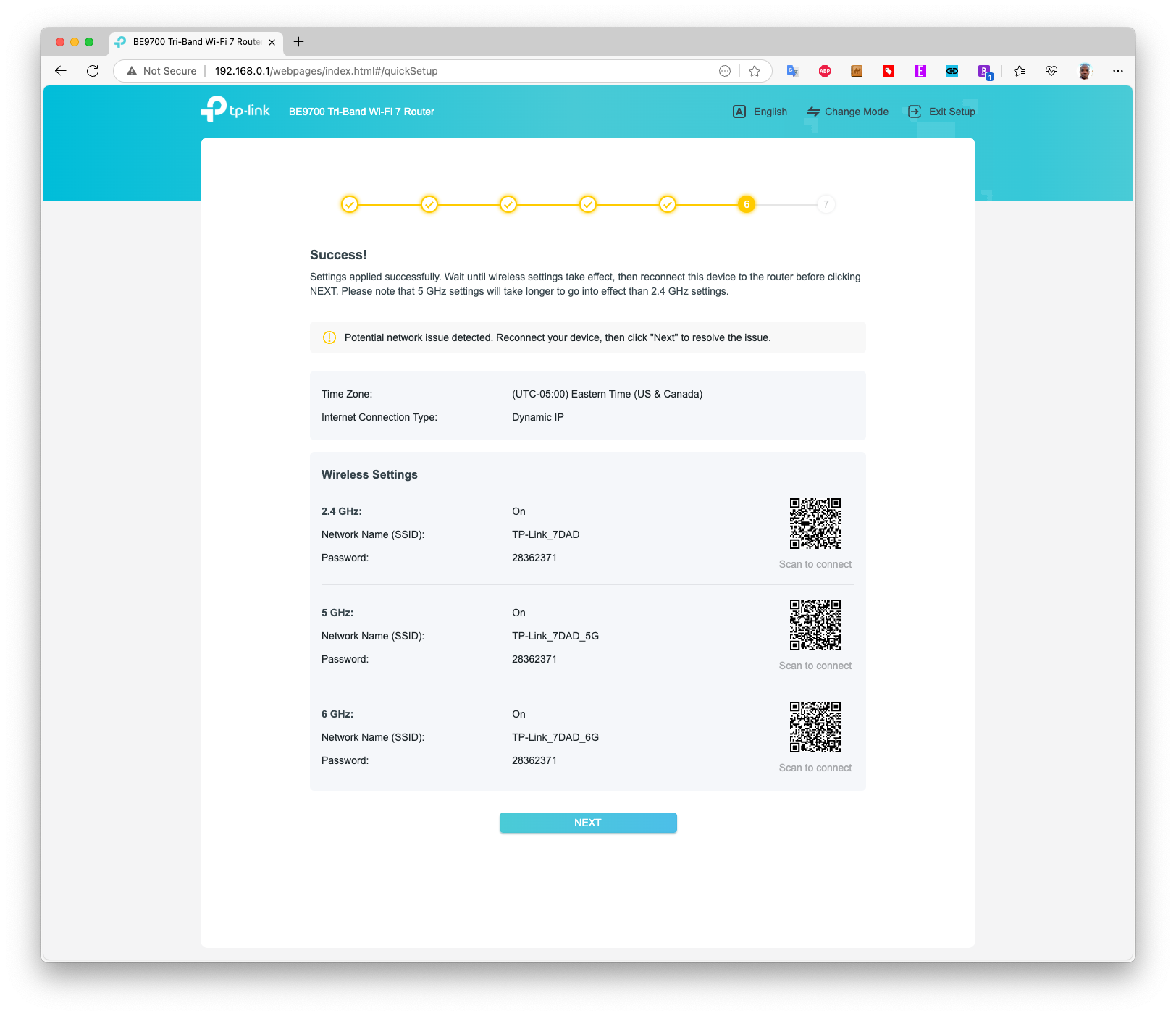
Credit: www.tomshardware.com
Tri Band Router Basics
Understanding the basics of a tri band router helps improve your home or office network. These routers offer more wireless bands than regular models. This means better performance and less interference. Knowing how they work is key to setting up strong security.
What Is A Tri Band Router
A tri band router has three separate wireless bands. Usually, it includes one 2.4 GHz band and two 5 GHz bands. Each band creates its own network channel. This setup allows many devices to connect without slowing down. It is useful for busy networks with multiple users.
Benefits Of Tri Band Technology
- More devices can connect smoothly at once
- Reduced wireless interference and congestion
- Faster speeds for streaming and gaming
- Better coverage across larger areas
- Improved network stability and reliability

Credit: www.esecurityplanet.com
Essential Security Features
Security is vital for tri band routers to protect your network. Essential features help keep hackers out and data safe. They also control who accesses your internet. Setting up strong security stops unauthorized users from causing harm.
Wpa3 Encryption
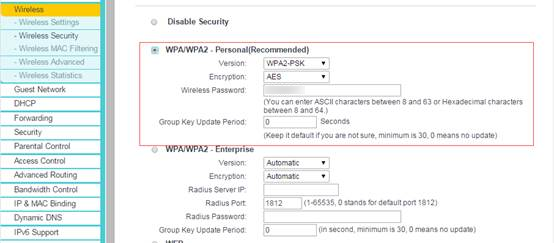
WPA3 is the newest security standard for Wi-Fi. It offers stronger protection than older versions. This encryption makes it hard for attackers to crack your password. WPA3 also improves security on public networks. It helps keep your personal data private.
Firewall Protection
A firewall blocks unwanted traffic from entering your network. It acts as a shield between your devices and the internet. Firewalls stop hackers and malware from accessing your router. Many tri band routers have built-in firewall settings. You can customize these rules to fit your needs.
Guest Network Setup
Guest networks give visitors internet access without exposing your main network. This keeps your devices and data separate from guests. You can set limits on speed and usage for guests. Enabling a guest network increases overall security. It prevents unauthorized access to your personal files.
Configuring Strong Passwords
Configuring strong passwords is one of the simplest yet most effective ways to protect your tri band router from unauthorized access. Weak passwords make it easy for hackers to break in and misuse your network. Taking time to set strong, unique passwords can save you from future headaches and keep your online activities safe.
Creating Complex Passwords
Complex passwords should mix uppercase letters, lowercase letters, numbers, and special characters. Aim for at least 12 characters to make guessing difficult. Avoid using common words or predictable sequences like “password123” or “admin2024”.
Think about using a passphrase made of unrelated words, like Blue!Tiger7$Coffee, which is easier to remember yet hard to crack. You can also try tools like password managers to generate and store complex passwords securely. Have you ever tried creating a password that’s both strong and easy to recall? It’s easier than you think with the right approach.
Changing Default Credentials
Most tri band routers come with default usernames and passwords that are publicly known. Leaving these unchanged invites trouble because hackers scan for these defaults first. Always log into your router’s admin panel and change these credentials immediately after setup.
Use a unique username instead of the default “admin” when possible. This adds an extra layer of security. Remember, your router’s security is only as strong as the weakest password you use. How often do you update your router login details?
Credit: www.tp-link.com
Firmware Updates
Firmware updates are crucial for keeping your tri-band router secure. These updates fix security vulnerabilities and improve router performance. Ignoring firmware updates can expose your network to threats. Regular updates ensure your router operates efficiently and safely.
Importance Of Regular Updates
Regular updates protect your router from new security threats. Hackers continuously find ways to exploit network vulnerabilities. Manufacturers release updates to counter these threats. An updated router is less likely to be compromised. This reduces the risk of unauthorized access to your network. Updates also enhance the overall performance of your router. They can improve speed, reliability, and connectivity. Staying current with updates helps maintain a stable internet connection.
How To Update Router Firmware
Updating router firmware is straightforward. Begin by checking your router’s model and version. Visit the manufacturer’s website for the latest firmware. Download the update file to your computer. Access your router’s admin panel through a web browser. Log in using your admin credentials. Navigate to the firmware update section. Upload the downloaded file and start the update process. Wait for the router to install the firmware. Do not turn off the router during this time. Once completed, reboot the router to apply changes.
Advanced Security Settings
Advanced security settings on a tri band router provide extra protection for your home network. These settings help control who connects and what devices can communicate. Using these options reduces the risk of hacking and keeps data safe.
Most routers offer ways to limit access and isolate devices. This keeps your network secure and organized. Adjusting these settings is simple and improves your Wi-Fi safety.
Enabling Network Isolation
Network isolation stops devices on the same Wi-Fi from seeing each other. It creates separate spaces for guest devices and main devices. This blocks unauthorized sharing and spying between devices.
Turn on network isolation in your router’s settings. This keeps your personal devices safe from visitors or unknown gadgets.
Mac Address Filtering
MAC address filtering lets you allow or block devices based on their unique ID. Each device has a MAC address, like a digital fingerprint. You can create a list of allowed devices to stop others from joining.
This adds a strong layer of control. Only trusted devices connect to your tri band router. This setting helps prevent unwanted access and limits network traffic.
Disabling Wps
WPS (Wi-Fi Protected Setup) is a quick way to connect devices. But it can also be a security risk. Turning off WPS stops hackers from exploiting weak points in your router.
Disabling WPS forces connections through passwords only. This makes your network harder to break into. Check your router’s security settings to find and disable WPS.
Monitoring And Managing Devices
Keeping a close eye on the devices connected to your tri band router is essential for maintaining a secure network. Monitoring and managing devices not only helps you spot unfamiliar connections but also lets you control who accesses your Wi-Fi. This proactive approach prevents bandwidth hogging and blocks potential threats before they cause trouble.
Checking Connected Devices
Start by logging into your router’s admin panel. Most routers display a list of connected devices with details like IP address, device name, and MAC address.
Review this list regularly. You might recognize your phone, laptop, and smart home gadgets, but unknown devices could be intruders.
Ask yourself: Do all these devices belong to you or your family? If not, it’s time to take action.
Blocking Unauthorized Access
Once you spot a suspicious device, your router’s settings usually allow you to block it by MAC address. This prevents that device from reconnecting without your permission.
Consider setting up a guest network too. This keeps visitors off your main network, reducing the risk of unauthorized access.
Don’t forget to change your Wi-Fi password regularly. A strong password is your first line of defense against unauthorized users.
Securing Remote Access
Securing remote access to your tri band router is crucial for protecting your network from unwanted intrusions. Allowing access from outside your home or office network can expose sensitive data and control settings to hackers. Taking clear steps to safeguard this access helps you keep control and maintain your privacy.
Using Vpns With Tri Band Routers
Setting up a VPN (Virtual Private Network) on your tri band router adds a strong layer of security. A VPN encrypts the data traveling between your device and the router, making it much harder for attackers to intercept or tamper with your connection.
Many tri band routers support VPN client or server modes. Running a VPN server on your router lets you connect remotely as if you were on your local network. This means you can securely access files, printers, or smart home devices from anywhere without exposing your router’s management interface.
Have you ever wondered how hackers exploit open remote connections? VPNs stop them by creating a secure tunnel. Even if someone tries to snoop, they will only see encrypted data, not your actual information.
Disabling Remote Management
Remote management lets you configure your tri band router from outside your network, but it’s a risky feature if left enabled without protections. Disabling remote management entirely can block all external access to your router’s settings, reducing the attack surface significantly.
If you don’t need to access your router remotely, turning off this feature is one of the simplest and most effective security moves. It prevents unauthorized users from reaching your control panel via the internet, which is a common target for cyberattacks.
Consider this: how often do you really need to change your router settings while away? If the answer is rarely or never, disabling remote management removes a major vulnerability without impacting your daily network use.
Troubleshooting Security Issues
Troubleshooting security issues on your tri band router is crucial for safe internet use. Problems may arise due to incorrect settings or software bugs. Identifying and fixing these issues quickly keeps your network secure.
Common Security Problems
- Weak passwords that are easy to guess
- Outdated firmware with security holes
- Unauthorized devices connected to the network
- Incorrect encryption settings like using WEP instead of WPA3
- Disabled firewall or security features
- Interference from nearby networks causing connection drops
Check these problems regularly to maintain strong protection. Use strong, unique passwords and update firmware often.
Resetting Router Settings Safely
Resetting your router can fix many security issues. It restores default settings and removes unauthorized changes.
Before resetting, write down current settings like Wi-Fi name and password. This helps you set up again easily.
Press and hold the reset button on the router for 10 seconds. Wait for the device to restart fully.
After reset, change the default admin password immediately. Set a strong Wi-Fi password and enable WPA3 encryption.
Update the router firmware to the latest version. Enable the firewall and other security features again.
Frequently Asked Questions
What Are The Best Security Settings For Tri Band Routers?
Enable WPA3 encryption, use a strong password, and update firmware regularly. Disable WPS and guest networks when not needed. These steps protect your tri band router from unauthorized access and cyber threats effectively.
How Do I Change The Wi-fi Password On A Tri Band Router?
Log into your router’s admin panel via its IP address. Navigate to the wireless settings section, then enter a new, strong password. Save changes and reconnect your devices using the updated password for secure access.
Why Is Wpa3 Important For Tri Band Router Security?
WPA3 offers stronger encryption and better protection against hacking attempts. It improves data privacy and secures your network from brute-force attacks. Using WPA3 enhances overall security for your tri band router’s wireless connections.
How Can I Secure Guest Networks On Tri Band Routers?
Enable a separate guest network with its own password. Limit guest access to local devices and sensitive data. Regularly update the guest network password to maintain strong security and prevent unauthorized use.
Conclusion
Securing your tri band router keeps your network safe and fast. Change default passwords and enable strong encryption. Regular updates protect against new threats. Use guest networks to separate visitors. Monitor connected devices often. These simple steps help protect your data and privacy.
Stay alert and keep your settings updated. Safe browsing starts with a secure router.