You’ve probably heard a lot about mesh WiFi systems and how they can improve your home internet. But before you decide to invest, it’s important to know the other side of the story.
What if mesh WiFi isn’t as perfect as it sounds? What if it brings problems you haven’t thought about yet? You’ll discover the key disadvantages of mesh WiFi. By understanding these downsides, you can make a smarter choice for your home and avoid surprises that could slow down your connection or drain your budget.
Keep reading to find out what you need to watch out for.
Coverage Limitations
Even though mesh WiFi systems are designed to extend coverage across larger areas, they still have some coverage limitations that can affect your internet experience. Understanding these limits can help you set realistic expectations and optimize your setup.
Dead Spots And Interference
Dead spots can still appear in your home despite having multiple mesh nodes. Walls, furniture, and even appliances can block or weaken signals, creating areas with poor connectivity.
Interference from other electronic devices, like microwaves and cordless phones, can also disrupt the mesh network. Have you noticed your WiFi acting up near certain devices? This interference can cause your connection to drop or slow down unexpectedly.
Distance Impact On Signal Strength
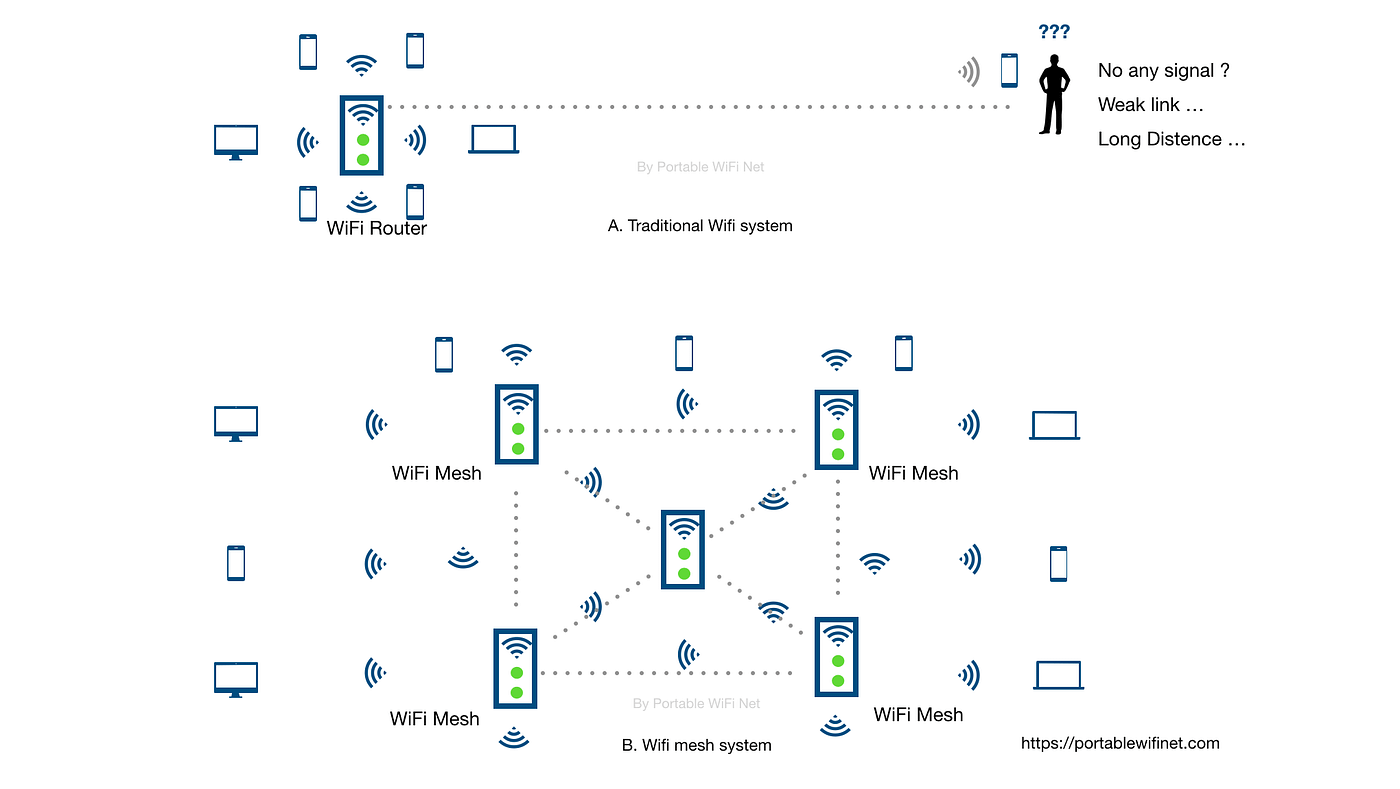
The distance between mesh nodes plays a crucial role in maintaining a strong signal. If nodes are placed too far apart, the signal strength will weaken, reducing internet speeds and reliability.
You might think adding more nodes solves this, but placing them too far or too close can both cause issues. Finding the right balance requires some trial and error. How far apart are your nodes currently, and could adjusting their placement improve your coverage?
Credit: medium.com
Cost Concerns
Mesh WiFi systems offer strong coverage but often come with higher costs. These expenses can be a barrier for many users. Understanding the cost concerns helps in making a smart choice for your home network.
Higher Initial Investment
Mesh WiFi kits usually cost more than traditional routers. You buy multiple devices instead of one. This raises the upfront price significantly. For some households, this initial cost feels too high. The price depends on the number of nodes and brand quality. Cheaper models may lack features or performance.
Ongoing Maintenance Expenses
Maintaining a mesh network may add extra costs over time. Firmware updates might require regular attention. Replacement parts or additional nodes increase spending. Some advanced models need subscription fees for extra features. Technical support or professional help can also add to expenses. These ongoing costs make mesh WiFi less budget-friendly for some users.
Complex Setup And Management
Managing a mesh WiFi system can sometimes feel more complicated than it should be. While these networks promise seamless coverage, setting them up and keeping them running smoothly often requires more effort than traditional routers. Understanding the challenges involved can help you decide if a mesh system fits your tech comfort level.
Challenging Configuration
Setting up a mesh WiFi isn’t always straightforward. You might face multiple steps involving connecting nodes, adjusting their placement, and syncing them properly. If you’re not tech-savvy, the initial configuration can quickly become frustrating.
Some mesh systems ask you to create accounts or install specific apps, which might not always work perfectly on every device. Have you ever struggled just to get your devices talking to each other? This setup phase can be a barrier for many users.
Firmware Updates And Compatibility
Keeping your mesh network updated is crucial but can be tricky. Firmware updates don’t always roll out uniformly to every node. This may cause temporary connectivity issues or inconsistencies in performance.
Additionally, different nodes might have varied hardware or software versions, leading to compatibility problems. Imagine one part of your home suddenly losing connection because a firmware update didn’t sync properly—frustrating, right?
Have you considered how much time and patience you’re willing to invest in maintaining your mesh system? Without regular attention, these networks can become more of a headache than a help.
Performance Issues
Mesh WiFi systems promise seamless internet coverage. But they can have performance issues. This can affect your online experience. It’s important to know these drawbacks.
Bandwidth Reduction
Mesh networks split your internet bandwidth. Each node passes data to another. This can slow down your network. The more nodes, the more bandwidth is used. This can limit your internet speed. Especially if many devices connect at once. This is a common issue with mesh WiFi.
Latency Problems
Latency refers to the delay in data transmission. Mesh systems can increase latency. Data travels through multiple nodes. Each node adds a slight delay. This can affect real-time applications. Like online gaming or video calls. Users may notice lag or buffering. This can be frustrating.
Security Vulnerabilities
Security vulnerabilities can often be overlooked when setting up a mesh WiFi system, but they are critical to consider. Since mesh networks expand the coverage by adding multiple nodes, each additional device could become a potential weak spot for hackers. Understanding these vulnerabilities helps you protect your home network more effectively.
Potential Entry Points
Every node in your mesh network acts like a door to your entire system. If one node has weak security or outdated software, attackers can exploit it to access sensitive data or disrupt your connection.
Think about your last experience with a public WiFi hotspot. You probably avoided entering personal information because you knew it wasn’t secure. Now imagine if someone could tap into your home WiFi just as easily through an unsecured mesh node.
To reduce risks, regularly check the security settings on all nodes. Change default passwords, enable encryption, and isolate guest networks to keep strangers out.
Firmware Exploits
Firmware controls how each mesh device operates, and outdated firmware can introduce serious security flaws. Hackers often search for known vulnerabilities in older versions to gain unauthorized access.
One time, a friend ignored firmware updates for months and faced repeated connectivity issues caused by malware exploiting those weaknesses. This could have been avoided with timely updates.
Make updating your mesh system’s firmware a routine task. Most manufacturers release patches to fix vulnerabilities, so staying current is your best defense.

Credit: www.xcitium.com
Device Compatibility
Device compatibility plays a crucial role in the effectiveness of a mesh WiFi system. Some devices may struggle to connect or perform well due to outdated technology or software limitations. This can cause slower speeds, dropped connections, or difficulty joining the network.
Mesh WiFi networks use modern standards that older devices might not fully support. This gap can lead to frustrating user experiences, especially in homes with mixed device ages and types.
Older Devices Limitations
Older devices often lack support for the latest WiFi standards like WiFi 5 or WiFi 6. This limits their ability to connect efficiently to mesh systems. As a result, these devices may:
- Experience slower internet speeds
- Face frequent disconnections
- Fail to take advantage of mesh network features
These issues reduce overall network performance and user satisfaction.
Smart Home Integration Challenges
Smart home devices depend heavily on stable WiFi connections. Some mesh systems may not fully support older smart devices or certain brands. This causes:
- Difficulty pairing devices with the network
- Inconsistent device responsiveness
- Limited control over smart home gadgets
Such challenges can hinder the smooth operation of home automation setups.
Environmental Factors
Environmental factors can affect the performance of mesh WiFi systems. These influences often reduce the signal strength and coverage. Understanding these factors helps in setting realistic expectations.
Physical Obstacles
Walls, floors, and furniture block mesh WiFi signals. Thick or dense walls cause more signal loss. Large metal objects and appliances can also interrupt the connection. Open spaces allow better signal flow. The more obstacles, the weaker the WiFi signal.
Signal Absorption By Materials
Certain materials absorb WiFi signals more than others. Concrete, brick, and stone reduce signal strength significantly. Glass and wood absorb less but still affect the signal. Water, such as fish tanks or pipes, can weaken the mesh network. Knowing the materials around your home helps in placing nodes smartly.

Credit: www.netgear.com
Frequently Asked Questions
What Are Common Drawbacks Of Mesh Wifi Systems?
Mesh WiFi can be costly compared to traditional routers. Setup complexity might confuse beginners. Some systems may reduce speed due to signal hopping.
Does Mesh Wifi Affect Internet Speed Negatively?
Yes, mesh networks can cause slight speed drops. Data hops between nodes may introduce latency. However, this is minimal with quality systems.
Are Mesh Wifi Systems Difficult To Set Up?
Setup can be more complex than single routers. Users must configure multiple nodes properly. Many brands offer user-friendly apps to simplify installation.
Can Mesh Wifi Have Security Risks?
Mesh WiFi can be vulnerable if not updated. Each node is a potential access point. Regular firmware updates and strong passwords are essential.
Conclusion
Mesh WiFi systems offer good coverage but come with some downsides. They can be costly and tricky to set up. Sometimes, devices may slow down due to signal sharing. Not all homes need this type of network. Think about your needs and budget first.
Simple routers might work just fine. Weigh the pros and cons before buying. This helps avoid surprises later on. Choose what fits your home and internet habits best.