Are you tired of dead zones and slow internet in your home? A Mesh WiFi system might be the solution you need.
Imagine having strong, reliable WiFi that reaches every corner of your house without interruptions. Sounds great, right? You’ll discover exactly what a Mesh WiFi system is, how it works, and why it could transform your internet experience. Keep reading to learn how to say goodbye to frustrating connections and enjoy seamless browsing wherever you are.
Mesh Wifi Basics
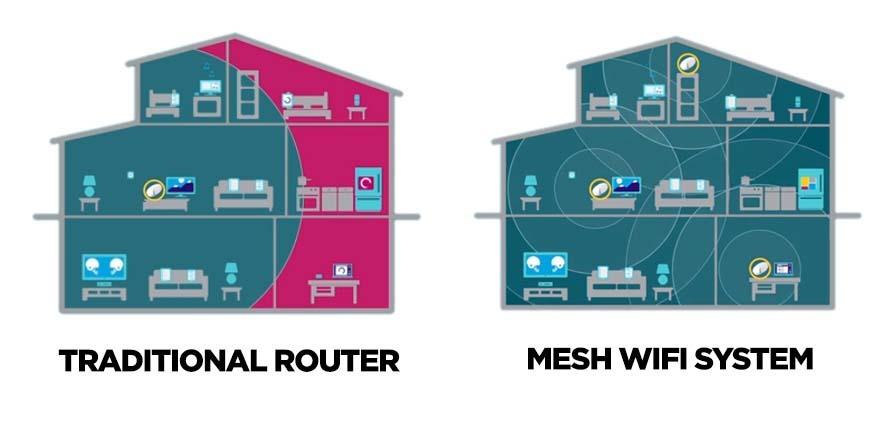
Mesh WiFi systems provide a simple way to extend wireless coverage across large spaces. They work by using multiple devices that work together to create a single, seamless network. This setup helps reduce dead zones and keep your connection strong everywhere in your home or office.
How Mesh Wifi Works
A mesh WiFi system uses several nodes placed around your space. Each node communicates with the others to share the internet signal. Devices automatically connect to the closest node for the best speed. This creates a strong, continuous network with no interruptions.
Key Components
- Main Router:Connects to your modem and sends the internet signal.
- Satellite Nodes:Spread out to cover larger areas with WiFi.
- Backhaul Connection:Links nodes to each other, often wirelessly or via Ethernet.
Comparison With Traditional Routers
| Feature | Mesh WiFi | Traditional Router |
|---|---|---|
| Coverage | Wide, with multiple nodes | Limited, single device |
| Signal Strength | Consistent throughout area | Weak in distant rooms |
| Setup | Simple with app guidance | Basic, but sometimes tricky |
| Network Name | One name for all nodes | One name per device or extender |

Credit: www.netgear.com
Benefits Of Mesh Wifi
Mesh Wifi systems bring several clear advantages that can transform your home or office internet experience. They go beyond just providing a signal; they ensure your connection is reliable, widespread, and adaptable to your changing needs. Understanding these benefits helps you decide if mesh technology fits your lifestyle or workspace.
Improved Coverage
One of the biggest perks of a mesh Wifi system is its ability to cover large areas without dead spots. Unlike traditional routers that struggle with walls and floors, mesh nodes work together to blanket your entire space with strong signals.
Imagine streaming a movie in your backyard or working in a distant room without losing connection. This extended coverage means you can move freely while staying connected, which is especially useful in bigger homes or offices.
Stable Connections
A mesh system constantly monitors and directs your device to the best signal source, reducing interruptions. This stability is crucial if you rely on video calls, gaming, or smart home devices that need a steady connection.
Ever experienced a sudden drop during an important call? Mesh networks minimize those moments by automatically switching to the strongest node without you noticing. This seamless handoff keeps your internet smooth and dependable.
Easy Network Expansion
Adding more nodes to a mesh Wifi system is straightforward and hassle-free. If you move to a larger space or find a new area with weak signal, you can simply add another node without complicated setups.
This flexibility means your network grows with you. You don’t have to buy a whole new system or deal with confusing configurations—just plug in a new node and enjoy better coverage instantly.
Choosing The Right Mesh System
Choosing the right mesh wifi system can improve your home internet experience. It helps eliminate dead zones and keeps your connection stable. Picking the correct system depends on several important factors. Consider your space size, device types, and budget. These details guide you to the best choice for your needs.
Coverage Area Needs
Measure the total area where you want wifi coverage. Large homes or offices need more nodes for full coverage. Smaller spaces may work well with fewer devices. Think about walls and floors that block signals. More obstacles need stronger or extra nodes. Check the system’s coverage range before buying.
Device Compatibility
Confirm the mesh system supports all your devices. Most work with smartphones, laptops, and smart home gadgets. Some systems pair better with certain brands or technologies. Look for compatibility with your internet service and devices. Ensure easy setup and smooth connection for all equipment.
Budget Considerations
Set a budget before choosing a mesh wifi system. Prices vary based on coverage, speed, and brand. Basic systems suit small areas and fewer devices. Premium options offer faster speeds and more features. Balance cost with your needs for the best value. Remember, investing in a good system saves frustration later.
Setting Up A Mesh Network
A mesh WiFi system uses multiple devices to spread internet evenly across your home. It helps eliminate dead zones and keeps your connection strong everywhere. Setting up is simple and improves WiFi coverage effectively.
Setting up a mesh network can enhance your home internet experience. It offers seamless coverage throughout your space. Understanding the setup process is key for optimal performance.Placement Tips
Position the main router centrally in your home. This helps distribute the signal evenly. Avoid placing it in corners or behind large objects. Keep it off the floor for better signal strength. Place additional nodes where the signal weakens. Ensure there’s a clear line of sight between nodes.Installation Steps
Begin by downloading the mesh system’s app. Follow the app instructions to connect the main router. Connect the main router to your modem using an Ethernet cable. Power on the router and wait for it to sync. Add additional nodes using the app. Position each node and sync it with the main router.Optimizing Performance
Ensure the firmware is updated regularly. This keeps your network secure and efficient. Limit interference by placing nodes away from microwaves or cordless phones. Adjust settings for devices that need priority. Consider enabling parental controls for family safety. Regularly check the app for performance insights.Troubleshooting Common Issues
Troubleshooting common issues with mesh WiFi systems helps keep your network stable. These systems improve coverage but can face problems like drops and slow speeds. Knowing how to fix these issues saves time and boosts performance.
Connection Drops
Connection drops occur when devices lose signal from the mesh nodes. Check if nodes are too far apart or blocked by walls. Place nodes closer or in open areas for better signal strength.
Restart your mesh system to clear temporary glitches. Ensure the firmware is up to date for improved stability. Avoid interference from other electronics like microwaves and cordless phones.
Slow Speeds
Slow speeds can happen due to many devices using the network at once. Limit heavy downloads or streaming during peak hours. Move nodes closer to areas where speed is slow.
Check if your internet plan supports your speed needs. Upgrade firmware to fix bugs that might slow down your system. Use a wired connection for devices needing faster speeds.
Device Compatibility Problems
Some devices may not connect well with mesh WiFi systems. Verify your device supports the WiFi standards used by the mesh system. Update device software to improve compatibility.
Reset the device’s network settings and try reconnecting. Check the mesh system’s settings for any access controls blocking devices. Use guest networks for less compatible devices.

Credit: www.pcmag.com
Future Of Mesh Wifi
The future of mesh WiFi looks bright and full of potential. This technology will grow beyond just improving internet speed. It will become a core part of smart homes and new tech advances. Mesh WiFi systems will serve many new purposes, making life easier and more connected.
Integration With Smart Homes
Mesh WiFi will connect seamlessly with smart home devices. Lights, locks, cameras, and thermostats will work smoothly together. This will create a safer and more efficient home environment. Users will control many devices from one app without lag or dropouts. Mesh networks will support more devices without losing speed or strength.
Advancements In Technology
New technologies will make mesh WiFi faster and more reliable. Features like AI will help optimize signals automatically. The system will learn usage patterns and improve coverage. Better security measures will protect homes from cyber threats. Future mesh WiFi will use less power, helping save energy.
Expanding Use Cases
Mesh WiFi will move beyond homes to offices, schools, and public spaces. It will support remote work and online learning better. Outdoor mesh networks will cover parks and events. Smart cities will use mesh WiFi to connect sensors and cameras. This will boost safety, traffic control, and public services.
Credit: kb.pineapple.net.au
Frequently Asked Questions
What Is A Mesh Wifi System?
A mesh WiFi system uses multiple devices to create one seamless wireless network. It improves coverage and reduces dead zones. Each node communicates with others to extend WiFi range throughout your home or office. This setup offers consistent and fast internet everywhere.
How Does Mesh Wifi Differ From A Router?
Unlike a single router, mesh WiFi uses several nodes that work together. This creates a larger coverage area without signal drops. Mesh systems are ideal for big or multi-story spaces. They provide a more reliable connection than traditional routers.
Can Mesh Wifi Improve Internet Speed?
Yes, mesh WiFi can enhance internet speed by reducing congestion. It intelligently routes traffic through the best node available. This minimizes interference and boosts overall performance. Users experience smoother streaming, gaming, and browsing throughout their space.
Is Mesh Wifi Easy To Set Up?
Mesh WiFi systems are designed for easy setup with user-friendly apps. Most models include step-by-step instructions and automatic updates. You don’t need technical skills to install or manage the network. This makes mesh WiFi accessible for everyone.
Conclusion
A mesh WiFi system spreads internet all around your home. It uses several devices to cover dead zones. This means fewer drops and better speeds everywhere. Setting it up is simple and user-friendly. It fits well in big or multi-story houses.
With a mesh system, streaming and browsing become smooth. It’s a smart choice for steady, strong WiFi. Consider it if you want reliable internet everywhere. Easy to use, effective, and built for comfort. Mesh WiFi helps keep your devices connected all the time.