Are you tired of lag ruining your gaming experience? Imagine playing your favorite game without sudden slowdowns or interruptions.
That’s where QoS in a gaming router comes in. But what exactly is QoS, and how can it make your connection smoother and faster? If you want to take control of your internet traffic and boost your gaming performance, keep reading.
This guide will help you understand QoS in simple terms and show you how to use it to get the edge you need.
Credit: medium.com
Role Of Qos In Gaming
Quality of Service (QoS) plays a crucial role in shaping your gaming experience by managing how your router handles internet traffic. It prioritizes gaming data over other types of network activity, ensuring smoother gameplay and reduced lag. Understanding how QoS works can help you get the most out of your gaming router and avoid frustrating interruptions.
How Qos Enhances Gaming Experience
QoS boosts your gaming by giving priority to gaming packets over less critical traffic, like downloads or video streaming. This means your game data reaches its destination faster, reducing delays and improving responsiveness.
Imagine you’re in a heated multiplayer match, and someone in your house starts streaming a movie. Without QoS, your game might lag or disconnect. With QoS enabled, your router automatically favors your gaming traffic, keeping your connection stable.
Many gaming routers let you customize QoS settings. You can specify which devices or games get priority, so you stay in control. Have you ever noticed a sudden lag spike when others use the Wi-Fi? QoS can prevent that.
Common Network Issues Affecting Gamers
Gamers often face problems like high latency, packet loss, and jitter that disrupt gameplay. These issues can make your character freeze, misfire, or even cause disconnections during critical moments.
High latency means delays in your commands reaching the game server. Packet loss happens when some data packets fail to arrive, causing erratic behavior in-game. Jitter refers to inconsistent delays that make your connection unpredictable.
Other devices using the network simultaneously can worsen these problems. Streaming videos, large downloads, or video calls consume bandwidth, leaving less for your game. QoS helps by managing this traffic, but identifying the root cause is essential.
Credit: helpdeskgeek.com
Types Of Qos Techniques
Quality of Service (QoS) in gaming routers uses different techniques to manage network traffic. These techniques help ensure smooth gameplay by reducing lag and avoiding interruptions. Each method controls data flow in unique ways to prioritize gaming packets over other types of traffic.
Traffic Prioritization
Traffic prioritization assigns higher priority to gaming data packets. This means gaming traffic moves faster than other internet data. The router identifies gaming packets and sends them first. This reduces delays and keeps the game responsive. It prevents other apps from slowing down your game.
Bandwidth Allocation
Bandwidth allocation reserves specific portions of internet speed for gaming. It limits how much bandwidth other devices or apps can use. This ensures your game always has enough internet speed. The router splits bandwidth based on set rules. This avoids network congestion during peak use.
Packet Scheduling
Packet scheduling controls the order in which data packets are sent. It arranges packets to reduce wait times for gaming data. The router uses algorithms to decide which packet to send next. This keeps gameplay smooth by minimizing data delays. It balances all network traffic effectively.
Setting Up Qos On Gaming Routers
Setting up QoS on gaming routers enhances your online play experience. It helps manage traffic and reduces lag by prioritizing gaming data. This setup ensures smooth gameplay even with many devices connected.
Accessing Router Qos Settings
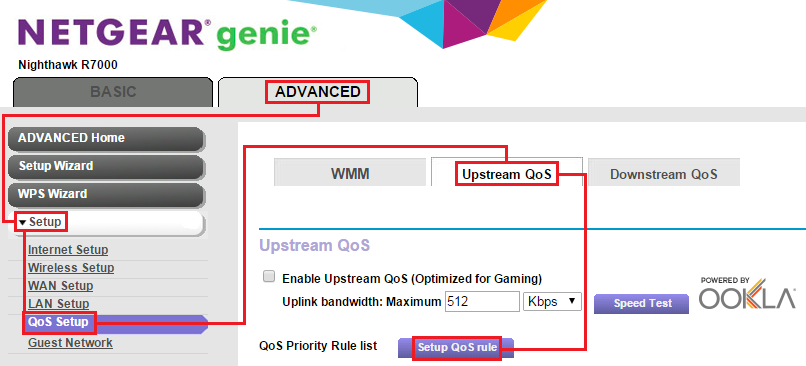
Start by opening your router’s admin page. Type the router’s IP address in a browser. Common addresses are 192.168.1.1 or 192.168.0.1.
Log in with your username and password. Look for the QoS or Traffic Control section. This option is usually under Advanced Settings or Network Settings.
Configuring Priorities For Gaming Devices
Identify your gaming devices by their IP or MAC addresses. Add these devices to the priority list in the QoS settings.
Set their priority level to high or highest. This tells the router to give these devices faster data flow.
Save changes to apply the new priority rules immediately.
Customizing Bandwidth Limits
Limit bandwidth for non-gaming devices to free up speed. Specify upload and download limits in the QoS menu.
Assign a fixed amount of bandwidth to gaming devices. This stops other devices from using all the internet speed.
Adjust these settings based on your internet speed and number of devices.

Credit: www.youtube.com
Optimizing Qos For Different Games
Quality of Service (QoS) in a gaming router helps prioritize traffic for different games. This reduces lag and improves gameplay by managing bandwidth effectively. Gamers get smoother connections tailored to each game’s needs.
Optimizing QoS for different games can greatly enhance your gaming experience. Each game type has unique network needs. A gaming router with QoS features can prioritize these needs. Let’s explore how to optimize QoS for various game genres.First-person Shooters
First-person shooters require fast response times. Latency is the main concern. Set your router to prioritize low latency. This reduces lag and improves reaction times. Check your router’s settings for gaming modes. Enable them for FPS games.Mmorpgs
MMORPGs need stable connections for large data exchanges. Consistent bandwidth is crucial. Set QoS to prioritize download and upload rates. This ensures smooth gameplay and fewer disconnects. Adjust settings for peak hours when servers are busy.Real-time Strategy Games
Real-time strategy games demand both latency and bandwidth. Prioritize balanced settings in your router. This helps in managing multiple players or units. Set QoS to maintain a steady stream of data. This keeps the game running smoothly.Troubleshooting Qos Issues
Troubleshooting QoS issues in a gaming router helps maintain smooth gameplay. QoS settings control how internet traffic is prioritized. Incorrect settings can cause lag or slow connections. Identifying and fixing these issues improves your gaming experience and reduces frustration.
Identifying Qos Misconfigurations
Check your router’s QoS settings for errors. Look for wrong device priorities or bandwidth limits. Ensure your gaming device is listed with high priority. Confirm that other devices do not use excessive bandwidth.
- Verify device IP addresses match QoS rules.
- Check if QoS is enabled on the router.
- Review upload and download speed limits.
Incorrect setup can slow gaming traffic. Adjust settings to give games priority over downloads or streaming.
Resolving Latency And Lag Problems
High latency often comes from poor QoS rules. Restart your router to clear temporary issues. Reduce the number of connected devices during gameplay. Limit background apps or downloads on your network.
- Set your gaming device to highest priority in QoS.
- Enable traffic shaping or bandwidth control features.
- Use wired connections when possible for stable speed.
Testing different QoS profiles can find the best setup. Monitor your ping and connection quality during game sessions.
Firmware Updates And Qos Performance
Router firmware updates improve QoS features and fix bugs. Check your router manufacturer’s website for updates. Always back up your settings before updating firmware.
- Install the latest firmware version for optimal QoS.
- After updating, review and reconfigure QoS settings.
- Restart the router to apply changes fully.
Updated firmware ensures better network stability and game traffic handling.
Comparing Routers With Advanced Qos
Comparing routers with advanced QoS (Quality of Service) is essential if you want a smooth gaming experience. Not all routers handle traffic prioritization the same way, which can make a huge difference during intense multiplayer matches. Understanding what sets top gaming routers apart helps you choose one that keeps your connection fast and stable, even when multiple devices are online.
Top Gaming Routers In The Market
Some routers stand out because of their advanced QoS features designed specifically for gamers. The ASUS ROG Rapture GT-AX11000is known for its robust QoS settings that let you prioritize gaming traffic effortlessly. Another favorite is the Netgear Nighthawk Pro Gaming XR500, which includes a user-friendly interface to control bandwidth allocation.
TP-Link’s Archer GX90also deserves a mention; it offers gaming-specific QoS that adjusts automatically based on your game’s needs. These routers don’t just boost speed—they reduce lag spikes by managing how your data flows.
Features To Look For In Qos Support
- Customizable Traffic Prioritization:Can you manually prioritize your favorite games or devices?
- Automatic QoS:Does the router adjust settings based on real-time network conditions?
- Device and Application Control:Can you control bandwidth for individual devices or specific apps?
- Ease of Use:Is the QoS setup straightforward, or does it require technical expertise?
- Low Latency Optimization:Does the QoS specifically reduce ping times for gaming?
Think about how often you share your network with others. Would automatic QoS that adapts on the fly make your gaming less frustrating? Or do you prefer hands-on control to fine-tune every detail? Your answers will guide you toward the best router for your gaming needs.
Frequently Asked Questions
What Does Qos Mean In A Gaming Router?
QoS stands for Quality of Service. It prioritizes gaming traffic on your network. This reduces lag and improves gameplay stability. QoS ensures smooth online gaming even with multiple devices connected. It is essential for a better gaming experience.
How Does Qos Improve Gaming Performance?
QoS manages bandwidth by prioritizing game data packets. It reduces latency and prevents network congestion. This leads to faster response times and less lag. By controlling traffic, QoS maintains stable connections during online games. It optimizes your network for gaming needs.
Can Qos Reduce Lag In Multiplayer Games?
Yes, QoS helps reduce lag by prioritizing gaming traffic. It ensures game data is transmitted quickly over other less important traffic. This minimizes delays and packet loss. Lag reduction improves responsiveness and player experience in multiplayer games.
Is Qos Necessary For All Gaming Routers?
While not mandatory, QoS is highly beneficial for gaming routers. It enhances online gaming by managing traffic priorities. Routers without QoS may cause inconsistent gaming performance. Using QoS ensures smoother gameplay, especially on busy networks with multiple users.
Conclusion
QoS in a gaming router helps keep your games smooth and fast. It controls traffic so important data gets priority. This reduces lag and keeps your connection steady. Gamers enjoy less delay and better online play. Setting up QoS is simple and worth the effort.
It makes a big difference during intense gaming moments. Understanding QoS can improve your gaming experience greatly. Try using it to see how your gameplay improves. A stable connection means more fun and less frustration.