A premium router is the silent backbone of everything you do online. With smart TVs, gaming consoles, laptops, and a dozen phones competing for bandwidth at once, a budget router simply doesn't hold up anymore. So which brand deserves your money when you're shopping at the premium end of the market?
The honest answer: there is no single "best" brand, but a small group of manufacturers consistently leads the pack. ASUS, Netgear, TP-Link, Linksys, and Google Nest each excel in different areas, and the right choice depends on your home layout, device count, and priorities. This guide explains what actually makes a router high-end, compares the top brands and their flagship lines, and gives you a clear path to the right purchase. For more on this, see our guide on best high range outdoor wifi booster.
What Defines a High-End Router Today?
A few years ago, "high-end" simply meant a fast dual-band router. In 2026, the bar is considerably higher. These are the features that separate a true premium router from an average one.
Wireless standard. The latest devices support Wi-Fi 7 (IEEE 802.11be), which brings multi-gigabit speeds and dramatically lower latency than its predecessors. The Wi-Fi Alliance now certifies Wi-Fi 7 hardware, and any serious flagship router in 2026 should carry that certification. Wi-Fi 6E is still a solid fallback, but it's no longer cutting-edge. For more on this, see our guide on best high power outdoor wifi extender.
Raw throughput. A high-end router should handle 2.5GbE or even 10GbE wired connections. If you're on a fiber plan above 1Gbps, a router with only gigabit LAN ports quietly becomes your network's bottleneck.
Security. Look for WPA3 encryption, built-in VPN support, automatic firmware updates, and ideally a dedicated security engine that scans traffic in real time. Home networks are a growing target for botnets, and the National Institute of Standards and Technology has repeatedly highlighted router flaws as a serious weak point in home cybersecurity. For more on this, see our guide on best high performance long range wifi extender.
Coverage and capacity. Premium routers use multiple antennas, beamforming, and tri-band or quad-band radios to serve many devices at once. Large homes and multi-level layouts often need a mesh system rather than a single unit.
Ease of management. A polished mobile app with parental controls, guest networks, QoS settings, and firmware updates is now expected at this price point, not a bonus. For more on this, see our guide on best outdoor wifi extender with high gain antenna.
The Top Router Brands Compared
ASUS: The Gamer's Choice, Trusted by Everyone
ASUS has earned its reputation for raw performance. The ROG Rapture line is aimed squarely at gamers, with features like triple-level game acceleration, latency prioritization, and aggressive cooling. But the broader ASUS range, including the RT-BE96U and RT-BE58U, delivers the same engineering pedigree for general use.
What sets ASUS apart is its firmware. The company ships regular updates and its AiMesh technology lets you mix and match compatible ASUS routers into a single mesh network, something few competitors offer with such flexibility. Power users also appreciate the deep settings menu, while beginners can rely on the companion app for basic setup. If you want one brand that scales from a single unit to a whole-home system over time, ASUS is hard to beat.
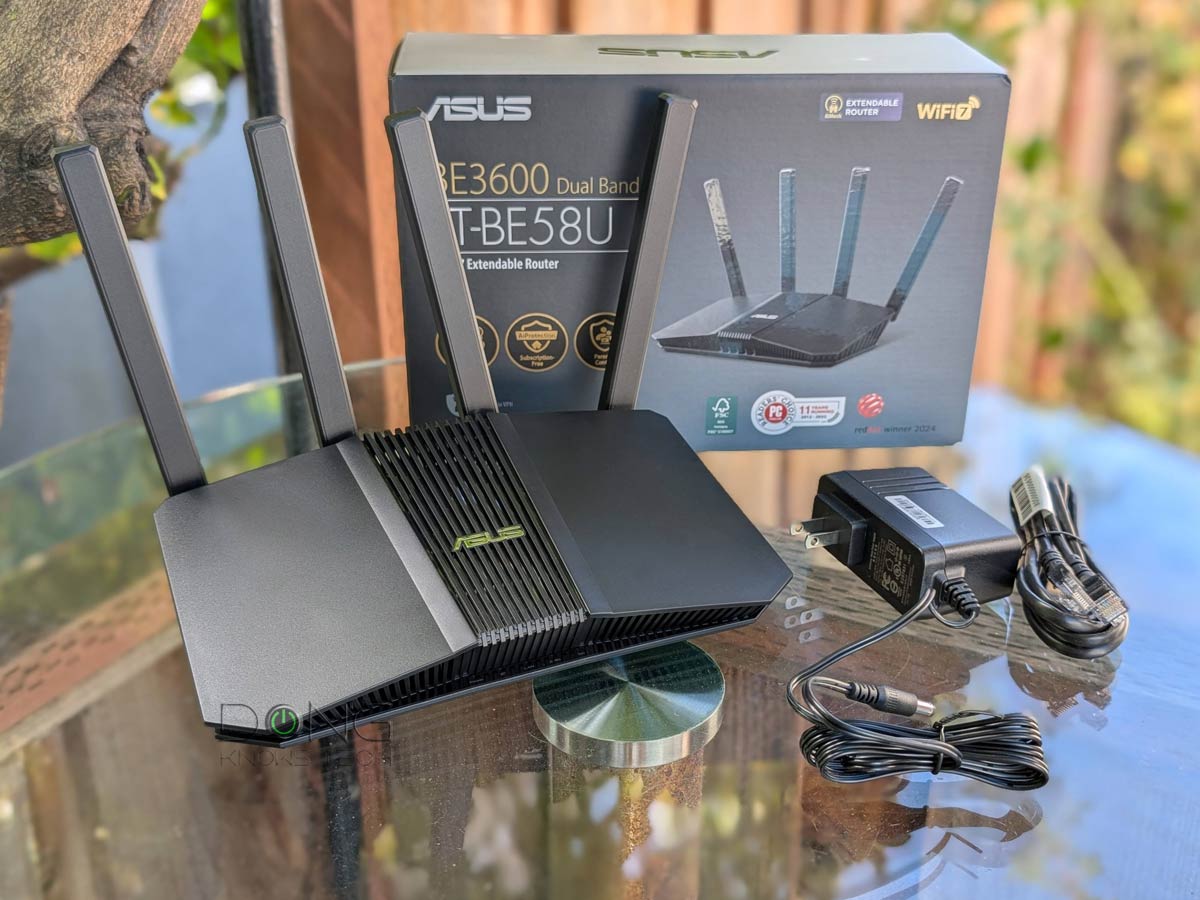
Image source: dongknows.com
Netgear: Versatile, Powerful, and Everywhere
Netgear's Nighthawk series has been a household name for over a decade, and for good reason. The latest Nighthawk RS700 is a Wi-Fi 7 beast that consistently tops speed charts, while the Orbi mesh lineup remains one of the most reliable ways to cover a large home without dead zones.
Netgear's advantage is breadth. Whether you need a compact all-in-one, a gaming-focused router, or a sprawling mesh system, there's a model at nearly every price point. The Nighthawk app handles setup, speed tests, and parental controls cleanly, though some advanced features are locked behind a subscription. For most households, though, the experience is smooth right out of the box. Netgear is also a safe choice if you want a router that supports third-party firmware like DD-WRT or OpenWrt, since many models are compatible.
TP-Link: Flagship Performance Without the Flagship Price
TP-Link has transformed its reputation over the last few years. The Archer BE800 is a genuinely premium Wi-Fi 7 router with a stunning design and multi-gig ports, yet it undercuts rivals from ASUS and Netgear by a noticeable margin. Meanwhile, the Deco mesh series offers some of the best value in whole-home coverage.
The trade-off is that TP-Link's advanced features—cloud-based security subscriptions, for example—are heavier-handed than on competing platforms. But if you're looking for a router that delivers 90% of the performance at 70% of the cost, TP-Link is the brand to beat. The company has also made huge strides in user-friendly apps, making its higher-end models approachable for less technical households.
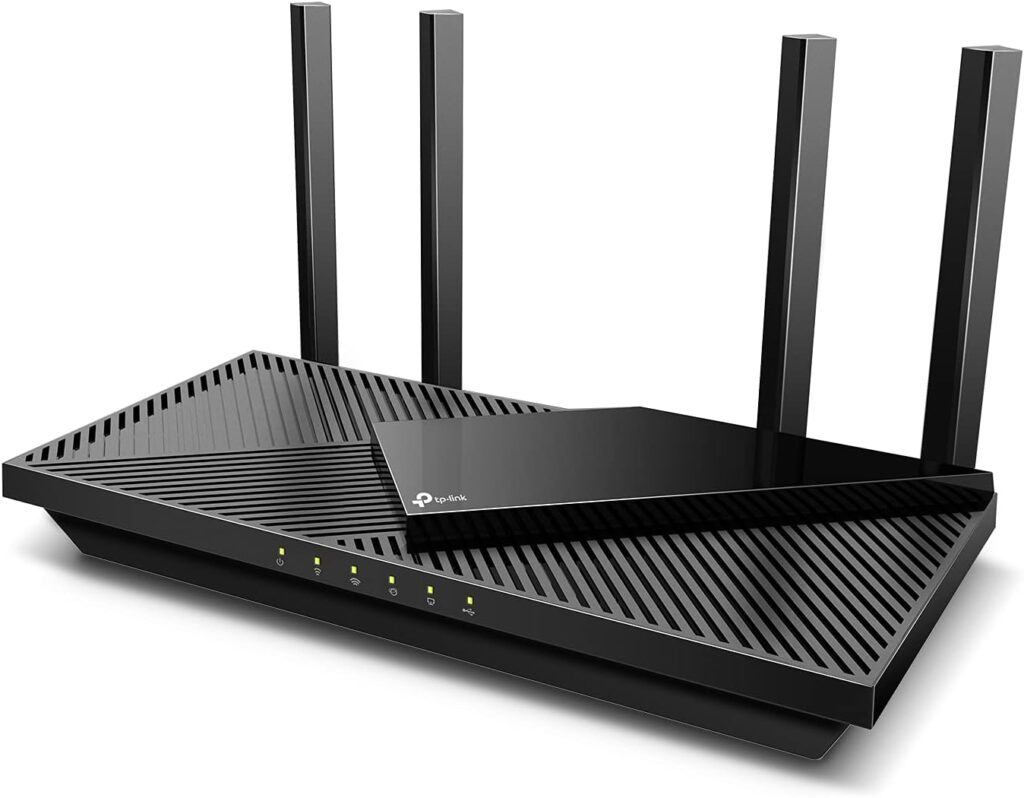
Image source: www.highspeedoptions.com
Linksys: The Mesh Pioneer
Linksys introduced the Velop mesh system years before mesh networking became mainstream, and the brand remains a reliable option for whole-home coverage. The Velop Pro 7 and the older MX4300 are built around stability rather than headline speed, which is exactly what many families need.
Linksys routers tend to be simpler to manage than the competition, with a clean app that never overwhelms you with technical jargon. The downside is that the hardware generally trails ASUS and Netgear in raw throughput, and the feature set can feel dated on older models. For a straightforward, dependable mesh network in a medium-to-large home, Linksys is still a very smart pick.
Google Nest: Smart Home Integration First
The Nest Wifi Pro is the only mainstream router built around the smart home. It doubles as a Thread border router and Matter controller, which means smart locks, lights, weather stations, and sensors connect seamlessly without extra hubs. For households that increasingly rely on connected devices, that integration is genuinely valuable.
Google's app is also among the easiest to use, with one-touch guest networks, built-in speed tests, and simple parental controls. The catch: Nest Wifi Pro lacks the advanced QoS and granular controls that enthusiasts expect, and each node's Ethernet ports are limited. If you want a set-and-forget mesh for general internet use and home automation, it's excellent. If you're a gamer or heavy user, look elsewhere.
Standout High-End Models Worth Your Money
| Brand | Flagship Series | Best For | Standout Feature |
|---|---|---|---|
| ASUS | ROG Rapture GT-BE98 | Gamers and power users | Quad-band Wi-Fi 7 with gaming acceleration |
| Netgear | Nighthawk RS700 | Speed-focused households | Tri-band Wi-Fi 7 with 10GbE ports |
| TP-Link | Archer BE800 | Value-seekers who want Wi-Fi 7 | Four 2.5GbE ports and a huge touchscreen display |
| Linksys | Velop Pro 7 | Whole-home coverage | Reliable mesh with secure boot and automatic updates |
| Nest Wifi Pro | Smart home setups | Thread/Matter integration and a dead-simple app |
How the Leading Brands Compare Head-to-Head
| Factor | ASUS | Netgear | TP-Link | Linksys | |
|---|---|---|---|---|---|
| Max speed potential | Excellent | Excellent | Very Good | Good | Good |
| Mesh ecosystem | AiMesh (flexible) | Orbi (dedicated) | Deco (dedicated) | Velop (dedicated) | Nest Wifi (dedicated) |
| App quality | Good | Good | Very Good | Good | Excellent |
| Gaming features | Best in class | Strong | Good | Basic | Basic |
| Smart home support | Add-on | Add-on | Add-on | Add-on | Native |
| Price positioning | Premium | Premium | Mid-premium | Mid-premium | Mid-premium |
No brand wins every category. The decision usually comes down to what matters most: ASUS for gaming and configurability, Netgear for balanced high performance, TP-Link for value, Linksys for simplicity, and Google for smart home integration.

Image source: www.ign.com
Real-World User Experience and Feedback
Setup and installation. Most modern flagships use a companion app that walks you through setup in minutes. ASUS and Netgear both offer beginner-friendly wizard screens, while Google's app is the most frictionless of the group. TP-Link's startup process is equally straightforward, which is a big improvement over older models that required a browser-based setup.
Reliability under load. The most common complaint about budget routers is dropouts when many devices are active. High-end models handle 30–50 connected devices without breaking a sweat. Netgear and ASUS owners consistently report the steadiest connections under heavy simultaneous streaming, video calls, and gaming.
Latency and gaming. For competitive gaming, the ASUS ROG line leads with features like automatic ping optimization and dedicated gaming ports. Netgear's Nighthawk series is a close second. TP-Link's gaming-friendly models offer solid performance at a lower price, but they lack the fine-tuning options that serious players expect.
Parental controls. All five brands include parental controls, but they differ in depth. Google's are the simplest to use, while ASUS and Netgear offer the most granular scheduling and content filtering. If you need to manage screen time across several children, check whether the router you're considering supports per-device schedules—many do, but the quality of the interface varies widely.
Where the Market Is Headed in 2026 and Beyond
Wi-Fi 7 is now the new baseline for high-end routers, but the industry is already looking further ahead. The IEEE is developing Wi-Fi 8 (802.11bn), which promises better coordination between access points and even lower latency, though consumer devices likely won't arrive until the late 2020s. In the meantime, expect these trends to dominate:
- Multi-gig internet ports moving from flagship-only to mainstream, especially as fiber ISPs push past 2Gbps plans.
- AI-driven traffic management, where routers learn which applications matter to you and allocate bandwidth automatically.
- Better mesh roaming, with newer nodes handing off seamlessly between themselves so video calls and gaming sessions don't stutter as you move around the house.
- Security baked in, with more brands following Netgear's lead on automatic threat detection and secure boot at the firmware level.
Frequently Asked Questions
What makes a router "high-end"?
A high-end router combines the latest Wi-Fi standard (currently Wi-Fi 7), multi-gigabit wired speeds, strong security features like WPA3 and automatic updates, and the ability to serve dozens of devices without latency spikes. It also includes a user-friendly management app and usually supports mesh expansion.
Which brand leads in high-end routers?
ASUS, Netgear, and TP-Link are the three most respected brands at the premium end right now. ASUS leads for gaming and customization, Netgear for overall performance and reliability, and TP-Link for value. Linksys and Google are excellent for mesh coverage and smart home use but trail on raw speed.
How do I choose between a single router and a mesh system?
If your home is under about 2,000 square feet and your devices are concentrated in a few rooms, a single flagship router is often enough. For larger, multi-level homes, or for properties with brick walls and awkward layouts, a mesh system with two or three nodes will eliminate dead zones. If you have a router that performs well centrally, you can instead stretch your signal beyond the walls with a dedicated outdoor extender rather than replacing everything.
Are high-end routers worth the investment?
Yes, if you have a fast internet plan, many connected devices, or specific demands like gaming and streaming in 4K or 8K. A quality router typically lasts five years or more and becomes the foundation of your entire home network. If your plan is under 300Mbps and you live alone, a mid-range model is probably sufficient.
Which router brand has the best app?
Google Nest Wifi Pro and TP-Link's Deco app are the most polished and easiest to navigate. ASUS and Netgear offer more features in their apps but at the cost of a steeper learning curve. Linksys's app is simple but has fewer advanced controls.
Conclusion
The best high-end router brand for you depends on exactly what you need. ASUS is the clear winner for gamers and tech enthusiasts who want maximum flexibility and raw performance. Netgear is the safest all-rounder, with fast hardware and a mature ecosystem. TP-Link delivers flagship Wi-Fi 7 at a more approachable price. Linksys and Google round out the list with excellent mesh coverage and smart home integration.
Before you buy, take stock of your internet plan, home size, and number of devices, then match those needs to the features that matter most. Read real user reviews, check the latest firmware support, and don't be swayed by the biggest number on the box. A well-chosen high-end router will keep every device in your home fast, secure, and connected for years to come.