Are you tired of slow internet that keeps you waiting? Your router plays a big role in how fast your connection feels.
But what if you don’t want to spend a fortune on top-of-the-line models? Understanding the maximum speed of a budget router can help you get the best value without breaking the bank. You’ll discover how fast these affordable devices can really go and what to look for to boost your internet experience.
Keep reading—you might be closer to faster Wi-Fi than you think!
Budget Router Speed Limits
Budget routers offer affordable internet access but have clear speed limits. These limits depend on several factors that affect how fast data travels through your network. Knowing these can help you pick the best router for your needs without overspending.
Factors Affecting Speed
Several things influence the speed of a budget router:
- Internet plan speed from your provider
- Distance between the router and your device
- Interference from walls or other electronics
- Number of devices connected at the same time
- Wi-Fi standards supported by the router
Each factor can slow down or limit your connection speed.
Typical Speed Ranges
Budget routers usually support speeds between 100 Mbps and 600 Mbps. Many older models max out near 300 Mbps. Newer budget routers might reach up to 600 Mbps on 5 GHz bands.
These speeds are enough for web browsing, video streaming, and light gaming. Heavy tasks like large downloads or 4K streaming may face slowdowns.
Impact Of Router Hardware
The internal parts of a router shape its speed limits. Processors and antennas play key roles. Better hardware handles more data faster and supports stable connections.
Budget routers often use simpler processors and fewer antennas. This limits maximum speed and coverage area. Investing in slightly better hardware can improve overall performance without a big price jump.

Credit: cybernews.com
Wireless Standards And Speeds
Wireless standards define the speed and performance of budget routers. These standards have evolved over time, improving how fast data moves through your home network. Each standard sets a maximum speed limit and affects the quality of your Wi-Fi connection.
Understanding wireless standards helps you know what to expect from a budget router. It also guides you in choosing the right device for your needs. Let’s explore the key wireless standards and their speeds.
Wi-fi 4 To Wi-fi 6 Comparison
Wi-Fi 4 (802.11n) offers speeds up to 600 Mbps. It uses the 2.4 GHz and 5 GHz bands but has limited capacity for many devices.
Wi-Fi 5 (802.11ac) increases speeds to 1.3 Gbps or more. It works mainly on the 5 GHz band, providing better performance and less interference.
Wi-Fi 6 (802.11ax) is the newest standard. It supports speeds up to 9.6 Gbps and improves performance with many connected devices. It uses both 2.4 GHz and 5 GHz bands efficiently.
Role Of Frequency Bands
- 2.4 GHz:Offers longer range but slower speeds. Good for basic browsing and smart home devices.
- 5 GHz:Provides faster speeds but shorter range. Ideal for streaming and gaming.
- Dual-band routers:Use both bands to balance speed and coverage.
Frequency bands affect how well your router handles distance and interference. Budget routers often support dual-band but may lack advanced features found in pricier models.
Compatibility With Devices
Routers must match your devices’ Wi-Fi standards. An older device may not use Wi-Fi 6 speeds fully.
Devices with Wi-Fi 4 or 5 will work on newer routers but at their maximum supported speeds only. Budget routers usually support backward compatibility.
Choosing a router with the right wireless standard ensures smoother connections and better speed for all your gadgets.
Wired Vs Wireless Speeds
Understanding the difference between wired and wireless speeds is key to getting the most out of your budget router. While wireless offers convenience, wired connections often deliver more stable and faster speeds. Knowing when and how to use each can greatly improve your internet experience.
Ethernet Port Speeds
Most budget routers come with Ethernet ports that support speeds of 100 Mbps or 1 Gbps. The exact speed depends on the router’s hardware and the cables you use. For instance, Cat5e cables support up to 1 Gbps, while Cat6 cables can handle even faster speeds.
Using a wired connection ensures you get the maximum speed your router and internet plan allow. If your router has only Fast Ethernet (100 Mbps) ports, your wired speed will be capped there, even if your internet is faster. Check your router’s specs to understand its limits.
Wireless Interference Issues
Wireless speeds can be affected by many factors, such as walls, distance, and other electronic devices. This interference often causes slower speeds and dropped connections. Even the best budget routers struggle with maintaining consistent wireless speeds in crowded or large spaces.
Have you noticed your Wi-Fi slowing down when many devices are connected? That’s a common sign of wireless interference. Budget routers usually offer fewer antennas and less advanced technology to combat this, so your wireless speed might not match the Ethernet port’s potential.
When To Use Wired Connections
If you need a stable, high-speed connection for gaming, video streaming, or work, wired is the way to go. It eliminates most interference issues and provides consistent speeds. Connecting your device directly to the router with an Ethernet cable can make a noticeable difference.
However, wired connections aren’t always practical. If your device is far from the router or you value mobility, wireless will be more convenient despite some speed loss. Ask yourself: Is speed more important than flexibility in your current setup?

Credit: www.youtube.com
Real-world Performance Factors
Real-world performance factors significantly impact the maximum speed of a budget router. While specifications might promise high speeds, actual performance can vary. Understanding these factors can help you optimize your router’s efficiency.
Network Congestion
Network congestion is like rush hour traffic for your internet. More devices using the network at the same time can slow down speeds. Consider scheduling heavy internet tasks during off-peak times to alleviate congestion.
Distance And Obstacles
Distance from the router and physical obstacles can reduce your Wi-Fi speed. Walls, furniture, and even microwaves can interfere with signal strength. Position your router in a central, elevated location to minimize these barriers.
Firmware And Software Updates
Keeping your router’s firmware updated is crucial for optimal performance. Manufacturers release updates to fix bugs and enhance speed. Check regularly for updates in the router settings to ensure you’re not missing out on improvements.
Have you ever noticed a sudden boost in speed after updating your router’s software? Regular updates can make all the difference, turning a sluggish connection into a more responsive one.
Choosing The Right Budget Router
Choosing the right budget router matters a lot for your home or office. It affects how fast your internet runs and how many devices connect smoothly. Budget routers come with different speeds and features. Picking one that fits your needs can save money and avoid frustration.
Understanding your speed needs, balancing cost with performance, and knowing the top models will help you make a smart choice.
Speed Needs By Usage
Your internet use decides the speed you need. Simple tasks like browsing or emails need less speed. Streaming videos or online gaming require faster connections. Multiple users or smart devices also need higher speeds to avoid lag.
- Basic browsing: 10-25 Mbps
- Streaming HD video: 25-50 Mbps
- Online gaming and 4K streaming: 50+ Mbps
- Multiple users and smart homes: 100+ Mbps
Balancing Cost And Performance
Budget routers cost less but may limit speed and coverage. Higher speeds often come with higher prices. Choose a router that offers good speed without extra features you don’t need. Check for reliable brands and positive reviews to avoid poor quality.
Focus on:
- Speed that matches your internet plan
- Strong signal for your space size
- Easy setup and security features
Top Budget Models In 2025
Several budget routers stand out for speed and value in 2025. They offer good performance for everyday needs. Consider models with the latest Wi-Fi standards like Wi-Fi 5 or Wi-Fi 6 for better speeds and range.
| Model | Max Speed | Key Features | Approximate Price |
|---|---|---|---|
| TP-Link Archer A7 | 1750 Mbps | Dual-band, easy setup, good coverage | $60 |
| NETGEAR R6700 | 1750 Mbps | Strong signal, parental controls | $70 |
| ASUS RT-AC66U | 1750 Mbps | Stable performance, security features | $80 |
| Linksys EA7300 | 1750 Mbps | Fast speeds, simple app control | $75 |
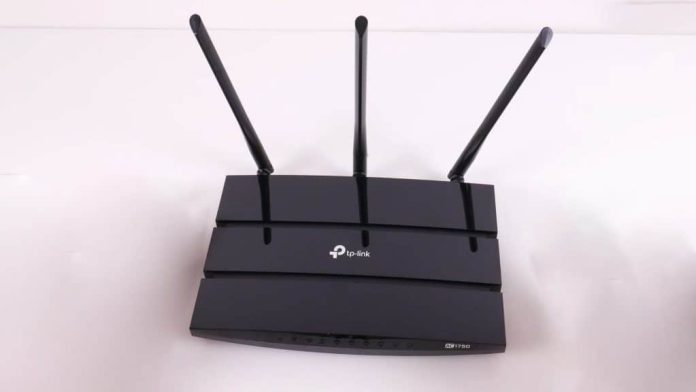
Credit: www.pcvarge.com
Tips To Maximize Router Speed
Maximizing your budget router’s speed doesn’t require expensive upgrades. Small changes in how you set up and maintain your router can lead to noticeable improvements. Let’s dig into practical tips that help you get the most from your device without breaking the bank.
Optimal Placement
Where you put your router makes a big difference. Place it in a central spot in your home to spread the signal evenly. Avoid hiding it behind furniture or inside cabinets, as walls and objects can block Wi-Fi signals.
Think about height too—placing the router higher up, like on a shelf, often improves coverage. Also, keep it away from other electronics that can cause interference, such as microwaves and cordless phones.
Security Settings
Have you checked if your network is secure? Open or weakly protected networks let others connect and steal bandwidth, slowing your speeds. Use WPA3 or at least WPA2 encryption to keep your Wi-Fi safe.
Change the default username and password on your router. Many people forget this simple step, leaving their networks vulnerable. Strong security settings not only protect your data but also ensure your bandwidth is used only by you.
Regular Maintenance
Like any tech, routers need occasional care. Restart your router regularly to clear temporary glitches that can slow down speeds. Updating the router’s firmware is crucial—manufacturers often release updates that improve performance and security.
Keep an eye on connected devices and disconnect the ones you don’t use. Overloading your router with devices can drag down its speed. Have you tried these simple maintenance habits lately? They could make your internet experience much smoother.
Frequently Asked Questions
What Is The Typical Max Speed Of A Budget Router?
Most budget routers offer speeds between 300 Mbps and 1,200 Mbps. This speed suits basic browsing and streaming but may lag in heavy gaming or 4K streaming.
How Does Budget Router Speed Compare To Premium Models?
Budget routers usually provide slower speeds and fewer features than premium models. Premium routers can exceed 3,000 Mbps, ideal for large homes and multiple devices.
Can Budget Routers Handle Multiple Devices Efficiently?
Budget routers handle a few devices well but may slow down with many connections. For heavy multi-device use, consider routers with higher speeds and better bandwidth management.
Does The Max Speed Affect Internet Browsing Quality?
Yes, max speed impacts browsing and streaming smoothness. Higher speeds reduce buffering and load times, improving overall user experience on budget routers.
Conclusion
Budget routers offer decent speed for everyday tasks like browsing and streaming. Most models reach speeds between 100 Mbps and 300 Mbps. This range suits small homes and light internet use well. Keep in mind, speed depends on factors like your internet plan and device distance.
Choosing the right router means balancing price and performance. Knowing these limits helps you avoid overspending. In the end, a budget router can deliver good speed without breaking the bank. Simple and practical for daily internet needs.