Choosing the right router can feel overwhelming, especially when you have a budget to stick to. But what if you could find a router that doesn’t just save you money, but also gives you fast, reliable internet for your home or office?
You’re about to discover exactly what matters most when shopping for a budget router. By the end of this article, you’ll know how to spot the features that make a real difference—so you can make a smart choice without wasting a dime.
Keep reading to unlock the secrets to getting the best value for your money.
Key Router Types
Choosing the right router depends on understanding key router types. Different routers serve different needs and budgets. Knowing these types helps find the best fit for your home or office. This section explains the main types to consider for a budget-friendly choice.
Single-band Vs Dual-band
Single-band routers operate on one frequency, usually 2.4 GHz. This band covers a larger area but offers slower speeds. It works well for basic internet tasks like browsing and emails.
Dual-band routers use two frequencies: 2.4 GHz and 5 GHz. The 5 GHz band provides faster speeds and less interference. It suits gaming, streaming, and multiple devices. Dual-band routers offer more flexibility and better performance.
Wired Vs Wireless Routers
Wired routers connect devices with cables. They provide stable and fast connections. Ideal for desktops, gaming consoles, and smart TVs.
Wireless routers use Wi-Fi to connect devices without cables. They offer convenience and mobility. Perfect for smartphones, laptops, and tablets around the house.
Some routers combine both wired and wireless features. This option provides the best of both worlds for different devices.
Speed And Performance
Speed and performance are key factors for any budget router. These features affect how fast your internet works and how well devices connect. A router with good speed and stable performance keeps your browsing smooth. It also supports streaming and online gaming without lag. Understanding Wi-Fi standards and speed ratings helps pick the right router for your needs.
Wi-fi Standards To Consider
Wi-Fi standards define how fast and stable your connection will be. Common standards include:
- 802.11n:Older but still common. Supports speeds up to 600 Mbps.
- 802.11ac:Faster and more reliable. Can reach speeds over 1 Gbps.
- 802.11ax (Wi-Fi 6):The latest standard. Offers better speed and handles many devices well.
Choosing a router with at least 802.11ac ensures good performance for most users. Wi-Fi 6 is best if you want future-proofing and support for many devices.
Maximum Speed Ratings
Speed ratings show the highest possible data transfer rate of a router. These are usually listed in Mbps or Gbps. Remember, these speeds are theoretical and real speeds depend on many factors.
- Check the combined speed rating if the router supports multiple bands (2.4 GHz and 5 GHz).
- For example, a router might say 1200 Mbps, which means combined speeds across bands.
- Higher speed ratings generally mean faster downloads and better streaming quality.
Compare speed ratings based on your internet plan and device needs. This helps avoid paying for unnecessary speed you cannot use.
Coverage And Range
Coverage and range define how far your router’s Wi-Fi signal reaches. A strong coverage area ensures stable internet in every corner of your home or office. Poor coverage means slow speeds or dropped connections in some rooms. Choosing a budget router with good range saves frustration and improves your online experience.
Antenna Types And Placement
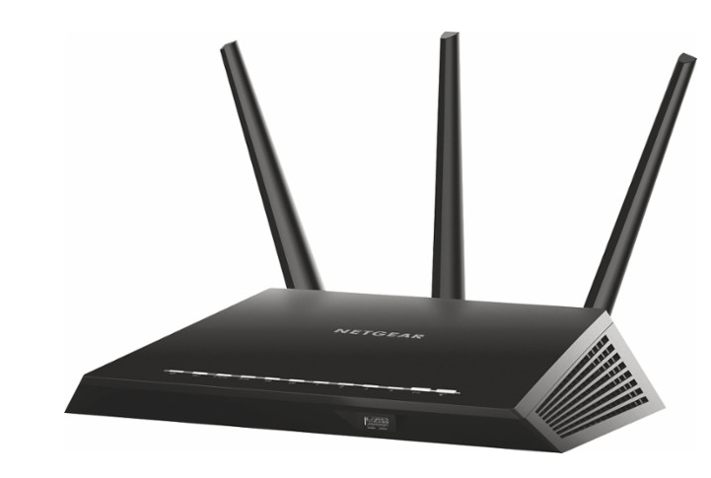
Antennas send and receive Wi-Fi signals. Routers usually have internal or external antennas. External antennas often provide better range and can be adjusted. Internal antennas keep the router sleek but may limit coverage. Multiple antennas help with signal strength and reduce dead zones.
Where you place the antennas matters. Position them upright for broad horizontal coverage. Angling some antennas can improve vertical reach in multi-story buildings. Experiment with placement to find the best signal in your space.
Factors Affecting Signal Strength
Several factors can weaken your Wi-Fi signal. Walls, floors, and furniture block or absorb signals. Materials like concrete, metal, and brick cause more interference. Distance from the router reduces signal strength. The farther the device, the weaker the connection.
Other electronics can cause interference too. Microwaves, cordless phones, and baby monitors operate on similar frequencies. Place your router away from these devices to avoid signal drops. Open spaces and higher positions usually improve signal quality.
Credit: www.switcherstudio.com
Security Features
Security features in a budget router protect your network from threats. They keep your data safe and control who accesses your internet. Strong security helps prevent hackers from stealing personal information. It also stops harmful software from entering your devices. Budget routers with solid security give peace of mind without extra cost.
Encryption Protocols
Encryption scrambles data to keep it private during transfer. Look for routers that support WPA3 or at least WPA2. WPA3 offers better protection against hackers. Without strong encryption, your network is vulnerable. Good encryption keeps your Wi-Fi safe from outsiders.
Built-in Firewalls And Parental Controls
A built-in firewall blocks unwanted traffic and threats. It acts as a barrier between your devices and the internet. Parental controls help manage what kids can access online. They allow setting time limits and blocking unsafe sites. These features add layers of protection and control on a budget.
Connectivity Options
Selecting a budget router requires attention to connectivity options. Ensure it offers essential ports like Ethernet and USB. Dual-band support can enhance performance, catering to various device needs at home.
Connectivity options are crucial in choosing a budget router. These features determine how well your devices can connect and interact with the network. Understanding connectivity helps you get the most out of your internet experience. Let’s explore some key aspects of connectivity options.Ethernet Ports And Usb Support
Ethernet ports are vital for wired connections. They provide stable internet for devices like PCs and gaming consoles. Typically, budget routers offer 2 to 4 Ethernet ports. This is enough for most home setups. More ports mean more devices can connect without sharing bandwidth. USB support adds flexibility to your network. A USB port on a router allows you to connect external storage. This lets you share files across devices easily. Some routers support USB printers, turning them into network printers.Guest Network Capabilities
Guest network capabilities enhance security and convenience. They allow visitors to access the internet without entering your main network. This keeps your personal data safe. Creating a guest network is simple with most routers. It often involves just a few clicks on the router’s interface. Guest networks also limit bandwidth usage. This means visitors won’t slow down your main network. It’s a useful feature for homes with frequent guests or small businesses.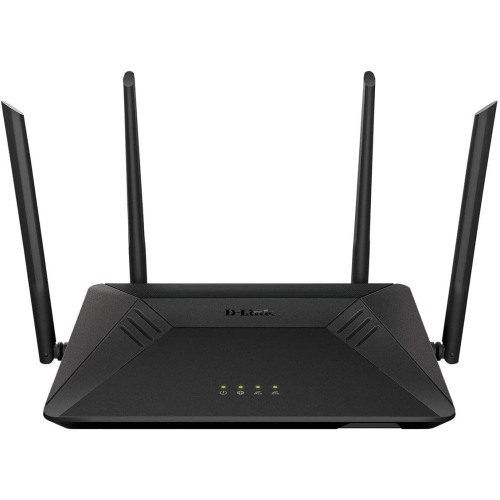
Credit: www.bestbuy.ca
Ease Of Setup And Management
Ease of setup and management can make or break your experience with a budget router. You want a device that doesn’t require a tech degree to get running and one that lets you manage your network effortlessly. Imagine spending minutes, not hours, setting up your router and then controlling it with just a few taps.
User-friendly Interfaces
A clear, intuitive interface can save you a lot of frustration. Look for routers that offer simple menus with straightforward options. The best ones use plain language instead of technical jargon, so you won’t feel lost trying to configure your network.
Think about the last time you set up a device and got stuck on a confusing screen. A user-friendly interface avoids that hassle by guiding you step-by-step. Features like setup wizards or visual aids can speed things up and help you avoid mistakes.
Mobile App Controls
Managing your router from your phone is a game-changer. Mobile apps let you adjust settings, monitor connected devices, and even pause internet access for certain users without needing to sit in front of your computer.
Good apps provide notifications for things like firmware updates or security alerts, so you stay informed without extra effort. If you’ve ever tried to fix a slow connection remotely, you know how handy this can be.
Ask yourself: Would you rather manage your network on a tiny screen or from a simple, well-designed app that puts control at your fingertips anytime, anywhere?
Power Efficiency And Build Quality
Choosing a budget router isn’t just about speed and range. Power efficiency and build quality play a crucial role in ensuring your device runs smoothly without racking up your electricity bill or breaking down after a few months. Understanding these aspects helps you pick a router that lasts longer and consumes less energy, saving you money in the long run.
Energy Consumption
Look for routers that clearly state their power usage, especially in standby mode. Some budget models can consume surprisingly high energy even when not actively used. Opt for devices with energy-saving features like auto power-down or scheduled on/off times to cut unnecessary electricity use.
Have you noticed your router heating up during heavy use? That’s a sign it’s consuming more power than necessary. Choosing an energy-efficient router reduces heat generation, which can improve performance and device longevity.
Durability And Design
A sturdy build can save you from unexpected replacements. Check the materials used—routers with solid plastic or metal casing tend to handle wear and tear better. Also, consider the design: good ventilation slots prevent overheating, and compact shapes fit better into your home setup.
Think about your daily environment. If your router sits on a cluttered desk or a high-traffic area, it needs to withstand occasional bumps or dust. A well-built router with a thoughtful design can handle these challenges without compromising performance.
Price Vs Value
When choosing a budget router, the balance between price and value is crucial. Paying less might save money upfront, but you want to ensure you’re getting reliable performance and essential features. Understanding this balance helps you avoid overspending on features you don’t need or settling for a router that won’t meet your daily requirements.
What To Expect In Different Price Ranges
Budget routers typically fall into three price ranges: under $50, $50 to $100, and $100 to $150. Each range offers different levels of performance and features.
- Under $50:Basic models with limited range and slower speeds. They work well for small apartments or light internet use like browsing and emails.
- $50 to $100:Mid-range routers often support faster speeds and better coverage. You can expect dual-band support and basic security features here.
- $100 to $150:These routers offer improved reliability, additional features like parental controls, and better handling of multiple devices.
Knowing what each range offers helps you decide what fits your needs without paying for extras you won’t use.
Balancing Features And Budget
Ask yourself which features are non-negotiable and which you can live without. Does your home have many devices competing for bandwidth? Prioritize routers with good multi-device management.
Think about future-proofing. Will your internet speed increase soon? Investing a bit more now might save you from upgrading again quickly.
Remember, a router is a long-term investment. It’s worth spending a little more for stable connections and fewer headaches. What’s your priority: speed, range, or security? Let that guide your choice.

Credit: www.youtube.com
Frequently Asked Questions
What Features Matter Most In A Budget Router?
Look for strong Wi-Fi range, dual-band support, and good speed. Also, check for easy setup and reliable security features.
How Important Is Router Speed For Home Use?
Router speed affects how fast your devices connect. For streaming and gaming, choose routers with at least AC1200 speed or higher.
Can Budget Routers Handle Multiple Devices Efficiently?
Yes, many budget routers support multiple devices. Look for routers with MU-MIMO technology to maintain stable connections for all devices.
Is Security Important In Budget Routers?
Absolutely. Choose routers with WPA3 encryption and regular firmware updates to protect your network from threats.
Conclusion
Choosing the right budget router can save you money and frustration. Focus on speed, range, and security features. A good router keeps your connection stable and devices connected. Don’t ignore customer reviews and brand reputation. Simple setup and support matter a lot too.
A smart choice means better internet for work and play. Keep these points in mind to find the best fit. Your home network deserves a reliable router without overspending.