Are you tired of slow internet and constant buffering? Your devices deserve faster, more reliable WiFi that keeps up with everything you do.
Upgrading to WiFi 6 is the smart move to boost your connection and enjoy smoother streaming, quicker downloads, and better performance even when many devices are connected. Imagine a WiFi experience where lag and interruptions are a thing of the past.
Keep reading to discover why WiFi 6 is the upgrade your home or office really needs—and how it can transform the way you connect every day.

Credit: www.youtube.com
Benefits Of Wifi 6
Wifi 6offers faster speedsand more bandwidth for all devices. This means downloads and streaming happen quicker. More devices can connect without slowing down the network. This helps when many people use the same Wi-Fi.
The technology improves network efficiency. It uses new ways to send data that reduce delays and keep connections steady. This helps devices talk to the router better, saving battery life on phones and laptops.
Better performancein crowded places like airports or offices is a big plus. Wifi 6 handles many devices at once, so the internet stays fast for everyone. It also reduces interference from other networks nearby.
Key Features Of Wifi 6
OFDMA Technologyhelps many devices use the internet at once. It splits channels into smaller parts. This means faster and smoother connections for everyone.
MU-MIMO Enhancementsallow routers to talk to many devices at the same time. This stops waiting and speeds up your wifi. Great for busy homes or offices.
Target Wake Timesaves battery for your devices. It tells devices when to wake up and send or receive data. This helps phones and laptops last longer.
Comparing Wifi 6 To Previous Standards
Wifi 6offers much faster speeds than previous Wifi versions. It can reach up to 9.6 Gbps, compared to Wifi 5’s 3.5 Gbps. This means downloads, streaming, and online gaming happen with less waiting.
Latency, or the delay before data starts moving, is also much lower with Wifi 6. This helps devices respond quicker, making video calls and games smoother and more enjoyable.
| Feature | Wifi 5 | Wifi 6 |
|---|---|---|
| Speed | Up to 3.5 Gbps | Up to 9.6 Gbps |
| Latency | Higher delay | Lower delay |
| Device Capacity | Supports fewer devices | Supports more devices efficiently |
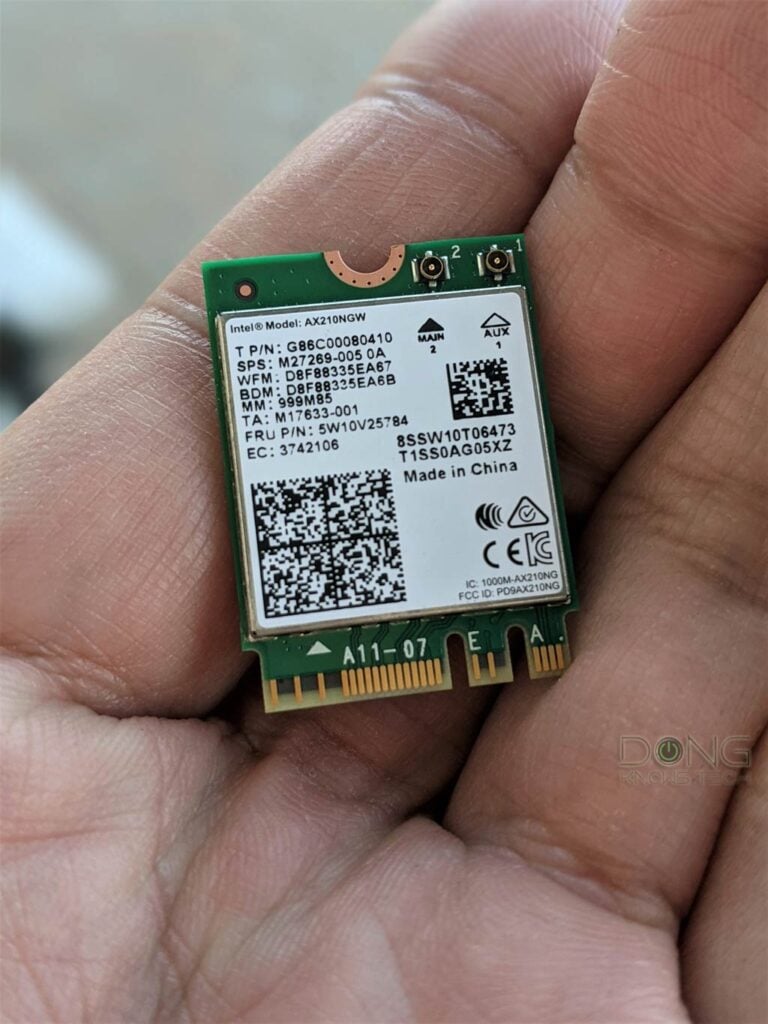
Wifi 6 can handle many devices at once without slowing down. This is great for homes with many phones, tablets, or smart gadgets all connected.
Credit: dongknows.com
Devices That Benefit Most
Upgrading to WiFi 6 greatly benefits smart devices like phones, laptops, and tablets. Faster speeds and better connectivity make them more efficient. Improved network capacity ensures smoother streaming and quicker downloads, enhancing everyday tasks and entertainment.
Smartphones And Tablets
Smartphones and tabletsgain faster speeds with Wifi 6. This means quicker downloads and smoother video calls. Many newer models support Wifi 6, improving battery life and connection stability. More devices can connect without slowing down your network.
Smart Home Gadgets
Smart home gadgets like lights, cameras, and speakers use Wifi 6 well. They get faster responses and better coverage. This helps your home run smoothly with many devices online at once. Wifi 6 handles many gadgets without lag or dropouts.
Gaming Consoles And Pcs
Gamers enjoy less lagand more stable connections with Wifi 6. Online games work better with quick data transfer. PCs and consoles can connect faster to WiFi, making gameplay smoother. Wifi 6 supports high-speed and reliable gaming experiences.
How To Upgrade To Wifi 6
Faster internet speeds and better connections make Wifi 6 worth the upgrade. It supports more devices without slowing down your network. Experience smoother streaming and quicker downloads at home or work.
Choosing A Compatible Router
Select a router that supports Wifi 6 technology. This ensures better speed and connectivity. Look for routers with the latest security features. Check the box for the Wifi 6 logo. It confirms compatibility.
Ensuring Device Compatibility
Check if your devices support Wifi 6. Older devices might not work well. Upgrade your devices if needed. Newer laptops and phones usually support it. This ensures faster connectionsand better performance.
Setting Up Your New Network
Connect the new router to your modem. Follow the instructions given with the router. Use a strong password for security. Secure your network with encryption. Test the network with different devices. Enjoy faster internet speeds with Wifi 6.
Future-proofing Your Network
Wifi 6supports new devices like smart home tools and virtual reality gadgets. It handles many devices at once without slowing down. This helps homes and offices stay ready for new technology.
It has better securitythan old wifi versions. It protects your data from hackers and keeps your network safe. Stronger security means less worry about online threats.
Though upgrading costs money at first, it saves money over time. Wifi 6 needs less repair and works well with future devices. It reduces the need to buy new equipment often.
Credit: telecomtalk.info
Frequently Asked Questions
What Are The Main Benefits Of Upgrading To Wifi 6?
WiFi 6 offers faster speeds, better capacity, and lower latency. It improves performance in crowded networks and enhances battery life for devices.
How Does Wifi 6 Improve Network Speed?
WiFi 6 uses advanced technology like OFDMA and MU-MIMO. These increase data efficiency and allow more devices to connect simultaneously with high speed.
Is Wifi 6 Compatible With Older Devices?
Yes, WiFi 6 is backward compatible. Older devices can still connect but won’t benefit from new WiFi 6 features or speed improvements.
Does Upgrading To Wifi 6 Enhance Gaming And Streaming?
Absolutely. WiFi 6 reduces lag and buffering by providing faster, more stable connections, ideal for high-quality gaming and streaming experiences.
Conclusion
Upgrading to WiFi 6 brings faster internet speeds and better connections. It helps many devices work well at the same time. You get stronger signals even in busy places. WiFi 6 also uses less energy, saving battery on your gadgets.
This new technology prepares your home for future needs. Choose WiFi 6 to enjoy smoother streaming and gaming. Stay connected with fewer interruptions every day. A smart step for better internet at home or work.