Are you tired of lag spikes, rubber-banding, and that sinking feeling when your connection drops mid-match? Choosing between WiFi 6 and WiFi 6E isn't just about buying the newest box on the shelf — it's about matching your network, your devices, and your physical space to the right technology. In practice, the difference can be dramatic, but only if your entire setup can actually use it.
This guide breaks down exactly how WiFi 6 and WiFi 6E compare for gaming, where the real-world gains show up, and when upgrading to WiFi 6E is genuinely worth it.
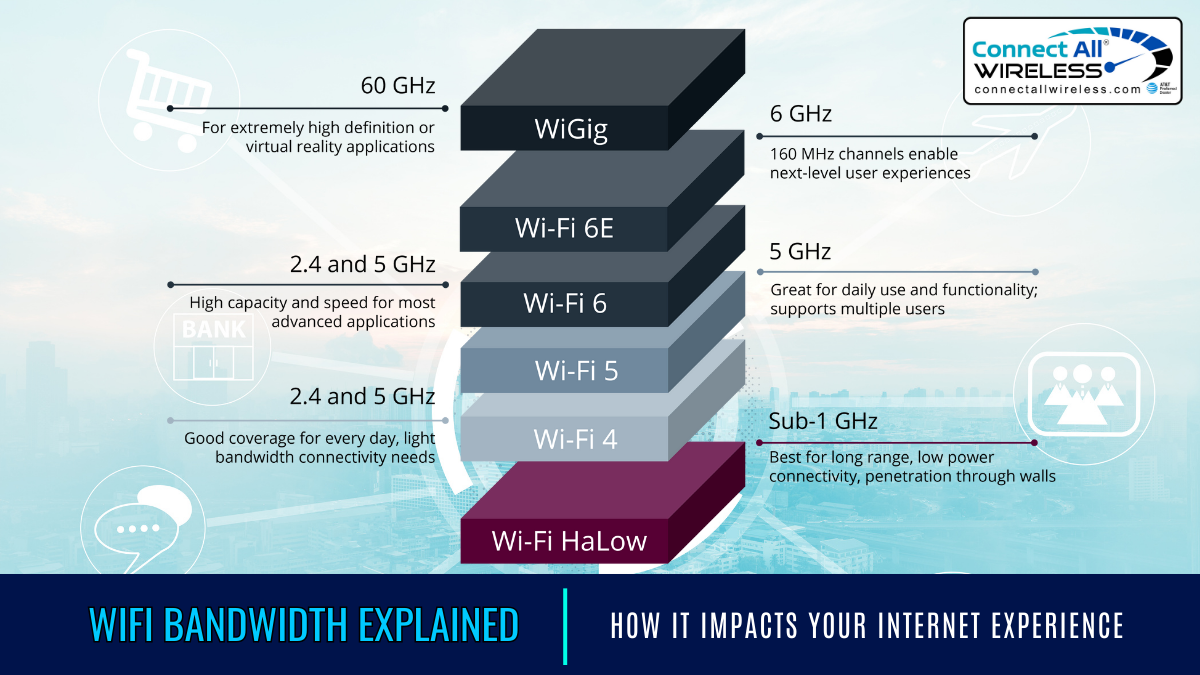
Credit: medium.com
What WiFi 6 and WiFi 6E Actually Are
Before choosing between them, it helps to understand what each standard actually does — and what it doesn't.
WiFi 6: The 2.4 GHz and 5 GHz Workhorse
WiFi 6 — also known as 802.11ax — was a significant leap forward for wireless networking. The standard introduced several technologies that directly benefit gaming.
Core features that matter for gaming:
- OFDMA (Orthogonal Frequency Division Multiple Access) — allows the router to serve multiple devices on the same channel without them fighting for airtime. Your console, laptop, and phone can all receive data in the same transmission window.
- Target Wake Time (TWT) — lets devices schedule wake times for lower-power communication; less relevant for a gaming desktop, but valuable for phones, streaming boxes, and smart home devices that share the network.
- MU‑MIMO — multi-user multiple-input, multiple-output — enables simultaneous streams to different devices, which helps when several people are gaming, streaming, or on a Discord call at once.
- 1024‑QAM modulation — packs more data into each transmission, improving throughput on clean channels.
WiFi 6 operates on 2.4 GHz (longer range, lower speed) and 5 GHz (shorter range, faster speed). Both bands are also shared with older WiFi standards and non‑WiFi devices like Bluetooth, baby monitors, and microwave ovens.
WiFi 6E: The 6 GHz Fast Lane
WiFi 6E is still WiFi 6 — same core radio technology — but with regulatory approval to operate in the 6 GHz band. That single change has outsized practical consequences.
What the 6 GHz band changes:
- Up to 59 non‑overlapping channels at 20 MHz widths in most countries — compared to a fraction of that on 5 GHz.
- No legacy WiFi devices on 6 GHz — every device on that band uses modern, efficient signaling.
- Ultra‑wide 160 MHz channels — ideal for high‑bandwidth, low‑latency traffic, exactly what online gaming benefits most from.
- Shorter range — 6 GHz signals attenuate faster through walls and floors, so distance from the router matters more than with 2.4 or 5 GHz.
Crucially, WiFi 6E does not change the maximum theoretical speed — both standards top out at 9.6 Gbps in lab conditions. WiFi 6E's real advantage is less noise, less interference, and more usable capacity on the 6 GHz band, not raw speed.
A common mistake is assuming WiFi 6E is "faster" than WiFi 6. In benchmarks where both are on clean channels, they're often nearly identical. WiFi 6E's advantage only appears when the 5 GHz bands are congested — which is most real-world environments.
If you're deciding whether to buy a new router or just upgrade your network card, the decision often comes down to the rest of your space. For example, a router tuned for gaming on a busy network makes a bigger difference than the WiFi generation alone.
Speed and Latency in the Real World
The spec sheets quote numbers that practically no one actually sees. Real-world speed and latency depend far more on your physical environment and the congestion around you.
Theoretical vs. Real‑World Speeds
| Metric | WiFi 6 (5 GHz) | WiFi 6E (6 GHz) | What It Means for Gaming |
|---|---|---|---|
| Max channel width | Up to 160 MHz on 5 GHz | Up to 160 MHz on 6 GHz | Wider channels allow higher peak throughput on both |
| Typical real‑world speed | 700 Mbps–1.5 Gbps | 800 Mbps–1.6 Gbps | Both can saturate a gigabit ISP plan |
| Interference sources | Neighboring routers, TVs, Bluetooth, older devices | Almost none | Less airtime lost to interference |
| Range | Moderate | Shortest of the three bands | Placement matters more for 6 GHz |
Latency: Why It Matters More Than Speed
Online games rarely need raw download speed. A match of Valorant or Fortnite uses only a few Mbps — far below any modern router's maximum. What determines whether a shot registers is latency, jitter, and packet loss.
In practice, on a congested 5 GHz network at the edge of the WiFi range, latency can spike from 30–50 ms on WiFi 6 to 15–25 ms on WiFi 6E's clean 6 GHz channel. The higher frequency's cleaner airtime translates into fewer retries and less packet loss, which shows up as smoother hit registration and less rubber‑banding.
If you're also driving a large download in the background — game download on Steam plus voice chat and a stream on a second monitor — the extra spectrum from a router with low-latency hardware keeps the connection stable enough to avoid hitches.
What Actually Causes Gaming Lag
- Bufferbloat — if your router has no Smart Queue Management or QoS, large downloads can crowd out game traffic.
- Shared airtime — every device on the same channel is competing for the same radio time.
- Signal retries — when a packet doesn't arrive intact, the client asks for it again, adding delay.
- Router CPU limits — a weak processor trying to handle QoS plus VPN plus game traffic can add latency.
- Spectrum congestion — in apartments, 5 GHz can be so noisy that even strong signals carry errors.
One of the best upgrades you can make isn't a new WiFi generation at all. It's choosing a router with enough CPU headroom, strong QoS, and a clean channel plan for your space. If you're also upgrading your console or PC, a modem matched to a PS5 avoids the modem becoming the bottleneck.
Where WiFi 6E Pulls Ahead
WiFi 6E isn't always the right answer — but there are specific situations where 6 GHz solves a real problem. If one of these applies to you, the extra cost may be justified.
- Apartment dwellers — fewer walls of concrete between you and the router on 6 GHz may not solve anything; if you're on the same floor and close by, 6 GHz can be huge.
- Household with many devices — if five phones, two consoles, a laptop, and smart TVs all pull from one router, the 6 GHz band gives your gaming PC a separate lane.
- WiFi 6E clients — if none of your devices have a 6 GHz radio, this entire conversation is moot. Confirm your motherboard or console has 6 GHz support first.
- Competitive play — if you're grinding ranked in a fast shooter and every frame counts, a clean channel reduces those occasional spikes that cost matches.
- You live in a WiFi-dense neighborhood — when your phone or laptop already sees a dozen networks, 5 GHz is likely congested.
If your uses lean more toward streaming, file transfers, or uploading video, a router built for creators may serve you better than a gaming-only upgrade. The main point is to solve the most common source of stalls, whichever standard you choose.
Router and Device Support: What's Actually Compatible
The best WiFi generation is worthless if your devices can't use it.
WiFi 6E Requires Three Things at Once
To use the 6 GHz band, you need:
- A WiFi 6E router with a 6 GHz radio.
- A WiFi 6E client device — a PC motherboard Wi‑Fi card, laptop, or console with a 6 GHz radio.
- Regulatory approval — in the US, the FCC opened the band for unlicensed use; check your country's rules.
Common Compatibility Mistakes
- Assuming a WiFi 6E router makes all devices use 6 GHz. Any device without a 6 GHz radio will transparently fall back to 5 GHz on the same router, with no error message.
- Buying a WiFi 6E motherboard card but forgetting the router — a 6 GHz client on a WiFi 6 router will only connect on 5 GHz.
- Thinking a WiFi 6E console exists for every generation.
- Ignoring the router's Ethernet ports — a wired connection to the console still outperforms any wireless standard; a gaming-focused router with strong routing and QoS can make a much bigger difference than WiFi 6E.
If you game on an Xbox 360 of all things, you'd need very different advice — a wireless router that supports that older console well is more useful than the newest WiFi standard.
Is WiFi 6E Worth It for You?
The decision is rarely about raw performance. It's about fit.
Upgrade if you answer yes to most of these:
- My client devices have a 6 GHz radio.
- My 5 GHz band is congested (see a dozen networks, or live in an apartment.
- My router is placed close enough to the gaming setup for 6 GHz to reach.
- My budget allows a more expensive router.
- My ISP plan is at least 500 Mbps down and 20 Mbps up — otherwise the router can't use the speed advantage.
Stay on WiFi 6 if:
- Your devices lack 6 GHz support.
- You live somewhere with congested 5 GHz but can't reposition the router closer, so 6 GHz range won't reach.
- You're on a slower ISP plan, where either router can saturate the plan.
- You already get good ping times and just need QoS better than a new band.
Router improvements that help regardless of WiFi generation:
- Enable QoS or SQM — this often eliminates the spikes caused by downloads and uploads.
- Use an Ethernet cable for your main gaming desktop.
- Place the router nearer to where you play.
- Pick a router CPU strong enough for QoS, VPN, and game traffic all at once.
If you need a router that handles heavy traffic and low latency at once, a high-end model built for power users is a strong starting point. The standard matters less than the total design of the network.
The Bottom Line: WiFi 6 vs. WiFi 6E for Gaming
WiFi 6 remains a solid, widely compatible, and often more affordable choice. WiFi 6E earns its higher price when 5 GHz congestion is actively hurting your latency or dropping your shots.
In practice, the best gaming experience usually comes from matching the right router to the right client, reducing shared airtime, and making sure your modem and router aren't the weak link. If you want the absolute best wireless gaming experience, a router with WiFi 7 and the newest spectrum use will be the next step, but for most gamers, the WiFi 6 vs. WiFi 6E decision is about solving your actual bottleneck rather than chasing a lab number.
At the end of the day, stable ping times, fewer jitter spikes, and a smooth Discord call while gaming is the real goal — and that's more about reducing retries and congestion than it is about WiFi 6 vs. 6E in a spec sheet.
Further reading: IEEE's overview of 802.11ax and 802.11ax in the 6 GHz band is a good technical reference for the wireless standard itself, and the US spectrum regulator maintains current 6 GHz band rules per region.